

Key Takeaways:
- Ecommerce software connects storefronts, payments, inventory, and order management.
- Different ecommerce platforms suit different business and technical requirements.
- Custom ecommerce solutions offer greater flexibility, scalability, and integration capabilities.
- Successful ecommerce development requires the right features, architecture, and tech stack.
- Build custom software when standard platforms cannot support your unique business workflows.
When you shop online, you mostly see the product pages, search bar, cart, and checkout. But there is a lot more happening behind the scenes. Ecommerce software is what keeps those moving parts connected and helps a business manage the entire buying process online.
For example, when a customer places an order, the software has to check the product price and availability, process the payment, create the order, and send the details for fulfillment. It may also exchange data with ERP, CRM, inventory, shipping, tax, and other business systems.
The setup can look very different from one business to another. A growing retailer may only need standard storefront and checkout capabilities.
A large retailer, marketplace, or B2B seller may need custom ecommerce software development to handle account-specific pricing, approval workflows, multiple storefronts, complex catalogs, or integrations with existing systems.
So, ecommerce software is not one specific tool or platform. It can take different forms depending on what you sell, who you sell to, and how much control your business needs. Understanding the different types of ecommerce software is the next step in choosing the right approach.
Types of Ecommerce Software for Different Business Needs
The type of ecommerce software you choose determines much more than what your storefront looks like. It affects how quickly your team can release changes, who maintains the infrastructure, how integrations are built, and how much engineering capacity the platform consumes over time.
We usually see the differences become much clearer once you look beyond licensing costs and ask a simpler question: What will our team actually have to own?
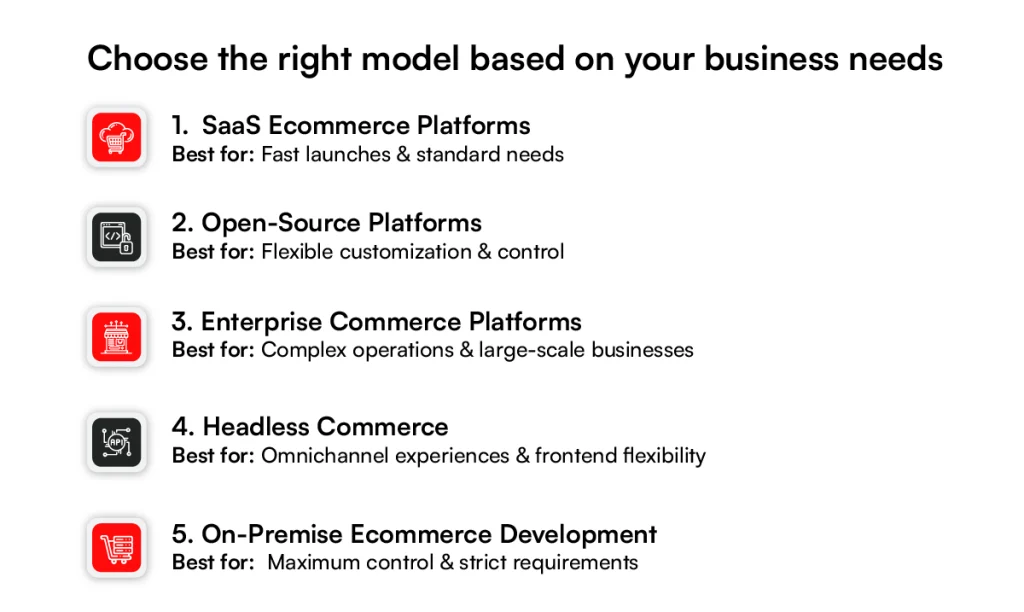
1. SaaS Ecommerce Platforms
SaaS platforms make sense when you want to get commerce capabilities running without building and maintaining the underlying platform.
Shopify and BigCommerce follow this model, providing hosted infrastructure alongside capabilities for managing products, orders, checkout, and storefront operations.
The vendor handles hosting, platform upgrades, patches, and much of the infrastructure work, leaving your team to focus on integrations and storefront improvements.
That can shorten implementation, but complexity often moves into customization and integrations with ERP, PIM, OMS, ecommerce crm, tax, or fulfillment systems. Costs can also grow through subscription tiers, transaction fees, apps, API usage, additional storefronts, and integration middleware.
2. Open-Source Ecommerce Platforms
Open source gives developers access to the underlying code. Adobe Commerce (Magento Open Source) and WooCommerce are familiar examples where teams can extend the commerce implementation around specific requirements.
That flexibility helps when standard workflows cannot support your checkout logic, product models, pricing rules, or internal integrations.
But open source does not mean low-cost commerce. Your team still has to manage hosting, security, patches, testing, and platform upgrades. Heavy customization adds engineering headcount and can make future upgrades slower because changes must be tested against custom code.
3. Enterprise Commerce Platforms
Enterprise commerce becomes relevant when complexity starts multiplying across brands, markets, customer groups, catalogs, and connected systems.
SAP Commerce Cloud and commerce tools support this level of commerce, although they take different architectural approaches. At that point, implementation is rarely just an ecommerce project.
Deployments can require solution architects, engineers, integration specialists, QA, DevOps, and security teams. Licensing adds to the investment, while data migration and ERP, OMS, or WMS integrations can consume as much effort as the storefront itself.
4. Headless Commerce
Headless commerce is often sold on frontend flexibility. From an engineering perspective, the bigger change is where responsibility moves. API-first platforms such as Commerce tools and Elastic Path are commonly used for headless and composable commerce for retail and ecommerce architectures.
Separating the frontend from the commerce backend gives teams more freedom to build web, mobile, and other customer experiences. That freedom comes with additional architecture.
Your team takes responsibility for areas such as frontend hosting, API orchestration, caching, authentication, and observability. Costs can spread across separate CMS, search, payment, and ecommerce personalization services, making headless harder to justify when a standard storefront already meets the requirements.
5. On-Premise Ecommerce Development
On-premise ecommerce puts more operational responsibility inside your organization. In practice, this often means a custom-built commerce system or a self-hosted legacy platform, such as an older Magento installation, running on infrastructure the business controls.
You gain direct control over infrastructure, deployments, security configuration, and data, which can matter when strict internal or regulatory requirements apply. The commitment is substantial, though.
Your team must manage servers, databases, backups, monitoring, security patches, disaster recovery, and capacity planning.
Those infrastructure and engineering costs continue after launch, making on-premises most practical when there is a clear reason to retain that level of control.
Ultimately, the best ecommerce architecture is not the one with the longest feature list. It is the one whose technical responsibilities match your business complexity, internal engineering capacity, and growth plans.
Once that foundation is clear, the next question is what the system actually needs to do. That brings us to the must-have features for custom ecommerce software development.
Struggling with ecommerce software complex integrations?
Build an ecommerce solution tailored to your workflows, scalability needs, and technology ecosystem.
Build My Ecommerce Solution
Must-Have Features to Add to Custom Ecommerce Software Development
Custom ecommerce software gives you more control over how the buying experience and backend operations work. That flexibility is useful only if the core features are designed around real customer journeys, internal workflows, and future growth.
Features such as navigation, payments, order management software, mobile responsiveness, SEO, hosting, and security form the baseline of a reliable ecommerce system.
1. User-Friendly Navigation
Customers should be able to move from a category to the right product without working too hard for it. Clear menus, logical category structures, search, filters, breadcrumbs, and predictable page layouts all matter here.
As the catalog grows, navigation should still help users narrow thousands of SKUs quickly instead of turning product discovery into trial and error.
2. Product Management
Product management needs to work just as well for the ecommerce merchandising team as the storefront does for customers. Your ecommerce software should support SKUs, variants, categories, pricing, descriptions, images, inventory status, and bulk updates from one manageable interface.
For larger catalogs, a dedicated PIM such as Akeneo can become the source of truth for product information and distribute enriched data to ecommerce and other sales channels. That avoids forcing the commerce database to manage every product-data workflow itself.
3. Secure Payment Processing
A checkout can look simple while depending on several systems underneath it. Custom ecommerce software should integrate with established payment processors such as Stripe to handle authorization, tokenized payment details, refunds, recurring payments, and the payment methods your customers expect.
Payment architecture should minimize how much cardholder data your application stores or processes directly. PCI DSS scope, tokenization, gateway integrations, failed-payment handling, and refund workflows should therefore be addressed while checkout is being designed, not after launch.
4. Order Management & Tracking
Placing an order is only the start of the transaction. The software needs to maintain order status as payment, inventory allocation, fulfillment, shipment, cancellation, return, or refund events occur.
For businesses using an OMS, ERP, WMS, or third-party logistics provider, order management software development also becomes an integration problem.
Platforms such as Manhattan Active Order Management are often used in more complex environments where orders and inventory must be coordinated across stores, warehouses, fulfillment locations, and digital channels.
5. Mobile Optimization
Mobile optimization should influence the architecture and interface from the beginning rather than becoming a responsive-design task at the end. Product discovery, images, navigation, cart actions, forms, and checkout all need to remain fast and usable on smaller screens.
That also means testing the experience across devices, browsers, network conditions, and screen sizes. A desktop checkout that simply shrinks to fit a phone rarely delivers a good mobile buying experience.
6. Scalability
Scalability is not just about supporting more users. Ecommerce traffic can jump suddenly during promotions, seasonal campaigns, or product launches, while catalogs, orders, integrations, and transaction volumes grow steadily over time.
Cloud infrastructure such as AWS can provide elastic compute, managed databases, caching, CDN delivery, and autoscaling capabilities. The architecture still needs load testing and capacity planning to confirm that checkout, search, APIs, and databases can handle expected peak demand.
7. SEO Optimization
SEO requirements should be built into the platform rather than handled entirely through content updates after launch. Teams need control over URLs, page titles, metadata, canonical tags, redirects, image alt text, structured data, and indexation rules.
Technical performance matters too. Tools such as Google Search Console can help teams monitor crawling, indexing, structured-data issues, and search visibility after launch, while the platform itself must support crawlable navigation, clean markup, and correct handling of product variants and filtered URLs.
8. Integrated Web Hosting
Hosting affects performance, availability, security, and how easily the platform can handle traffic spikes. A custom ecommerce setup may use infrastructure such as AWS, Microsoft Azure, or Google Cloud, depending on its architecture and operational requirements.
Whatever you choose, plan for SSL/TLS, CDN delivery, backups, monitoring, failover, deployment pipelines, and capacity management.
9. Advanced Security
Advanced security covers the broader attack surface around the commerce platform, including customer accounts, APIs, administrative access, bots, fraudulent orders, and third-party integrations.
Controls should include MFA, role-based access, encryption, secure API authentication, input validation, rate limiting, logging, vulnerability management, and DDoS protection.
Ecommerce Fraud prevention can also sit as a specialized layer in the transaction flow. Some platforms evaluate ecommerce orders for fraud risk and can automate approval or rejection decisions, reducing the need to rely entirely on manual review or static fraud rules.
These features define what the ecommerce system needs to support. But turning them into a stable production platform requires the right sequence of architecture, design, development, integration, testing, and deployment decisions. Next, we’ll walk through the ecommerce software development process step by step.
Create Your Ideal Ecommerce Platform
Get a solution engineered around your business goals, from customer experience and checkout to integrations, security, and scalability.
Get My Ecommerce StrategyEcommerce Software Development Process: Step by Step
Building ecommerce software involves more than developing a storefront and connecting a payment gateway. You are creating a system where product data, inventory, customers, payments, orders, and third-party services need to work together.
A structured development process helps define those dependencies before they become expensive problems later.
These steps are not always strictly sequential. Once the architecture and API contracts are clear, frontend and backend development can run in parallel, while integration and QA work often begin before either side is finished.
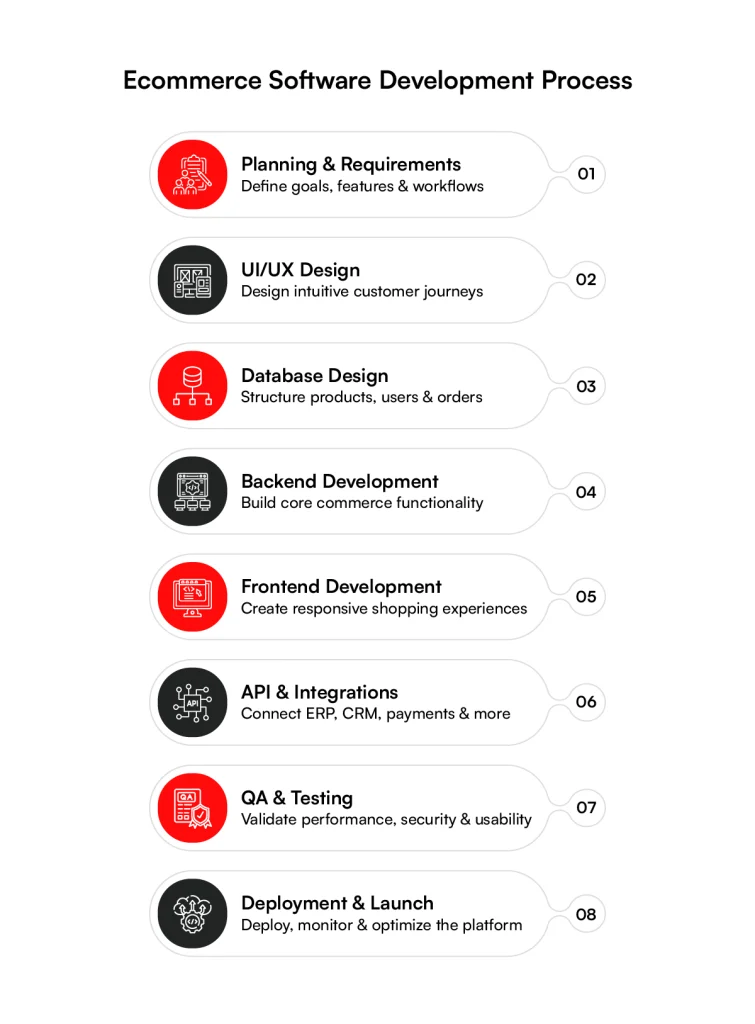
Step 1: Planning & Requirements
Start by defining how the business actually sells. Map customer types, catalog size, expected traffic, payment methods, fulfillment models, markets, currencies, and business-specific workflows.
At RBMSoft, we typically start custom ecommerce software projects by mapping these requirements against the systems, data flows, and integrations the business already relies on.
This is also where you identify integrations with systems such as ERP, PIM, OMS, WMS, CRM, and payment providers. Turn those requirements into a prioritized scope, architecture plan, budget, and delivery timeline before development begins.
Step 2: UI/UX Design
Next, map the ui ux design for ecommerce journeys customers will take through the store, from product discovery to checkout and post-purchase activities.
Designers typically use user flows, wireframes, and prototypes to validate navigation, search, product pages, cart behavior, account areas, and checkout before engineering starts.
Mobile behavior and accessibility should be considered here as well. Fixing a confusing checkout in a prototype is considerably easier than rebuilding it after frontend and backend logic already depend on it.
Step 3: Database Design
An ecommerce application generates connected data across products, SKUs, customers, carts, inventory, orders, payments, and promotions. Database design determines how that information is structured, related, retrieved, and updated.
Teams also need to decide which system owns each dataset. For example, product information may originate in a PIM while inventory comes from an ERP or WMS. Clear ownership prevents different systems from maintaining conflicting versions of the same information.
Step 4: Backend Development
Backend development turns business requirements into working commerce logic. Developers build services for areas such as authentication, product management, pricing, promotions, carts, checkout, inventory, orders, returns, and customer accounts.
This layer also has to handle less visible scenarios. What happens when inventory changes during checkout? What if payment succeeds but order creation fails? These failure paths need retries, validation, logging, and recovery logic rather than relying only on the ideal purchase flow.
Step 5: Frontend Development
Frontend developers turn approved designs into the storefront customers actually use. They build product listing pages, search and filtering interfaces, product detail pages, carts, checkout flows, customer accounts, and other interactive components.
Performance matters as much as appearance. Image delivery, JavaScript execution, caching, responsive behavior, and Core Web Vitals should be considered during development because slow product and checkout pages directly affect the shopping experience.
Step 6: API Development & Integrations
Most custom ecommerce systems do not operate alone. APIs connect the digital commerce application with payment gateways, ERP, PIM, OMS, CRM, tax engines, shipping carriers, search platforms, and marketing systems.
The difficult part is not simply making an API call. Teams need to plan authentication, data mapping, rate limits, timeouts, retries, duplicate events, and what happens when an external system becomes unavailable.
Depending on the requirement, integrations may use REST, GraphQL, webhooks, or asynchronous messaging through platforms such as Apache Kafka.
Step 7: QA & Testing
Testing needs to cover complete commerce journeys, not just individual screens. Teams should validate product search, pricing, promotions, inventory, checkout, payments, order creation, refunds, returns, and integrations across browsers and devices.
Performance and security testing belong here too. Playwright can automate browser-based ecommerce journeys, while tools such as k6 can load-test APIs and critical flows under expected traffic levels. Automated regression tests then help protect purchase journeys as the software changes.
Step 8: Deployment & Launch
Before launch, move the application through staging and production environments using a controlled deployment process. Configure domains, SSL/TLS, databases, CDN, caching, backups, redirects, payment credentials, and production integrations.
Do not treat deployment as the finish line. Once real traffic arrives, some tools can monitor application errors, API latency, infrastructure health, and performance.
Teams should also watch payment success rates and critical commerce workflows, with a rollback plan ready if a release affects checkout or ordering.
The development process defines how the ecommerce system comes together, but the decisions made at each stage depend heavily on the technology behind it.
Performance expectations, integration complexity, scalability, security, and available engineering expertise all influence which languages, frameworks, databases, and infrastructure make sense for the final architecture.
Tech stack used for ecommerce software development
Every choice covered so far, the platform type, the features, the build process, eventually comes down to actual technology decisions. The right ecommerce tech stack depends on your team’s existing skills, your performance requirements, and how much you expect the platform to scale, but a few categories show up in nearly every custom ecommerce build.
| Technology Layer | Examples | Purpose |
| Frontend | React, Angular, Vue.js | Builds responsive storefronts, product pages, shopping carts, and checkout interfaces |
| Backend | Node.js, Django, Laravel, Ruby on Rails | Implements business rules, user authentication, product management, and REST/GraphQL APIs |
| Databases | PostgreSQL, MySQL, MongoDB | Stores and manages customer accounts, product catalogs, inventory, orders, and transaction records |
| Payment gateways | Stripe, PayPal, Razorpay, Square | Processes online payments, refunds, and transaction authorization securely |
| Cloud and hosting | AWS Lambda, Microsoft Azure, Google Cloud | Hosts the app, databases, storage, and networking infrastructure |
| Search and caching | Elasticsearch, Redis | Delivers fast product search, autocomplete, filtering, and low-latency data retrieval |
| Content delivery network | Cloudflare, Akamai | Cache and deliver content from edge locations to improve performance, availability, and DDoS protection |
| CI/CD and DevOps | GitHub Actions, GitLab CI/CD, Jenkins, Docker, Kubernetes | Automates code builds, testing, deployments, and infrastructure management |
None of these choices happen in isolation. A team building on Node.js and MongoDB will make different infrastructure decisions than one running Django and PostgreSQL, and those decisions ripple into hiring, maintenance costs, and how quickly the platform can grow.
Getting the stack right matters, but so does knowing what it actually costs to build. That brings us to the real number businesses want to know: the cost to develop B2B custom ecommerce software.
Cost to Develop B2B Custom Ecommerce Software Development
There’s no single number that answers “what will this cost,” and anyone who gives you one without asking about your catalog, integrations, or user roles is guessing. B2B ecommerce carries cost drivers that B2C storefronts simply don’t have to deal with.
Account-based pricing, multi-level approval workflows, custom catalogs per client, and integrations with ERP or procurement systems all add engineering time before a single product page gets built.
So instead of chasing a flat figure, it helps to look at what actually moves the price up or down.
| Build Type | Estimated Cost Range | Typical Timeline | Best Suited For |
| Customized SaaS or open-source (WooCommerce, Shopify Plus, Adobe Commerce) | $15,000 – $50,000 | 2–3 months | B2B sellers with a few buyer tiers and moderate customization needs |
| Semi-custom build on a framework | $50,000 – $120,000 | 3–5 months | Growing distributors or wholesalers needing account-specific pricing and approval workflows |
| Fully custom enterprise build | $120,000 – $500,000+ | 6–12 months | Manufacturers, distributors, or marketplaces with complex catalogs, ERP integrations, and multiple storefronts |
| Ongoing maintenance and support | 15–20% of build cost per year | Continuous | All B2B platforms, covering patches, integration upkeep, and scaling needs |
Once you know what’s driving your costs, the next decision is whether building custom software is even the right call for your business, or whether buying an existing platform gets you further for less.
Know Your Ecommerce Investment
Unsure what your custom ecommerce project will cost? Get a practical estimate based on your features, integrations, user roles, scalability requirements, and business goals.
Get My Cost EstimateBuild vs. Buy: Custom Ecommerce Software Development
The build vs. buy decision comes down to speed, control, and how closely your ecommerce requirements fit an existing platform. Buying usually lowers upfront effort, while custom development gives you more control over complex workflows and integrations.
When Buying Ecommerce Software Makes Sense
Buying an ecommerce platform such as Shopify, BigCommerce, or Adobe Commerce works well when your catalog, checkout, pricing, and fulfillment needs fit standard platform capabilities.
You can launch faster because the vendor already provides the core commerce infrastructure. Upfront costs are usually lower, but subscription tiers, apps, transaction fees, integrations, and custom extensions can increase the total cost over time.
When Building Custom Ecommerce Software Makes Sense
Custom development makes more sense when your business has workflows that standard platforms struggle to support cleanly.
A B2B seller may need customer-specific catalogs, contract pricing, approval flows, and ERP-driven inventory. A marketplace may need custom seller onboarding, commissions, payouts, and order routing.
Building gives you control over those workflows and integrations, but it also requires more upfront investment and ongoing engineering ownership.
| Factor | Build Custom Ecommerce Software | Buy Ecommerce Software |
| Time to market | Longer development cycle | Faster implementation |
| Upfront investment | Higher | Usually lower |
| Customization | Built around specific workflows | Limited by platform capabilities and extensions |
| Integrations | Designed around your existing systems | Depends on APIs, connectors, and apps |
| Scalability | Designed for expected business requirements | Depends on platform limits and pricing tiers |
| Technical ownership | Business owns more of the architecture and roadmap | Vendor controls much of the underlying platform |
| Maintenance | Requires ongoing engineering resources | Core platform maintenance is largely vendor-managed |
| Best suited for | Complex or differentiated commerce operations | Standard or moderately customized commerce models |
The right choice depends on how much flexibility your business actually needs and how much technical ownership your team can support.
If custom development is the better fit, the next step is choosing a partner like RBMSoft that understands both commerce architecture and the systems your ecommerce platform must connect with.
Conclusion
As an ecommerce software development company, RBMSoft helps businesses build, integrate, and modernize ecommerce systems around their workflows, technology stack, and growth requirements.
Our ecommerce software development capabilities include:
- Custom Ecommerce Development: Build B2B, B2C, marketplace, and enterprise commerce applications.
- Ecommerce Platform Development & Modernization: Build new platforms or modernize legacy commerce systems.
- System & API Integrations: Connect ERP, PIM, OMS, WMS, CRM, payments, shipping, and other systems.
- Ecommerce Solutions Development: Add personalization, recommendations, and automation.
- Cloud & Scalability Engineering: Build infrastructure for growing traffic, catalogs, and transactions.
- Security & Quality Engineering: Integrate security, testing, monitoring, and observability.
Whether you are replacing a legacy platform or building custom ecommerce software, RBMSoft can support the project from architecture and development through integration, deployment, and optimization.
FAQ’s
1. What is custom ecommerce software development?
Custom ecommerce software development is the process of building an ecommerce platform tailored to your business workflows, customer journeys, product catalog, and backend systems.
Unlike off-the-shelf platforms, software development for ecommerce allows businesses to create custom pricing, checkout flows, integrations, marketplaces, and enterprise features that align with long-term growth.
2. How long does it take to build ecommerce software?
The timeline depends on the project’s complexity, integrations, and feature set. A basic MVP can take 8-12 weeks, while a mid-sized custom platform typically requires 3-5 months.
Large enterprise ecommerce development software projects with ERP, OMS, and multiple storefront integrations can take 6-12 months.
3. How much does it cost to build custom ecommerce software?
The cost varies based on platform architecture, integrations, design complexity, and scalability requirements.
Software development for ecommerce can range from $15,000-$50,000 for customized SaaS implementations, $50,000-$120,000 for semi-custom platforms, and $120,000-$400,000+ for fully custom enterprise ecommerce solutions.
4. What services do you provide after launching ecommerce software?
Post-launch support typically includes performance monitoring, bug fixes, security updates, feature enhancements, API maintenance, cloud infrastructure management, backup and disaster recovery, scalability optimization, and ongoing testing.
These services help keep ecommerce development software secure, reliable, and ready for future business growth.
5. What is the difference between custom ecommerce software and SaaS?
SaaS ecommerce platforms provide ready-made infrastructure and faster deployment, while custom platforms offer complete control over features, integrations, and architecture.
Software development for ecommerce is a better choice when businesses need complex workflows, customer-specific pricing, advanced catalogs, or deep integration with existing enterprise systems.
6. How do you plan an ecommerce software MVP?
An MVP starts with identifying the core customer journey and essential business workflows. Teams prioritize features such as product catalog, search, cart, checkout, payments, and order management before adding advanced capabilities.
This approach helps validate ecommerce development software quickly while reducing development time and cost.
7. Is custom ecommerce software worth the investment for an enterprise?
For enterprises with complex operations, the answer is often yes. B2B ecommerce software development supports customer-specific pricing, approval workflows, multiple buyer roles, large catalogs, ERP integrations, and scalable architecture that standard ecommerce platforms may not support efficiently.
8. How do you design ecommerce software for millions of SKUs?
Large product catalogs require scalable architecture, optimized databases, search indexing, caching, pagination, and Product Information Management (PIM) integration.
B2B ecommerce software development also focuses on catalog segmentation, bulk pricing, inventory synchronization, and fast search performance across millions of products.
9. How do you integrate custom ecommerce software with ERP?
ERP integration connects ecommerce with inventory, pricing, customers, orders, shipping, invoicing, and fulfillment systems through APIs, webhooks, or middleware.
B2B ecommerce software development ensures data synchronization, secure authentication, error handling, and real-time updates between ecommerce and enterprise business systems.
10. How can AI be integrated into custom ecommerce software?
AI can improve product search, personalized recommendations, chatbot support, dynamic pricing, fraud detection, demand forecasting, inventory optimization, and customer segmentation.
Retail ecommerce software development increasingly uses AI to automate merchandising, improve conversions, and enhance the overall shopping experience.
11. How do you make custom ecommerce software PCI DSS compliant?
PCI DSS compliance starts with secure payment architecture that minimizes cardholder data exposure. Best practices include tokenization, encrypted data transmission, secure payment gateway integration, role-based access control, multi-factor authentication, regular vulnerability testing, audit logging, and continuous security monitoring to protect customer payment information.