

Quick Summary:
- Ecommerce CRM is not the same as traditional CRM. It is built for high transaction volumes, anonymous buyers, and behavioral triggers that fire in minutes, not weeks.
- The gap between your storefront, email tool, support desk, and ad accounts is where revenue leaks. Ecommerce CRM closes it by pulling every customer signal into one profile.
- Core functions include data consolidation, behavioral segmentation, automated post-purchase sequences, RFM scoring, and revenue attribution.
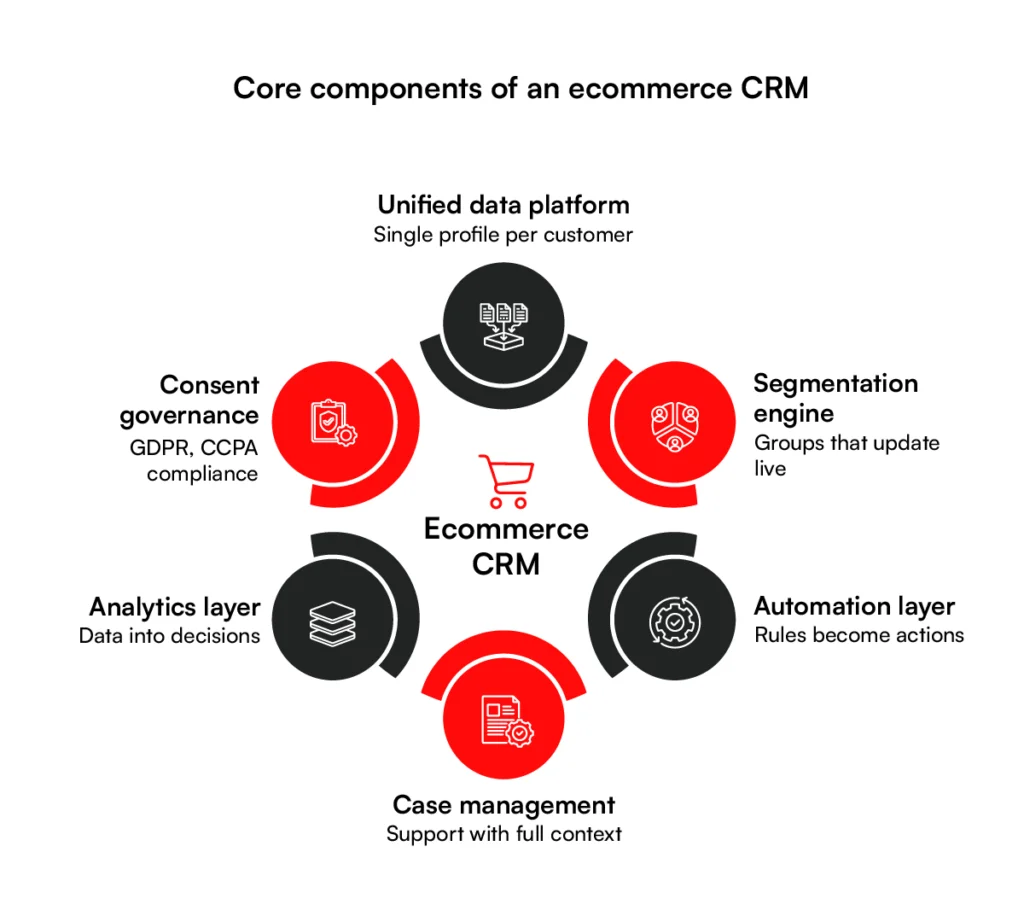
- Six components make or break implementation: unified data platform, segmentation engine, automation layer, case management, analytics, and consent governance.
- Key benefits are better retention, precise marketing spend, consistent customer experience, and business decisions based on actual customer behavior.
- The real costs go well beyond the license fee. Implementation, migration, training, and ongoing maintenance routinely push first-year spend to 2-3x the subscription price.
- Integration is not a post-launch task. What data flows, in which direction, at what frequency, and through which method must be decided before configuration begins.
- Real-time sync handles behavioral events. Batch sync handles scoring and reporting. Most retailers need both.
- Salesforce suits enterprise. Klaviyo suits DTC email and SMS. HubSpot suits growing teams. Zoho suits budget-conscious SMBs. Dynamics 365 suits Microsoft-stack enterprises.
- Choose based on goals, stack fit, segmentation depth, omnichannel data handling, total cost of ownership, scalability, and vendor stability, not feature lists.
The average online store touches a buyer across six or more channels before a purchase happens, and most of that behavioral data sits unused, split across tools that never share it. The traditional CRM, typically used by sales teams, wasn’t built for this.
It was designed for named accounts and long deal cycles. To deal with anonymous shoppers who make decisions in minutes, you need an ecommerce CRM capable of processing various data points to nudge prospects towards buying.
In this guide to ecommerce CRM software, we’ll cover everything you need to know about ecommerce CRM. Apart from discussing how they differ from traditional CRM, we’ll also dive into where ecommerce CRM implementations typically fail, and tell you how to choose the right platform for your business.
What Is an Ecommerce CRM?
An ecommerce CRM is software that collects every customer signal across your store, marketing channels, and support desk, then pulls it into one profile your team can act on.
Order history, browsing behavior, email engagement, support tickets, all of it in one place, updated in real time.
Ecommerce runs on anonymous buyers, high transaction volumes, and behavioral triggers that fire in minutes, not weeks. You can connect an ecommerce CRM directly with your online store and get real-time visibility in customer actions.
It can help you identify browsing habits, cart abandonments, product clicks, and other other customer engagement points. With access to such rich insights, you can further use ecommerce CRM to improve marketing strategies and grow the bottomline.
E-commerce CRM vs. Traditional CRM
The differences between an ecommerce CRM and traditional CRM mostly stem from the fact that the two systems were built for fundamentally different realities.
Traditional CRM is optimized for low-volume, high-touch relationships. Its data model is built around contacts, activities, and pipeline stages. It performs well when a rep manages fifty named accounts and needs a log of every conversation.
Modern CRMs for ecommerce business are much more complicated though. You get thousands of transactions, zero sales conversations, and customer behavior that spans dozens of micro-events. Most of this data is behavioural and involves no conversations.
This makes traditional CRM architecturally unsuitable for ecommerce. You cannot bolt behavioral event tracking, real-time segmentation, and post-purchase automation onto a contact-and-pipeline data model.
Here is how the two compare across the dimensions that matter most for online retail:
| Feature | Traditional CRM | E-Commerce CRM |
| Primary use case | B2B sales pipeline management | Customer retention and revenue growth at scale |
| Buyer type | Named accounts, known contacts | Anonymous shoppers becoming known customers |
| Data volume | Hundreds to thousands of records | Tens of thousands to millions of profiles |
| Data inputs | Manual entry, call logs, emails | Automated: orders, clicks, page views, events |
| Automation trigger | Sales rep action or scheduled task | Real-time customer behavior |
| Purchase cycle | Long, human-driven, weeks to months | Short, self-serve, minutes to days |
| Key metrics | Pipeline value, win rate, deal size | CLV, repeat purchase rate, churn risk, RFM |
| Integration depth | Email, calendar, phone | Storefront, ESP, SMS, ads, support, ERP |
| Personalization | Account-level, manually applied | Individual-level, automated from behavior |
| Out-of-box features | Minimal, requires heavy customization | Native: cart abandonment, order sync, LTV scoring |
Adapting a traditional CRM for ecommerce is a possibility, but the customization cost in time, money, and ongoing maintenance can’t justify the effort.. Ecommerce-native platforms ship these capabilities by default, which is why most online retailers building for growth move toward purpose-built ecommerce CRM solutions.
Still running your ecommerce store on a traditional CRM? RBMSoft builds purpose-built solutions that grow with your customer base.
Book a Free Consultation
What an Ecommerce CRM Helps Businesses Do
A CRM platform is only as useful as what it actually does day to day. These are the core functions that separate working ecommerce CRM software from a system that collects data and sits idle.
1. Create a Unified View of Every Customer
You are already collecting customer data. The problem is it lives in six different tools that never share it. Orders in the store platform, email behavior in the ESP, support history in the helpdesk, and ad interactions nowhere at all. An ecommerce CRM pulls every signal into one profile, so a customer who browsed running shoes on Tuesday, clicked an email on Thursday, and purchased on Friday has that full sequence under one identity.
2. Build Dynamic Customer Segments Automatically
Customers who qualified for “high engagement, no purchase” fourteen days ago may have since bought, churned, or gone cold. Acting on stale segments means sending the wrong message to the wrong people, which erodes deliverability and wastes budget.
An ecommerce CRM maintains segments in real time. As customers move — completing a purchase, crossing a spend threshold, going silent for 45 days — their segment membership updates automatically.
3. Personalize Customer Communication at Scale
Personalization at scale breaks down when teams have to decide manually what to send, to whom, and when. That decision-making doesn’t scale past a few hundred customers.
The CRM handles it by connecting behavioral signals directly to communication triggers. And the best part is that the message and the moment are both determined by data and rules set by you.
4. Strengthen Post-Purchase Retention
It is significantly easier and much more cost-effective to sell to an existing customer than to acquire a new one. An ecommerce CRM helps run the post-purchase sequence automatically: shipping update, delivery confirmation, review request, replenishment reminder, first cross-sell. Each step is timed to when the customer is most likely to act.
5. Prioritize High-Value Customers More Effectively
Most ecommerce businesses know, at a general level, which customers are valuable. What they lack is a system that acts on that knowledge continuously and automatically. An ecommerce CRM calculates RFM scores (recency, frequency, monetary value) for every customer and updates them as behavior changes.
That score then drives concrete system behavior: high-value customers get routed into early access and loyalty sequences; customers whose scores are declining receive targeted retention offers before they stop buying entirely. The ecommerce CRM applies the logic across the full contact base in real time.
6. Give Every Team Shared Customer Context
Three teams — marketing, support, and sales — regularly interact with the same customer without knowing what the others have said or done. An ecommerce CRM resolves this by maintaining a single customer profile that every team reads from and writes to.
When a support ticket closes, it updates the customer record the marketing team sees. When a loyalty tier changes, the support agent sees it before the next interaction. The ecommerce CRM is the connective layer that makes each team’s actions visible to the others in real time.
7. Measure Which Retention Efforts Generate Revenue
Which automation drove the most repeat purchases last quarter? Where in the win-back flow are customers dropping off? An ecommerce CRM ties these answers directly to hard data and revenue figures.
After these CRM capabilities are in place, the next step is making sure customer data moves reliably across the systems that depend on it. RBMSoft provides IT services and solutions for the retail industry to connect ecommerce CRM platforms with OMS, ERP, loyalty, marketing, customer support, and other retail systems so teams can work with consistent customer data.
What are the Core Systems Behind an Ecommerce CRM?
Understanding what an ecommerce CRM does is one thing. Understanding what it is made of tells you why some real-time CRM enrichment for ecommerce projects work and others collapse six months after go-live. Here are the 6 core components every ecommerce CRM must get right:
1. Unified Customer and Commerce Data Platform
This is the foundation everything else runs on. The data platform ingests customer records from every connected source. Storefront, email tool, support desk, ad platforms, ERP.
It resolves all of that into a single profile per customer, so purchase history, behavioral events, marketing engagement, and support interactions sit under one identity.
Without clean identity resolution, every downstream system operates on fragmented data. Segmentation groups the wrong customers together.
Automations fire against incomplete event histories. Analytics attributes revenue to the wrong interactions. The data platform determines whether the rest of the system is trustworthy.
2. Segmentation and Rules Engine
Once customer data is unified, the segmentation engine organizes it into groups worth treating differently. It classifies customers by purchase frequency, spending tier, product affinity, engagement level, churn risk, and dozens of other criteria, then keeps those classifications current as behavior changes.
The rules engine defines the conditions that move customers between segments and determine what happens next. Cross a spending threshold and a customer moves into a VIP group with a new set of rules attached.
Go silent for 90 days and a different sequence begins. Miss three consecutive email opens and suppression rules kick in. The engine handles all of this continuously, without manual intervention.
3. Automation and Channel Activation Layer
Rules become actions here. The automation layer takes the conditions defined by the segmentation engine and executes them across whichever channels the CRM connects to: email, SMS, push notifications, paid retargeting, and on-site personalization. A cart abandonment triggers a recovery email.
A post-purchase review request fires three days after delivery. A win-back offer goes out via SMS because that customer has never opened an email.
This is much different from the segmentation layer. Segmentation decides who qualifies and when. Automation decides what gets sent and where. Both need to work independently for either to be reliable.
4. Customer Service and Case Management Module
Support interactions generate data that the rest of the CRM needs. A customer waiting four days for a refund response with no proactive update is writing a negative review, not placing a second order.
The case management module gives support teams full customer context inside the same system, including order history, previous tickets, loyalty status, current segment, so resolutions are faster and responses are informed rather than generic.
It also feeds data back into the customer profile. A buyer who contacts support three times in one month is a churn signal. Without a case management module connected to the CRM, that signal never reaches the retention team.
5. Analytics and Reporting Layer
Everything on your ecommerce infrastructure generates data. The analytics layer turns that data into decisions. It tracks repeat purchase rates, customer lifetime value (CLV) by segment, automation revenue attribution, churn rates, campaign performance, and support resolution times, then surfaces them in a format teams can act on rather than just observe.
The reporting layer also closes the feedback loop. If a win-back sequence produces a 4% conversion rate on one segment and 18% on another, the analytics layer surfaces that gap. Without it, both sequences keep running at the same budget with no one knowing which one is worth scaling.
6. Consent and Data Governance Layer
This component governs what the CRM is permitted to do with each customer’s data, based on expressed consent and applicable regulation.
For ecommerce businesses operating across multiple jurisdictions, that means managing GDPR, CCPA, and a growing body of state-level privacy laws — each with different requirements for consent capture, data retention, and deletion requests.
The governance layer sits underneath every other component. Consent status must be checked before any data is written to a profile, before any automation fires, and before any segment includes a contact.
A CRM without a functional governance layer runs the risk of regulatory liability as well as data quality degradation. Both of which can have lasting negative impacts on your ecommerce business.
What are the top 8 Key Benefits of an Ecommerce CRM?
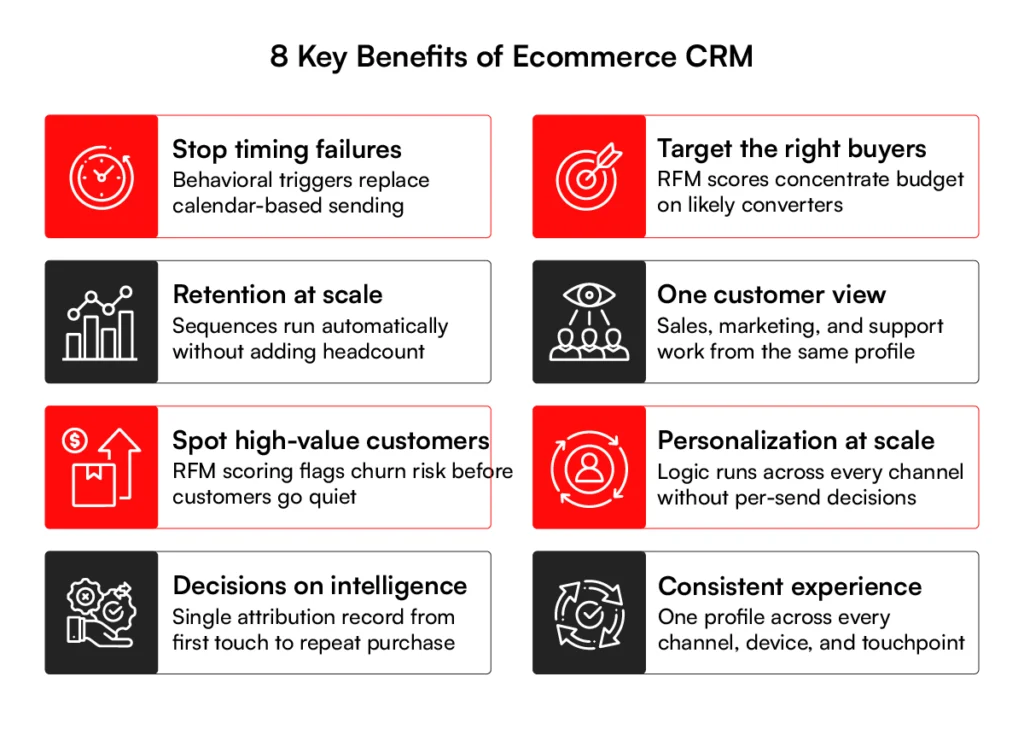
An ecommerce CRM implementation changes specific, measurable things about how an crm for ecommerce business performs. These are the eight outcomes that matter most.
1. Repeat Purchase Revenue Increases Without Additional Acquisition Spend
Acquisition cost per customer has risen consistently across paid channels over the past several years. The businesses absorbing that increase without margin erosion are the ones converting first-time buyers into repeat buyers at a higher rate.
An ecommerce CRM directly affects that rate by replacing generic post-purchase follow-up with sequences timed to individual behavior.
A buyer who receives a replenishment reminder calibrated to their actual reorder interval converts at a much higher rate than one who receives a batch email sent to everyone on day 30.
2. Your Marketing Spend Stops Funding the Wrong Audiences
Sending a discount to a customer who was already going to repurchase is not personalization. It is margin erosion dressed up as a campaign.
Using CRM in ecommerce means segmenting audiences by actual purchase likelihood, RFM scores, and engagement signals. This concentrates the promotional budget on customers who need the nudge rather than those who did not.
Segmented campaigns generate 3x to 5x more revenue per recipient than unsegmented sends. That multiple comes from targeting precision, not from spending more.
3. Retention Improves Without Proportionally Increasing Headcount
Retention at scale breaks the moment it depends on a team manually deciding who to follow up with and when. A CRM for ecommerce business runs post-purchase sequences, replenishment reminders, loyalty milestone triggers and churn-risk interventions automatically, across thousands of customers simultaneously.
The effort to retain your hundredth customer is not materially different from retaining your ten-thousandth.
See how RBMSoft helped DSW scale their ecommerce operations without adding operational overhead.
4. You Address Churn While Intervention is Still Possible
RFM scoring surfaces which customers are active, which are sliding toward churn, and which have already stopped buying, without anyone pulling a manual report.
A customer who purchased four times in six months and has gone silent for 45 days is a different intervention target than someone who made a single low-value purchase 18 months ago.
Ecommerce CRM makes that distinction automatically and routes each customer to the appropriate response while there is still time to act on it.
5. Personalization at Scale Becomes Operationally Viable
Manual personalization — pulling segments, writing variants, matching offers to customer history — is viable up to a point. Past a few hundred active customers, the labor required outpaces the return. CRM-driven personalization removes the manual step.
Product recommendations draw from individual purchase and browsing history. Offer values reflect what each customer has previously responded to. Email content shifts by category affinity without a human decision required for each send.
The business effect is that one-to-one relevance, which used to require significant team effort, becomes a function of system configuration rather than headcount.
6. Business Decisions Rest on Attribution, Not Intuition
Which segment drives your highest repeat purchase rate? Which acquisition channel produces buyers with the strongest 90-day CLV? Without a CRM connecting behavior data to revenue outcomes, those questions get answered with gut feel or reports pulled from three tools that never fully agree with each other.
An ecommerce CRM builds a single attribution record from first touch through repeat purchase. Every growth decision then rests on what customers actually did, not what the team assumes they did.
8. Customer Experience Stays Consistent Across Every Channel
As ecommerce businesses add channels — wholesale, retail pop-ups, a second storefront, a marketplace — each new channel generates customer data that needs to connect to existing profiles. Without a CRM maintaining unified identity across touchpoints, every new channel is effectively starting from scratch.
There’s no purchase history, behavioral context, or segment membership to start. With ecommerce CRM, a customer’s first interaction on a new channel immediately inherits the full relationship history from every previous one.
The business can expand its surface area without losing continuity in how it recognizes and treats individual buyers.
Ready to stop losing revenue to timing failures and fragmented customer data? RBMSoft builds and integrates ecommerce CRM systems that deliver these outcomes from day one.
Start the conversationWhat are the Potential Downsides of Ecommerce CRM?
Ecommerce CRM platforms are not safe, low-risk purchases. Going in with unrealistic expectations is one of the most common reasons implementations fail within the first year.
Here are the 5 potential downsides of an ecommerce CRM if you are not careful:
1. The True Cost Runs Far Beyond the License Fee
Even though your ecommerce subscription fee rises based on the size of your contact list, it’s usually not the biggest of concerns. That’s because the pricing is transparent and you can easily calculate how much it’s going to cost you at various growth stages.
However, you don’t have the same clarity when dealing with setup and maintenance expenses. Legacy database integration, data migration, custom configuration, staff training, and post-launch maintenance each carry their own cost. And together, they can push your ecommerce CRM costs much higher than the original estimate..
But with better planning and clear strategy, you can avoid cost-associated surprises. With a seasoned CRM integration partner, you eliminate data bloat, prevent scope creep, and avoid brittle custom. All of which are the biggest contributing factors in ecommerce CRM hidden costs.
2. Adoption Is Harder Than Implementation
Getting the CRM live is the straightforward part. Getting sales, marketing, and support teams with different workflows, different habits, and different definitions of a customer record to use it consistently is where most implementations fall apart.
Research puts company-wide CRM adoption at around 40%, meaning the majority of businesses that deploy one end up with a system their teams use partially or not at all.
3. Integration Complexity Can Stall the Entire Rollout
A CRM that isn’t connected to your storefront, marketing tools, and support desk has no useful data to work with. You need to build, test, and maintain every integration point. And if not done properly, it can cause rollouts to run overtime or over budget.
This complexity compounds with stack size. A retailer running Shopify, Klaviyo, Gorgias, and Meta Ads is managing four live integration points before the CRM contributes anything.
Native connectors can break when platforms push updates. API-based connections need development resources to build and maintain. Any single point going down disrupts the data flow every other component depends on.
4. Dirty Data Produces Confident Wrong Decisions
When historical records are pulled from a previous platform, incomplete or inconsistent data comes with them. Or when live integrations between the CRM and connected tools aren’t maintained properly, records go out of sync. Duplicate profiles, missing order events, and stale contact details accumulate within the system.
This bad data can have various consequences. It can look like an RFM score that ranks a churned buyer as high-value because the order history never fully migrated, or a win-back sequence firing at someone who purchased yesterday through a different channel.
The system runs, the dashboards populate, and teams act on what they see. It can be months or sometimes longer, before anyone traces a performance problem back to the source data.
5. You Are Dependent on a Vendor You Do Not Control
Building your retention strategy, segmentation logic, and automation architecture inside a single platform can be risky. Vendors reprice at renewal, often significantly, once switching costs are high enough to make it difficult to leave. Features get deprecated with little notice.
Acquisitions shift product roadmaps toward use cases that have nothing to do with ecommerce retention. An API your entire integration stack relies on gets retired in the next release with six weeks to adapt. Platform dependency can grow quite a lot overtime.
Ecommerce CRM Integrations and Architecture
A CRM disconnected from your storefront cannot act on customer behavior. It can only store it. This section covers how the integration stack works, which connection method fits your setup, and where most implementations break down.
Why Integration Is the Foundation, Not an Afterthought
A CRM that cannot talk to your storefront is not an ecommerce CRM but a marketing database.
Most CRM projects that fail do not fail because integration was treated as a post-launch configuration task. Teams spend months configuring segments, automations, and dashboards, then discover that the data feeding those features is incomplete, delayed, or arriving from the wrong source.
At that point, rebuilding the integration architecture means rebuilding half of what was already configured on top of it.
Interesting read: Ecommerce architecture guide
The Ecommerce CRM Integration Stack
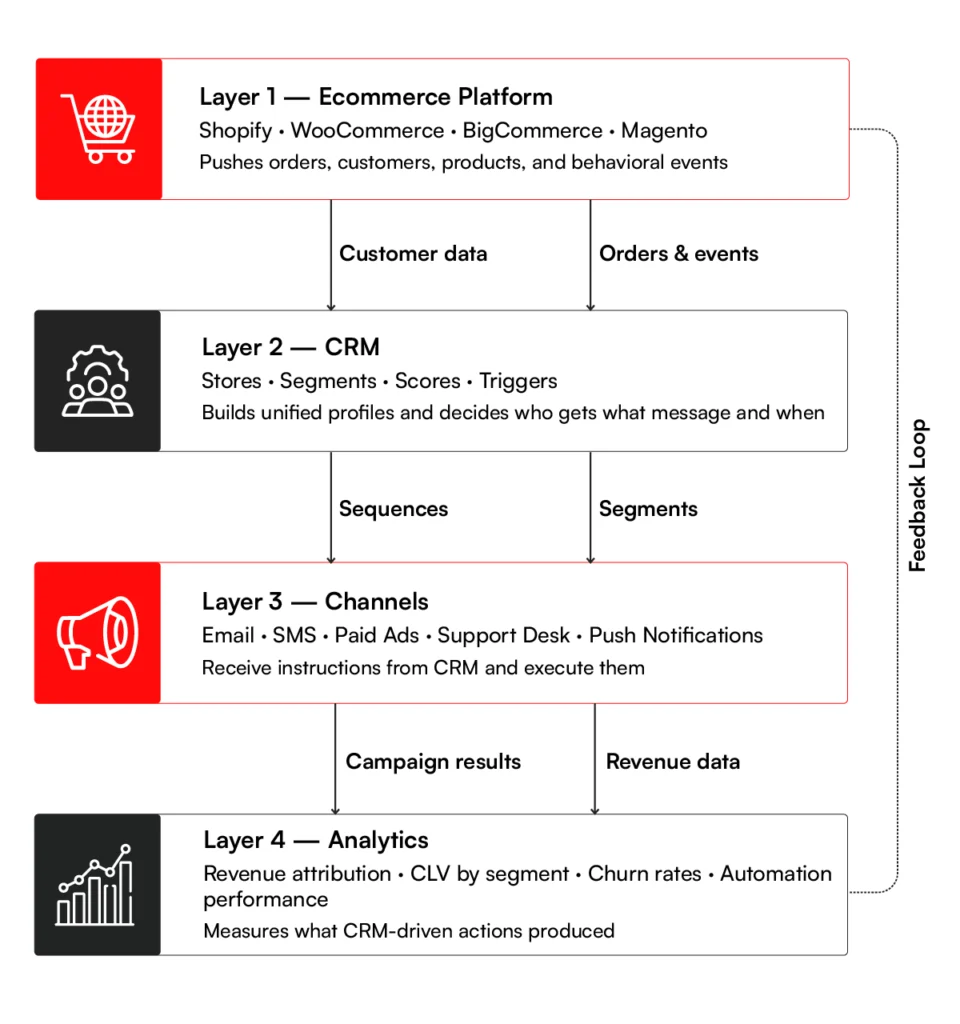
Most ecommerce CRM integration follows the same four-layer logic. Understanding that structure is what separates a clean ecommerce CRM integration from one that breaks under real traffic.
Layer 1: The Ecommerce Platform
This is the primary data generation layer.
Platforms such as Shopify, WooCommerce, BigCommerce, and Magento generate:
- customer records,
- product interactions,
- cart activity,
- checkout events,
- orders,
- refunds,
- and behavioral signals.
The CRM depends on this layer to capture events accurately and pass them downstream with minimal delay.
Poorly structured storefront implementations often create data gaps here first. Missing checkout events, inconsistent customer identifiers, and fragmented guest-user behavior eventually weaken every downstream workflow.
Layer 2: The CRM and Customer Intelligence Layer
The CRM acts as the system responsible for:
- unifying customer records,
- resolving identities,
- maintaining customer profiles,
- segmenting audiences,
- scoring customer value,
- and triggering decision logic.
This is where disconnected customer activity becomes actionable intelligence. It’s imprortant to keep in mind that the CRM itself does not generate customer behavior. It interprets and operationalizes it.
Layer 3: Activation and Communication Channels
Once the CRM determines what action should happen, execution shifts to downstream channels. These may include email platforms, SMS systems, loyalty tools, paid ad platforms, and so on.
The CRM determines:
- who qualifies,
- what message should be sent,
- when it should trigger,
- and which channel should be prioritized.
The downstream platforms simply execute those instructions.
Separating customer intelligence from execution channels creates flexibility. Businesses can change communication tools later without rebuilding segmentation and customer logic from scratch.
Layer 4: Analytics and Feedback Layer
The final layer measures whether CRM-driven actions actually improve business outcomes.
This includes tracking:
- repeat purchase rates,
- retention by segment,
- churn reduction,
- customer lifetime value,
- automation-attributed revenue,
- campaign efficiency,
- and support resolution trends.
This layer closes the feedback loop between customer behavior and operational decisions.
Without reliable analytics, teams optimize for activity metrics like clicks and sends instead of measurable retention and revenue impact.
Integration Methods: Native Connectors vs API vs Middleware
The right integration method depends less on company size and more on how customized the ecommerce environment and customer workflows have become.
Some businesses only need reliable order and customer synchronization. Others require complex event pipelines, custom customer attributes, warehouse integrations, and cross-platform orchestration. A broader ecommerce integration strategy can define how CRM data works alongside ERP, inventory, order management, and fulfillment systems.
The three most common integration approaches each solve different levels of complexity.
| Dimension | Native Connectors | API-Based Integration | Middleware Tools |
| Setup speed | Fast | Slow | Moderate |
| Configurability | Vendor-defined fields only | Full control | Partial |
| Technical overhead | Low | High | Medium |
| Cost model | Fixed, low | High upfront plus ongoing maintenance | Subscription that scales with data volume |
| Best suited for | Standard order and customer sync | Custom logic, custom attributes, complex builds | Mid-complexity flows without a dedicated dev team |
| Key risk | Misses custom fields and edge cases your business needs | Breaking changes on every API update | Adds another vendor dependency to the stack |
Most mid-market and enterprise retailers end up using a hybrid model. Native connectors handle high-volume, low-complexity flows like order sync and customer record creation.
API or middleware takes over wherever custom logic, non-standard data structures, or platform-specific quirks make a pre-built connector insufficient.
Platform-Specific Integration Patterns
Different ecommerce platforms create very different integration requirements. The complexity of the CRM architecture often depends as much on the storefront platform as the CRM itself.
1. Shopify
The most mature native connector ecosystem of any ecommerce platform. Most major CRMs ship a Shopify integration out of the box, and order data, customer records, and behavioral events sync reliably through Shopify’s webhooks.
Complexity increases when retailers introduce:
- headless storefronts,
- heavily customized checkout flows,
- or custom event tracking requirements.
In these environments, native connectors often miss critical behavioral signals needed for accurate segmentation and automation.
2. WooCommerce
WooCommerce offers flexibility but introduces variability because the ecosystem depends heavily on WordPress plugins and implementation quality.
Native connectors exist but tend to be thinner than their Shopify equivalents. Businesses with complex WooCommerce setups, custom product types, or non-standard checkout flows typically need API-based integration or middleware to get clean data into the CRM.
3. BigCommerce
Sits between Shopify and Magento in terms of native connector depth. Major CRMs support it, but custom catalog structures and multi-storefront configurations often require additional development work beyond the out-of-the-box connector.
4. Magento
Magento provides the highest level of flexibility and usually the highest integration complexity. Highly customized Magento builds with bespoke order workflows, custom customer attributes, and complex catalog structures rarely work cleanly with native connectors. API-based integration is the norm for Magento retailers running at scale.
Retailers deciding between platforms at this stage will find the RBMSoft guide to ecommerce replatforming useful before locking in either the storefront or the CRM architecture.
Real-Time Sync vs Batch Sync: What Matters for Your Store
Not all ecommerce data needs to move at the same speed.
Some workflows depend on immediate event processing, while others function perfectly well with periodic synchronization. Choosing incorrectly creates unnecessary infrastructure costs or weakens customer experience timing.
| Dimension | Real-Time Sync | Batch Sync |
| Data movement | Instant event-based sync | Scheduled synchronization |
| Best suited for | Time-sensitive automations | Reporting and enrichment workflows |
| Common use cases | Cart abandonment, opt-outs, post-purchase triggers | RFM scoring, replenishment logic, analytics |
| Infrastructure load | Higher | Lower |
| API consumption | High | Moderate |
| Main limitation | Cost and scaling complexity | Delayed responsiveness |
Real-time synchronization is essential when timing directly affects conversion or retention outcomes. A delayed cart recovery sequence or opt-out suppression workflow can materially affect customer experience and campaign performance.
Batch synchronization is more efficient for reporting, customer scoring, analytics, and periodic enrichment workflow where a few hours of delay create little operational impact.
Running every workflow in real time usually creates unnecessary infrastructure strain, API rate limit pressure, and higher maintenance complexity.
The Data That Must Flow Between Your Ecommerce Platform and CRM
Not all customer data carries equal operational value. The most effective CRM implementations prioritize the data categories that directly influence retention, personalization, and lifecycle automation.
| Data Category | Why It Matters | What Breaks Without It |
| Customer identity data | Connects customer activity into unified profiles | Duplicate records and fragmented customer journeys |
| Order and transaction data | Powers purchase history, RFM scoring, and lifecycle automation | Inaccurate segmentation and weak retention workflows |
| Behavioral event data | Enables browse abandonment and predictive personalization | Delayed or irrelevant automation |
| Support interaction data | Surfaces churn signals and service issues | Disconnected customer support and retention efforts |
| Marketing engagement data | Measures channel responsiveness and suppression logic | Poor targeting and lower deliverability |
| Consent and preference data | Maintains compliance and communication preferences | Compliance risk and poor customer experience |
Among these categories, identity resolution is often the most technically important and the most underestimated.
Customers interact through multiple devices, accounts, and channels. And if the CRM cannot reliably stitch those interactions into a single profile, segmentation accuracy and personalization quality are bound to degrade.
Most enterprise catalogs wait on a nightly batch job before changes go live. Arvyn updates browse, facets, and previews in real time — no reindex, no delay.
Get Free DemoCommon Ecommerce CRM Integration Failure Points
Four integration failures account for the majority of ecommerce CRM implementation problems. All four are preventable if caught before go-live rather than after. Define requirements upfront across every one of them. Decisions deferred to post-launch cost significantly more to fix.
1. Duplicate Customer Profiles
The most common integration failure in ecommerce CRM projects. A customer who purchases as a guest, creates an account, then uses a different email for a loyalty program can generate three separate records in the CRM. Without identity resolution logic built into the integration, those records never merge.
Every segment, automation, and report that customer touches becomes inaccurate. Define the identity resolution rules before integration is built, not after the duplicates accumulate.
2. Incomplete Event Capture
Native connectors frequently sync only completed orders and miss the behavioral events that drive the most valuable automations.
A connector that does not capture cart abandonment, browse history, or checkout initiation cannot support the sequences that typically produce the highest CRM revenue.
Before go-live, verify that your connector captures cart abandonment, browse events, and checkout initiation specifically, and not just the completed orders. .
3. Consent Data Lag
If opt-out signals take hours or days to sync from the storefront to the CRM, automations continue firing to customers who have already unsubscribed. Deliverability takes the hit.
Regulatory exposure follows. And the customer experience fails at the worst possible moment in the relationship. Consent data must sync in real time, not at the next batch cycle.
4. API Rate Limit Breaches
High transaction volumes can push more sync requests than the CRM’s API allows per hour. The connection does not break visibly. It throttles silently, creating data delays that look like sync failures but are considerably harder to diagnose.
Building rate limit handling and retry logic into the integration from the start prevents this from becoming a live incident during peak trading periods.
Integration gaps found after go-live cost more to fix than getting the architecture right from the start. RBMSoft maps your data flows, selects the right sync method, and stress-tests before anything goes live.
Get an integration assessmentHow to Choose the Right Ecommerce CRM
Choosing a CRM for ecommerce operations is not a feature-comparison exercise. The right platform depends on how your business manages customer data, retention workflows, operational complexity, CRM, and ecommerce integration across the broader ecommerce stack.
A CRM that works well for a fast-growing DTC brand may become limiting for a multi-region retailer managing multiple storefronts, ERP synchronization, and cross-channel customer journeys. The evaluation process needs to focus on operational fit and architectural requirements.
These seven evaluation principles help structure the selection process properly.
1. Define the Business Problem Before Evaluating Platforms
Every CRM vendor promises better retention, personalization, and customer visibility. Those claims only matter if the underlying operational problem is clearly defined first.
Some businesses need stronger post-purchase retention, better lifecycle automation, or cleaner customer segmentation. While others might be trying to solve fragmented customer data, disconnected support systems, or unreliable reporting across channels.
Deep understanding of the problems will help you determine the most important CRM capabilities, and therefore, the most suitable CRM platform for your business.
2. Evaluate Your Existing Ecommerce Stack First
The ecommerce CRM platform needs to integrate reliably with the systems already running the business. These typically include ecommerce platforms, SMS tools, ERP systems, ad channels, and more.
Map which CRM and ecommerce integration are essential on day one and which can be phased in later. Integration gaps discovered after implementation are significantly more expensive to solve than requirements defined during platform evaluation.
3. Evaluate Segmentation and Automation Together
Segmentation and automation are frequently treated as separate CRM capabilities during vendor demos. In practice, they only create value when they work together reliably.
A useful evaluation scenario should test both simultaneously.
For example:
- identify customers who purchased from a specific category in the last 90 days,
- exclude anyone who opened an email recently,
- and trigger a win-back workflow the next time they revisit the site.
This reveals far more about the CRM’s operational depth than a generic automation demo or segmentation dashboard walkthrough.
Nearly all the CRM platforms offer automation. But the real question is how precisely and reliably automation logic can operate on live customer behavior at scale.
4. Evaluate Omnichannel Identity Resolution at the Data Layer
Most CRMs claim omnichannel capability. Few actually resolve customer identity across channels at the data layer.
Ask the vendor specifically: if a customer browses on mobile, abandons a cart on desktop, then contacts support by phone, does the CRM recognize all three touchpoints as the same person? How does it resolve identity when the email address differs?
What happens when a customer opts out on one channel but remains active on another? The answers will tell you more about the omnichannel capabilities than any spec-sheet..
5. Model Total Cost of Ownership
License pricing is only one part of CRM investment. Implementation, data migration, custom integration development, staff training, and ongoing technical maintenance all sit on top of it.
For mid-market retailers, first-year total cost of ownership routinely runs two to three times the subscription price. Build a 36-month cost model that includes platform growth tiers, additional connector costs as your stack expands, and the internal or external resource required to keep the system running.
6. Stress-Test Scalability and Reporting Depth
Ask the vendor what happens to query speed and automation performance when your customer database doubles.
Ask if you can see the reporting layer with real data volume.Focus on query performance, automation reliability, and API throughput and during scalability evaluation.
Similarly, reporting that works cleanly at 50,000 contacts can degrade significantly at 500,000. The automation engine that handles 10 active workflows may throttle at 200.
Scalability is ultimately an architectural question, and it should be evaluated with the same level of scrutiny as storefront infrastructure or backend systems.
7. Evaluate Security, Compliance, and Vendor Stability Together
CRM platforms become deeply embedded into ecommerce operations. That makes both security standards and vendor stability long-term operational risks.
On the security side, evaluation should include:
- SOC 2 Type II compliance,
- GDPR and CCPA readiness,
- encryption standards,
- data residency controls,
- and breach response processes.
At the same time, businesses should evaluate:
- vendor financial stability,
- product roadmap direction,
- ecommerce ecosystem investment,
- and long-term platform support.
A CRM vendor shifting away from ecommerce use cases or undergoing major product changes can create operational disruption even if the platform itself remains functional.
RBMSoft provides retail software development solutions to help retailers assess CRM fit, plan integrations, and connect the selected platform with ecommerce, ERP, marketing, and customer data systems. We can also build custom integrations where standard CRM connectors fall short.
Recommended Ecommerce CRM Platforms
No ecommerce CRM platform fits every business equally well. The right choice depends on:
- operational complexity,
- customer lifecycle strategy,
- technical resources,
- integration requirements,
- and the level of customization the business expects over time.
Some platforms are built primarily for retention marketing. Others function as broader enterprise customer systems connected to ERP, commerce, and operational infrastructure.
The platforms below represent different approaches to B2B ecommerce CRM architecture and customer lifecycle management.
1. Salesforce Commerce Cloud + Salesforce CRM
Best suited for: Mid-market and enterprise retailers managing complex multi-channel operations.
Salesforce offers the deepest customization and ecosystem flexibility of any platform on this list. Combined with Salesforce Data Cloud, it can unify customer behavior, transactional data, support interactions, and cross-channel engagement into a highly customizable customer intelligence layer.
The platform is particularly strong for businesses managing multiple storefronts, regional operations, b2b and b2c commerce together, or advanced omnichannel workflows.
The tradeoff is implementation complexity. Salesforce requires strong architectural planning, integration governance, and ongoing technical ownership to operate effectively at scale.
As a Salesforce partner, RBMSoft can help you with Salesforce Commerce Cloud implementation, architecture planning, integration engineering, automation design, customer data modeling, and long-term CRM optimization.
2. HubSpot CRM
Best suited for: Growing ecommerce businesses prioritizing operational simplicity and faster implementation.
HubSpot provides a cleaner onboarding experience than most enterprise CRM platforms and integrates reliably with platforms such as Shopify, WooCommerce, and BigCommerce for standard ecommerce workflows.
It works particularly well for businesses that need centralized customer visibility, lifecycle automation, email marketing, and reporting without maintaining a large internal technical team.
Its limitations usually appear as segmentation depth, data flexibility, and behavioral orchestration requirements become more advanced.
3. Klaviyo
Best suited for: DTC and B2C ecommerce brands heavily dependent on email and SMS retention.
Klaviyo is one of the most ecommerce-native platforms in this category. Its architecture is built around behavioral ecommerce data. It’s particularly strong for lifecycle marketing, cart recovery, predictive customer scoring, and retention-focused segmentation.
Its limitation is broader operational scope. Businesses requiring deep support management, complex operational workflows, or enterprise-wide customer orchestration often need additional systems alongside it.
4. Zoho CRM
Best suited for: Small to mid-sized ecommerce businesses looking for broad functionality with lower operational overhead.
Zoho covers most foundational CRM requirements at a comparatively accessible price point. For businesses earlier in CRM maturity, it provides customer management, automation, reporting, and integration flexibility without the implementation complexity associated with larger enterprise platforms.
As retention programs and customer orchestration become more sophisticated, businesses may encounter limitations around behavioral segmentation depth, and enterprise-scale customization.
5. Microsoft Dynamics 365
Best suited for: Enterprise retailers already operating heavily within the Microsoft ecosystem.
Dynamics 365 is particularly strong when CRM, ERP, inventory management, and operational systems need to function as part of a unified enterprise environment.
The platform works well for organizations prioritizing operational centralization, Microsoft-native infrastructure, enterprise reporting, and cross-departmental workflow alignment.
Like Salesforce, the platform requires experienced implementation planning and integration management to support complex ecommerce operations effectively.
| Platform | Best Fit | Technical Complexity | Customization Depth | Omnichannel Maturity | Ideal Use Case |
| Salesforce | Enterprise multi-channel retail | High | Very high | Very strong | Complex enterprise commerce operations |
| HubSpot | Growing ecommerce businesses | Low to moderate | Moderate | Moderate | Fast operational rollout |
| Klaviyo | DTC retention-focused brands | Moderate | High for retention workflows | Strong for B2C | Email and SMS-driven retention |
| Zoho CRM | SMB ecommerce operations | Low to moderate | Moderate | Moderate | Cost-conscious CRM adoption |
| Dynamics 365 | Enterprise Microsoft environments | High | High | Strong | ERP + CRM operational unification |
RBMSoft works with ecommerce businesses across CRM evaluation, integration architecture with best practices for ecommerce CRM implementation, and long-term optimization to help teams select systems that align with actual operational requirements rather than vendor checklists alone
See Get CRM consultationHow RBMSoft Can Help You Build the Right Ecommerce CRM
Most ecommerce CRM development projects fail because of implementation issues. Integration gaps, data quality problems, and scalability issues show up quickly in case of poor planning or execution..
RBMSoft approaches ecommerce CRM development differently. We start with architecture before touching configuration.
Architecture and Strategy Before Platform Selection
We start by mapping what data needs to flow, between which systems, and through which method before a vendor is selected. Platform decisions driven by your actual requirements, not a feature checklist.
Integration Engineering
Whether your store runs on Shopify, Magento, WooCommerce, or BigCommerce, our IT services for ecommerce cover the full integration layer including identity resolution across buyer touchpoints, real-time behavioral sync, and rate limit handling that holds up during peak trading periods without breaking the data flow your automations depend on.
Custom CRM Development
For retailers with complex catalog structures, non-standard order workflows, or multi-brand operations that standard platforms cannot accommodate, RBMSoft handles ecommerce CRM development from scratch, delivering B2B ecommerce CRM solutions designed around the specific business model rather than adapting a generic one.
Ongoing Optimization
Segments need refinement. Automations need adjustment. Integration points need maintenance as APIs update. We provide the technical oversight that keeps the system performing as the business scales.
If you are evaluating CRM for ecommerce options or need help with ecommerce solutions development, contact RBMSoft experts for free consultation.
FAQs
- What is an ecommerce CRM?
An ecommerce CRM is software that consolidates every customer signal across your store, marketing channels, and support desk into one profile your team can act on.
Unlike traditional CRM built for B2B sales pipelines, CRM in ecommerce is designed for high transaction volumes, anonymous-to-known buyer journeys, and behavioral triggers that need to fire in minutes, not weeks.
- What does ecommerce CRM software do?
Ecommerce CRM software captures customer data across every touchpoint, segments customers into actionable groups, triggers personalized communications based on behavior, manages the post-purchase relationship, and attributes revenue back to CRM activity.
Good B2B ecommerce CRM software also surfaces that attribution in a format teams can act on, not just observe.
- How much does an ecommerce CRM cost?
License fees range from around $30 per month for entry-level tools to $50,000 or more annually for enterprise platforms like Salesforce. The more relevant number is total cost of ownership.
Implementation, data migration, integration development, staff training, and ongoing maintenance routinely push first-year spend to two or three times the license fee for mid-market retailers. Model the 36-month cost before selecting a platform, not just the monthly subscription.
- What are the benefits of using an ecommerce CRM?
The primary benefits are improved customer retention, more precise marketing spend, consistent customer experience across channels, and business decisions grounded in actual customer behavior rather than fragmented reports. For a detailed breakdown of each benefit, the key benefits section above covers all eight outcomes with specific examples.
- How do ecommerce businesses use CRM systems to improve operations?
Most ecommerce businesses use CRM for online store management across three areas: automating retention sequences like cart recovery, win-back, and post-purchase flows; unifying customer data so sales, marketing, and support work from the same profile; and scoring customers by lifetime value to prioritize where attention and budget go. Operationally, the CRM reduces the manual work required to manage customer relationships at scale.
- How do CRM strategies fuel ecommerce retention?
Retention depends on reaching the right customer with the right message at the right moment. A CRM strategy built around RFM scoring, behavioral triggers, and segment-specific automation does this systematically rather than manually.
Customers sliding toward churn get targeted interventions before they stop buying. High-value customers get loyalty treatment proportional to their value. Every post-purchase touchpoint runs automatically, timed to when each customer is most likely to respond.
- What is ecommerce CRM integration?
CRM integration with ecommerce platforms is the process of connecting your CRM to every system that generates or acts on customer data: your storefront, email platform, support desk, ad accounts, and ERP.
Without that integration, the CRM holds incomplete profiles and cannot trigger automations based on real customer behavior. Integration is not a feature of the CRM. It is the infrastructure that makes the CRM functional.
- How do you integrate a CRM with an ecommerce platform?
There are three methods: native connectors for standard data flows like order sync, API-based integration for custom logic and complex data structures, and middleware tools for mid-complexity requirements without a dedicated development team. Most retailers use a combination.
The integration process involves mapping which data needs to flow in which direction, selecting the right method for each data type, building identity resolution logic, and stress-testing before go-live.
For platform-specific patterns across Shopify, WooCommerce, BigCommerce, and Magento, the integration section above covers each in detail.
- What features should an ecommerce CRM have?
The features of ecommerce CRM that matter most for a CRM for ecommerce website and business use cases are: unified customer profiles that resolve identity across channels, real-time behavioral segmentation, automation triggered by customer actions rather than schedules, native ecommerce platform connectors, RFM and CLV scoring, post-purchase sequence management, support case management connected to the customer profile, and a reporting layer that attributes revenue to CRM activity directly.
Any CRM for ecommerce website operators that cannot deliver these out of the box will require significant custom development before it functions as intended.
- How long does it take to integrate an ecommerce CRM?
A native connector integration between a standard platform like Shopify and a purpose-built CRM for online store operations can be live in days. The right CRM for online store teams at this stage is one with a proven native connector, not a custom build.
A full integration across multiple systems including custom API connections, identity resolution logic, and bidirectional data flows typically takes six to twelve weeks depending on stack complexity.
Enterprise builds with ERP integration, multi-storefront configurations, or heavily customized platforms can run longer. The variable that matters most is not the CRM itself but how clean your existing data is and how many systems need to connect.
- How to choose an ecommerce CRM?
Start with your business goals and current tech stack. Look for a CRM that connects with your store, email tool, and ad accounts. Check if it supports behavioral segmentation, automation, and real-time data sync. Always factor in the full cost including setup, migration, and training, not just the monthly price.
- What are the challenges of implementing and integrating eCommerce CRM for enterprises?
Enterprise ecommerce CRM implementation fails in four predictable places. Data migration is the first, moving millions of behavioral records and order histories into a new system without losing context or duplicating profiles takes more planning than most teams allow for. Integration complexity comes next.
Your CRM needs to connect to your storefront, ERP, ESP, support platform, and ad networks, and legacy infrastructure makes every connection harder.
Organizational alignment is the third problem. Marketing, operations, and customer service rarely agree on what the CRM needs to do, and those conflicts surface mid-build as scope changes that blow timelines and budgets.
The fourth is ongoing maintenance. Behavioral triggers, segmentation logic, and automation flows need continuous refinement as your catalog and customer base grow.
Enterprises that treat CRM implementation as a one-time project consistently underperform against those that build a dedicated ownership model around the platform from the start.