

Table of Contents
Quick Summary:
- Ecommerce solutions development helps businesses connect online sales, inventory, orders, and customer management in one system.
- Effective ecommerce development solutions reduce manual work, improve order accuracy, and streamline operations.
- A well-built ecommerce platform supports business growth with reliable performance and secure transactions.
- Ecommerce solutions development includes storefront creation, order management, inventory tracking, and system integrations.
- The right ecommerce development solutions improve customer experience and simplify day-to-day business processes.
- Strong planning and seamless integrations are essential for successful ecommerce solutions development.
- Ongoing updates and optimization help ecommerce development solutions remain efficient and scalable.
- Choosing an experienced development partner ensures long-term success and flexibility for future business needs.
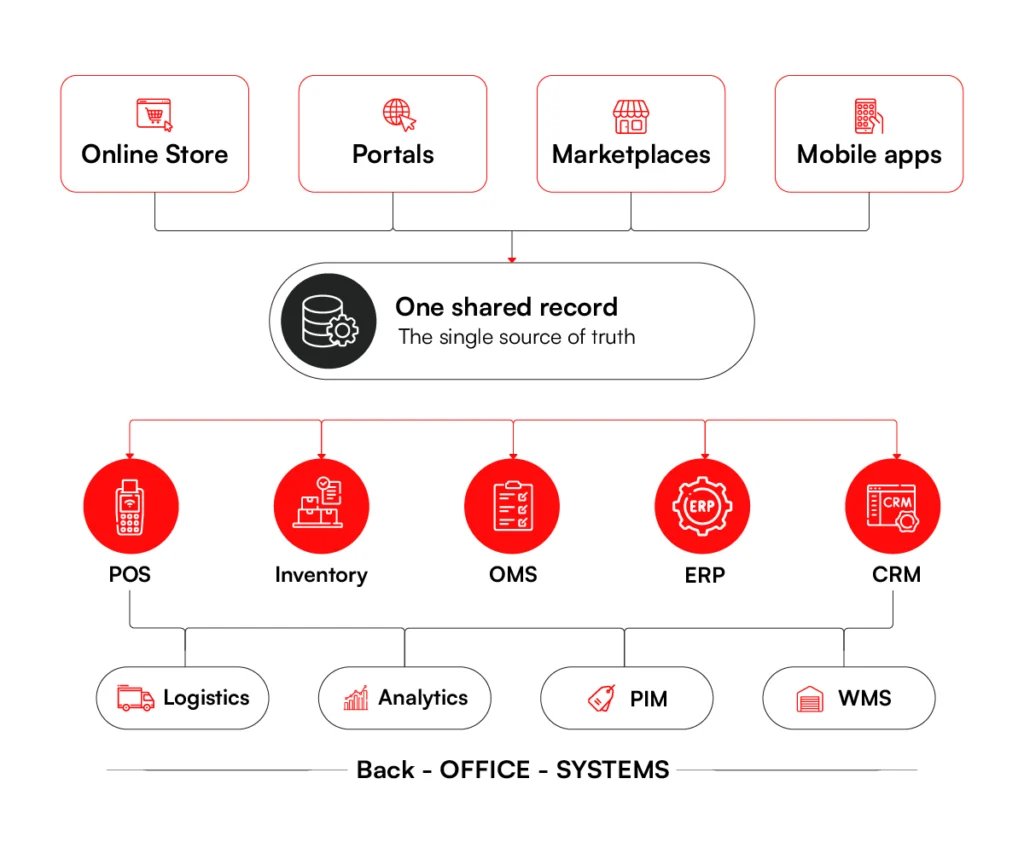
Your online store stopped being a simple website a long time ago. Once your store handles real volume, it’s a stack of connected systems: storefront, POS, inventory, ERP, and CRM. All are meant to work as one, but they rarely do.
The average enterprise now runs 957 apps, yet Salesforce found only 27% are connected, and the rest is where the cost adds up. Your website shows stock that the warehouse doesn’t have, so you oversell and then refund.
Finance and inventory close the month on different numbers. A customer waits on a late order while two of your teams trade emails to find it.
Custom ecommerce solutions development is a great way to close these gaps. You can build systems that work with shared records and achieve better alignment across operations.
In this article, we give you a practical map for the types of ecommerce systems, the tech that makes them smarter, the build process, the challenges to plan for, and what it all costs.
What Are Ecommerce Development Solutions?
For a large business, ecommerce development solutions cover three connected layers: the customer-facing channels buyers shop through, the operational systems that handle fulfillment, and the integrations that tie it all back to the rest of your business. The storefront is only the part customers see.
This scope is what separates an enterprise-grade platform from a basic setup. “Enterprise-grade” gets thrown around loosely, but it comes down to one thing: a platform that holds up under heavy demand. When a major sale sends thousands of people to browse and check out at once, it keeps running. That depends on:
- Growth capacity: more traffic, more orders, and a bigger catalog as you expand, without spikes dragging the site down or knocking it offline.
- Connected systems: live links to your ERP, CRM, and inventory so the numbers stay accurate and nobody is rekeying data by hand.
- Security and compliance: protection for customer and business data, plus support for the requirements you answer to, including PCI-DSS and GDPR.
- Reliable support: a dedicated team when something breaks at 2 am, not a ticket sitting in a general queue.
Get these right and the store holds up through your busiest days. The cracks from getting them wrong tend to surface at the worst possible moment.
Need a platform built to hold up at enterprise scale? RBMSoft builds custom ecommerce development solutions that stay fast, connected, and reliable as your order volume grows.
Speak with Our Team
The Different Types of Ecommerce Software Solutions Development
An enterprise ecommerce setup is a connected ecosystem of customer-facing platforms, operational systems, and enterprise integrations, each one affecting what the others can do.
Building the right stack means selecting solutions that work together: ones that help customers buy, teams fulfill, and leadership make decisions based on reliable data.
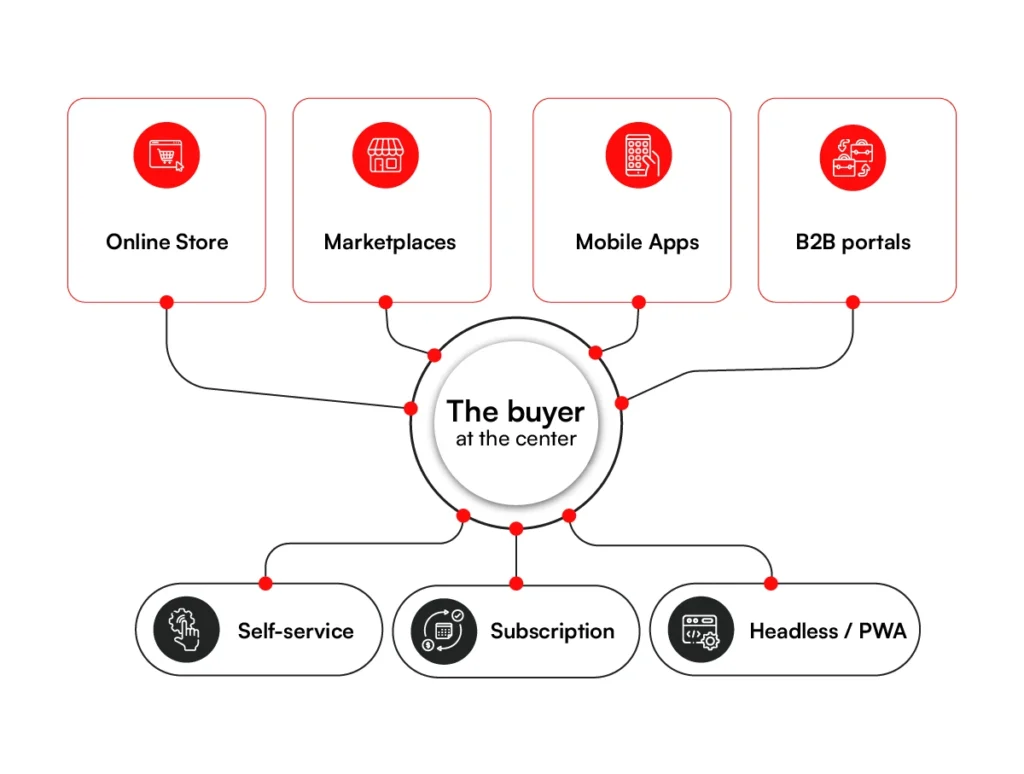
Broadly, ecommerce solutions fall into three categories: customer-facing ecommerce solutions, commerce operations solutions, and enterprise integration and intelligence solutions.
1. Customer-Facing Solutions
Customer-facing ecommerce solutions are the digital channels buyers directly use to discover products, place orders, manage accounts, and return for repeat purchases. These solutions shape the buying experience and often determine whether a customer completes the purchase or drops off.
a) Online Stores
An online store is the main digital storefront of an ecommerce business. For enterprises, the requirements go well beyond displaying products: high traffic handling, large catalog support, smooth checkout, and live connections to inventory, payment, logistics, and customer systems running in the background.
A custom ecommerce website gives businesses more control over design, performance, customer journeys, and integrations. Instead of forcing the brand into a fixed template, the store can be built around how customers actually shop.
Best for:
- High-traffic ecommerce businesses
- Large product catalogs and multiple SKUs
- Custom checkout flows
- Brand-led digital experiences
- Integration with ERP, CRM, OMS, and inventory systems
The main challenge is performance under load. During a flash sale, even a few slow seconds can lead to abandoned carts, failed transactions, and lost revenue.
At millions of SKUs, a stale catalog is lost revenue at scale. Arvyn keeps your catalog data live and unified, from source system to storefront.
Get Free Demob) B2B Ecommerce Portals
A B2B ecommerce portal gives business buyers a self-service space to place orders, reorder products, view invoices, check order status, and manage accounts. Unlike a B2C store, a B2B ecommerce development solutions need to support negotiated pricing, customer-specific catalogs, bulk ordering, approval workflows, and credit-based purchases.
The solution has to be built around how business customers actually buy. This includes their approval chains, credit terms, and catalog restrictions.
Best for:
- Manufacturers, distributors, and wholesalers
- Customer-specific pricing and catalogs
- Bulk ordering and repeat purchases
- Account-based buying journeys
- Reducing dependency on sales teams for routine orders
The main challenge is access control. A buyer under one contract should not see another customer’s pricing, credit terms, or product availability. Permissions, roles, and pricing logic all require precise engineering.
c) Multi-Vendor Marketplaces
A marketplace allows multiple vendors or sellers to list products on one platform. Instead of selling only its own inventory, the business can create a platform where third-party sellers reach customers and the marketplace earns through commissions, subscriptions, listing fees, or value-added services.
Marketplace development requires vendor onboarding, seller dashboards, product approval workflows, commission management, order routing, payments, reviews, and dispute handling.
Best for:
- Businesses that want to expand catalog size without holding all inventory
- Industry-specific marketplaces
- Multi-seller retail platforms
- Commission-based ecommerce models
- Brands that want to bring partners or distributors onto one platform
The primary challenge is vendor quality. One seller listing counterfeit, unavailable, or poorly described products can damage trust in the entire marketplace. The platform therefore needs strong seller verification, catalog controls, and performance monitoring built in from the start.
d) Mobile Commerce Apps
Mobile commerce apps are dedicated shopping applications built for smartphones, designed for speed, personalization, push notifications, and repeat engagement. For loyal customers, the app can become the primary way to shop.
A mobile commerce app can include saved carts, one-tap reorder, app-only offers, loyalty rewards, personalized recommendations, and real-time order tracking.
Best for:
- Repeat purchase businesses
- Loyalty-driven ecommerce brands
- Personalized offers and push notifications
- Faster mobile checkout
- App-first customer engagement
The usual challenge is consistency across channels. If a promotion goes live on the website but not in the app, customers may see different prices for the same product. The app, website, inventory, pricing, and promotions engine must stay synchronized.
e) Customer Self-Service Portals
Customer self-service portals allow buyers to manage their own relationship with the business. It allows them to track orders, raise support requests, download invoices, manage returns, and access purchase history without contacting support.
For B2B businesses, the portal plays a key role in improving customer experiences.
Best for:
- Reducing customer support workload
- Giving customers access to order and invoice history
- Managing returns, complaints, and service requests
- Supporting enterprise and B2B accounts
- Improving post-purchase experience
Data accuracy is usually the biggest challenge here. If the portal shows outdated order status, incorrect invoice details, or missing shipment updates, customers lose trust and still end up contacting support.
f) Subscription Commerce Platforms
Subscription commerce platforms are built for businesses that sell products or services on a recurring basis. These may include monthly product boxes, replenishment models, digital subscriptions, memberships, or auto-renewal services.
The solution needs to support recurring billing, subscription plans, renewals, cancellations, upgrades, downgrades, customer notifications, and failed payment recovery.
Best for:
- Recurring product deliveries
- Membership-based ecommerce
- Digital products and services
- Auto-replenishment models
- Predictable revenue streams
Lifecycle management is where most subscription builds fall short. Customers expect to pause, modify, skip, upgrade, or cancel without friction. If those actions require contacting support or navigating a confusing UI, churn follows.
g) Headless Storefronts and Progressive Web Apps
Headless storefronts separate the frontend shopping experience from the backend commerce engine. This gives businesses more flexibility to build fast, custom, and content-rich customer experiences across websites, apps, kiosks, and other digital touchpoints.
Progressive Web Apps, or PWAs, offer app-like experiences through the browser. They improve mobile performance, reduce load times, and remove the dependency on app store downloads.
Best for:
- Brands that need highly customized frontend experiences
- Omnichannel ecommerce journeys
- Faster mobile experiences
- Content-led commerce
- Businesses using composable commerce architecture
The main challenge is integration complexity. Since the frontend and backend are decoupled, APIs and data flows need to be planned around the systems they connect. A broader ecommerce integration strategy defines how commerce data moves between the storefront, ERP, CRM, inventory, fulfillment, and other applications.
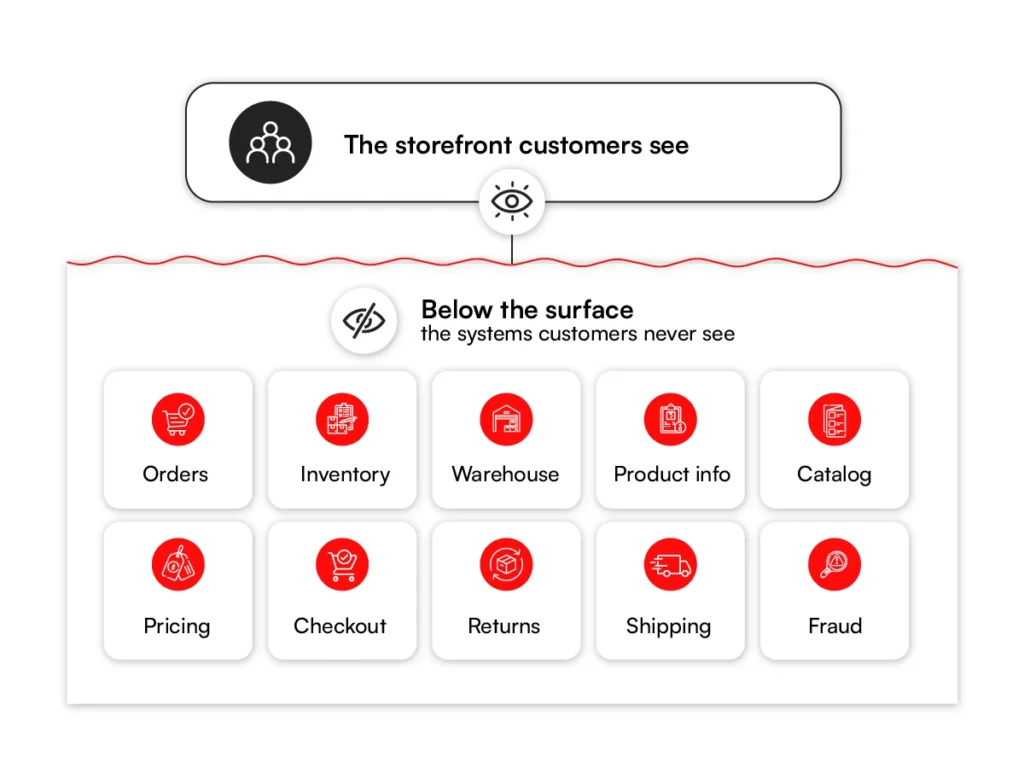
2. Commerce Operations Solutions
Commerce operations solutions manage what happens behind every sale: product data, inventory, pricing, payments, orders, fulfillment, returns, and logistics. Customers never see these systems, but they determine whether an order is accepted, shipped, delivered, or refunded correctly.
a) Order Management Systems
An Order Management System, or OMS, captures orders from different channels and routes them to the right fulfillment point. Once order volumes grow across websites, apps, marketplaces, stores, and warehouses, an OMS becomes essential.
It manages order status, split shipments, partial fulfillment, cancellations, exchanges, and returns. It also routes each order to the right fulfillment source: warehouse, store, distributor, or third-party logistics partner.
Best for:
- Multi-channel order management
- Smart fulfillment routing
- Split shipments and partial fulfillment
- Returns and exchanges
- Centralized order visibility
Routing logic can be the tricky part during implementation in this case. If an order ships from a distant warehouse while a nearby store has the product in stock, delivery becomes slower and more expensive than it needs to be.
b) Inventory Management Solutions
Inventory management solutions track how much stock is available, where it is located, and when it needs to be replenished. For enterprise ecommerce, inventory visibility must work across warehouses, stores, marketplaces, and online channels.
Best for:
- Real-time stock visibility
- Multi-location inventory tracking
- Reorder alerts and replenishment planning
- Reducing stockouts and overstock
- Feeding accurate stock data to ecommerce channels
The main challenge is real-time accuracy. If two channels sell the last unit at the same time and the system does not update instantly, one customer places an order that cannot be fulfilled.
This is the type of problem RBMSoft solved for a North American apparel retailer. Stock data was sitting across separate store, warehouse, and ecommerce systems, while planning still depended on Excel cycles that took one to three days. RBMSoft added a real-time visibility and allocation layer on top of the existing SAP setup, without replacing the core system. Stockouts dropped by 32% and planning cycles became roughly 90% faster.
c) Warehouse Management Systems
A Warehouse Management System, or WMS, manages the movement of goods inside the warehouse. It supports receiving, putaway, bin location management, picking, packing, shipping, and warehouse labor optimization.
Best for:
- Faster picking, packing, and shipping
- Better bin and storage management
- Receiving and putaway control
- Higher warehouse accuracy
- Improved labor efficiency
We focus on warehouse efficiency during WMS development. Without proper bin logic and picking workflows, staff spend too much time traversing the warehouse floor, driving up labor costs as order volume grows.
d) Product Information Management Systems
A Product Information Management system, or PIM, stores product information in one central place. This includes product names, descriptions, images, specifications, attributes, pricing details, and channel-specific content.
For businesses with large catalogs, a PIM keeps product data consistent across websites, apps, marketplaces, catalogs, and partner channels.
Best for:
- Large and complex product catalogs
- Consistent product data across channels
- Faster product launches
- Multi-language or multi-region catalogs
- Reducing manual data entry
Consistency has to be the biggest priority during development. If a product description is correct on the website but outdated on a marketplace, customers may get confused, place the wrong order, or return the product.
e) Catalog Management Solutions
Catalog management solutions help businesses organize products into categories, collections, bundles, variants, and attributes. They are especially useful when products differ by size, color, region, customer type, or business rule.
In most ecommerce builds, catalog management works closely with PIM, pricing, inventory, and search systems.
Best for:
- Complex product hierarchies
- Product variants and bundles
- Region-specific catalogs
- B2B customer-specific catalogs
- Faster merchandising updates
The main challenge is catalog complexity. A poorly structured catalog makes products harder to find, harder to manage, and harder to sell across channels.
RBMSoft ran into this exact problem with a luxury furniture company whose catalog spanned more than 80,000 products and millions of SKUs.
Every new product had its SKUs mapped to options, color codes, and swatches by hand on a legacy Oracle ATG setup, so a single seasonal launch could take weeks, and mapping errors kept surfacing on the storefront as missing swatches or unavailable options.
Rather than patch the old system, RBMSoft built a custom merchandising automation engine that generates the full web of SKU relationships on its own. It produces over 7 million mappings in under an hour and takes manual mapping out of routine catalog work entirely.
f) Pricing and Promotion Engines
Pricing and promotion engines manage discounts, offers, coupons, customer-specific pricing, volume-based pricing, loyalty offers, seasonal campaigns, and dynamic price rules.
For B2B businesses, this may include contract pricing, account-level discounts, and approval-based pricing. For B2C businesses, it may include flash sales, coupon campaigns, loyalty benefits, and personalized offers.
Best for:
- Promotional campaigns
- Customer-specific pricing
- Volume discounts and bulk pricing
- Loyalty and coupon programs
- Dynamic pricing rules
You need to look out for rule conflict in this case. If two promotions apply at once or pricing rules are not prioritized correctly, customers may see incorrect discounts or the business bleeds margin.
g) Checkout and Payment Solutions
Checkout and payment solutions manage the final stage of the buying journey. They include cart management, payment gateway integration, tax calculation, shipping cost display, fraud checks, address validation, and order confirmation.
A well-built checkout reduces friction and improves conversion. For enterprises, checkout may also need to support multiple payment methods, currencies, tax rules, regions, and compliance requirements.
Best for:
- Smooth and secure checkout
- Multiple payment methods
- Faster transaction completion
- Cart abandonment reduction
- Payment gateway and fraud tool integration
These solutions also impact your trust and reliability. If checkout fails, payment status is unclear, or customers do not receive confirmation, even interested buyers will abandon the purchase.
h) Returns and Exchange Management Solutions
Returns and exchange management solutions help customers return, replace, or exchange products while giving the business control over eligibility, approvals, refunds, reverse pickup, and restocking.
Best for:
- Self-service return requests
- Exchange and replacement workflows
- Refund processing
- Reverse logistics coordination
- Customer support reduction
You need to balance customer convenience with business control in this case. A return process that is too rigid frustrates customers. One with weak controls increases losses.
Shipping and Logistics Solutions
Shipping and logistics solutions manage how products move from warehouses, stores, suppliers, or logistics partners to customers. These systems compare carrier rates, generate shipping labels, assign delivery partners, track shipments, and handle delivery exceptions.
For high-volume ecommerce businesses, logistics solutions reduce shipping costs and improve delivery visibility.
Best for:
- Carrier integration
- Real-time shipment tracking
- Delivery exception management
- Multi-warehouse shipping
- Returns and reverse logistics
i) Fraud Detection and Risk Management Solutions
Fraud detection solutions identify risky transactions before they create financial loss. They check unusual purchase patterns, suspicious addresses, mismatched payment details, chargeback risk, and account takeover attempts.
For ecommerce businesses with high transaction volumes, fraud prevention has to work without blocking legitimate customers.
Best for:
- Reducing payment fraud
- Preventing account abuse
- Managing chargeback risk
- Protecting high-value transactions
- Supporting secure checkout
You need to make sure that this solution is calibrated right. Fraud rules that are too permissive cost the business money. Rules that are too strict block genuine customers and suppress conversion.
3. Enterprise Integration and Intelligence Solutions
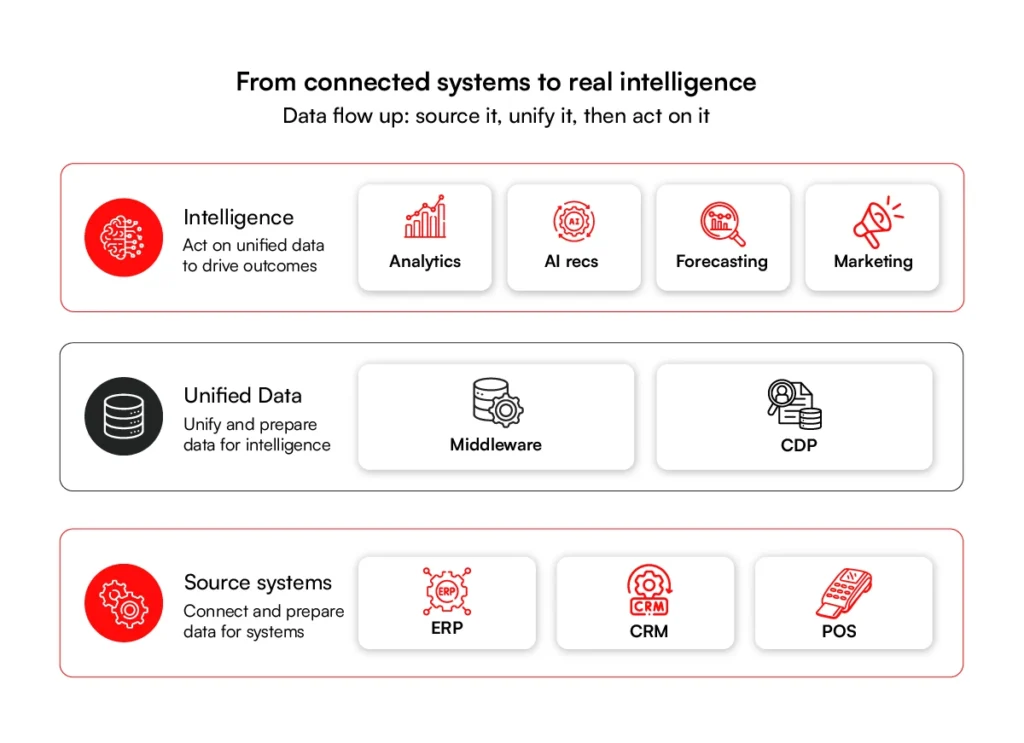
Enterprise integration and intelligence solutions connect ecommerce to the rest of the business. They keep sales, stock, finance, customer, marketing, and fulfillment data synchronized across systems, and give leadership the visibility to understand what is happening and act on it.
a) ERP Integrations
ERP integrations connect ecommerce platforms with enterprise systems used for finance, purchasing, accounting, inventory, tax, and operations. Instead of teams manually reconciling data, ecommerce transactions flow into the ERP and ERP data flows back into ecommerce systems.
Best for:
- Finance and accounting synchronization
- Inventory and purchasing alignment
- Tax and invoice data flow
- Operational reporting
- Reducing manual reconciliation
Without a well-designed integration, finance may report one revenue number while inventory or sales teams report another.
b) CRM Integrations
CRM integrations connect ecommerce activity with customer records. This allows sales, marketing, and support teams to understand the customer’s full history — purchases, inquiries, complaints, preferences, and account activity.
Best for:
- Unified customer profiles
- Sales and account management
- Marketing segmentation
- Customer support history
- B2B relationship management
The main challenge is data fragmentation. If web, store, marketplace, and support data sit in separate systems, the same customer may appear as multiple disconnected records.
c) POS Integrations
POS integrations connect physical retail sales with ecommerce systems. This is important for omnichannel models where customers may buy online, pick up in store, return products anywhere, or expect store stock to reflect online availability.
Best for:
- Buy online, pick up in store
- Return anywhere models
- Unified inventory across stores and ecommerce
- Store-level customer data
- Omnichannel retail operations
Real-time sync has to be the primary focus during development. If a product sells in-store but the ecommerce site still shows it as available, the business will oversell and disappoint the customer.
d) Analytics and BI Dashboards
Analytics and Business Intelligence solutions turn ecommerce data into dashboards, reports, and insights. They help teams track sales, traffic, conversion rates, revenue, customer behavior, product performance, inventory trends, and fulfillment performance.
Best for:
- Sales and revenue reporting
- Conversion and traffic analysis
- Product and category performance
- Demand forecasting
- Leadership dashboards
Poor data quality can be detrimental in this case. If two dashboards pull from different systems and show different revenue for the same period, teams stop trusting the numbers — and go back to building their own spreadsheets.
e) Middleware and API Integration Solutions
Middleware and API integration solutions connect different ecommerce systems so they can exchange data reliably. They are particularly important when the ecommerce ecosystem includes a storefront, ERP, CRM, OMS, WMS, PIM, POS, payment gateway, and logistics partners.
Instead of building one-to-one connections between every system, middleware acts as a central integration layer.
Best for:
- Connecting multiple ecommerce systems
- Real-time data synchronization
- Reducing manual data transfer
- Supporting composable commerce
- Scaling integrations as the business grows
The main challenge here is reliability. If APIs fail or data does not sync correctly, orders, inventory, pricing, and customer records become inconsistent across systems.
f) Customer Data Platforms
A Customer Data Platform, or CDP, brings customer data from different channels into one unified profile. It helps ecommerce businesses understand customer behavior across websites, apps, email, stores, campaigns, support interactions, and purchases.
A CDP is the foundation for personalization, segmentation, and cross-channel journey analysis.
Best for:
- Unified customer profiles
- Personalized marketing
- Customer segmentation
- Cross-channel journey tracking
- Retention and loyalty programs
You need to make sure identity resolution is done right. The system must correctly identify when different data points belong to the same customer without creating duplicates or mixing unrelated profiles.
g) Marketing Automation Integrations
Marketing automation integrations connect ecommerce data with email, SMS, ads, push notifications, and campaign tools. This allows businesses to trigger messages based on various customer behaviors such as abandoned carts, repeat purchases, product views, loyalty status, or inactive accounts.
Best for:
- Abandoned cart recovery
- Personalized email and SMS campaigns
- Loyalty and retention workflows
- Product recommendation campaigns
- Post-purchase communication
h) AI Recommendation and Personalization Solutions
AI-based recommendation solutions suggest products based on browsing behavior, purchase history, customer preferences, similar users, and real-time context.
These systems power product recommendations, personalized search results, dynamic offers, cross-sell suggestions, and upsell opportunities.
Best for:
- Personalized product recommendations
- Cross-selling and upselling
- Improving average order value
- Product discovery
- Customer retention
Demand Forecasting Solutions
Demand forecasting solutions use historical sales, seasonality, inventory data, promotions, and market signals to predict future demand. They help ecommerce businesses plan stock, purchasing, warehouse capacity, and promotions more accurately.
Best for:
- Inventory planning
- Seasonal demand prediction
- Reducing stockouts and overstock
- Promotion planning
- Supply chain optimization
Choosing the right mix of these systems is the foundation of any serious build. What makes them smarter, and what increasingly separates leaders from the rest, is the technology layered on top. That is where we turn next.
Advanced Technologies for Ecommerce Development Solutions
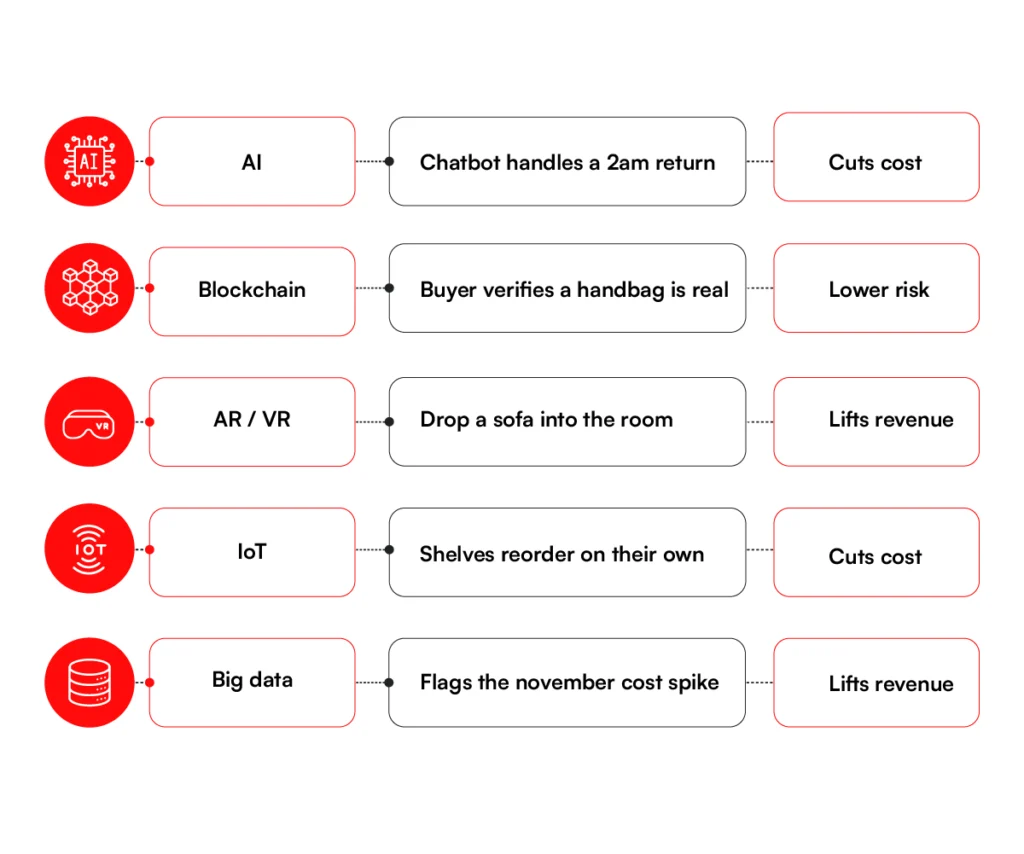
Picking the right systems gets your store running. The right technology on top makes it smarter and harder to beat. When you plan ecommerce solutions development, weigh these options: none are mandatory, but used well, each can lift revenue, cut cost, or lower risk.
1. AI Solutions for Ecommerce Development
AI learns from data to make decisions or predictions. In ecommerce, it powers product recommendations, support chatbots, demand forecasts, and fraud checks. For a large store, those add up to real money.
A simple example is the “customers also bought” prompt that lifts the average order. Another is a chatbot that can handle a return at 2am with no staff online. Good AI solutions for ecommerce development work in the background, lifting revenue and trimming costs without much fuss.
2. Blockchain
Blockchain is a shared digital record that no single party can change on its own. In ecommerce, it makes transactions more secure and helps prove a product is real.
Take a luxury brand fighting fakes. A blockchain record lets a buyer confirm a handbag is genuine. Each bag gets a unique digital ID at the factory, logged on the chain as it moves through the supply chain. The buyer scans a tag on the product, pulls up that record, and checks where it came from. No one can edit that entry after the fact, so a fake has no real history to point to.
Smart contracts can also release payment on their own once conditions are met, which cuts out a middleman. For most stores this is still early, but in high-value categories, it carries real weight.
3. AR and VR
Augmented reality (AR) lays digital images over the real world through a phone camera. Virtual reality (VR) builds a full digital space. Both let customers see a product before they buy.
The classic case is furniture. An app drops a sofa into your living room so you can judge the fit. Eyewear and makeup brands let buyers try items on the same way. Research links this to higher conversion and fewer returns, because buyers know what they are getting.
4. Internet of Things (IoT)
The Internet of Things means everyday devices that connect and share data, such as sensors, smart shelves, or wearables. In ecommerce, it mostly works behind the scenes.
Warehouse sensors can track stock and flag low items on their own, so reorders happen before you run out. Some connected devices even reorder supplies without anyone lifting a finger.
5. Big Data and Predictive Analytics
Big data is the large volume of information your business collects every day. Predictive analytics uses it to forecast what is likely to happen next.
Say your data shows winter coats spike every November. The system flags it early, so you stock up before demand lands. It can also spot which customers may stop buying, so you reach them in time.
Used together, these technologies turn solid ecommerce web development solutions into a real edge over slower rivals. But technology is just a tool. What matters is the result: lower cost, smoother operations, and faster growth. The next section covers this in details.
Advantages of Ecommerce Solutions Development
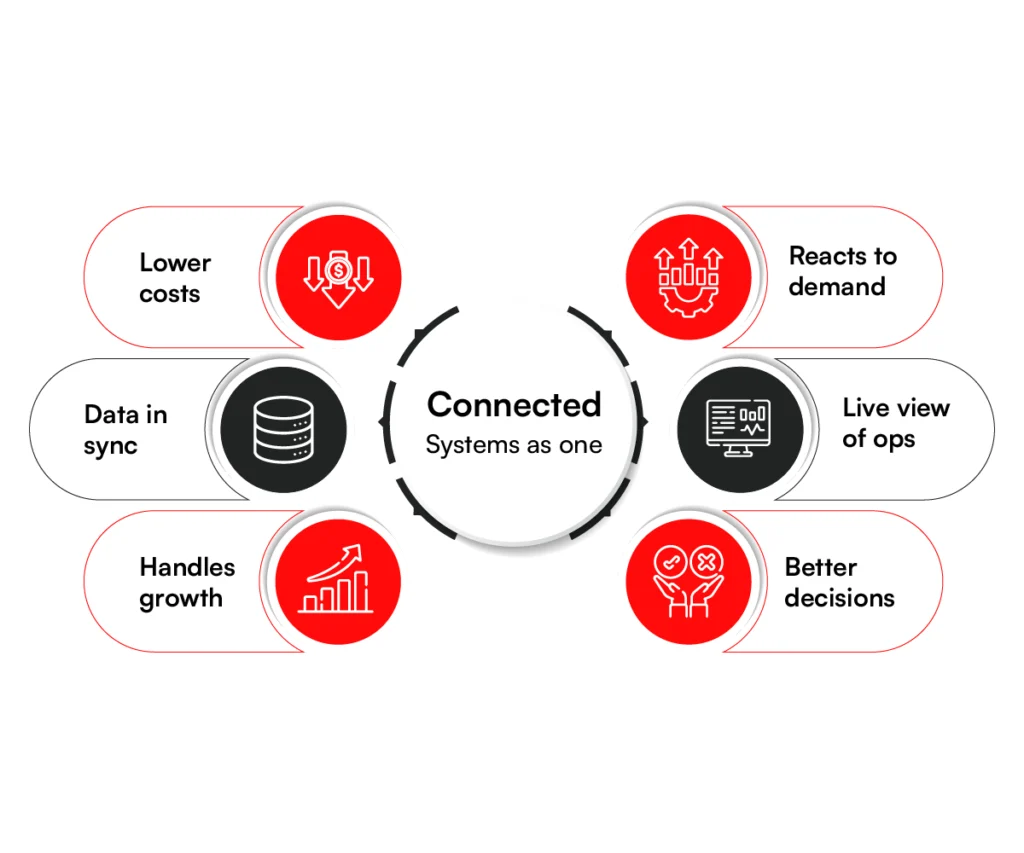
A custom build is a real investment, so it should pay you back in ways you can measure. Here are six advantages that show up most often once the systems work as one.
1. Lower Operating Costs
Handling the same volume of orders costs less when routine work moves off your team’s plate. Updating inventory, processing orders, managing returns, and answering common customer questions can all be automated.
Connect your store to an ERP, and many of these workflows run on their own, allowing your existing team to support more growth without adding headcount. Less manual data entry also means fewer errors, reducing the costs associated with refunds, reshipments, and operational rework.
2. Data You Can Trust
Everyone ends up working from the same numbers because your store, ERP, CRM, and inventory all share one record. A change in one place updates everywhere, so finance, sales, and operations are never closing the month on three versions of the truth.
When the figures agree, the arguments about whose number is right disappear, and people stop building private spreadsheets to double-check the system. The whole business runs on a single source of truth.
3. Scales Without Rebuilds
Your platform absorbs more orders and heavier traffic without needing to be re-architected every time you grow. A custom build is engineered for that growth from the start, adding capacity as you expand, so a flash sale or a strong season is something you ride out rather than survive.
You never hit the wall a simple store runs into as it gets busy. Instead, growth remains manageable without the expensive rebuilds that can stall a business for months.
4. Faster Response to Demand
Demand can swing and you still move while it matters, instead of reacting a day late when the opportunity has already cooled. Live sales data lets you restock a fast mover, reprice against a competitor, or push a promotion the moment you see the trend forming.
That kind of speed stays out of reach when each tool holds only its own slice of the data and your team is stitching the picture together by hand.
5. Real-Time Visibility
You can see exactly what is happening across the business as it happens, with stock levels, orders, returns, and sales all in one view.
That pulls teams out of yesterday’s spreadsheet and lets them act on live conditions as they shift, catching a stockout before it sells, spotting a spike before it becomes a backlog. Decisions get made on what is true right now, not on a snapshot from the last export.
6. Better Decisions
Leadership gets to make calls backed by clean, connected data rather than gut feel. Reliable reporting surfaces what sells, what stalls, and what to plan for next, and because every system feeds the same dashboards, the trends you act on are real rather than artifacts of mismatc
These six gains are the real return on ecommerce solutions development: lower cost, more speed, and a business that runs on facts. Getting there comes down to how the build is run, which is where we head next.
Turn more searches into orders with enterprise-grade site search
Talk to an ExpertEcommerce Development Process & Lifecycle
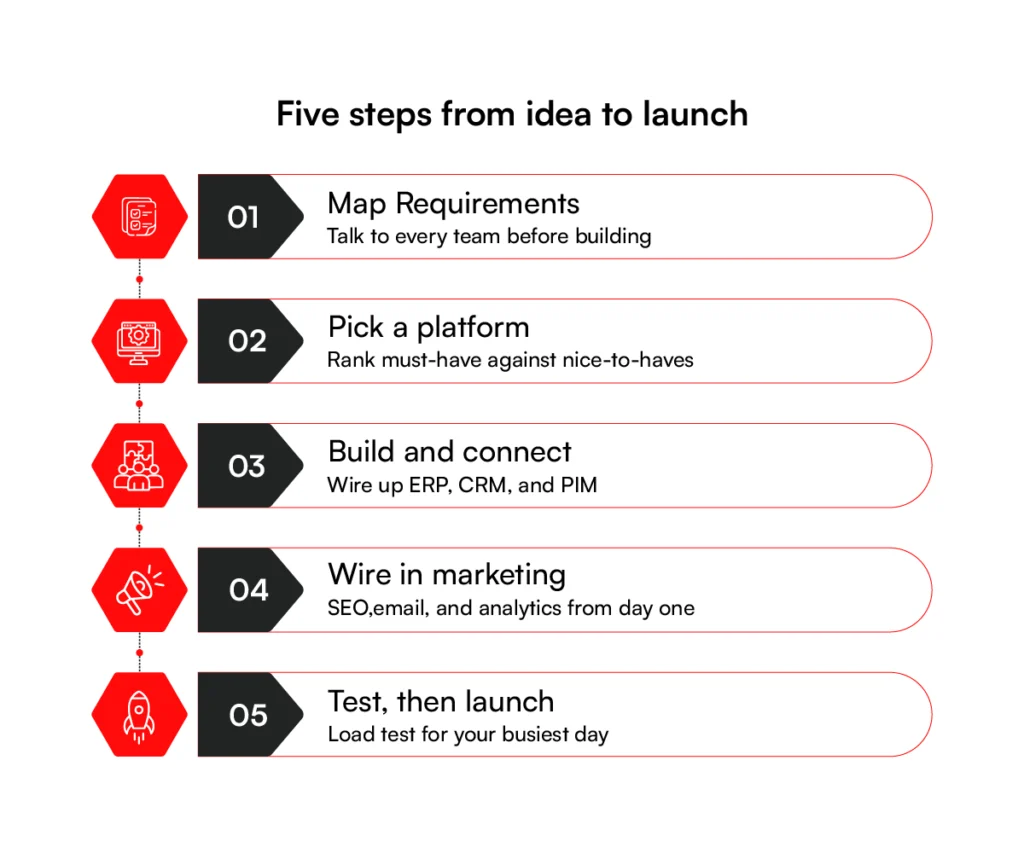
A strong result starts with a clear process. The best ecommerce builds move through a defined sequence, so problems surface early while they are still cheap to fix. The five steps below take a project from idea to a store that earns.
Step 1: Map Requirements Before You Build Anything
Start by learning who you are building for and what the business needs. Talk to customers and to every team the store will touch, from IT and logistics to marketing and support. Your warehouse team, for example, may flag a fulfillment rule that reshapes the whole design. Skip this step and you build the wrong thing well.
Step 2: Pick a Platform You Won’t Outgrow
With requirements in hand, pick the platform and tools to build on. Make a ranked list of must-haves vs. nice-to-haves, then judge each option against it. The wrong platform is costly to leave later, so this choice carries real weight.
Step 3: Build and Connect the Core Systems
For a fresh build, designers map the layout and checkout while developers handle the front and back end. When you are adding a single solution to a store that already runs, the work narrows to building that one piece and wiring it into the rest.
The constant in both cases is integration: your systems have to share data cleanly, so ERP, CRM, and PIM stay in step. A weak link here is what later surfaces as mismatched stock or wrong prices, so the connections have to be solid.
Step 4: Wire In Marketing From Day One
Before launch, set up the tools that bring customers in and keep them. That means SEO, email, discounts, and analytics, all wired in from day one.
You want abandoned-cart emails running the moment the store opens, not bolted on months later. Marketing built in early starts paying back sooner.
Step 5: Test for the Worst Day, Then Launch
Test hard before going live. Check every path from checkout to returns, run security and compliance checks, and load test for peak traffic so the site holds on your busiest day. Then launch, watch how real customers behave, and keep improving. Launch is the start of the work, not the finish line. That habit is how good ecommerce solutions development stays ahead.
Even a careful process hits obstacles, and knowing them early is half the fight. So what tends to go wrong along the way? The next section covers the common challenges and how to handle them.
RBMSoft provides ecommerce software development services to take projects from requirements and platform selection through development, integration, testing, and launch. We build ecommerce systems around real business workflows and support them as requirements grow.
Challenges in Ecommerce Development Solutions
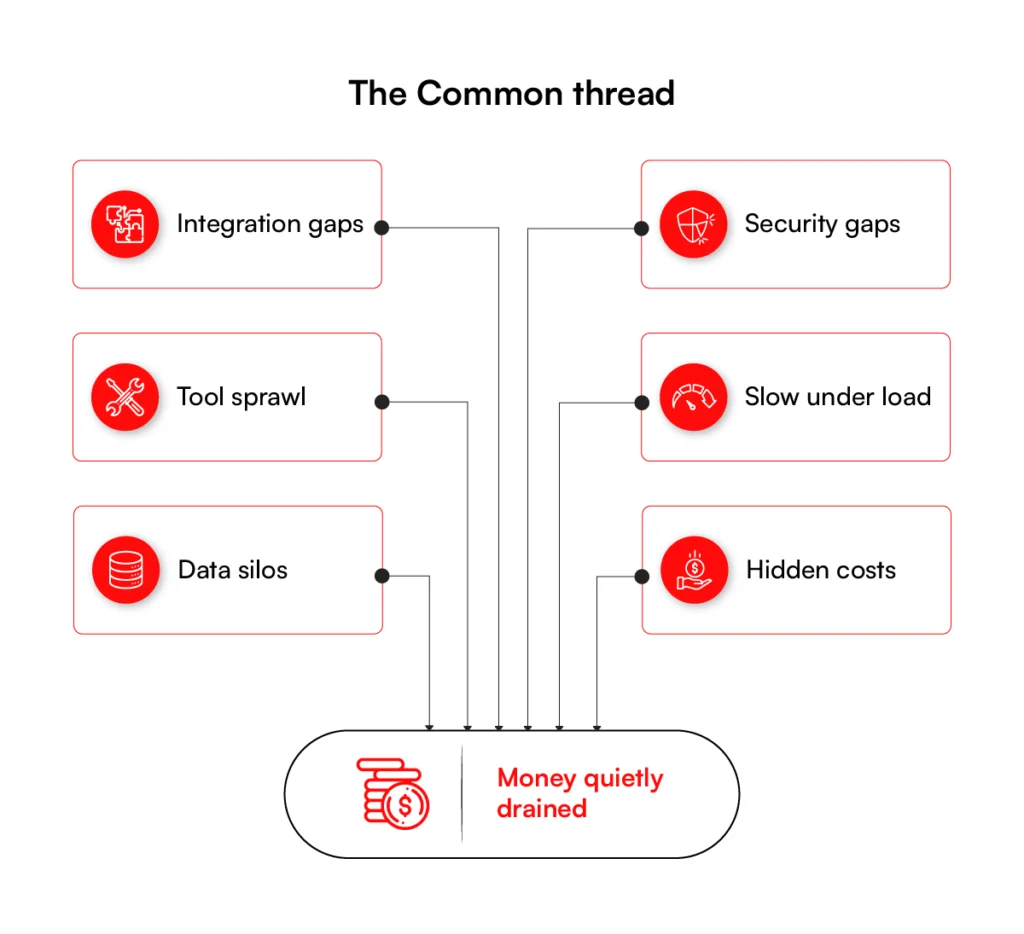
Growth puts pressure on every part of an ecommerce platform. What runs smoothly at a small scale can turn into a bottleneck once order volume, product catalogs, and integrations climb. Here is what tends to bite, and why each one matters.
1. Integration Is the Hardest Part to Get Right
Integration stalls more enterprise builds than anything else on this list. Your store has to exchange data with your ERP, CRM, inventory, and payment tools, and getting all of them to agree on the same information is far harder than any demo suggests.
Let the store-to-ERP link go weak and the site will show a product in stock while the warehouse sits empty. The cancelled orders and refunds that follow are what customers remember.
2. Weak Security Costs More Than Prevention
Cutting corners on security is a false economy that tends to catch businesses out late. Once you handle payments and personal data, you are bound by rules like PCI-DSS and GDPR, and falling short means fines and reputational damage.
One breach usually costs more than doing the work properly would have. The penalties are only part of it; the customers who leave for good are the rest.
3. Every Extra Tool Adds Hidden Complexity
Complexity is the cost nobody quotes you at the start, and it grows with every tool you add. Each one makes the system a little harder to run, and the effect compounds.
A stack that began as five clean systems can become twenty that no single person fully understands. Once you are there, a small update can take weeks, because nobody is sure what else it might break.
4. A Fast Site Today Can Buckle Under Growth
A site that performs well now can still fall over the moment order volume spikes. Slow pages and timeouts during a rush cost you sales at the exact point demand is highest.
Picture a holiday sale where checkout crawls and shoppers walk away from full carts. This is a weakness to engineer out in the early design, because a busy day will always find it.
5. Disconnected Systems Pull Your Data Apart
Separate records are how the same data ends up in two places and slowly drifts out of sync. The problem stays invisible until it lands in front of a customer.
Marketing fires off a promotion to someone who just complained to support, because the two teams were never reading from the same record.
6. The Bigger Cost Lands After Launch
The price you pay to build is only the opening figure. Licenses, hosting, support, and upgrades across a stack of systems keep accruing year after year, and a setup that looked cheap at sign-off can become the most expensive option on the table. Judge the cost across the platform’s whole life, not just the bill to get it live.
Each of these drains money when it is handled badly, which is why cost is usually the first thing leaders want pinned down. The next section puts real numbers to it.
Integration is where these builds usually break. RBMSoft untangles it.
Schedule a ConsultationEcommerce Development Solutions: Cost Breakdown
Enterprise ecommerce costs vary by project scope, integrations, and business needs. The table below provides typical cost ranges and timelines.
| Phase | Component | Estimated Cost | Typical Timeline |
| Design | UI/UX design | $1,000 – $8,000 | 2–4 weeks |
| Build | Frontend development | $2,000 – $15,000 | 4–8 weeks |
| Build | Backend development | $5,000 – $40,000 | 6–12 weeks |
| Integrate | Payment gateway | $500 – $3,000 | 1–2 weeks |
| Integrate | ERP integration | $15,000 – $75,000+ | 6–16 weeks |
| Integrate | CRM integration | $5,000 – $30,000 | 4–10 weeks |
| Integrate | POS / OMS / WMS | $3,000 – $40,000 each | 3–10 weeks |
| Launch | Testing & QA | $1,000 – $5,000 | 2–4 weeks |
The numbers above provide a realistic planning range, but every enterprise environment is different. The right ecommerce website development solution balances upfront investment with scalability, operational efficiency, and long-term business value.
How RBMSoft Helps Businesses Build Enterprise Ecommerce Solutions
Enterprise ecommerce success comes down to more than technology. It requires connected systems, scalable ecommerce architecture, and a platform that can support growth without creating operational bottlenecks.
The right ecommerce development solutions help businesses improve efficiency, reduce costs, and deliver better customer experiences at scale.
RBMSoft helps enterprises build and modernize ecommerce ecosystems through custom ecommerce development solutions, system integrations, and scalable commerce platforms. From ERP and CRM integration to inventory visibility and omnichannel operations, its team focuses on creating solutions that align with long-term business goals.
Whether you’re planning a new platform, expanding B2B capabilities, or modernizing legacy systems, RBMSoft brings the technical expertise needed to support sustainable growth.
With proven experience in enterprise ecommerce solutions development, the company helps businesses transform complex operations into connected, high-performing commerce environments.
Build an ecommerce platform that grows with your business. Get in touch with RBMSoft to discuss your requirements.
FAQs
1. How long does it take to build an ecommerce solution from scratch?
Most enterprise builds take four to nine months. A simpler store can launch sooner, while a platform with deep ERP, CRM, and POS links takes longer. The biggest factor is integration, since connecting your back-office systems is the hard part. A clear scope up front is what keeps the timeline on track.
2. What are the best ecommerce development companies in the USA?
The best ecommerce solution development companies in the USA share a few traits: proven enterprise work, real client results, and strong integration skills. Look for named case studies and clients in your size range, not just a long service list. A partner who has handled high traffic and tight ERP links has already solved the problems you will face.
3. How do I choose an ecommerce development company?
To choose an ecommerce development company, weigh four things: fit with your tech, custom and scalable builds, a proven portfolio, and support after launch. Ask what they have built recently and why they made those calls. The right partner builds around how your business runs, not around one platform they prefer.
4. How do I modernise my ecommerce platform without losing revenue?
You modernise safely by upgrading in stages, not all at once. A good partner adds new systems alongside the old ones, tests them, then switches over with no downtime. RBMSoft did this for a North American apparel retailer, adding a real-time layer on top of the existing SAP setup without disrupting core operations. That side-by-side approach is how you avoid lost sales during a change.
5. How much does it cost to build ecommerce solutions?
The cost of ecommerce development solutions USA depends on scope. The work splits across design, build, integration, and launch, and integration is usually the biggest line. ERP integration alone can run from $15,000 to $75,000 or more. Treat any range as a planning guide, then get a scoped quote for your build.
6. What is the best ecommerce solution for a $10M+ revenue business?
For a $10M+ revenue business, the best ecommerce solution is one built around your operation, not a fixed template. Off-the-shelf platforms strain under high order volume and rarely fit models like B2B pricing or multi-vendor selling. A custom or composable build grows with you and keeps your systems in sync. The right choice depends on your catalog, channels, and back-office stack.
7. What is the ecommerce website re-platforming cost and timeline?
Ecommerce website replatforming usually takes three to eight months and costs vary widely by scope. Data migration, custom features, and the number of systems to reconnect drive both numbers. Moving in phases lowers risk and protects revenue. Get a scoped plan before you commit, since a rushed migration costs more later.
8. What does an ecommerce solutions development company cost in the USA vs India?
US rates are higher per hour, while India offers lower rates for similar quality. The real cost driver is not location but scope, team skill, and how well the work is managed. Many enterprises use a blended model: US-based strategy with offshore development. Judge a partner on results and process, not rate alone.
9. Can RBMSoft build sales tax compliance ecommerce solutions for multi-state selling?
Yes. RBMSoft builds ecommerce solutions that handle sales tax across multiple states, with rules that apply the right rate by location at checkout. This connects to your ERP and accounting systems, so tax data stays accurate and audit-ready. Multi-state compliance is built in from the start, not added later.