




Table of Contents
Quick Summary:
- Visual search in ecommerce lets shoppers find products by uploading an image instead of typing keywords.
- It improves product discovery, especially for large catalogs and visually driven industries like fashion, furniture, home décor, and beauty.
- Modern visual search combines image recognition with product attributes, personalization, and multimodal search for more relevant results.
- Successful implementation requires clean product data, scalable infrastructure, and integration with ecommerce platforms, PIM, ERP, inventory, and analytics systems.
- Track business impact using metrics such as search adoption, conversion rate, average order value, revenue per search, and zero-result rate.
- Implementation costs vary based on catalog size, search volume, integrations, and deployment complexity, with enterprise projects requiring ongoing operating costs.
- Visual search is evolving alongside AI shopping assistants, video search, augmented reality, and multimodal product discovery, creating more intuitive shopping experiences.
Every ecommerce business loses sales when customers cannot find the products they want. Many shoppers discover products through Instagram, Pinterest, videos, or screenshots, but traditional keyword search often fails because they do not know the product name or the right words to describe what they saw.
When search results miss the mark, shoppers leave, even if the product is already in your catalog. As product assortments grow, this problem becomes even harder to solve with keywords alone.
Visual search in ecommerce changes how customers discover products. Instead of typing a description, shoppers can upload an image and find similar products within seconds.
This article explains how ecommerce visual search works, its business benefits, implementation challenges, costs, and the steps required to introduce it successfully.
What Is Visual Search in Ecommerce?
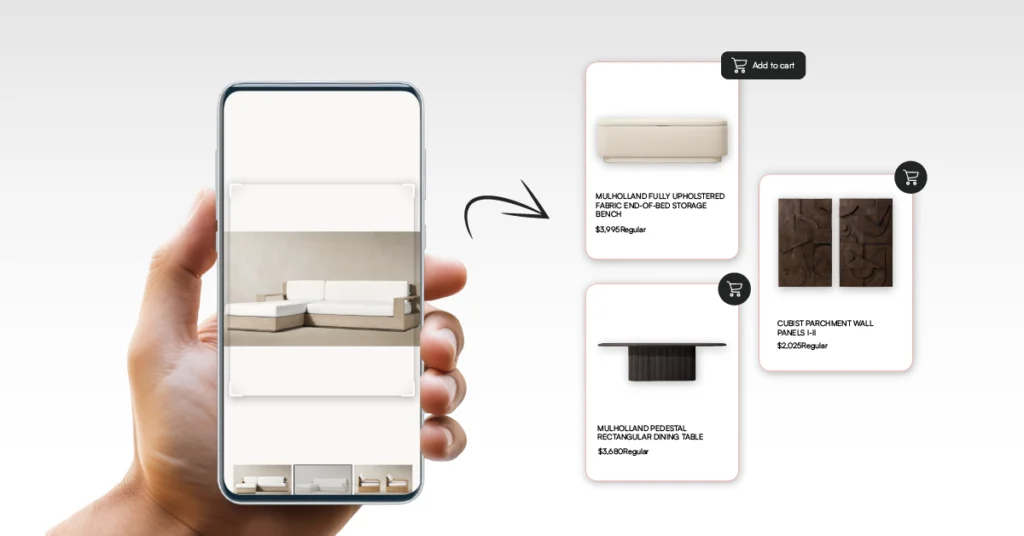
Visual search in ecommerce allows customers to find products by uploading an image instead of typing keywords. Customers can upload a photo, use a screenshot, or take a picture with their phone to search for products with similar colors, shapes, patterns, and styles.
This approach solves a common shopping problem. Customers often discover products through social media, online videos, or everyday experiences but do not know the product name or the right words to describe what they want.
Searching with an image removes the need to describe the product with keywords and makes product discovery faster.
For ecommerce businesses, visual search helps customers find relevant products more easily, especially across large product catalogs. It also improves product discovery in categories such as fashion, furniture, home décor, and beauty, where visual appearance often influences buying decisions.
Why Ecommerce Businesses Are Investing In Visual Search
More shoppers now begin looking for products with an image instead of typing keywords. They discover products through social media, videos, online marketplaces, and even while shopping in physical stores.
As buying behavior changes, retailers are adding visual search to help customers find products the same way they discover them.
1. Image-based shopping is growing
Around 36% of online shoppers had already used visual search by 2025, and adoption continues to grow as more customers discover products through photos instead of keywords.
The visual search market is also expanding rapidly, reflecting rising demand for image-based product discovery.
Customers often save a screenshot, take a photo, or share an image when they find something they like. Describing that product with keywords can be difficult, especially if they do not know the brand or product name.
Visual search in ecommerce lets shoppers upload an image and find products with a similar style, color, pattern, or design. This approach works particularly well for fashion, furniture, home décor, and accessories, where appearance plays a major role in purchase decisions.
2. More shoppers buy on mobile
Mobile commerce accounted for 60% of global ecommerce sales in 2023, and 84% of shoppers said they would install a shopping app for better prices or offers. As mobile shopping continues to grow, customers increasingly expect faster and simpler ways to find products.
Most online purchases now happen on mobile devices. Since shoppers already have a smartphone with a camera, taking a photo is often quicker than typing a detailed search query.
This shift has increased interest in visual search technology, allowing retailers to reduce the effort required to find products on smaller screens. Businesses that build visual search for ecommerce can create a shopping experience that matches how mobile users naturally browse.
3. Social commerce drives discovery
Platforms such as Instagram, Pinterest, TikTok, and YouTube have become common places for discovering new products. A shopper may see an outfit in a video or a piece of furniture in a home tour and want to find something similar within seconds.
Text searches are not always enough because shoppers may not know the product name or brand. As a result, more retailers are adopting ecommerce visual search development to create a shopping experience available in their online stores.
4. Large catalogs are harder to search
As ecommerce catalogs grow, finding the right product with keywords alone becomes more difficult. Thousands of products can share similar names or descriptions, making it harder for shoppers to locate exactly what they want.
Visual search ecommerce addresses this challenge by comparing products based on how they look rather than relying only on text. This makes it easier to find similar products across large catalogs, even when customers use different words to describe them.
5. Customers expect better search
Around 69% of shoppers use the search bar as soon as they arrive on an ecommerce website, showing how important search is to the buying journey. If they cannot find the right product quickly, they are likely to leave and continue shopping elsewhere.
Adding AI-powered visual search for ecommerce gives customers another way to find products when keywords are not enough. As expectations continue to rise, image-based search is becoming an increasingly valuable part of the online shopping experience.
Types of Ecommerce Visual Search
Different shopping situations require different ways to search. The most effective ecommerce websites support multiple visual search methods so customers can find products using the information they already have.
1. Camera Search for Products Seen in the Real World
Camera search lets shoppers find products by taking a photo with their smartphone. Instead of remembering product details or searching later, they can capture an image and immediately look for matching products in an online store.
This approach works well for fashion, furniture, home décor, and accessories, where appearance often influences buying decisions. As more businesses adopt AI powered visual search for ecommerce, camera search is becoming a practical way to connect products seen offline with online purchases.

2. Image Upload Search from Saved Photos
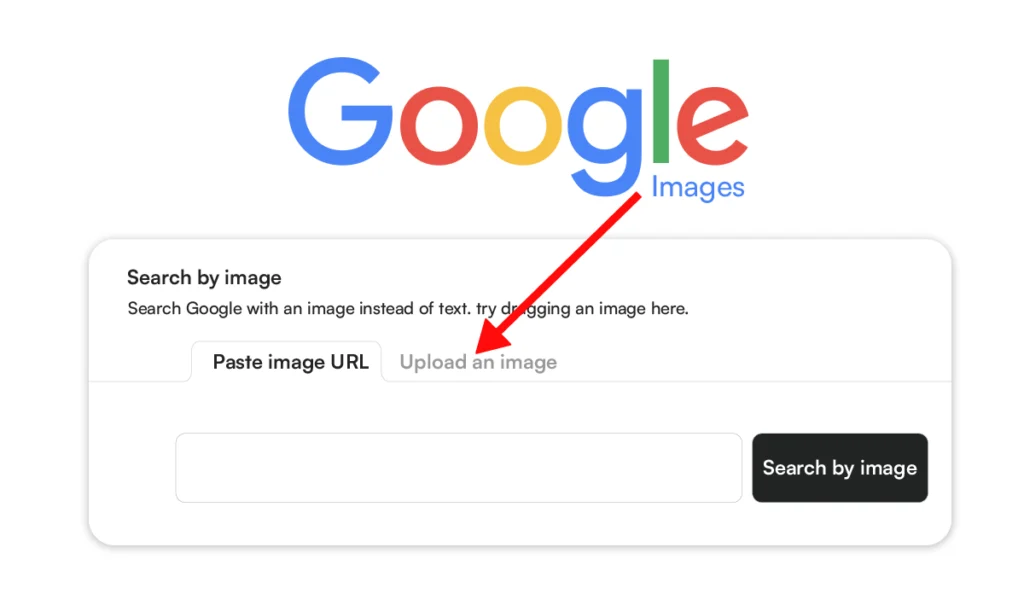
Image upload search allows shoppers to use an existing photo instead of typing keywords. They can upload screenshots from social media, design websites, or other online stores to find similar products.
Retailers often add this capability early in an ecommerce visual search development project because it integrates easily with existing search pages and gives customers another way to begin their search.
3. Shop the Look and Similar Product Search
Lifestyle images frequently contain several products that customers want to identify separately. They may be recreating an outfit, furnishing a room, or comparing similar styles before making a purchase.
“Shop the Look” identifies multiple products within one image and recommends matching items from the retailer’s catalog. Similar product search starts with one item and returns products that share a similar style, color, pattern, or design.
These remain some of the most common Examples of Ecommerce Visual Search because they encourage customers to continue browsing when the original product is unavailable or outside their budget.

While each search method starts differently, they all rely on the same technology to identify products and return accurate matches. The next section explains how visual search works step by step.
How Visual Search Works
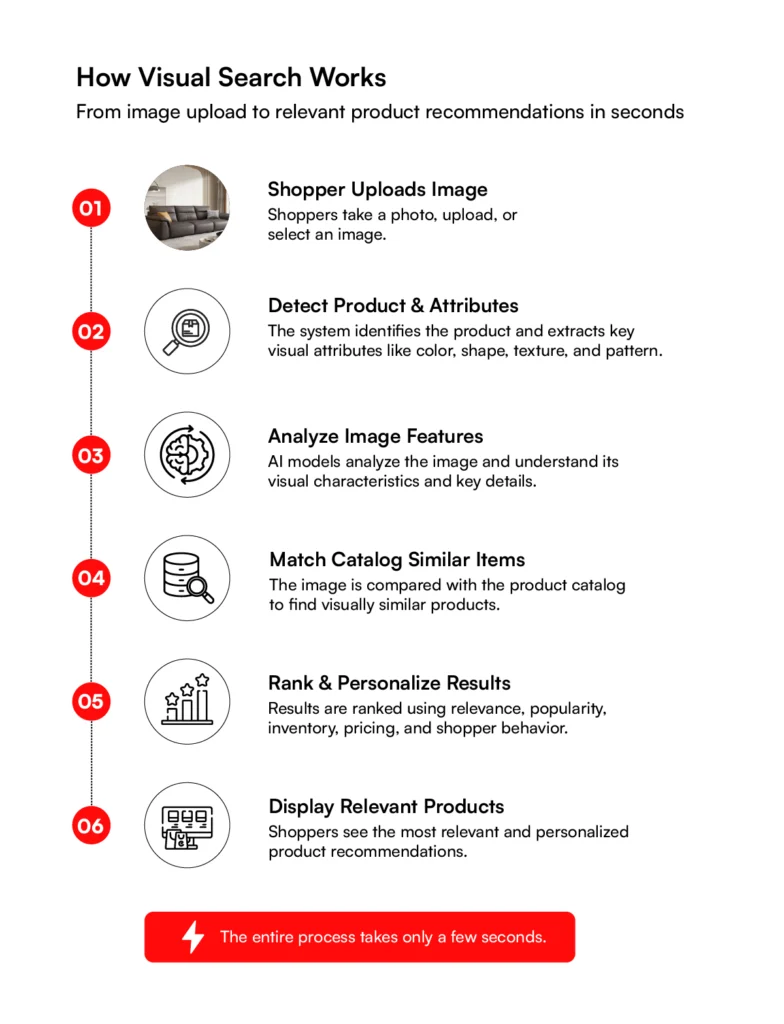
Visual search follows a series of steps to turn an image into relevant product recommendations. While the process takes only a few seconds, each step helps the system understand what the shopper is looking for before searching the product catalog.
1. Capture or Upload an Image
Every visual search begins with an image. Shoppers can take a photo with their smartphone, upload a screenshot, or select a saved image from their device.
Unlike keyword search, they do not need to know the product name, brand, or the right search terms. The image itself becomes the starting point for the search.
2. Detect Products and Visual Attributes
Once the image is uploaded, the system identifies the product and separates it from the background. If the image contains multiple items, each product is recognized individually.
It then analyzes visual details such as color, shape, texture, pattern, and material. These attributes help the system understand what makes the product visually distinctive.
3. Analyze the Image Using AI Models
After identifying the product, AI models process the image to understand its visual characteristics. Instead of looking for an identical picture, the system learns the important details that describe the product’s appearance.
This allows products with similar designs to be recognized even when catalog images differ in lighting, background, or camera angle.
4. Match Similar Products
After image analysis, the search engine compares the extracted visual features with products stored in the retailer’s indexed catalog. Rather than searching for the same photograph, it retrieves products with similar visual attributes.
Each catalog image is indexed before customers perform a search. The platform stores visual feature data alongside product information, enabling similarity search across large product catalogs without scanning every image in real time. This architecture maintains fast search performance as catalogs continue to grow.
For example, a shopper uploading a photo of a striped linen shirt may receive products from different brands that share a similar style, color, or pattern instead of only identical matches.
5. Rank and Personalize Search Results
Visual similarity determines which products qualify for the results, but the ranking algorithm decides the order in which customers see them. Enterprise search platforms evaluate multiple catalog and customer signals before returning the final product list.
Ranking combines visual similarity with inventory availability, pricing, product popularity, customer behavior, merchandising rules, and business priorities.
Retailers can also configure ranking rules to promote seasonal collections, private-label products, regional inventory, or high-margin items without changing the underlying search engine.
Customers receive products that closely match what they are looking for, while merchandising teams retain control over how products are presented across different channels and campaigns.
Build Visual Search Around Your Ecommerce Business
RBMSoft helps ecommerce businesses design and build custom visual search solutions that integrate with existing platforms, product catalogs, and business systems.
Talk to RBMSoft Experts
Features of a Modern Visual Search Solution
The value of visual search depends on what happens after a customer uploads an image. Enterprise platforms combine several capabilities to understand shopper intent, compare products accurately, and present results that make it easier for customers to continue their buying journey.
1. Multimodal Search Combines Images with Text
Product searches often include requirements that a photo cannot express. A shopper may upload an image of a chair while searching for a fabric version, a different color, or a specific price range.
Multimodal search combines an image with a text query so both inputs become part of the same search request. The retrieval pipeline interprets visual features, natural language, and structured product attributes before searching the catalog.
Enterprise platforms also apply filters for brand, price, category, availability, and other business rules before the ranking engine returns the final results.
The combination of image and text gives shoppers greater control over product discovery, especially across large and diverse ecommerce catalogs.
2. Visual Similarity Matching Finds Comparable Products
Photos uploaded by shoppers often differ from the images stored in an ecommerce catalog. Mobile photos, screenshots, and social media images can include shadows, background objects, cropped views, or different camera angles.
Visual similarity matching identifies the visual features of each image during catalog indexing and stores them in the search index alongside product information. During a search, the retrieval engine compares those indexed visual features with the uploaded image to identify products that share similar colors, shapes, textures, patterns, and design details.
Shoppers see products with a similar visual appearance even if the uploaded photo and catalog image were captured under different conditions.
3. Multi-Object Recognition Separates Products Within One Image
Lifestyle images, furnished rooms, and complete outfits often contain several products customers want to explore. Treating the entire image as one search request limits product discovery and reduces search precision.
Multi-object recognition combines object detection with image segmentation to identify and isolate each product within the scene. After classification, every object enters the retrieval pipeline independently, where it is matched against the indexed product catalog.
A single room photo can return separate results for a sofa, coffee table, rug, and floor lamp, increasing catalog visibility while helping shoppers discover more relevant products.
4. Personalized Product Ranking Prioritizes the Best Matches
Product retrieval identifies the candidate products, while the ranking engine determines their order. Ranking has a direct influence on product visibility, click-through rates, and conversions.
The scoring model evaluates ranking signals such as visual similarity, inventory availability, pricing, catalog attributes, merchandising rules, customer behavior, and business priorities before generating the final results.
Enterprise platforms can also apply configurable business rules for seasonal campaigns, regional inventory, sponsored products, and private-label collections.
Relevant products appear alongside the retailer’s commercial priorities, giving merchandising teams greater control over product discovery without modifying the underlying search architecture.
5. Smart Filters Narrow Large Result Sets
Image searches across large product catalogs can return hundreds of visually similar products. Large result sets increase decision time and make product comparison more difficult.
Smart filters use indexed product attributes such as brand, color, size, material, dimensions, price, and availability to refine the result set. Enterprise search platforms generate faceted navigation from catalog metadata, ensuring filters remain relevant to the product category and current search query.
Faceted filtering shortens the path to relevant products while improving search precision across large ecommerce catalogs.
6. AR and Virtual Try-On Support Purchase Decisions
Purchase decisions often depend on seeing how a product fits, scales, or appears in a real environment. Product images alone cannot answer those questions for categories such as furniture, eyewear, fashion, and home décor.
Virtual try-on combines computer vision, pose estimation, and real-time rendering to position products on the shopper. Augmented reality uses spatial mapping and surface detection to place digital products within the surrounding environment while maintaining realistic scale and positioning.
Greater visual confidence before checkout can reduce hesitation, improve purchase decisions, and lower return rates for visually driven products.
Related read: Virtual Reality Commerce: A Glimpse Into the Future of E-Commerce
Visual Search vs. Traditional Search vs. Image Search
Visual search, traditional search, and image search all help customers find products, but they work in different ways. The comparison below shows how each approach processes search queries and where it fits best in an ecommerce experience.
| Comparison Factor | Traditional Search | Image Search | Visual Search |
| Primary Input | Keywords or text queries | Upload an image to find the same or identical image | Upload an image or use a camera to find visually similar products |
| How It Understands Intent | Matches typed words with indexed content | Looks for identical or closely matching images | Analyzes colors, shapes, patterns, textures, and product attributes to understand what the shopper is looking for |
| Best Use Case | Shoppers who know the product name, brand, or category | Finding the original source of an image or exact image matches | Discovering products when shoppers cannot describe them with keywords |
| Search Accuracy | Depends on the quality of keywords entered | Works well for exact image matches but struggles with product variations | Finds visually similar products even when the uploaded image differs in color, angle, or background |
| Product Discovery | Limited to matching search terms | Limited to matching or duplicate images | Helps shoppers discover similar products, alternatives, and complementary items |
| Supports Large Product Catalogs | Can become difficult when products have similar names or descriptions | Limited because it focuses on image matching | Handles large catalogs by comparing visual characteristics instead of relying only on text |
| Personalization | Can personalize results using search history and customer behavior | Minimal personalization | Combines visual similarity with browsing history, purchase behavior, and preferences to improve recommendations |
| Mobile Shopping Experience | Requires typing on a mobile keyboard | Users upload an existing image | Users can take a photo instantly using their smartphone camera to begin shopping |
| Business Impact | Improves product discovery through keyword search | Primarily helps users locate an existing image | Reduces search friction, improves product discovery, increases conversions, and supports larger average order values |
| Best Fit | General ecommerce search and navigation | Reverse image lookup and image identification | Fashion, furniture, home décor, beauty, jewelry, automotive parts, and other visually driven ecommerce businesses |
Visual search is already part of the buying experience on many ecommerce websites. The examples below highlight different ways retailers use it to improve product discovery and navigation.
Examples of Ecommerce Visual Search
Visual search has become part of the shopping experience across marketplaces, fashion retailers, home furnishing brands, and visual discovery platforms. While the technology works on the same principle, every business applies it differently based on how its customers search and buy.
1. ASOS Style Match Brings Fashion Inspiration into Shopping
Fashion purchases often begin with a photo rather than a product name. A screenshot from Instagram, a TikTok video, or a picture taken on the street can be enough to start looking for a similar outfit.

ASOS built Style Match around that behavior. Customers upload an image, and the platform recommends clothing with a matching style from the ASOS catalog. Rather than relying on keywords, the search focuses on visual appearance, making it easier to shop when customers know what they like but not what it is called.
2. Amazon StyleSnap Ranks Products Across a Massive Catalog
For Amazon, finding visually related products is only one part of the search process. Millions of listings may contain comparable items, so deciding which products appear first has just as much influence on the customer experience.

StyleSnap lets customers search with a fashion image, then combines visual matching with signals such as product relevance, availability, and catalog information to organize the results. That approach helps customers reach suitable products without sorting through thousands of listings.
3. Google Lens Extends Product Discovery Beyond Retail Websites
Purchase ideas often begin long before someone visits an ecommerce store. A pair of shoes spotted at the airport or a lamp in a restaurant can quickly become the reason to start searching.

Google Lens recognizes products from those everyday moments and connects users with retailers selling related items. For ecommerce businesses, this means product discovery increasingly starts outside their own website, making accurate product information and strong product imagery more valuable.
4. Pinterest Lens Supports Inspiration-Driven Shopping
Pinterest has always been a place where people collect ideas before making buying decisions. Home renovation projects, outfit inspiration, recipes, and seasonal décor often begin with images rather than product searches.

Pinterest Lens allows users to search directly from those images. A saved photo becomes the starting point for finding products with a comparable style, helping users move from inspiration to purchase without needing to describe what they see.
5. IKEA Combines Visual Search with Augmented Reality
Buying furniture involves several decisions beyond selecting a product. Customers also want to know whether it fits their space, matches existing décor, and looks right from different angles.
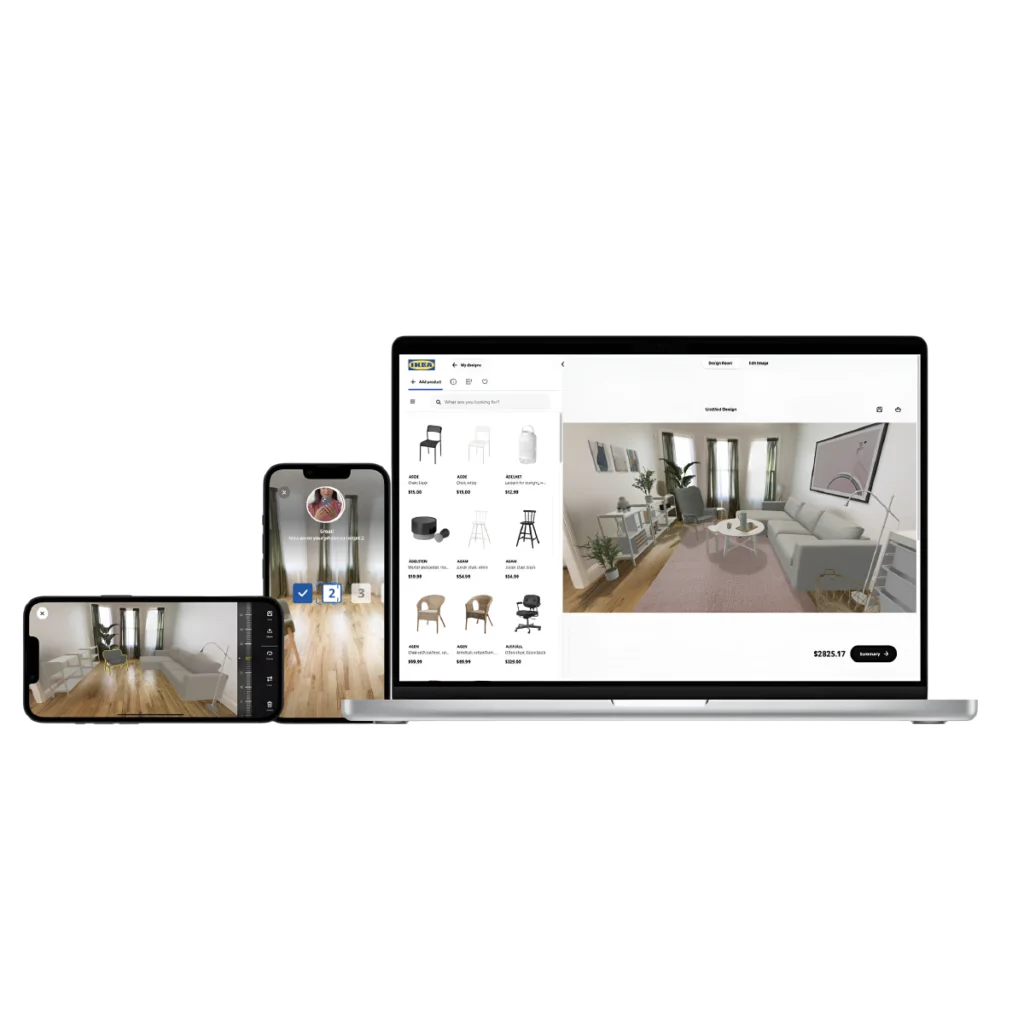
IKEA connects visual search with augmented reality so customers can place selected products inside their own rooms before purchasing. Seeing furniture at full scale helps reduce uncertainty and supports more confident buying decisions.
6. eBay Uses Images to Improve Marketplace Search
Marketplace sellers often describe identical products in different ways. Variations in titles, product details, and listing quality make keyword searches less dependable, particularly for second-hand goods and collectible items.
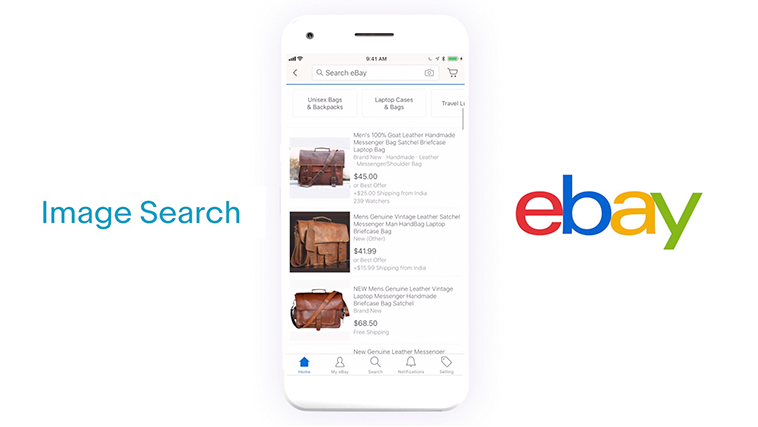
eBay Image Search gives buyers another way to find what they need. After uploading a photo, users receive visually related listings from across the marketplace, making it easier to locate products even when listing information is inconsistent.
Ready to Bring Visual Search to Your Ecommerce Store?
See how a custom visual search solution can fit your ecommerce platform, product catalog, and existing business systems.
Talk to Our ExpertsBenefits of Visual Search for Enterprises
Visual search contributes to both customer experience and ecommerce operations. Enterprise retailers use it to improve product discovery, strengthen merchandising decisions, increase conversions, optimize inventory visibility, and encourage repeat purchases.

1. Large Product Catalogs Become Easier to Navigate
Enterprise retailers often manage thousands or even millions of SKUs across multiple categories. As catalogs expand, keyword search becomes less reliable because customers rarely know the exact product name, brand, or terminology used in the catalog.
Visual search lets customers begin with an image instead of a keyword. A photo of a patterned rug, designer handbag, or sneaker is often enough to surface relevant products, making more of the catalog accessible without depending on perfect search terms.
2. Higher Search Relevance Can Increase Conversion Rates
Before a customer adds an item to the cart, search usually determines whether they continue shopping or leave the website. Irrelevant results create friction, even when the retailer stocks the right product.
Matching products by their visual appearance keeps customers closer to what originally caught their attention. Finding suitable products more quickly shortens the buying process and gives customers fewer reasons to abandon their search.
3. Visual Discovery Encourages Larger Basket Sizes
Finding one product often leads customers to look for complementary items with the same style, color, or finish. That behavior is especially common in fashion, furniture, home décor, and beauty.
Visual search makes those connections easier by presenting products that share similar visual characteristics. Coordinated recommendations feel like a natural extension of the original search, creating more opportunities to increase average order value.
4. Image-Based Search Reduces Zero-Result Searches
Large ecommerce catalogs frequently contain products that remain hidden behind inconsistent descriptions, spelling mistakes, or seller-specific naming conventions. Traditional keyword searches cannot always overcome those differences.
An uploaded image removes much of that dependency on text. Customers can locate visually related products even when product titles, attributes, or descriptions vary across brands, suppliers, or marketplace sellers.
5. Better Search Experiences Support Customer Retention
A positive search experience leaves a lasting impression because customers remember how quickly they found what they wanted. Frustrating searches have the opposite effect, often sending buyers to another retailer before a purchase is completed.
Consistently relevant search results build confidence in the shopping experience. Over time, that reliability encourages customers to return when they need similar products again.
6. Visual Search Data Strengthens Merchandising Decisions
Thousands of image searches reveal buying patterns that sales reports never capture. They show what customers wanted to find, even when they did not complete a purchase.
Those insights help merchandising teams identify missing products, growing design trends, and gaps in existing assortments. Accurate product images and complete catalog attributes make those decisions far more reliable.
Visual search delivers measurable business value when supported by the right technology, data, and integrations. Understanding the technical and operational challenges is the next step before planning an implementation.
Challenges in Implementing Visual Search in Ecommerce
Image recognition is only one part of a visual search implementation. Search accuracy also relies on catalog quality, indexing, infrastructure, and platform integrations operating together in a production ecommerce environment.
1. Image Recognition and Retrieval Accuracy
Customer uploads rarely resemble product catalog images. Mobile photos, screenshots, and social media images often include shadows, reflections, background objects, cropped views, or different camera angles that reduce retrieval accuracy.
Computer vision models extract visual features before the retrieval pipeline compares them with the indexed search catalog. Feature extraction, object detection, and similarity matching become more difficult when visually similar products differ only in texture, material, pattern, or color.
Recognition errors reduce search precision, surface irrelevant products, and increase the number of abandoned searches.
2. Catalog Data and Search Indexing
Visual search performs best when product data remains complete, consistent, and synchronized. Missing attributes, inconsistent metadata, and low-quality images reduce the effectiveness of similarity search and faceted filtering.
Enterprise platforms maintain search indexes through continuous catalog synchronization. Product images, metadata, pricing, inventory, and product attributes are indexed as catalog updates occur, ensuring search results remain aligned with the latest business data.
Well-maintained search indexes improve visual search, keyword search, recommendations, and product discovery across the entire ecommerce platform.
3. Infrastructure and Search Performance
Enterprise deployments process image uploads, similarity search, and ranking requests across large product catalogs while maintaining low response times. Search performance must remain consistent during traffic spikes, seasonal campaigns, and catalog updates.
Production environments commonly use GPU inference, distributed search indexes, scalable storage, caching layers, and load balancing to support high search volumes. Infrastructure planning also includes indexing throughput, search latency, storage growth, and system availability.
Scalable ecommerce architecture keeps search performance consistent as catalogs, customers, and search traffic continue to grow.
4. Platform Integration and Data Governance
Visual search exchanges data continuously with ecommerce platforms, PIM systems, ERP software, inventory services, pricing engines, customer platforms, and analytics tools. Product availability, pricing, promotions, and customer data must remain synchronized across every search request.
Integration architecture also includes identity management, access controls, image storage, audit logging, API security, and regulatory requirements such as GDPR.
Data governance becomes increasingly important as visual search processes customer-uploaded images across multiple business systems.
Building visual search around these requirements requires experience across computer vision, enterprise search, and ecommerce integrations.
RBMSoft helps retailers design scalable visual search architectures that integrate with existing platforms, business systems, and product catalogs while maintaining long-term performance and flexibility.
How to Choose the Right Visual Search Technology
Visual search becomes part of your ecommerce architecture once it connects with your product catalog, search services, and business systems.
The technology you choose influences platform integrations, search behavior, scalability, and future product development, making it a long-term engineering decision rather than a feature selection exercise.
1. Build a Custom Visual Search Solution
Enterprise retailers often have unique merchandising strategies, product catalogs, and customer journeys that standard visual search products cannot fully support.
Custom development gives complete control over the retrieval pipeline, ranking logic, search experience, and integration architecture.
A custom solution also connects directly with PIM, ERP, inventory, pricing, recommendation engines, customer platforms, and analytics. Search behavior can be tailored around business rules, merchandising priorities, and operational workflows instead of adapting business processes to fit a third-party product.
RBMSoft designs and develops custom visual search solutions using enterprise search architecture, computer vision, and AI technologies.
Our engineering teams build scalable retrieval pipelines, optimize search performance, and integrate visual search with existing ecommerce ecosystems while following enterprise security, scalability, and performance best practices.
2. Use a Visual Search API
A visual search API provides image recognition and similarity search as managed services while your team builds the surrounding application.
User experience, platform integrations, search workflows, and business logic remain under your control, while the provider manages the computer vision models and search infrastructure.
Visual search APIs reduce implementation effort because engineering teams integrate existing AI services instead of building and training computer vision models.
The tradeoff is long-term ownership. Image recognition capabilities, usage limits, pricing, and feature availability remain tied to the provider’s platform.
3. Compare Technology Options Before Making a Decision
Each approach offers a different balance of cost, control, implementation effort, and long-term ownership. The right choice depends on your business priorities, available resources, and future plans.
| Option | Best suited for | Ownership |
| Custom Visual Search Solution | Enterprise retailers requiring custom search behavior, deep integrations, and long-term platform ownership. | Full control over search architecture, ranking algorithms, integrations, infrastructure, and future development. |
| Visual Search API | Businesses adding image search while building their own customer experience and application logic. | Your team owns the application, integrations, and business logic. The provider owns the computer vision models and search infrastructure. |
Retailers that view product discovery as a competitive capability usually benefit from a custom implementation because the platform can evolve with changing business requirements.
Visual search APIs remain a practical option for businesses that want faster implementation while relying on managed AI services for image recognition and similarity search.
Need Help Choosing the Right Visual Search Solution?
Planning a custom, API, or SaaS solution? We’ll help you choose the right architecture and implementation approach.
Talk to Our Ecommerce ExpertsHow to Integrate Visual Search with Ecommerce Platforms
Visual search should operate as part of the existing ecommerce platform rather than a standalone feature. It needs to connect with the product catalog, pricing, inventory, customer accounts, and analytics so customers receive accurate results from image upload through checkout.
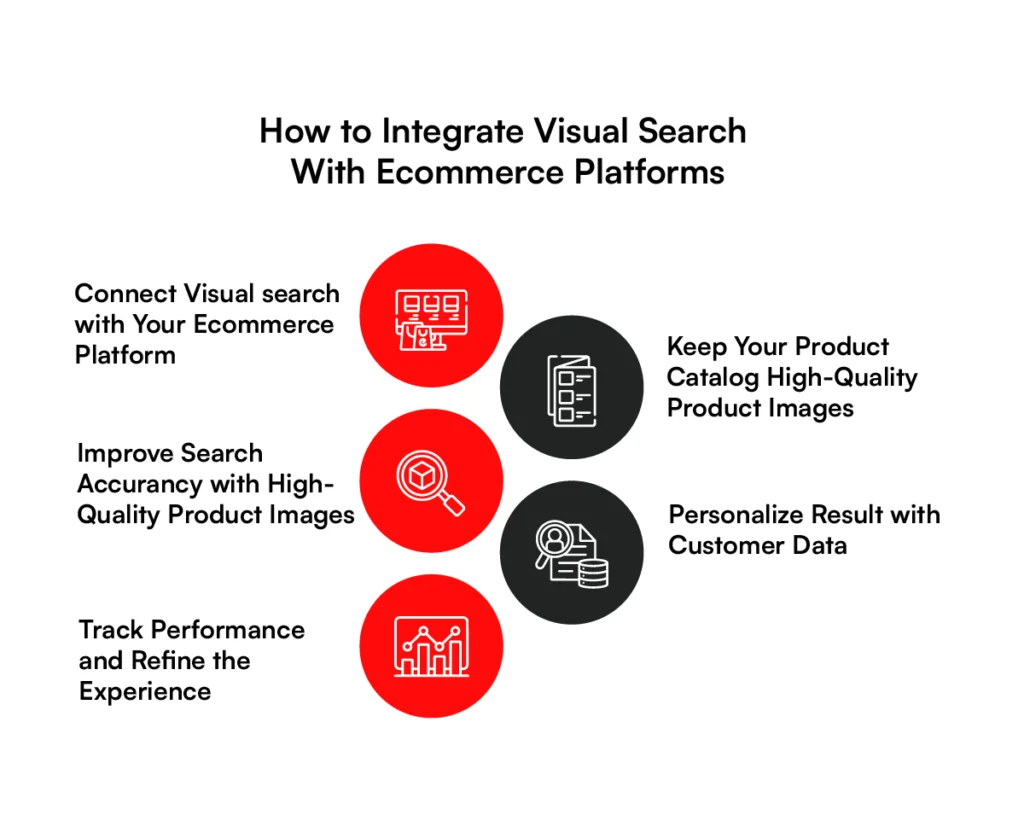
1. Connect Visual Search with Your Ecommerce Platform
Customers should be able to start an image search from the homepage, search bar, or mobile app without changing the shopping experience. Pricing, promotions, inventory availability, and checkout should remain consistent regardless of how the search begins.
Most retailers connect visual search through APIs. After a customer uploads an image, the platform sends it to the recognition service, retrieves matching products, and displays the results using existing product listing pages.
Reusing the current shopping flow reduces implementation effort and creates a familiar experience for customers.
2. Keep Your Product Catalog Synchronized
Visual search relies on current product information. New products, inventory updates, price changes, and discontinued items should appear in image search as soon as they are reflected elsewhere on the website.
Automated catalog synchronization keeps product images, attributes, pricing, and availability consistent across search, recommendations, and category pages. Without regular updates, customers may see products that are unavailable or out of stock, reducing confidence in the results.
3. Improve Search Accuracy with High-Quality Product Images
Customer photos are compared against the images stored in your product catalog. Clear, consistent catalog images give the search engine a much stronger reference for finding similar products.
Use high-resolution images, maintain consistent photography standards, and include multiple angles for products with important visual details. Complete attributes such as color, material, pattern, and style also help distinguish products that look similar.
4. Personalize Results with Customer Data
The same uploaded image can produce different results depending on the customer. Brand preferences, browsing history, previous purchases, and budget all influence which products are most relevant.
Connecting visual search with customer profiles allows product ranking to reflect those preferences while keeping visual similarity as the primary matching signal. Personalization should improve relevance without overriding the image itself.
5. Track Performance and Refine the Experience
Visual search continues to improve after launch. Customer behavior highlights where the experience performs well and where adjustments are needed.
Monitor metrics such as image search usage, searches with no matching products, click-through rate, conversion rate, and revenue generated through image search sessions.
This information helps identify catalog gaps, ranking issues, and product categories where visual search creates the greatest business value.
RBMSoft develops custom visual search solutions that integrate with ecommerce platforms, PIM, ERP, inventory services, and analytics while following enterprise architecture and deployment best practices.
How to Measure Visual Search Success
Visual search success is measured by business outcomes, not feature usage alone. Customer behavior, engagement, and revenue together provide a clearer view of how the feature performs.
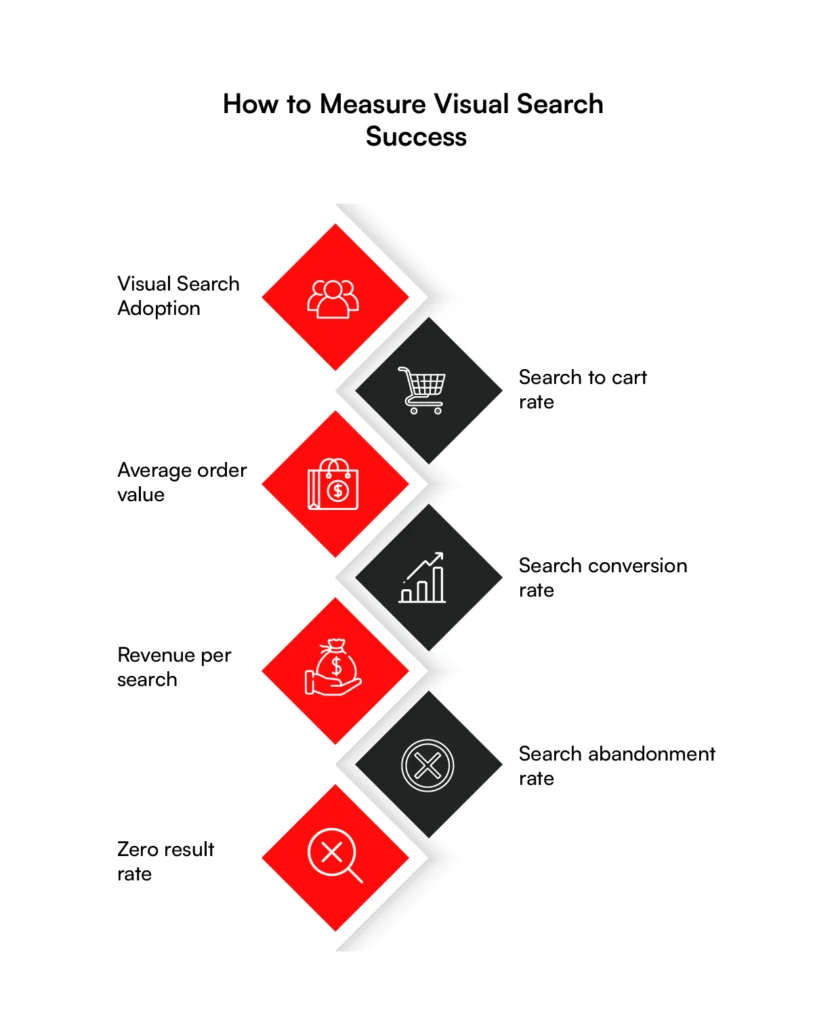
1. Visual Search Adoption
Customers cannot use a feature they do not notice. A low adoption rate usually points to poor visibility, unclear placement, or limited awareness rather than a problem with the technology itself.
Track how many visitors use visual search, how frequently they return, and how adoption differs between desktop and mobile devices. Adoption becomes a meaningful business indicator when it is accompanied by stronger engagement and higher conversions.
2. Search-to-Cart Rate
Adding a product to the cart is one of the clearest signs that search results meet customer expectations. If shoppers regularly leave after viewing the results, product matching or ranking may need attention.
Monitor how many image searches lead to products being added to the cart. A low rate can indicate weak ranking, incomplete product information, or visually similar products that differ in important details such as color, size, or material.
3. Average Order Value
Image search often helps customers discover premium alternatives or complementary products they might not have found through keyword search alone. As shoppers add higher-value or additional products to their carts, the total value of each order can increase.
Compare the average order value of purchases made after image searches with orders generated through keyword search or category browsing. A consistent difference shows whether visual search is contributing to larger purchases instead of simply generating more searches.
4. Search Conversion
A feature that receives regular use still needs to contribute to completed purchases. Conversion rate shows whether customers who start with image search continue through checkout.
Review conversion rates across visual search, keyword search, and category browsing. Higher conversion through image search demonstrates that the feature is influencing purchasing decisions rather than generating curiosity clicks.
5. Revenue per Search
Two search experiences can generate similar levels of engagement while producing very different financial outcomes. Revenue per search connects customer activity with business performance.
Analyze this metric by product category. Furniture, fashion, and home décor may generate stronger returns from image search than consumer electronics or office supplies. Those differences can guide future investment and merchandising priorities.
6. Search Abandonment
Customers leave image search when they cannot find products that match what they expected to see. Tracking where they abandon the experience helps identify weaknesses before they affect more sales.
Review abandoned searches alongside product rankings, image quality, and conversion data. The combination helps identify categories where customers lose confidence and stop shopping.
7. Zero-Result Rate
Zero-result searches usually point to missing product data, indexing problems, or incomplete catalog information rather than a lack of customer demand. Every failed search creates an opportunity for a customer to leave the website.
Monitor zero-result searches regularly and investigate the underlying cause. Improving catalog quality and indexing frequently produces faster results than making small adjustments to ranking because customers cannot purchase products they never see.
How Much Does Visual Search Cost?
Visual search projects typically range from $5,000 for a proof of concept to $250,000+ for an enterprise implementation.
The final cost depends on catalog size, integrations, cloud infrastructure, search traffic, and the level of customization, with ongoing spending required for infrastructure, AI services, and platform maintenance.
1. Catalog Size
As the product catalog grows, implementation costs grow with it. Every image must be processed, indexed, stored, and updated before it can appear in search results.
A catalog containing 10,000 products can usually be indexed within a short period. Retailers managing hundreds of thousands of products require larger search indexes, additional storage, and scheduled re-indexing to keep search results accurate as the catalog changes.
2. SKU Volume
Product variations increase the searchable catalog much faster than many businesses expect. A single product available in multiple colors, sizes, or materials can create dozens of searchable items.
Higher SKU volumes require additional storage, computing resources, and more frequent synchronization across commerce platforms, PIM systems, and inventory services. Those requirements become more noticeable as product updates become more frequent.
3. AI Model
The AI model influences both implementation costs and ongoing operating expenses. The decision affects infrastructure, engineering effort, and monthly service charges.
Managed AI services reduce development time and charge according to image processing or search requests. Building a custom model requires a larger engineering investment and dedicated infrastructure, but it provides greater control over search quality, model training, and future enhancements.
The right choice depends on expected search volume and long-term operating costs.
4. API Usage
Most commercial visual search providers use usage-based pricing. Monthly costs rise as customers upload more images and perform more searches.
Smaller ecommerce businesses may stay within lower pricing tiers for extended periods. Enterprise retailers should estimate search traffic before launch because seasonal promotions and peak shopping periods can increase monthly API costs significantly.
5. Integrations
Visual search rarely operates in isolation. Product information, inventory, pricing, analytics, recommendations, and customer data all need to move between multiple business systems.
Every new integration increases development effort, testing, and long-term maintenance. Connecting ecommerce platforms, ERP systems, PIM software, and recommendation engines frequently requires more work than integrating the visual search service itself.
6. Cloud Infrastructure
Cloud infrastructure costs extend beyond AI processing. Image storage, vector databases, application servers, monitoring, backups, content delivery, and networking all contribute to monthly operating expenses.
Search traffic has a larger impact on infrastructure costs than feature expansion. A platform processing one million image searches each month requires significantly higher computing capacity, storage, and network resources than one handling only a few thousand requests.
7. Estimated Cost
The cost drivers above determine the overall implementation budget. While every project differs, most ecommerce visual search implementations fall into one of the following investment ranges.
| Project Stage | Typical Cost (USD) | Typical Use |
| Proof of Concept (POC) | $5,000–$20,000 | Validate visual search with a limited product catalog. |
| Minimum Viable Product (MVP) | $20,000–$75,000 | Launch visual search with core ecommerce functionality and essential integrations. |
| Enterprise Implementation | $75,000–$250,000+ | Support large catalogs, custom AI models, advanced personalization, multiple integrations, and high search volumes. |
The implementation budget is only part of the total investment. After launch, businesses continue paying for cloud infrastructure, AI processing, storage, monitoring, technical support, and ongoing maintenance.
Managed visual search platforms typically charge monthly subscription fees, while cloud-based services bill according to image processing volume or search requests.
As product catalogs and customer traffic grow, these recurring costs become a larger part of the long-term operating budget.
Planning a Visual Search Project?
Get an implementation roadmap with architecture recommendations, estimated timelines, technology options, and a realistic budget for your ecommerce business.
Request a Cost EstimateWhere Visual Search Is Heading Next
Customers no longer rely on a single way to find products. They move between images, text, videos, and AI assistants before making a purchase. Retailers are connecting these experiences to create a more flexible product discovery journey.
1. Multimodal Commerce
A single search no longer reflects how people shop online. Someone looking for a sofa may upload a photo, describe the fabric they want, choose a price range, and filter by color before making a decision.
Modern search platforms process those signals together instead of treating them as separate searches. Images, text, product attributes, and customer preferences all influence the final ranking.
Google’s latest Search updates follow the same approach by combining text, images, videos, and other content types into one search experience.
2. AI Shopping Assistants
Product research increasingly happens before shoppers open a product page. AI shopping assistants can answer questions, compare products, and explain differences while customers are still deciding what to buy.
Reliable product information is becoming a competitive advantage. Missing specifications, outdated inventory, and inconsistent attributes reduce the quality of recommendations and product comparisons generated by AI assistants.
3. AR Shopping
Many purchase decisions depend on seeing a product in context. Furniture, home décor, eyewear, and cosmetics already use augmented reality to help customers judge size, color, fit, or placement before placing an order.
AR is not essential for every ecommerce business. Creating and maintaining 3D product assets requires additional investment, so many retailers introduce the technology first in categories where visual confidence has the greatest impact on purchase decisions.
4. Video Search
Product videos now play a larger role in online product discovery. Retailers publish video content across ecommerce websites, marketplaces, and social platforms, creating another source of searchable product information.
Search systems can identify products within individual video frames instead of relying only on still images. Supporting video search requires more storage, additional processing capacity, and larger search indexes than image-only search.
5. Agentic Commerce
AI agents can already compare products, monitor prices, track inventory, and complete purchases after customer approval. Google has introduced early shopping capabilities that monitor products and notify shoppers when prices change.
Accurate inventory, pricing, and product information become even more important when AI agents make recommendations or complete purchases on a customer’s behalf.
Retailers with reliable data and connected business systems will be better prepared as agent-assisted shopping becomes more common.
How RBMSoft Helps Businesses Build AI-Powered Visual Search Solutions
Visual search delivers the best results when it fits naturally into your existing commerce platform. Product catalogs, inventory, pricing, customer data, and search infrastructure all need to work together to deliver fast and accurate results.
RBMSoft designs and develops custom visual search solutions for ecommerce businesses. We help companies plan the right architecture, integrate visual search with existing platforms, connect business systems, and prepare search infrastructure for future growth.
Our experience covers every stage of implementation, from proof of concept to enterprise deployment. Whether you are launching visual search for the first time or improving an existing solution, we focus on performance, reliable integration, and a shopping experience that makes products easier to find.
Learn more about our Ecommerce Software Development Services and IT Services for Ecommerce to see how we help businesses deliver better product discovery.
FAQs
1. How much does ecommerce visual search cost to implement?
The cost of implementing ecommerce visual search depends on your product catalog, number of SKUs, system integrations, and expected search volume. A proof of concept typically costs between $5,000 and $20,000, while enterprise implementations can range from $75,000 to $250,000 or more.
Ongoing costs may include cloud infrastructure, image processing, storage, and platform maintenance.
2. How long does it take to implement visual search in ecommerce?
Most ecommerce visual search projects take 6 to 12 weeks for a proof of concept or minimum viable product. Enterprise implementations usually require 3 to 6 months, depending on catalog size, integrations with ecommerce platforms, product information management (PIM) systems, ERP software, and the level of customization required.
3. What is the best visual search engine for ecommerce?
There is no single best visual search engine for ecommerce. The right choice depends on your business goals, catalog size, budget, and technical requirements.
Some retailers use managed cloud services for faster deployment, while others develop custom visual search solutions to gain greater control over ranking, personalization, and search performance.
4. How do I add ecommerce visual search for my business?
Start by reviewing your product catalog, image quality, and existing ecommerce platform. From there, choose a visual search technology, connect it with your product data, and integrate it with inventory, pricing, and search systems. Before a full rollout, test the solution with a limited product catalog to measure search accuracy and customer adoption.
5. What is the difference between visual search and image search?
Image search finds images that look similar to the one provided. Visual search goes further by identifying products within an image and matching them to items available for purchase.
An ecommerce visual search solution also considers product attributes, availability, pricing, and customer preferences when ranking search results.
6. What is visual search optimization?
Visual search optimization is the process of improving product images and product data so customers receive more accurate search results. This includes using high-quality images, consistent product attributes, descriptive metadata, structured product catalogs, and regular updates to inventory and pricing information.
7. Which industries benefit most from visual search?
Visual search works best in industries where buying decisions rely heavily on appearance. Fashion, furniture, home décor, beauty, consumer electronics, jewelry, automotive parts, and retail marketplaces commonly use ecommerce visual search to help customers discover products more quickly and reduce the effort required to find similar items.
8. Can visual search work for B2B ecommerce?
Yes. Visual search for B2B ecommerce helps buyers identify industrial equipment, machinery parts, tools, medical supplies, building materials, and replacement components when product names or part numbers are unknown. It can shorten product discovery and improve purchasing efficiency for large business catalogs.
9. What is multimodal ecommerce product search?
Multimodal ecommerce product search combines multiple search inputs into a single experience. A customer might upload a product photo, describe what they need, select a price range, and apply filters during the same search. The search engine evaluates all of those inputs together to return more relevant product recommendations.