Table of Contents
Key Takeaways:
- Retail AI vision solutions help monitor shelves, track inventory, analyze customer movement, and detect checkout issues.
- Connecting AI vision with POS, ERP, WMS, and inventory platforms turns visual insights into actionable workflows.
- Start with high-impact needs, such as planogram compliance, shelf monitoring, or loss prevention, before scaling.
- Ensure camera compatibility, data protection, access controls, and applicable privacy requirements are addressed.
- RBMSoft helps retailers integrate AI-powered applications with existing infrastructure and scale solutions based on business needs.
Retailers have spent years buying POS systems, inventory software, and ecommerce platforms. And yet some basic questions still don’t have a clean answer. Is that product actually on the shelf right now?
Why did the checkout line get so long this afternoon? Which displays catch the eye, and which ones get ignored?
The trouble is that most retail software tracks transactions and stock movements. It has no idea what’s happening on the floor itself. Computer vision fills that gap. AI-powered cameras can recognize products, monitor shelves, spot checkout problems, and show how a store is used. Connect them to the software a store already runs, and what the camera sees becomes something staff can act on.
Still, installing cameras and training a model is only part of the work. Retail AI vision systems integration is where the real effort sits, because it ties visual data into inventory, POS, ERP, warehouse, and store management tools. This article covers the benefits, use cases, process, and obstacles of retail AI vision solutions for stores.
Benefits of Retail AI Vision Systems Integration
A camera that can name objects isn’t worth much by itself. The payoff comes when that information changes how a store runs, serves shoppers, and keeps stock.
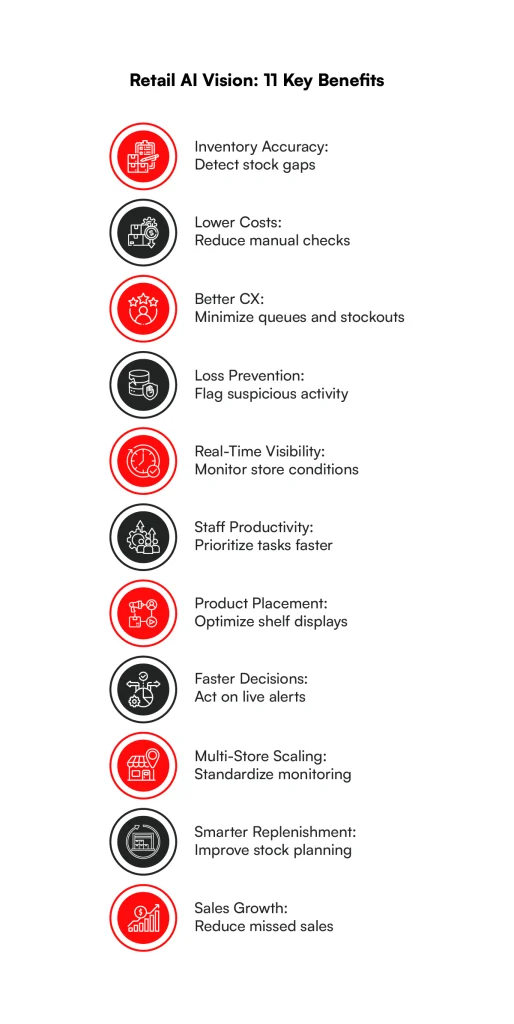
1. Improved Inventory Accuracy
The system says twelve boxes are in stock. The shelf holds none. Vision tools notice empty spots and mismatches, and once they’re linked to inventory software, staff can investigate before a shopper hits the problem.
2. Reduced Operational Costs
Shelf walks, manual counts, and checkout supervision all swallow staff hours. Vision handles part of that and flags only what looks wrong, so employees fix problems instead of hunting for them.
3. Enhanced Customer Experience
Cameras that notice a pile-up at the registers or a bare shelf can get a staff member over there while the shopper’s still in the aisle. That beats finding out later through a bad review.
4. Better Loss Prevention
Most stores still count on a person watching footage, and that person gets tired. Vision software picks out strange checkout behavior, items that might be hidden, or a scan that doesn’t match what actually left the till. It hands the security team something to look into, not a verdict.
5. Real-Time Store Visibility
A store manager typically learns how the day is going from end-of-shift reports and chats with the team. Cameras linked to a dashboard show shelf conditions, how busy the floor is, and what’s going wrong right now.
6. Improved Employee Productivity
Walking the same aisles again and again just to spot a gap is nobody’s idea of a good shift. When the system tells an associate exactly which shelf is low or which display got knocked out of place, they can go straight there.
7. Optimized Product Placement
Where a product sits can make or break its sales, yet plenty of placement choices come down to habit. Cameras can show how people walk through a store, where they pause, and what they pick up. Put that next to sales figures and a merchandiser has real evidence for moving a display.
8. Faster Decision-Making
By the time a daily report lands, the lunchtime rush is long gone. Live alerts change that. If a queue starts to build, the manager gets a ping, pulls someone over to open another till, and the line shrinks before anyone gets annoyed.
9. Scalable Multi-Store Operations
Checking hundreds of stores by hand needs a lot of people and a lot of phone calls. Retail AI vision solutions run the same checks in every location, and regional teams only look at what’s unusual in their area.
10. Better Demand and Replenishment Planning
Sales numbers tell you what sold. They stay silent about the shopper who walked away because the shelf was empty. Shelf monitoring picks up those stockouts. Combine it with sales history and inventory records, and ordering decisions rest on much better information.
11. Increased Sales Opportunities
A bare shelf means a lost sale, and it stings more when the product is sitting in the stockroom. Finding gaps quickly keeps items in front of shoppers. All of that sounds nice in theory. The better test is where computer vision is already working inside real stores.
Reduce Manual Checks. Improve Store Visibility.
Automate shelf monitoring, track product placement, and identify operational issues with retail AI vision integration tailored to your needs.
Simplify My Store Operations
Use Cases of Retail AI Vision System Integration
Different jobs in a store call for different recognition skills. Some identify products. Others follow movement, flag conditions, or support automated payments. Here’s where retail AI vision solutions are being put to work.
Here’s a quick view of what each one delivers.
| Use Case | Benefit |
| Automated Shelf Monitoring | Fewer empty shelves and faster restocking |
| Cashierless Checkout | Shorter waits and less pressure on staffing |
| Smart Queue Management | Quicker response to long lines |
| Visual Product Recognition | Faster checkout for items without barcodes |
| Automated Product Quality Inspection | Damaged goods caught sooner |
| Customer Behavior and Engagement Analysis | Evidence for layout decisions |
| Warehouse and Stockroom Automation | Less manual checking |
| Smart Parking and Entrance Monitoring | Better traffic and staffing plans |
| Self-Checkout Monitoring | Fewer losses, with staff reviewing only exceptions |
| Retail Safety and Hazard Detection | Hazards found and fixed faster |
| Personalized In-Store Shopping Experiences | Suggestions based on real stock |
| Delivery and Loading Dock Monitoring | Fewer delivery discrepancies |
1. Automated Shelf Monitoring
Cameras, or robots like the ones Simbe Robotics makes, photograph shelves, and models spot gaps, missing items, and things in the wrong place. A restock alert goes to an associate’s phone.
2. Cashierless Checkout
Amazon’s Just Walk Out is the one most people know. Tesco’s GetGo store in London uses Trigo’s technology in the same spirit. Neither depends on cameras alone. Shelf sensors and transaction tracking help work out what each shopper picked up.
3. Smart Queue Management
Cameras gauge how long a line is and how long people have been standing in it. Once it crosses a limit, a manager gets a nudge to open another register.
4. Visual Product Recognition
Loose apples don’t have barcodes. Tiliter builds computer vision that recognizes fresh produce at checkout.
5. Customer Behavior and Engagement Analysis
Where do shoppers walk? Where do they stop? Which displays do they touch? Cameras can answer with aggregated data, and nobody has to be identified.
6. Warehouse and Stockroom Automation
In the backroom, cameras and robots read labels, identify packages, confirm items landed in the right spot, and help with picking. When they feed a warehouse management system, manual checking drops and stock moves become simpler to verify.
7. Smart Parking and Entrance Monitoring
Cameras at the door count visitors and spot crowding. In the car park, they show free spaces and traffic flow. Large stores lean on this for staffing and for managing how customers get in and out.
8. Self-Checkout Monitoring
Self-checkout produces honest scanning slips and, now and then, a deliberate one. Vision compares what it watches moving past the scanner with what was rung up. Staff look at the mismatches rather than watching every transaction.
9. Retail Safety and Hazard Detection
A spill by the dairy case. A pallet blocking the fire exit. Models can catch hazards like these when they’re visible and send someone over.
10. Personalized In-Store Shopping Experiences
Sephora’s Virtual Artist lets shoppers try makeup on screen. A fitting-room mirror might recognize a garment, then offer other sizes or items that go with it.
11. Delivery and Loading Dock Monitoring
Cameras can follow trucks arriving, loading activity, package movement, and how busy the dock gets. With logistics software behind them, retailers can look into delivery mismatches and find where receiving slows down.
Each use case solves a different problem. The next question is how to roll them out without creating yet another system that doesn’t talk to the rest.
Best Practices for Retail AI Vision Systems Integration
Accurate image recognition won’t carry a project on its own. For retail AI vision solutions to last, the setup has to fit existing workflows, infrastructure, and security rules.
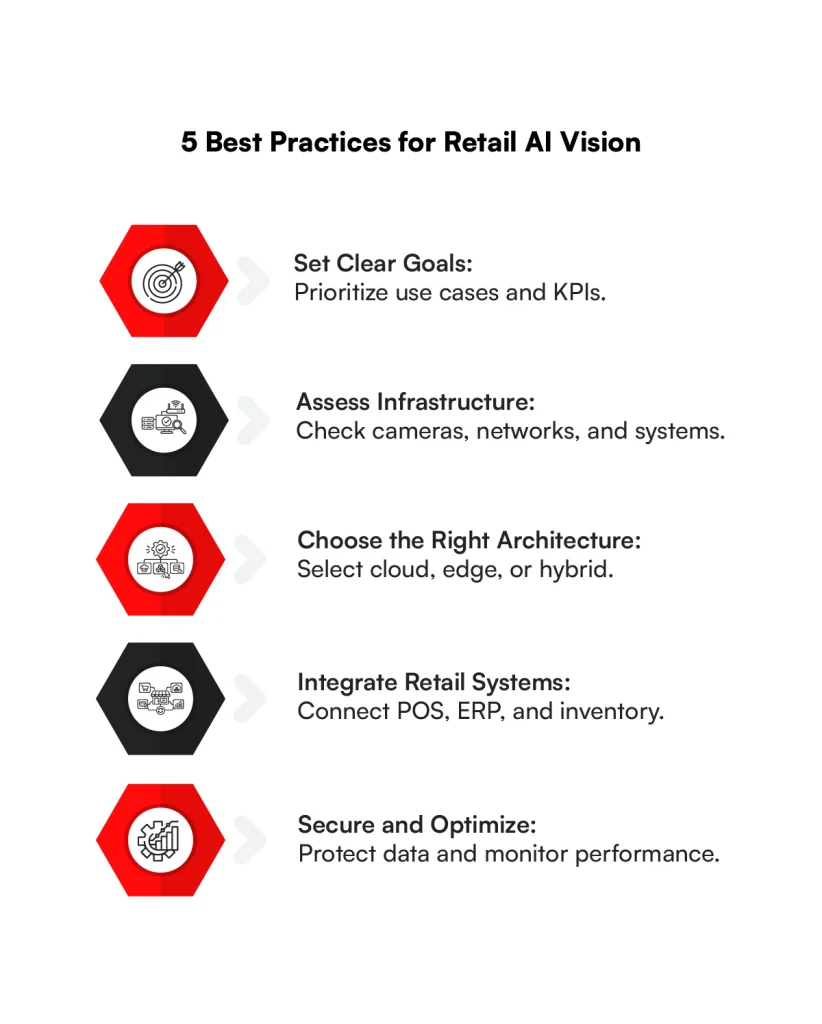
1. Define Clear Business Objectives and Prioritize Use Cases
Start with a problem that has a clear payoff. A grocery chain might care most about shelf availability, while a convenience store may just want faster checkout.
Record baseline numbers first, like how often items run out or how long people queue. And hold off on launching several applications until one has proved itself.
2. Assess Existing Retail Infrastructure and Integration Requirements
Check camera coverage, network capacity, store hardware, and the software each store runs. Older POS or inventory tools may have no modern APIs, and some stores have patchy connections. Write those limits down early so the design fits the stores as they are, not as people wish they were.
3. Choose the Right AI Vision Tools and Deployment Architecture
Weigh recognition accuracy, speed, hardware compatibility, and what each vendor can connect to. Processing at the edge keeps images local and cuts network traffic.
Cloud processing gives central control and plenty of computing power. Many chains end up with a hybrid. Let operational needs drive the choice, not whatever is newest.
4. Ensure Seamless Integration With POS, ERP, and Inventory Systems
A detection needs somewhere to go. A shelf alert might become a task for an employee. A recognized checkout item must match the right product record and price.
This is the part of retail AI vision systems integration that most often decides whether a project works. Use documented APIs, event-driven messaging, and consistent SKU codes, and settle which system owns each record so updates don’t clash.
5. Prioritize Data Security, Pilot Testing, and Continuous Performance Monitoring
Collect only the images each application really needs. Add encryption, access controls, retention limits, and clear privacy notices.
Test in live store conditions before expanding. After launch, keep an eye on recognition errors, missed detections, delays, and business results, because accuracy slips as packaging, lighting, and layouts change.
With those habits in place, planning can turn into an actual rollout.
Retail AI Vision Automation and integration: Tools and Platform Providers
Choosing the right technology provider is important for retailers looking to automate store operations, improve inventory accuracy, and reduce manual work. Some providers offer ready-to-use AI vision tools, while others help businesses develop custom solutions and integrate them with existing retail systems.
1. RBMSoft: Custom Retail AI Vision Development and Integration
RBMSoft helps retailers develop and integrate custom AI-powered solutions with their existing technology infrastructure. Its software engineering and integration capabilities can support computer vision applications connected to POS, ERP, inventory management, and ecommerce platforms.
Key capabilities:
– Custom retail AI vision solution development
– AI and machine learning model integration
– POS, ERP, and inventory system integration
– Retail workflow automation
– Cloud and API integration
– Ongoing application support and optimization
Best for: Retailers that need customized AI vision applications integrated with their existing systems rather than standalone software.
2. NVIDIA Metropolis: Edge AI and Video Analytics
NVIDIA offers Metropolis, an AI-powered video analytics ecosystem that helps businesses build and deploy computer vision applications. Its edge AI technologies support real-time video processing and automated monitoring across retail locations.
Key capabilities:
– Real-time video analytics
– Object detection and tracking
– Edge AI processing
– Store traffic monitoring
– Loss prevention applications
– Multi-camera video processing
Best for: Large retailers that need scalable video analytics and real-time computer vision processing across stores.
3. Google Cloud Vertex AI: AI Vision Model Development
Google Cloud provides Vertex AI for developing, training, deploying, and managing machine learning models, including computer vision applications. Retailers can use its AI infrastructure to build customized visual recognition and monitoring systems.
Key capabilities:
– Custom computer vision model development
– Image classification and object detection
– AI model training and deployment
– Cloud-based AI infrastructure
– Data pipeline integration
– Model monitoring and management
Best for: Retailers building cloud-based AI vision applications that require custom models and integration with enterprise data systems.
Integrate AI Vision Without the Complexity
Simplify system integration and connect computer vision insights with your existing retail workflows without replacing your entire technology stack.
Explore My Integration OptionsHow to Integrate Retail AI Vision Systems: Step-by-Step Process
Retail AI vision systems integration usually runs through eight stages. How long it takes depends on store size, current infrastructure, model complexity, and how many applications get connected.
Step 1. Define Business Objectives and Identify AI Vision Use Cases
Pick the workflow you want to improve and decide how success will be measured. For shelf monitoring, that might be the time between a shelf emptying and an associate receiving the restock task. Pull in operations, IT, merchandising, and store employees early. They rarely want the same thing, and it’s better to find that out now.
Step 2. Assess Existing Retail Infrastructure and Integration Requirements
Audit cameras, bandwidth, computing resources, POS software, ERP platforms, and inventory databases. Note which APIs, data formats, and security limits exist. Look at camera angles and lighting as well. A camera installed for security may not show enough detail to tell two similar packages apart.
Step 3. Select the Right AI Vision Technology and Deployment Architecture
Compare commercial platforms, pretrained models, and custom-built retail AI vision solutions. Then decide where the processing runs: on edge devices, on local servers, or in the cloud.
Checkout recognition needs speed, so local processing often makes sense. A scheduled merchandising audit can happily wait for the cloud.
Step 4. Prepare Visual Data and Train AI Vision Models
Collect sample images from the kind of stores where the system will run. Include different lighting, shelf arrangements, packaging, angles, and partly hidden products.
Label them for the job at hand. Fine-tuning a pretrained model beats starting from scratch, and testing on separate images shows how it really performs.
Step 5. Develop or Configure the AI Vision Solution
Build the parts around your chosen models: image intake, inference services, detection rules, dashboards, alert handling, and admin controls. Set confidence thresholds and decide what happens when the model isn’t sure. It should ask someone to verify, not quietly log a wrong answer.
Step 6. Integrate AI Vision With Existing Retail Systems
Connect the outputs to the applications that run the business. POS takes checkout recognition, ERP holds product master data, inventory systems check availability, and workforce tools hand out tasks.
A shelf gap, for example, turns into an event with a store ID, shelf location, product code, timestamp, and confidence score. Middleware validates it and sends it on.
Step 7. Test System Accuracy, Security, and Integration Performance
Test the whole workflow, not just the model. Do detections match the right SKUs? Do alerts reach the right people? What happens with duplicate events? Try poor lighting, network drops, heavy foot traffic, and shelves mid-restock.
Step 8. Launch a Pilot and Scale Across Retail Locations
Begin with a few stores that represent the rest. Compare results with your baseline and ask employees what they actually think. A system that flags every tiny shelf difference can create more work than it saves.
Adjust alert thresholds, processes, and models, then expand in phases with central monitoring and local settings where needed.
Even a careful rollout hits obstacles. Enterprise retailers should expect several.
Challenges for Retail AI Vision Systems Integration
The hard part often starts when a working prototype meets a busy store. Lighting shifts. Packaging changes. Older systems behave differently from what their documentation promised.
1. Integration With Legacy Retail Systems
Older retail software may run on proprietary databases, batch file transfers or thin interfaces. Linking detection events to them can mean custom middleware and data conversion.
Try not to edit those databases directly. A controlled integration layer protects the business rules already in place and makes future changes easier.
2. High Implementation and Infrastructure Costs
Costs add up: cameras, edge devices, network upgrades, software licenses, integration work, and ongoing support. Stores that need heavy hardware changes cost more.
Rolling out in phases keeps spending in check, and it’s worth testing whether current cameras give good enough images before buying new ones.
3. Data Privacy, Security, and Regulatory Compliance
Store cameras capture customers, employees, and other personal information. Depending on where a retailer operates, rules such as GDPR or US state privacy laws may apply.
Collect as little as possible, restrict access, encrypt what you keep, and set clear retention periods. Anything involving biometric identification deserves extra legal and privacy review.
4. Inaccurate Product Recognition and AI Model Performance
Similar packaging, shiny surfaces, crowded shelves, and changing light all hurt accuracy. A model trained on tidy product photos may struggle in a real supermarket.
Retailers need representative training data, confidence-based handling of uncertain cases, regular evaluation, and retraining when assortments or store conditions change.
5. Real-Time Data Synchronization and Scalability Across Retail Locations
The vision system may spot an event instantly while the inventory or task platform takes much longer to process it. Across hundreds of stores, network delays and duplicate messages become real headaches.
Event queues, retry logic, idempotent processing, and monitoring improve reliability, and edge processing can keep some functions alive during outages.
Handling all of this takes coordinated work across AI engineering, enterprise integration, infrastructure, and store operations. That’s where an experienced partner in retail AI vision solutions pays off.
Retail AI Vision Systems Integration Cost
The cost of retail AI vision systems integration can range from $40,000 for mid-complexity custom integrations to over $3 million for large-scale autonomous retail deployments. The final investment depends on store size, camera coverage, AI model complexity, existing infrastructure, and the number of systems that need to be connected.
A retailer integrating AI-powered shelf monitoring with an existing inventory system will generally spend less than one implementing cashierless checkout with real-time shopper tracking.
| Deployment Type | Estimated Cost (USD) | What’s Included |
| Mid-Complexity Custom AI Integration | $40,000–$250,000 | AI model integration, APIs, data pipelines, and connections with existing retail systems |
| Pilot-Scale Deployment (Single Small Store) | $500,000–$1,500,000 | Cameras, sensors, edge/cloud infrastructure, custom software, and testing for advanced autonomous retail |
| Full Production System (Large Store or Chain) | $3,000,000+ | Extensive camera coverage, AI infrastructure, multi-system integration, and deployment |
| Ongoing Annual Operational Costs | $100,000–$300,000 | Cloud computing, system monitoring, software maintenance, and ongoing support for complex deployments |
Key Factors Affecting Retail AI Vision Integration Costs
- Hardware and cameras: Camera quality, sensor requirements, store size, and coverage density influence upfront expenses.
- AI model development: Custom product recognition, shopper tracking, and loss detection models require different levels of development and training.
- System integration: Connecting AI vision solutions with POS, ERP, WMS, and inventory platforms increases implementation complexity.
- Cloud and edge infrastructure: Real-time video processing, data storage, and computing requirements affect infrastructure costs.
- Maintenance and scalability: Model updates, monitoring, security, and expansion across multiple stores add ongoing expenses.
Retailers can manage costs by starting with a focused use case, such as shelf monitoring or inventory tracking, before expanding to more complex automation. Working with an experienced technology integration partner like RBMSoft can help businesses assess existing infrastructure, identify reusable components, and develop a phased implementation plan.
How RBMSoft Can Help Enterprises With Retail AI Vision Systems Integration
Choosing an AI platform is only the first step. Businesses also need dependable connections between recognition software, existing applications, and the teams that act on the results.
RBMSoft develops and integrates AI-powered applications within existing technology environments. Its capabilities span custom software development, AI integration, data engineering, legacy modernization, and retail software development services, helping retailers introduce new capabilities without replacing their entire technology stack.
In practice, this means building custom applications around computer vision models, image processing, and automated detection workflows.
RBMSoft can also connect retail AI vision solutions to POS, ERP, inventory, WMS, and other business applications through APIs and middleware. Data pipelines carry detection events to operational systems, while legacy modernization helps older applications exchange data with newer AI tools.
Cloud and edge infrastructure can support image processing, distributed deployments, and centralized monitoring, with ongoing testing and optimization to improve reliability, security, and scalability.
Whether you’re evaluating shelf monitoring or deploying retail AI vision solutions across multiple locations, RBMSoft can help assess your technical requirements and develop an integration plan around your existing systems.
Take the Next Step Toward Retail Automation
Identify the right use cases, integration requirements, and deployment approach to bring AI vision into your everyday store operations.
Get My Integration RoadmapConclusion
Retail AI vision solutions help retailers understand physical store activity that traditional business software cannot capture alone. However, the technology creates value only when its insights lead to action.
An empty-shelf alert must reach the right employee, a detected checkout item must match the correct SKU, and a safety alert must reach someone who can respond.
That’s why retail AI vision systems integration deserves as much attention as model selection and camera hardware. Retailers need connected applications, reliable data pipelines, and workflows that turn visual insights into practical decisions.
Alongside IT services for ecommerce, AI vision integration can help businesses connect digital operations with in-store intelligence for a more unified retail technology environment.
Retailers don’t need to automate everything at once. Start with a specific business problem, validate performance under real operating conditions, and expand when the results support the investment.
With the right integration architecture, retail AI vision solutions can become part of everyday store operations rather than another isolated technology investment.
FAQ’s for Retail AI Vision Solutions Integration
1. What is AI vision automation in retail?
AI vision automation in retail uses computer vision and AI models to analyze camera footage and images to automate tasks such as shelf monitoring, inventory tracking, customer traffic analysis, loss prevention, and checkout monitoring. It helps retailers identify operational issues faster and make data-driven decisions with less manual effort.
2. How much does it cost to integrate a retail AI computer vision system?
The cost of retail AI vision systems integration can range from $40,000 for mid-complexity custom integrations to over $3 million for large-scale autonomous retail deployments. The final investment depends on store size, camera coverage, AI model complexity, existing infrastructure, and the number of systems that need to be connected.
3. How long does it take to implement retail AI vision system integration?
Retail AI vision system integration typically takes 30 to 180 days, depending on project complexity, camera infrastructure, data availability, and integration requirements. A basic proof of concept may take 15-30 days, while a single-store production deployment can require 60-120 days. Large-scale, multi-store implementations may take 120-180 days or longer, especially when custom AI models, POS, ERP, and inventory integrations are involved. A phased rollout helps retailers test accuracy, resolve integration issues, and validate performance before expanding across locations. These are estimated project timelines, not guaranteed delivery periods.
4. Can existing security cameras be used with modern retail AI vision solutions?
Yes, existing security cameras may be suitable if their resolution, viewing angles, frame rates, connectivity, and lighting conditions meet the requirements of the selected AI application. Some use cases may require camera upgrades or additional hardware. RBMSoft can assess your current infrastructure and determine the most practical integration approach.
5. What is the ROI of retail AI vision solutions?
ROI depends on the use case and the retailer’s existing operational performance. Benefits may include reduced inventory discrepancies, improved planogram compliance, lower manual monitoring costs, better shelf availability, and more effective loss prevention. Retailers can measure ROI by comparing implementation and operating costs against improvements in these areas.
6. What compliance standards does RBMSoft follow when integrating retail AI vision solutions?
Compliance requirements depend on where the retailer operates, what the system captures, and how the data is processed. Relevant requirements may include GDPR, applicable US state privacy laws, and local surveillance and data-protection regulations. RBMSoft’s AI integration approach considers security, access controls, governance, and regulatory requirements during implementation. Specific certifications or compliance commitments should be confirmed for each project.
7. What is planogram compliance in retail AI vision solutions?
Planogram compliance measures whether products are displayed on shelves according to the retailer’s planned layout. AI vision systems analyze shelf images or camera feeds to identify misplaced products, empty shelf spaces, incorrect product arrangements, and display inconsistencies. With AI vision systems integration in retail, these insights can help store teams correct merchandising issues faster and maintain consistent product displays.
8. How can retailers integrate AI vision in retail operations without replacing their existing systems?
Retailers can integrate AI vision in retail operations by connecting computer vision models to compatible cameras, inventory platforms, point-of-sale systems, and store management applications through APIs or other integration methods. This allows visual insights to feed into existing workflows without requiring a complete technology overhaul. RBMSoft supports tailored AI integration approaches designed around existing infrastructure, business requirements, and scalability needs.