Table of Contents
Key Takeaways:
- Choose the right retail app type based on your business goals, whether it’s e-commerce, omnichannel, loyalty, marketplace, or inventory management.
- Focus on seamless customer experiences with features such as personalized recommendations, secure checkout, real-time inventory, and order tracking.
- Follow a structured development process from discovery and planning to MVP development, testing, launch, and continuous optimization.
- Plan your budget around complexity, retail app development costs can range from $15,000 to $300,000+, depending on features, integrations, platforms, and technology requirements.
- Adopt emerging technologies strategically, including AI, cross-platform development, real-time data, AR/VR, and super-app ecosystems to build scalable retail experiences.
If you’re in retail today, you’ve probably noticed the shift already. Customers don’t want to switch between websites, stores, and multiple channels to complete a purchase.
They expect a fast, personalized, and seamless shopping experience from their phones. The challenge is that many retailers still rely on outdated apps, disconnected systems, or websites that don’t meet these growing expectations.
You might be struggling with low customer engagement, abandoned carts, inconsistent inventory across channels, or limited visibility into customer behavior. At the same time, competition is getting stronger, and brands that deliver better mobile experiences are winning repeat customers and increasing sales.
That’s where retail app development becomes a competitive advantage. A well-designed retail app helps you connect online and offline shopping, personalize customer interactions, simplify checkout, manage inventory in real time, and build stronger customer loyalty from a single platform.
Whether you’re launching your first retail app or upgrading an existing one, making the right development decisions early can save time, budget, and rework later. This guide will help you understand the strategies, technologies, and practical considerations behind building a retail app that supports long-term business growth.
Types of Retail Mobile Applications for Business
The right app development for retail depends on your business model, customer journey, and operational goals. Some apps focus on driving online sales, while others improve in-store experiences, customer loyalty, or inventory management. Understanding these categories helps you decide which type of retail app delivers the most value for your business.
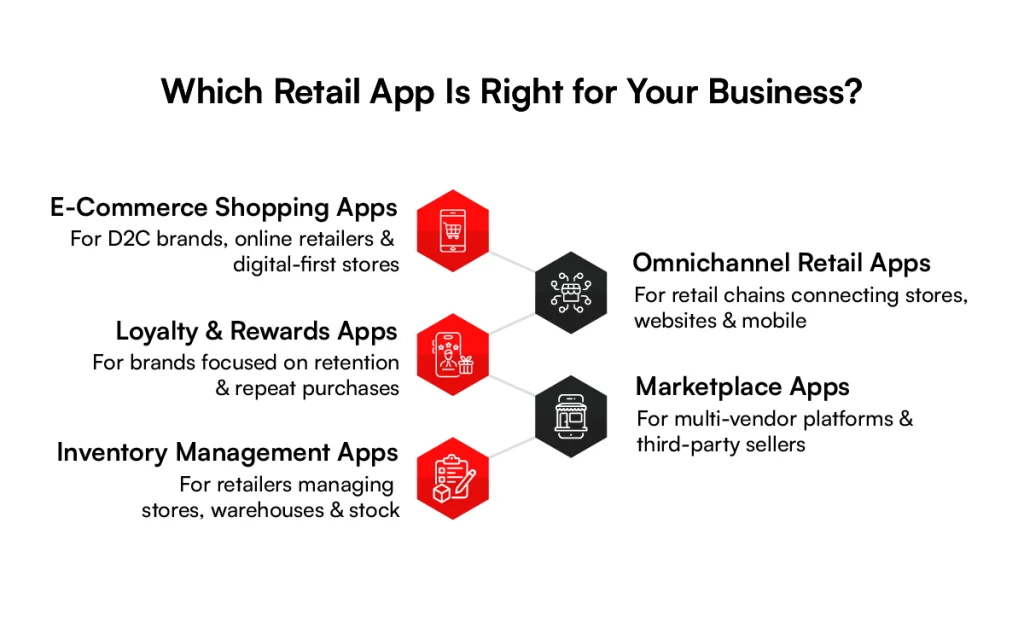
1. E-Commerce Shopping Apps
E-commerce shopping apps are the foundation of custom retail app development. They give customers a dedicated mobile storefront where they can browse products, compare options, place orders, and track deliveries without visiting a website.
These apps are designed to make shopping fast and frictionless. Features like personalized product recommendations, secure payment gateways, wishlists, one-tap checkout, and order tracking encourage customers to complete purchases with fewer steps. Brands like Amazon, Walmart, and Target have shaped customer expectations by making convenience a core part of the shopping experience.
Best for: D2C brands, online retailers, grocery stores, fashion brands, and consumer electronics businesses.
2. Omnichannel Retail Apps
Today’s customers don’t think in terms of online and offline shopping. They simply expect a consistent experience wherever they shop. Omnichannel retail apps connect digital channels with physical stores to create that seamless journey.
Customers can check real-time inventory at nearby stores, buy online and pick up in-store, schedule curbside pickup, locate products inside stores, and receive updates on orders from a single app. For retailers with multiple locations, this approach turns physical stores into fulfillment and customer engagement hubs rather than just sales outlets.
Best for: Retail chains, supermarkets, home improvement stores, and brands with both e-commerce and physical locations.
3. Loyalty and Rewards Apps
Acquiring new customers is expensive. Loyalty and rewards apps help retailers keep existing customers engaged and encourage repeat purchases through personalized incentives.
These apps allow customers to earn reward points, unlock exclusive offers, receive birthday or anniversary discounts, access member-only sales, and redeem rewards digitally. Many retailers also use push notifications to send personalized deals based on purchase history and browsing behavior, making promotions more relevant and timely.
Instead of creating a separate loyalty app, many brands integrate rewards directly into their shopping app so customers can shop and earn benefits in one place.
Best for: Fashion retailers, beauty brands, coffee chains, grocery stores, and subscription-based retail businesses.
4. Marketplace Apps
Marketplace apps bring multiple sellers together on a single platform, giving customers access to a wider range of products while retailers expand their product catalog without managing every item themselves.
Unlike traditional e-commerce apps, marketplace apps need features for vendor onboarding, product catalog management, seller ratings and reviews, commission and payout management, order tracking, and dispute resolution. This business model supports scalability by allowing third-party vendors to sell alongside your own inventory.
Best for: Multi-vendor marketplaces, B2B retail platforms, wholesale businesses, and online shopping marketplaces.
5. Inventory Management Apps
Not every retail app is customer-facing. Inventory management apps are built for store associates, warehouse teams, and retail managers to streamline day-to-day operations.
These apps provide real-time stock visibility across locations, barcode and QR code scanning, automated restocking alerts, product transfers between stores, inventory audits, and supplier or warehouse synchronization. By giving teams instant access to inventory data on mobile devices, retailers can reduce stockouts, improve order accuracy, and manage inventory more efficiently.
Best for: Retail chains, warehouses, supermarkets, pharmacies, and businesses managing inventory across multiple locations.
Which Type of Retail App Should You Build?
The right retail mobile app depends on the problem you’re trying to solve. An e-commerce app focuses on increasing mobile sales, an omnichannel app connects digital and in-store experiences, a loyalty app boosts customer retention, a marketplace app supports multiple sellers, and an inventory app improves operational efficiency.
In reality, many successful retailers combine two or more of these capabilities into a single application to deliver a connected customer experience while streamlining backend operations.
The next question is: why are retailers investing so heavily in mobile apps? Let’s look at the key business benefits of retail mobile app development.
Create a Retail App That Scales
From e-commerce and loyalty to omnichannel and inventory management, build a retail app designed around your business needs.
Build My App
Benefits of Retail App Development
A retail mobile app does much more than help customers shop from their phones. It becomes a direct channel for sales, customer engagement, loyalty, and day-to-day retail operations.
Whether you run a single store or a multi-location retail chain, a well-built mobile app helps you create better customer experiences while improving business efficiency. Here are the biggest benefits retailers gain from investing in mobile app development.
1. Improved Shopping Experience
Customers expect shopping to be quick, convenient, and personalized. A retail mobile app removes unnecessary steps and makes the buying journey smoother from product discovery to checkout.
Shoppers can browse products, apply filters, save favorite items, make secure payments, and track orders from one place. Features like saved payment methods, one-tap checkout, and real-time order updates reduce friction and encourage customers to complete purchases instead of abandoning their carts.
2. Higher Customer Engagement
A mobile app keeps your brand connected with customers long after their first purchase. Unlike websites, apps create a direct communication channel through push notifications, personalized offers, and in-app messages.
You can notify customers about new arrivals, flash sales, price drops, or back-in-stock products in real time. Loyalty rewards, referral programs, and exclusive app-only promotions also encourage users to return more frequently and stay engaged with your brand.
3. More Sales and Revenue
Retail apps create more opportunities to convert shoppers into buyers and increase repeat purchases. The easier it is for customers to shop, the more likely they are to complete transactions.
Personalized promotions, wishlists, abandoned cart reminders, limited-time offers, and loyalty rewards encourage customers to spend more and shop more often.
Retailers also gain a direct marketing channel that reduces dependence on third-party marketplaces and paid advertising for repeat customers.
4. Real-Time Stock Management
Nothing frustrates customers more than ordering a product that’s actually out of stock. Retail mobile apps solve this by connecting inventory systems with the customer-facing app.
Customers can view live product availability, check inventory at nearby stores, and receive notifications when products are restocked. For retailers, synchronized inventory helps reduce stockouts, prevent overselling, and improve fulfillment across warehouses and store locations.
5. Personalized Recommendations
Personalization has become a competitive advantage in retail. A mobile app collects first-party customer data, including browsing behavior, purchase history, preferences, and wishlist activity, to deliver a more relevant shopping experience.
Instead of showing the same catalog to every user, the app can recommend products based on individual interests, highlight recently viewed items, and send personalized discounts. This makes shopping feel more relevant while increasing the chances of additional purchases.
6. Strong Brand Image
A dedicated retail app strengthens your brand presence by giving customers a consistent and professional shopping experience. Your brand stays visible every time customers unlock their phones, making it easier to stay top of mind.
A well-designed app also builds trust through secure payments, easy returns, order tracking, and responsive customer support. Over time, these experiences contribute to stronger customer loyalty and a more recognizable brand in a competitive retail market.
Now that we’ve covered the business benefits, let’s look at real-world case studies of retail application development to see how leading retailers use mobile apps to improve customer experiences and drive measurable results.
Unlock More Value From Mobile
Don’t let a disconnected app limit growth. Create a scalable retail experience that connects customers, data, and operations.
Explore My App StrategyReal-World Case Studies of Retail Application Development
The best way to understand the impact of custom retail app development is to look at brands that have already transformed their retail operations with technology.
Companies like Walmart and Zara use AI, real-time data, and mobile-first retail systems to improve inventory management, customer experience, and sales performance. These examples show how the right retail app strategy can solve real business challenges at scale.
1. Walmart’s AI-Powered Inventory Management
Walmart has built one of the world’s largest AI-powered retail ecosystems by connecting its mobile apps, stores, warehouses, and supply chain into a single inventory management system.
The retailer uses machine learning to analyze purchase history, real-time point-of-sale data, local events, weather forecasts, seasonal demand, and shopping patterns across thousands of stores.
This data helps predict product demand for individual locations and automatically adjusts inventory replenishment before products run out.
For customers, the Walmart mobile app shows accurate product availability, nearby store inventory, and pickup options in real time. Behind the scenes, AI ensures products are stocked at the right location and at the right time.
Business impact
- Reduced out-of-stock incidents across stores.
- Lowered excess inventory by improving demand forecasting.
- Increased inventory turnover and supply chain efficiency.
- Improved customer satisfaction with better product availability.
This is a strong example of how retail mobile apps become much more valuable when they’re connected with AI-powered backend operations.
2. Zara’s Real-Time Fashion Forecasting
Zara’s success in fast fashion comes from its ability to respond to customer demand faster than most retailers. Its retail technology ecosystem continuously collects sales data, customer preferences, inventory movement, and fashion trends from stores and digital channels.
Instead of relying only on seasonal forecasts, Zara analyzes what’s selling in real time and quickly adjusts production and distribution. This allows the company to introduce new collections in weeks instead of months.
The Zara mobile app also plays a key role by capturing browsing behavior, purchase history, wishlist activity, and regional shopping preferences. These insights help the brand recommend products and stock stores based on local demand.
Business impact
- Faster product launches based on customer demand.
- Reduced unsold inventory through smarter forecasting.
- Better product availability across global markets.
- More personalized shopping experiences for app users.
Zara demonstrates how data collected through retail apps can directly influence merchandising, inventory planning, and product strategy.
These examples show what’s possible when retail businesses combine mobile technology with data-driven decision-making. Whether you’re building a shopping app, a loyalty platform, or an omnichannel solution, success starts with a structured development approach. Let’s walk through the custom retail app development process step by step.
Retail Mobile App Development: Step-by-Step Process
Building a retail mobile app involves more than creating product screens and adding a payment gateway. You need to understand your customers, define the right features, choose suitable technology, and continuously improve the app after launch.
A structured process for app development for retail helps you control costs, reduce technical risks, and build an app that supports your business goals.
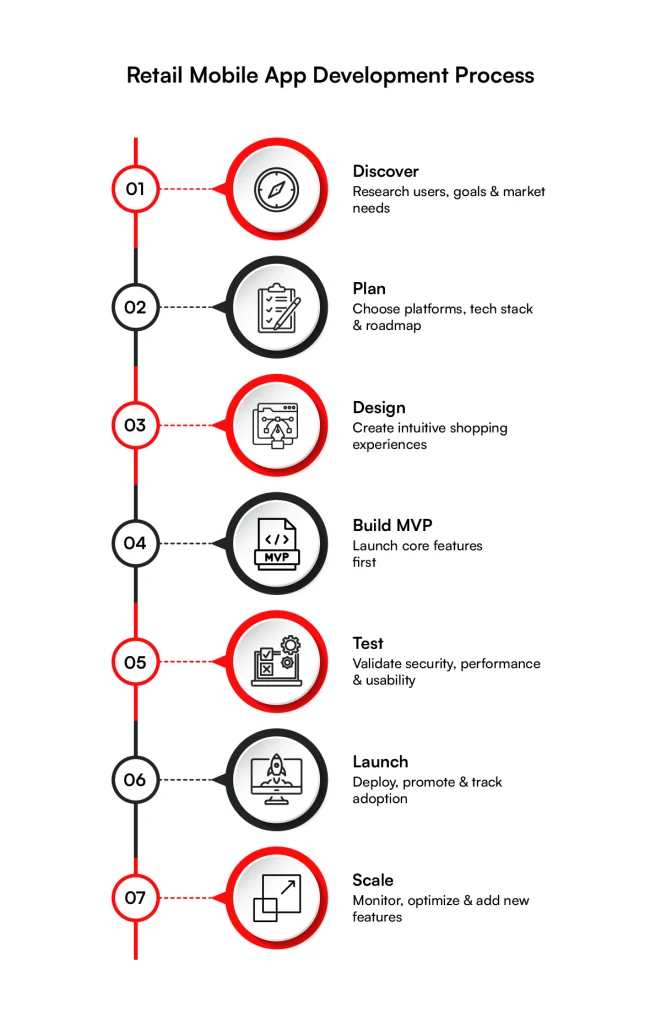
1. Discovery: Start with Research
Start by understanding what your customers need and what your business wants to achieve. Research your target audience, shopping behavior, pain points, competitors, and existing digital experiences before defining the app’s features.
At this stage, identify the core purpose of your app. Are you trying to increase mobile sales, improve customer loyalty, connect online and offline shopping, or streamline retail operations? Your answer will shape the entire development strategy.
You should also define your target users, key user journeys, business requirements, and success metrics. A clear discovery phase prevents you from investing time and money in features that customers may never use.
2. Planning: Pick the Right Platform and Tech Stack
Once you know what you’re building, decide where and how you’ll build it. Choose between iOS, Android, or both based on your target audience, geographic market, and business requirements.
You can also consider cross-platform development if you want to launch on multiple platforms while reducing development effort.
Next, select the technology stack for the frontend, backend, database, APIs, cloud infrastructure, analytics, payment processing, and security. Your choices should support scalability, performance, integrations, and future feature development.
At this stage, create a detailed product roadmap that defines the MVP scope, development milestones, resources, estimated timeline, and priorities.
3. Design an Experience, Not Just an App
Retail customers expect the shopping experience to feel effortless. Your design should help them find products quickly, make informed decisions, complete purchases easily, and manage orders without unnecessary steps.
Start by mapping important user journeys such as product discovery, search, checkout, payment, order tracking, returns, and loyalty redemption. Then create wireframes and prototypes before moving into the final UI design.
Keep navigation intuitive, optimize screens for mobile devices, use clear calls to action, and minimize checkout friction. A consistent visual identity across the app also helps reinforce brand recognition and trust.
4. Build an MVP: Start Small, Improve Continuously
You don’t need to launch every possible feature in version one. Build a minimum viable product with the core functionality required to deliver value to customers and meet your primary business objective.
For a shopping app, this could include user registration, product browsing, search and filters, shopping cart, secure checkout, payments, and order tracking. You can introduce advanced features such as AI recommendations, augmented reality, voice search, or gamification in later releases.
Launching an MVP lets you collect real user feedback, identify usability issues, validate your assumptions, and prioritize future app development for retail based on actual customer behavior.
5. Test Like Your Business Depends on It. Because It Does
A retail app handles sensitive customer information, payments, product data, and orders, so testing cannot be an afterthought. Test the application throughout development rather than waiting until the final stage.
Run functional, usability, performance, security, compatibility, and integration testing across different devices and operating systems. Pay particular attention to high-impact workflows such as login, product search, checkout, payment processing, inventory synchronization, and order tracking.
Also test the app under different network conditions and high traffic loads. A fast and reliable experience can directly affect conversions, while crashes or failed transactions can quickly damage customer trust.
6. Create a Launch Plan That Gets You Noticed
App development for retail doesn’t end when your application passes testing. You also need a strategy for getting customers to download and use it.
Prepare your App Store and Google Play listings with compelling descriptions, relevant keywords, screenshots, and clear value propositions. Before launch, build awareness through your website, email campaigns, social media, existing loyalty programs, and other customer touchpoints.
Consider a launch offer such as an exclusive discount, loyalty points, or free delivery to encourage existing customers to try the app. Track downloads, registrations, conversions, retention, and other relevant metrics from day one.
7. Post-Launch: Monitor, Improve, and Scale
Once your app is live, use analytics and customer feedback to understand how people actually use it. Monitor metrics such as downloads, active users, conversion rates, cart abandonment, retention, session behavior, and average order value.
Fix bugs quickly and regularly release updates that improve performance, security, usability, and functionality. You can then introduce new capabilities based on customer demand and business priorities.
As your customer base grows, make sure your backend infrastructure can handle increased traffic and transactions. You may also need to expand integrations with payment providers, CRM platforms, ERP systems, inventory management solutions, logistics providers, and marketing tools.
Of course, all these stages come with different technology, development, design, and maintenance requirements. So, before you start budgeting for your project, let’s look at how much it costs to build a retail mobile application and what factors influence the overall development cost.
Cost to Build a Retail Mobile Application
One of the first questions retailers ask is, “How much does it cost to build a retail mobile app?” The honest answer is that there isn’t a fixed price.
The cost depends on the type of app you’re building, the features you need, the platforms you want to launch on, and the complexity of your backend systems and integrations. A simple shopping app costs significantly less than a multi-vendor marketplace with AI recommendations and real-time inventory synchronization.
Estimated Retail Application Development Cost
The table below gives a realistic estimate based on app complexity and typical app development for retail scope.
| App Type | Estimated Cost (USD) | Timeline |
| Basic retail shopping app | $15,000 – $30,000 | 2–3 months |
| Standard retail app with loyalty, analytics, and multiple payment options | $30,000 – $60,000 | 3–5 months |
| Omnichannel retail app with POS, ERP, and inventory integration | $60,000 – $120,000 | 4–7 months |
| Multi-vendor marketplace retail app | $80,000 – $150,000 | 5–9 months |
| Enterprise retail app with AI, automation, and advanced personalization | $150,000 – $300,000+ | 6–12+ months |
Get a Clearer App Development Budget
Avoid unexpected costs by defining the right features, technology, integrations, and MVP scope before development begins.
Estimate My App CostRetail mobile apps are evolving faster than ever. Customers now expect apps to be intelligent, personalized, and responsive in real time, while retailers want solutions that scale quickly and integrate seamlessly with their digital ecosystem.
The latest trends in retail application development focus on creating smarter shopping experiences, reducing development costs, and connecting online and offline retail more effectively. Here are the technologies shaping the next generation of retail apps.
Advanced Trends for Retail Mobile App Development
1. AI-Powered Mobile Experiences
Artificial intelligence has moved from a nice-to-have feature to a core part of modern retail apps. Instead of offering the same experience to every shopper, AI helps retailers deliver personalized interactions based on customer behavior, preferences, and purchase history.
Retail apps now use AI to recommend products, power visual search, answer customer queries through AI chatbots, predict customer intent, and send personalized promotions at the right moment.
Many AI features are also beginning to run directly on mobile devices, making experiences faster while improving user privacy.
Popular retail AI use cases include:
- AI-powered search and product discovery.
- Smart shopping assistants and chatbots.
- Predictive promotions and loyalty offers.
- Visual search using product images.
- Personalized product recommendations.
2. Cross-Platform Development Maturity
Building separate apps for Android and iOS is no longer the default choice for many retailers. Cross-platform frameworks have matured enough to deliver near-native performance while allowing developers to maintain a single codebase for both platforms.
For retailers, this means faster launches, lower development costs, simpler maintenance, and consistent user experiences across devices. Frameworks like React Native, Flutter, and Kotlin Multiplatform have become popular choices for scalable retail applications.
Why retailers are adopting cross-platform development:
- Faster time to market.
- Reduced development and maintenance costs.
- Simultaneous feature releases for Android and iOS.
- Easier long-term updates and bug fixes.
3. Super Apps and Mini-App Ecosystems
Retail apps are expanding beyond shopping into complete digital ecosystems. Instead of asking customers to download multiple apps, businesses are bringing shopping, payments, loyalty programs, bookings, customer support, and other services into one platform.
Mini-app architecture also allows retailers to add new services without rebuilding the entire application. This creates more opportunities for customer engagement and cross-selling while keeping users inside a single ecosystem.
Examples of services inside a retail super app:
- Shopping and checkout.
- Digital payments and wallets.
- Loyalty and rewards.
- Store locator and appointments.
- Customer support and order management.
4. 5G and Real-Time Data Applications
Faster 5G connectivity is enabling retail apps to deliver real-time experiences that were difficult with previous mobile networks. Lower latency and higher bandwidth support instant updates, live interactions, and data-heavy features.
Retailers can synchronize inventory across stores in real time, offer live order tracking, support high-quality live shopping events, and update pricing or promotions instantly. This helps customers receive accurate information while retailers improve operational efficiency.
Real-time retail app capabilities include:
- Live inventory availability.
- Instant order and delivery tracking.
- Live shopping and product demonstrations.
- Dynamic pricing and flash sales.
- Faster synchronization between stores and warehouses.
5. AR/VR and Spatial Computing in Mobile
Augmented reality is becoming a practical feature for retail apps because it helps customers visualize products before making a purchase. Instead of guessing how something will look, shoppers can interact with products in their own environment through their smartphones.
Retail brands are using AR for virtual try-ons, furniture placement, product visualization, interactive store navigation, and immersive product demonstrations. As spatial computing continues to evolve, these experiences are becoming more realistic and accessible on mobile devices.
Retail use cases for AR and spatial computing:
- Virtual try-ons for fashion, eyewear, and beauty products.
- Furniture and home décor placement.
- Interactive 3D product previews.
- AR-powered in-store navigation.
- Immersive shopping experiences for high-value products.
Conclusion
A retail mobile app is more than a digital storefront. It helps you create better shopping experiences, strengthen customer loyalty, streamline inventory, and drive long-term business growth. The right app combines customer-focused features with a scalable backend that supports your retail operations.
RBMSoft builds custom retail mobile apps tailored to your business model, whether you’re launching an eCommerce app, an omnichannel retail solution, or a marketplace platform.
Our custom retail app development capabilities include:
- Custom iOS, Android, and cross-platform app development.
- Omnichannel shopping and loyalty app development.
- POS, ERP, CRM, and inventory management integrations.
- AI-powered personalization and smart search features.
- Secure payment gateway and order management integration.
- Ongoing app maintenance, updates, and scalability support.
Whether you’re building a new retail app or upgrading an existing one, RBMSoft helps you create a secure, scalable, and customer-centric solution that grows with your business.
FAQ’s
1. How much does retail app development cost?
The cost typically ranges from $15,000 to $300,000+, depending on the app’s complexity, features, platforms, integrations, and backend requirements. Basic shopping apps may cost $15,000-$30,000, while enterprise solutions with AI, omnichannel capabilities, and advanced integrations can exceed $150,000.
For accurate budgeting, app development for retail should begin with clearly defined business requirements and an MVP scope.
2. What factors actually affect the cost of building a retail mobile application?
Several factors influence the total cost of retail application development, including app complexity, number of platforms, UI/UX requirements, backend architecture, third-party integrations, security, and testing.
Advanced features such as AI recommendations, real-time inventory, loyalty programs, and POS or ERP integrations can increase development effort. The technology stack and development team location also affect the cost of mobile app development for retail.
3. What is the best AI tech stack for enterprise retail application development?
There is no single best AI stack for every retailer. A typical enterprise setup may combine Python, FastAPI, or similar backend frameworks, cloud AI services, vector databases, machine learning frameworks, and APIs for generative AI models.
For app development for retail, the stack should support scalable data pipelines, personalization, AI-powered search, recommendations, and secure integration with existing retail systems. The right retail application development architecture depends on your data, use cases, cloud environment, and compliance requirements.
4. How long does it take to build a retail mobile app?
A basic retail app can take around 2–3 months, while a standard application may require 3–5 months. Omnichannel or marketplace solutions can take 4–9 months, and enterprise apps with AI, complex integrations, and advanced automation may take 6–12+ months.
The timeline for app development for retail depends on the feature scope, platforms, integrations, design requirements, testing, and approval processes. A phased MVP approach can help businesses launch faster and add advanced capabilities later.
5. What legal and compliance requirements apply to USA retail app development?
USA retail apps may need to address requirements related to payment security, consumer privacy, data protection, accessibility, and marketing communications.
Depending on the business and data collected, this can include PCI DSS for payment card data, state privacy laws such as CCPA/CPRA, COPPA where children’s data is involved, and applicable accessibility requirements.
Retailers should also review terms of use, privacy policies, consent management, data retention, and third-party data-sharing practices. Strong app development for retail should build security and compliance into the architecture rather than treating them as final-stage requirements.
6. What are the ongoing costs of maintaining a retail app after launch?
Ongoing costs can include cloud hosting, monitoring, security updates, bug fixes, OS compatibility updates, third-party API fees, analytics, customer support, and new feature development.
Retailers should also budget for performance optimization, security testing, infrastructure scaling, and integration maintenance as the business grows. Reliable retail app development solutions include post-launch monitoring and continuous improvements to keep the application secure, stable, and competitive.
For businesses using mobile app development for retail, maintenance costs are typically planned as a recurring operational budget rather than a one-time expense.
7. Can RBMSoft integrate AI into an existing retail application?
Yes. RBMSoft can integrate AI into an existing application without necessarily rebuilding the entire product. Depending on the business goal, AI can be added for personalized recommendations, intelligent search, conversational shopping assistants, demand forecasting, customer segmentation, or automated support.
The approach starts with evaluating the existing architecture, data, APIs, and security requirements before selecting the right AI services and integration model.
RBMSoft can extend existing retail app development solutions while minimizing disruption to current users and operations. This approach can also support custom retail app development when bigger changes are required.