



Key Takeaways:
- Employees are still switching between multiple systems just to find one piece of information.
- Traditional search shows everything that matches a word, not what the user actually needs.
- The real cost of poor search shows up as lost time, duplicated work, and delayed decisions.
- Most enterprise data already exists; it’s just scattered across tools that don’t connect.
- If search results aren’t relevant in a few tries, people stop using the system altogether.
- AI-powered search brings information together and delivers answers instead of document lists.
- Permissions, data freshness, and context have to work together for search to be trusted.
- When implemented right, search becomes part of how teams work, not another tool they avoid.
Why Enterprises Are Switching to AI-Powered Search (And How to Do It Right)
When you look for a file, an email, or a document at work, how often do you find it in one try? Without digging into files and folders or opening a couple of different tabs?
Now, think about how effortlessly you find things outside of your work. You type a question into Google, and the answer is right there. That same ease, that same instinct to just ask and get an answer, is exactly what AI-powered enterprise search brings into the workplace.
Type what you’re looking for, the same way you’d actually say it, and it finds what you need from wherever it is across your systems.
This piece breaks down what AI-powered enterprise search is, how it works, why enterprises need it, and how to implement it effectively.
What is AI-Powered Enterprise Search
As the name suggests, AI-powered enterprise search is a smart, advanced way to find information across your enterprise.
AI enterprise search uses artificial intelligence to help teams find relevant information across systems and data sources.
It’s a significant improvement over traditional search tools that often match specific words and phrases or require Boolean operators to interpret query context and refine results.
AI-powered platforms can be programmed and trained to logically deduce what you’re looking for, even if you don’t use the exact terms in the searched data.
With enterprise search generative AI capabilities, search tools can also create more precise answers by combining information from multiple sources.
Traditional Enterprise Search Solution vs. AI-Powered Enterprise Search Solution
Traditional search asks employees to think like a search engine, to guess the right keyword, in the right system, at the right time.
AI-powered search changes that. It thinks like the employee, understanding what they’re actually looking for even when the words don’t match exactly.
An employee searches for “contract.” Are they looking for a supplier agreement, a customer deal, or an employment offer? Traditional search returns everything that contains the word “contract”.
AI-powered search reads the context, who’s asking, what team they’re on, what they’ve been working on, and surfaces what’s actually relevant.
What separates the frustrating search from the one that works is understanding meaning.
| Parameters | Traditional Enterprise Search | AI-Powered Enterprise Search |
| How It Searches | Matches exact keywords in documents | Understands the meaning and intent behind the query |
| Query Handling | Struggles with complex or conversational questions | Handles natural language, nuance, and multi-part questions |
| Learning Over Time | Static requires manual updates to improve | Continuously learns from interactions and gets sharper over time |
| Data Integration | Limited, often searches within one system at a time | Connects across cloud, databases, documents, and enterprise tools |
| Personalization | One-size-fits-all results | Tailors results based on role, behavior, and context |
| Security | Basic access controls | Permission-aware at every search, in real time |
Challenges of Traditional Search Solutions
To appreciate how far AI-powered enterprise search has come, it’s worth being clear about what it’s replacing. The challenges with traditional search are structural problems that compound quietly across the organization until the cost becomes impossible to ignore.
- Knowledge Trapped in Silos
Most enterprises have multiple places where information lives, like CRMs, ERPs, intranets, ticketing tools, shared drives, chat platforms, and an ever-growing stack of SaaS applications. Each holds a piece of the picture, none of them connected.
Employees navigate this fragmentation every day, switching between as many as six different systems just to find what they need for a single task. When they can’t find it, they do one of two things: recreate it from scratch, or give up entirely. Neither is acceptable at scale.
- Silent Drain on Productivity
The time employees spend searching for information rarely appears as a line item in any report. But it’s there. Microsoft research found that 62% of digital workers feel they spend too much time hunting for information or chasing updates, time that comes directly at the expense of focused, high-value work. Across hundreds or thousands of employees, those lost minutes accumulate into weeks of productivity the organization never gets back.
- Measurable Hit to the Revenue
Lost productivity has a price. IDC estimates that an organization with 1,000 knowledge workers can lose over $5 million annually in salary costs alone, not from inefficiency in operations, but simply from time spent searching for information or rebuilding content that already existed somewhere but couldn’t be found.
What feels like a few extra clicks per employee per day is, at the organizational level, a significant and largely invisible financial drain.
- Hidden Compliance Gap
When employees can’t find what they need through official channels, they turn to other sources. Files get saved locally. Documents get forwarded over email. Unsanctioned tools fill the gaps. Each workaround creates another point of exposure.
Compounding this, compliance documents and regulated policies are frequently updated in one system but not consistently reflected across others, meaning employees can unknowingly act on outdated information.
The result is an organization that is both operationally vulnerable and increasingly difficult to audit.
Make Information Instantly Accessible
Give your teams instant access to knowledge. Exactly what they need, the moment they need it.
Talk to Experts
What are the 7 Core Components of Modern Enterprise AI Search Systems
Finding information in an enterprise shouldn’t feel like piecing together a puzzle across disconnected systems. Yet for most organizations, that’s exactly what it looks like.
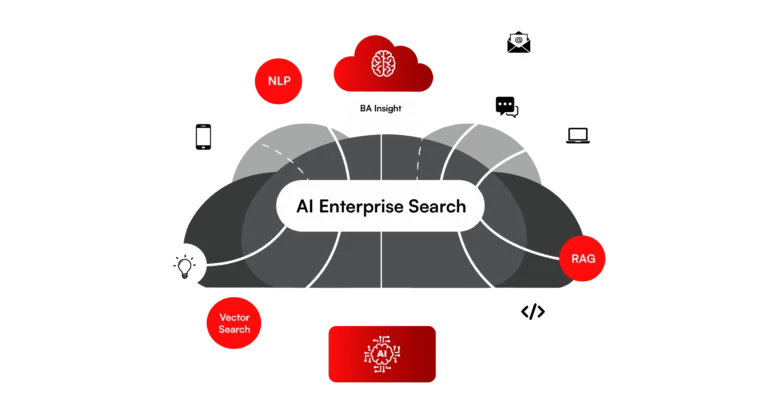
Modern AI-powered enterprise search brings together multiple technologies that understand, connect, and deliver it in context.
To see how this happens, it’s important to break down the core components that power these systems and make intelligent search possible.
1. Natural language processing (NLP)
The reason traditional search frustrates people is simple: it’s literal. You have to speak its language, not the other way around. NLP allows the system to understand queries the way a human would, preserving context, nuance, and intent.
Whether someone asks a question formally or types it the way they’d say it out loud, NLP parses the meaning behind it. It recognizes names, dates, organizations, and relationships within text, so the system knows not just what was asked, but what was meant.
2. Vector Search and Semantic Understanding
Keyword search looks for matches. Semantic search looks for meaning. Vector search works by converting words, phrases, and documents into numerical representations that capture how concepts relate to each other.
Instead of asking “does this document contain these words,” it asks “does this document mean what the user is looking for?”
A search that finds the right answer even when the exact words don’t match. Most modern platforms combine this with traditional keyword matching, getting the best of both approaches.
3. Real-Time Indexing and Data Freshness
If the data that the enterprise search tool surfaces is outdated, the decisions built on it will be too.
Real-time indexing solves this by continuously updating the system as new content is created or changed, not by rescanning everything from scratch, but by capturing only what’s new.
Some platforms go further, fetching data on demand at the moment of search rather than relying on a stored index. For fast-moving organizations, this is a baseline requirement.
4. Security and Permission-Aware Architecture
Making information more findable only creates value if the right people are finding it, and the wrong people aren’t.
Modern enterprise search builds security into its core, not as an afterthought. Permission-aware systems ensure that every search result a user sees is one they’re actually authorized to see, verified in real time.
The most advanced platforms authenticate at the moment of search itself, rather than storing a centralized index that could become a vulnerability.
Encryption, access controls, and compliance filters work continuously in the background, so openness and security aren’t in tension and operate together.
5. Retrieval-Augmented Generation (RAG)
It’s like traditional search retrieves documents, and RAG retrieves and reasons over them.
Retrieval-Augmented Generation works by combining search with generative AI. Instead of returning a list of links, the system first pulls the most relevant information from enterprise data sources and then uses a language model to generate a direct, synthesized answer grounded in that data.
This is what allows enterprise search to move from “finding information” to “delivering answers.” It reduces the need for employees to open multiple documents, read through them, and connect the dots manually.
The system does that work upfront, while still providing source references for transparency and trust.
In practice, this means a user can ask a complex, multi-part question, and the system responds with a clear, contextual answer built from across documents, systems, and historical data.
6. Transformer models and LLMs
At its core, modern AI-powered enterprise search relies on transformer and large language models (LLMs), which enable the system to understand, interpret, and generate human-like language.
These models are a key driver behind generative AI enterprise search, allowing systems to recognize patterns in language, context, and relationships between concepts.
In an enterprise setting, they are further adapted to understand domain-specific terminology, internal knowledge, and organizational context.
This is what allows the system to handle ambiguity, follow conversational queries, and maintain context across interactions. Instead of treating every search as a standalone request, LLMs allow search to feel more like an ongoing conversation.
Basically, a system that not only retrieves information but can explain it, summarize it, and present it in a way that is immediately usable for decision-making.
7. APIs and Integration Infrastructure
APIs and integration infrastructure form the backbone that connects the search system to the rest of the enterprise ecosystem, from CRMs and ERPs to cloud storage, collaboration tools, databases, and internal applications.
These integrations ensure that data can be accessed, indexed, and queried without disrupting existing systems.
Modern enterprise search platforms rely on a network of connectors and APIs to continuously sync data across sources, maintain consistency, and enforce security policies at every interaction point.
Search indexes can’t compute live facet counts or category-wide math across a real enterprise catalog. Arvyn’s aggregation layer does it in real time, at full scale.
Get Free DemoThis is what enables a truly unified search experience. Instead of pulling data into isolated silos, the system creates a connected layer across the organization, where information flows seamlessly and can be accessed through a single, intelligent interface.
Without this integration layer, even the most advanced AI models would be limited by incomplete or fragmented data.
What are the 8 Best AI Enterprise Search Use Cases and Examples
AI-powered enterprise search appears across every function, department, and role where people need information to move work forward. Which, in most enterprises, is everywhere.
From leadership dashboards to customer support workflows, AI-driven enterprise search solutions are becoming a foundational layer for how organizations access and act on data. Let’s take a look at where it shows up most visibly:
1. Leadership and Executive Teams
Senior leaders stop waiting for analysts to cobble together reports from disconnected systems. Ask a strategic question – “How did marketing spend influence sales growth last quarter?” — and get a contextual answer drawn from live data across CRM, ERP, and finance platforms, with sources attached.
Faster preparation, sharper decisions, no lag between asking and knowing.
2. Customer Support Teams
Agents stop bouncing between ticketing systems, product manuals, and knowledge bases mid-call. Case history, troubleshooting guides, and resolution data surface in a single query. Issues get resolved in the first interaction rather than the third —, and customers notice the difference.
3. Sales Teams
A rep on a live call needs the latest pricing deck or a competitor battlecard. Instead of an awkward pause while digging through emails and Slack threads, the answer is there in seconds. Conversations stay sharp, deals move faster, and approved collateral is always within reach.
4. HR Teams
Employees self-serve answers to common questions about leave, benefits, onboarding steps, and medical insurance, without routing everything through HR.
An employee asks, “What’s our parental leave policy?” and gets the right answer instantly, pulled directly from policy documents and HR systems. HR gets its time back. Employees get a better experience.
5. Engineering and IT Teams
Developers surface past incident reports, technical specs, and troubleshooting guides without wading through outdated wikis. IT staff handle device requests, access issues, and outages faster because the fix from last time is findable this time. Recurring problems get resolved, not repeated.
6. Product and R&D Teams
Teams stop reinventing research that already exists. Past experiments, user feedback, design iterations, and support ticket patterns are a single query away — consolidated from every system they originally lived in. Less time looking backward, more time building forward.
7. Compliance and Legal Teams
Legal search requires a level of precision that keyword search was never built to deliver. AI-powered enterprise search finds specific clauses, approved protocols, and current regulatory guidelines across large document libraries — regardless of how differently they’re worded across contracts and drafting styles. Audit preparation that once took weeks now takes a fraction of the time.
8. Across the Organization
Employees stop guessing which system holds the answer, be it SharePoint, Salesforce, a shared drive, or a CRM. One search bar becomes the gateway to everything.
Knowledge flows freely across departments, collaboration gets easier, and people spend their time doing their best work rather than chasing information.
For a full breakdown, read our detailed guide: Enterprise Search: Top 13 Use Cases and Real-World Examples.
How to Implement AI-Powered Enterprise Search
Implementing AI-powered enterprise search is different from deploying traditional search. The technology is more sophisticated, the data landscape is more complex, and the stakes, in terms of adoption, security, and ROI, are higher.
If done right, it allows you to build an AI enterprise search solution that transforms how your organization accesses and acts on knowledge. And if it’s done without a clear plan, it becomes another tool employees work around.
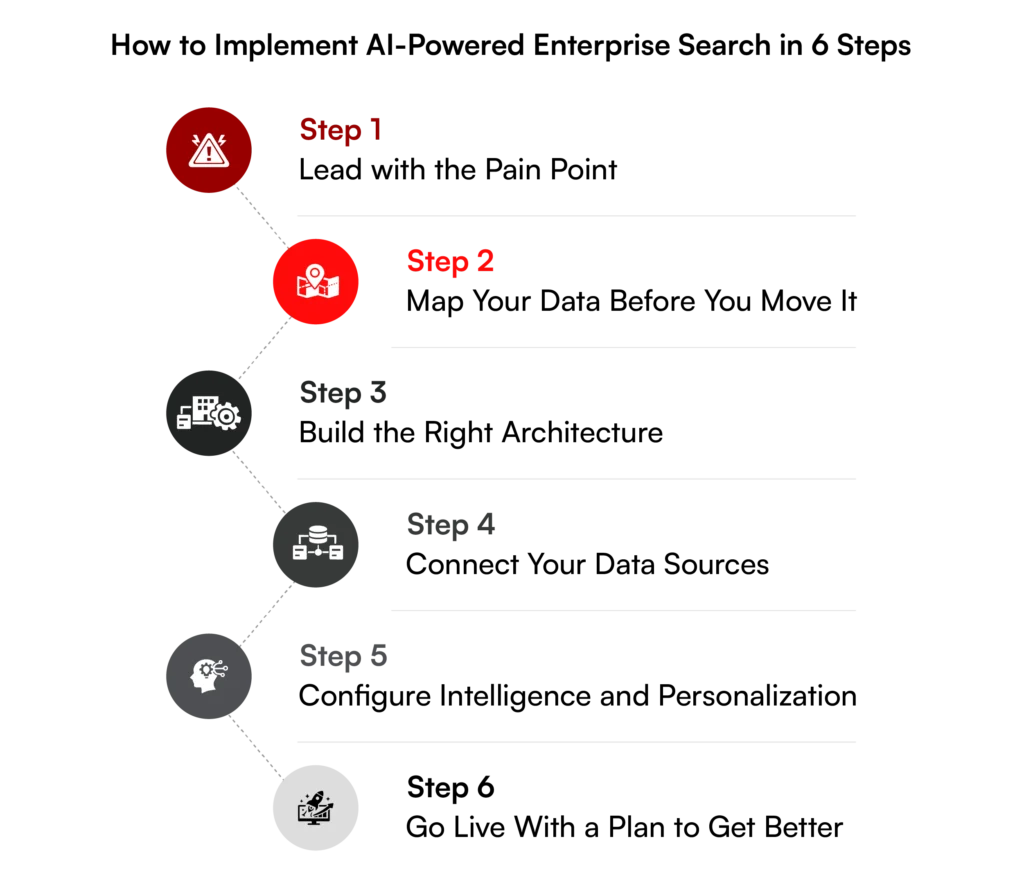
So here’s a step-by-step framework for getting it right.
Step 1: Lead with the Pain Point
Before evaluating platforms or mapping data sources, define what success actually looks like for your organization. The implementation should be driven by a specific business problem and not the other way around.
The answer shapes every decision that follows, from which data sources to prioritize, to how search results should be personalized, to how you’ll measure impact from day one.
| Business Goal | Objective (Example) |
| Employee Productivity | Reduce time spent searching for internal documents and policies |
| Customer Support | Give agents a unified view of case history and resolution guides |
| Leadership Insights | Surface cross-functional data without waiting on analyst reports |
| Compliance | Ensure teams always act on the latest, approved information |
Step 2: Map Your Data Before You Move It
AI-powered search can only be as intelligent as the data it’s working with. Before any architecture is designed, map out where your organizational knowledge actually lives, from CRMs, ERPs, intranets, shared drives, chat platforms, ticketing systems, and every SaaS tool in between.
This audit serves two purposes. It reveals the full scope of what needs to be connected, and it surfaces data quality issues, outdated content, duplicate files, and ungoverned repositories that will directly affect search relevance if left unaddressed.
Getting the data foundation right before touching the AI layer is what separates implementations that deliver from ones that disappoint.
Step 3: Build the Right Architecture
This is where most implementations succeed or stall. To develop an AI enterprise search solution, you require a layered architecture, each layer handling a distinct part of how information is ingested, understood, and returned.
| Architectural Layer | What it Does |
| Content Sources | Connects all authoritative data: SharePoint, Salesforce, intranets, databases, chat tools |
| Ingestion Pipeline | Crawls, parses, and enriches content into a normalized, indexed format |
| Semantic Index | Stores text, vector embeddings, and metadata in a unified, searchable layer |
| Query and Relevance | Handles natural language understanding, hybrid retrieval, re-ranking, and personalization |
| Presentation Layer | Delivers results through search interfaces, APIs, chatbots, or embedded tools |
Build vs. Buy
The core decision at this stage is whether to build or buy. Both have merit depending on your organization’s engineering capacity and timeline.
| Approach | When It Makes Sense |
| Build on Open Source | Maximum control and flexibility. Best when internal AI engineering capability is strong and long-term customization is a priority |
| Buy a Commercial Platform | Faster time to value. Best when implementation speed matters and internal search engineering resources are limited |
| Hybrid Approach | Use a commercial platform for core search while building custom layers for proprietary data or specialized use cases |
Step 4: Connect Your Data Sources
Integration typically accounts for the most time-intensive phase of the entire implementation. This is where your data sources, structured and unstructured, cloud and on-premises, get connected, cleaned, and indexed into a single searchable layer.
The key steps in this phase are:
| Step | What Happens |
| Source Identification | Map every system holding organizational knowledge |
| Data Extraction | Pull content from each source using connectors or APIs |
| Transformation and Cleansing | Normalize formats, remove duplicates, flag outdated content |
| Semantic Indexing | Generate vector embeddings and metadata across all content |
| Validation | Test that indexed content returns accurate, relevant results |
Prioritize out-of-the-box connectors for common platforms first, then address proprietary systems through API-based connectivity. The goal is a unified index where no source is treated as secondary.
Step 5: Configure Intelligence and Personalization
This is what separates enterprise AI search from a smarter version of the old model. Once data is indexed, the system needs to understand who is searching and what they’re most likely to need, based on role, department, past behavior, and current context.
A compliance officer and a sales rep asking the same question should not get the same results. Permissions need to be enforced in real time at the search layer. Role-based access, semantic relevance, and personalization logic all need to be configured before go-live.
Step 6: Go Live With a Plan to Get Better
From day one, track the metrics that reflect real business impact. The implementations that deliver lasting value treat this as an ongoing capability, continuously refined as your data grows, your teams evolve, and the system learns from every interaction.
| Metric | What it Tells You |
| First-try resolution rate | How often do employees find what they need without refining the query |
| Zero-result query rate | Where content gaps exist in your knowledge base |
| Average search-to-action time | How quickly information translates into a decision or task |
| Support ticket deflection | How much self-service search reduces inbound HR and IT queries |
| Search engagement over time | Whether adoption is growing and the system is being trusted |
Why Are Simple Questions Still Becoming Tickets?
If employees can’t self-serve answers, your knowledge isn’t truly accessible.
Reduce Internal TicketsChallenges in Implementing an Enterprise Search Solution
Getting enterprise search right is harder than it looks, as the platform is only part of it. The bigger challenge is everything around it, like fragmented data, shifting permissions, and employees who stop using the system the moment it returns one too many irrelevant results.
Instead of enabling productivity, this sprawl creates silos, wastes time, and raises risk. That’s the environment in which enterprise search has to work, and why getting the implementation right matters.
1. Siloed Systems and Fragmented Data
Without a unified search system, teams waste time looking through different platforms and repositories across the enterprise. But integrating these tools adds another layer of complexity.
Each system comes with its own architecture, access rules, and ways of organizing datasets. Without careful planning, search results can be incomplete, inconsistent, or confusing. The more fragmented your data, the harder it becomes to deliver a smooth, reliable AI search for an enterprise that employees trust and actually use.
2. Security and Access Control
Aggregating personal and shared data demands strict permission management to protect sensitive information and maintain trust. Most enterprise search solutions use indexing, which copies information from source systems into a central repository. Indexing is popular because it makes search fast, but it introduces a limitation: data replication and custody.
Permissions in source systems change all the time when employees leave or get promoted, files move from public to private, and access rules get updated. Index snapshots only show permissions at one point in time, so even a short delay can expose sensitive information.
User-level permissions help enforce security, ensuring employees see only what they’re allowed to. But managing permissions across dozens of connected tools is complicated; every system has its own rules, and syncing them in real time is a major challenge.
These issues are easier to avoid with live, API-based search capabilities, since access is checked directly against the source system.
3. User Experience and Adoption
Poor user experience or irrelevant results can quickly erode confidence. Think about how you use Google. If you can’t find what you’re looking for after two or three tries, you probably give up or ask someone directly for the link.
It’s the same with enterprise search. When employees can’t easily find answers to common questions like “how do I request a new laptop,” they often end up flooding IT or HR with tickets. This low adoption leads to more manual work, duplicated efforts, and slower decisions, putting extra pressure on support teams.
Solution: How AI Implementation Makes Enterprise Search Easy?
AI offers a new way forward. It can understand the question, navigate the mess, and deliver the answer. It can interpret natural language, recognize patterns in unstructured data, and reason across multiple sources at once.
Instead of forcing employees to match the system’s rules, AI adapts to how people actually ask questions and keeps improving as it learns.
1. RAG Grounds Search in Real, Current Company Data
RAG is an AI approach that grounds large language models in your company’s own data. It works by pulling information from enterprise systems and generating an answer based on that live context, so employees get accurate, current, and relevant responses.
Instead of scrolling through a list of links, employees receive direct answers backed by the company’s most up-to-date knowledge.
For example, if someone asks, “What’s our remote work policy?” RAG searches your systems for the right documents and uses an LLM to craft a clear, concise response.
Here’s how it works:
| Step | What Happens |
| Retrieval | Searches your organization’s data: documents, databases, and tickets to find relevant information |
| Reranking | Prioritizes the most relevant results before generating a response |
| Generation | Uses an LLM powered by NLP to summarize or rephrase results into a concise, natural answer |
RAG isn’t perfect in an enterprise setting. It can struggle with real-time updates or queries that require reasoning across multiple systems.
An employee asking “Can I expense my home office setup?” might get relevant policy documents but miss role-specific rules or the latest updates, leaving them with an incomplete answer.
2. Agentic RAG Adds Reasoning and Personalization
Agentic RAG combines Agentic AI with RAG, bringing reasoning to search to deliver enhanced quality and accuracy.
For every query, an agentic RAG system performs four key steps: understanding the user’s objective, query enrichment and planning, intelligent retrieval and ranking, and direct and reflected summaries.
The added layers of intelligence are what differentiate Agentic RAG from basic RAG:
- Personalized: predicts what the user wants based on their prompt as well as attributes like role, identity, and location
- Directed: prioritizes systems and content based on the user’s prompt and type of query
- Context-aware: understands the relative importance and reliability of data sources, such as content recency, most-viewed, and highly-rated signals
3. Search Becomes Actionable
Search shouldn’t stop at delivering information. A search system that supports end-to-end workflows turns a simple query into productive work, be it submitting a request to HR or IT, triggering a workflow, or automating a routine task, all directly from the search interface.
An employee searching for how to request a new laptop finds the relevant policy and submits the request directly from the search results, without opening a separate system.
Someone is troubleshooting Wi-Fi access instructions and automatically logs a ticket if the issue persists, all from the same platform.
With the right platform, enterprise search becomes more than a tool for finding information. It creates a hub for action, insight, and productivity across the organization.
Compliance and Security in AI-Powered Enterprise Search
Unsecured enterprise search systems can expose sensitive corporate data, customer information, and intellectual property to cybercriminals or internal misuse.
Organizations experiencing breaches in enterprise systems spend approximately 2.5 times more on remediation and legal costs than they would on implementing robust security measures upfront.
A security-first approach integrates protective measures directly into the search infrastructure rather than treating security as an afterthought. The core pillars of securing enterprise search are:
1. Secure Authentication
Strong authentication ensures only authorized users have access to sensitive information. This includes multi-factor authentication combining passwords with one-time codes, biometric verification, or security tokens; role-based access control granting permissions based on role; and token-based authentication providing secure, temporary access while minimizing credential exposure.
According to IBM’s 2025 data, enterprises that deploy strong identity controls reduce credential-related breach costs by up to 43%.
2. Data Masking
Data masking ensures sensitive information is not exposed during search queries. Static data masking replaces sensitive information in copies of databases used for testing or analytics.
Dynamic data masking masks data in real time based on user roles, so only authorized users view the original information.
Advanced implementations combine dynamic data masking with tokenization and Customer-Managed Keys to ensure end-to-end encryption control, reducing audit and compliance penalty costs by up to 25%, according to Gartner’s enterprise security benchmarking.
3. Encryption
AES-256 protects data at rest. TLS 1.3 secures data in transit between search interfaces and backend systems. These controls align with NIST SP 800-57 and ISO/IEC 27001 standards for enterprise-grade encryption assurance.
4. Continuous Monitoring and Threat Detection
When integrated with User and Entity Behavior Analytics and SIEM systems, continuous monitoring reduces Mean Time to Respond by as much as 50%. Behavioral analytics identify abnormal access patterns.
Automated alerts notify administrators when suspicious activity occurs. Regular security audits evaluate the system for vulnerabilities and compliance gaps.
Compliance requirements by industry:
| Regulation | What It Requires |
| GDPR | Data minimization and user consent in search implementations. Platforms must provide mechanisms for users to request data deletion, export their information, and understand how their data is processed, including search histories and personalization data |
| HIPAA | Stringent access controls and audit requirements for healthcare information visibility in search results. Medical records, patient communications, and clinical data require special handling with enhanced encryption, detailed access logs, and regular security assessments |
| SOC 2 Type II | Validates security controls in search infrastructure through independent audits, covering data security, availability, processing integrity, confidentiality, and privacy |
| PCI-DSS / SOX | Financial services must comply with SOX and PCI-DSS, requiring strict controls over how financial data is accessed, indexed, and disclosed across systems |
Take a deeper look at how to secure your enterprise search infrastructure across authentication, data masking, encryption, and compliance.
Read our complete guide: Enterprise Search Security: RBMSoft’s Guide to MFA, Data Masking, Encryption, and Cloud Compliance
Top 6 Business Benefits of an AI-Powered Enterprise Search
The impact of getting search right goes well beyond saving a few minutes per employee. When information moves faster, so do decisions, teams, and outcomes. This is why AI-driven enterprise search is now seen as a strategic investment rather than just a productivity tool.
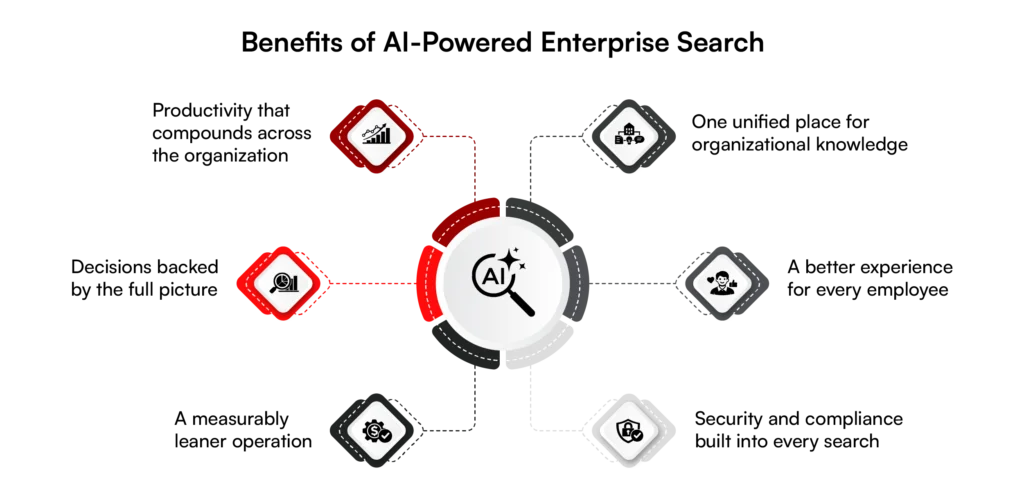
Here are the 6 key benefits of AI-powered enterprise search that enterprise leaders need to know.
1. Productivity That Compounds Across the Organization
Every minute an employee spends hunting for a document is a minute not spent on the work that actually moves the business forward. AI-powered enterprise search eliminates that friction entirely.
Employees ask questions the way they naturally would, and get direct answers without toggling between systems or retracing someone else’s folder logic. At scale, across hundreds or thousands of employees, that time adds up fast.
2. Decisions Backed by the Full Picture
Leaders make better calls when they have access to complete, current information and not just what they can find in time. AI-powered search retrieves and connects data across multiple sources simultaneously, so instead of waiting on an analyst to pull a report, the answer is already there.
Be it tracking cost trends, reviewing performance data, or surfacing the latest market intelligence, decisions are made with confidence rather than approximation.
3. A Measurably Leaner Operation
Duplicate work, manual data management, and redundant processes quietly drain resources across every department. When teams can instantly find what already exists, past campaigns, existing research, and prior analyses, they stop rebuilding from scratch.
The operational savings aren’t just in time but also in budgets, headcount efficiency, and a business model that doesn’t carry the dead weight of avoidable repetition.
4. One Unified Place for Organizational Knowledge
Usually, enterprises face fragmentation. The information is stored in CRMs, intranets, email threads, shared drives, and project tools that don’t coordinate with each other.
AI-powered enterprise search connects all of it, giving every employee a single place to ask and a single experience to navigate, regardless of where the answer actually lives.
5. A Better Experience for Every Employee
Search shapes how people feel about doing their jobs. When finding information is effortless, work feels less like an obstacle course. Employees spend less time frustrated and more time effective.
For customer-facing teams in particular, the impact is immediate. Faster access to service histories, product details, and troubleshooting guides means faster, more accurate responses for the people they serve.
6. Security and Compliance Built Into Every Search
Greater access doesn’t have to mean greater risk. AI-powered enterprise search is built with permission-aware architecture, ensuring that every employee sees only what they’re authorized to see, verified in real time, every time.
For industries with strict regulatory requirements, this means teams can move quickly without cutting corners on compliance. The right information reaches the right people, and the wrong information never does.
How to choose the Right Enterprise Search Platform
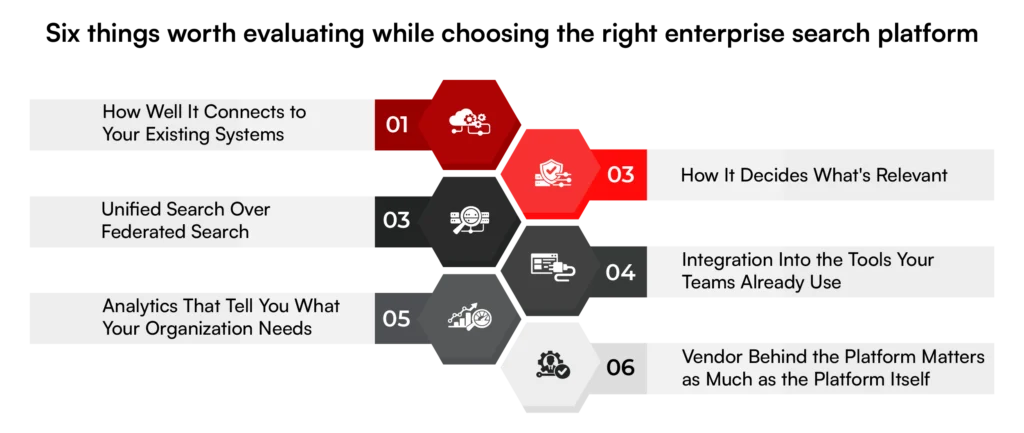
Here are the six things worth evaluating before you commit.
1. How Well It Connects to Your Existing Systems
SharePoint, Google Drive, Salesforce, proprietary tools, on-premises systems, and everything in between.
A platform that can’t reach your data can’t surface your answers. So before anything else, establish whether a platform can connect to every data source your organization relies on.
Look for out-of-the-box connectors for common platforms, flexible API connectivity for less standard tools, and the ability to pull on-premises content into a searchable cloud environment.
If a platform requires your development team to build and maintain those connections from scratch, factor that cost in. For large enterprises, that’s rarely sustainable.
2. How It Decides What’s Relevan
What separates a good platform from a great one is what it does with that content once it’s indexed.
AI-powered relevance means the platform understands who is searching, what role they’re in, what they’ve been working on, and what they’re most likely to need, and weights results accordingly.
A new employee should see the onboarding content. A regional manager shouldn’t be surfacing HR policies that don’t apply to their location.
Platforms that rely on manual curation to stay relevant don’t scale. As your document count grows into the millions, human oversight becomes a bottleneck.
Look for a platform that learns automatically from every interaction and improves without requiring someone to manage it.
3. Unified Search Over Federated Search
Federated search can get you started. It sends a single query across multiple systems and pulls results from each. For smaller organizations with fewer data sources, it’s workable.
For enterprises managing large volumes of content across many disparate systems, a unified search architecture is the stronger option.
It brings all structured and unstructured data into a single index and uses machine learning to continuously build connections across everything in it — regardless of source.
The result is a search that gets smarter over time. If your organization is growing, unified search paired with machine learning will make everything else possible.
4. Integration Into the Tools Your Teams Already Use
Adding another tool to an already crowded digital workplace is the last thing employees need. The right enterprise search platform doesn’t ask people to go somewhere new to find information; it brings information to where they already are.
Whether that’s embedded within your intranet, surfaced inside an application, or integrated into your service portal, search should live within the flow of work. When employees don’t have to break their concentration to find what they need, productivity just compounds.
Evaluate how flexibly a platform can be deployed across your existing environment, and how much disruption that deployment actually requires.
RBMSoft provides AI integration services to embed AI-powered search into the applications, portals, and business systems your teams already use. We connect search with existing data sources and workflows without requiring teams to change how they work.
6. Analytics That Tell You What Your Organization Needs
The best enterprise search platforms reveal which questions are being asked most, where employees are getting stuck, and what content gaps are slowing teams down. That intelligence is valuable beyond IT.
People leaders can use it to improve onboarding. Department heads can use it to identify training gaps. Senior leadership can use it to understand where knowledge is flowing freely and where it’s getting bottlenecked. Search analytics, used well, turns a productivity tool into an organizational learning system.
7. Vendor Behind the Platform Matters as Much as the Platform Itself
Enterprise search is not a set-and-forget investment, as your data will grow, systems will evolve, and the workforce will change. The platform you choose needs to be built for that reality, and the vendor behind it needs to be genuinely invested in staying ahead of it.
Ask the hard questions: How does the platform handle generative AI? What’s the roadmap? How have they responded to major shifts in the past? Can the platform support a merger, an acquisition, or a significant change in your technology stack?
The right vendor isn’t just a software provider but a long-term partner in how your organization finds, uses, and builds on its knowledge.
Which is Better: Build vs. Buy?
At some point in the implementation journey, you will hit this question:
Do we buy a platform, or do we build one?
On the surface, buying might look easier. Faster setup, ready-made connectors, and a working interface out of the box. And for teams that need a quick fix, that’s often enough.
But enterprise search is not a short-term tool. It becomes the foundation layer for how your organization accesses, trusts, and uses knowledge. And that’s where the limitations of pre-built platforms start to show.
| Criteria | Build | Buy |
| Control Over Data | Full control over how data is stored, indexed, and accessed across systems | Data is often replicated into vendor-managed indexes with limited visibility |
| Integration Flexibility | Easily adapts to proprietary systems, legacy tools, and evolving data sources | Depends on available connectors and custom integrations require extra effort |
| Scalability | Scales with your architecture and data growth without platform constraints | Scaling often tied to vendor pricing tiers and infrastructure limits |
| Security & Compliance | Built around your governance, permission models, and compliance requirements | Standard security layers; deeper control may be restricted |
| Time to Deploy | Slower initial setup due to the architecture and development effort | Faster implementation with ready-to-use features |
Building makes sense when:
- Your data landscape is complex, fragmented, or proprietary
- Search is mission-critical (support, compliance, decision-making)
- You need deep customization in relevance and ranking
- Security, compliance, or data residency cannot be compromised
- You’re thinking beyond search into AI-driven workflows and automation
Buying can get you started, but building is what gives you long term value.
Know Exactly What You’re Building Before You Build It
Clarity upfront prevents expensive rework later in enterprise search projects.
Work With ExpertsHow RBM Expedites Implementing AI-Powered Enterprise Search Solutions
Implementing AI-powered enterprise search is an organizational decision. The difference between a deployment that delivers from day one and one that drags on for months comes down to how well the implementation is scoped, structured, and measured from the start.
Starting With Your Data
Every engagement begins with a discovery and audit across your existing systems. Before a single line of configuration is written, RBMSoft maps where your information currently lives, ERPs, CRMs, legacy systems, cloud platforms, and everything in between, and builds a clear picture of what needs to connect and how.
From there, our experts leverage Retrieval-Augmented Generation (RAG) and vector databases to enable employees to access organizational knowledge conversationally, surfacing answers that were previously buried, siloed, or simply unfindable
This is a custom search architecture built around how your organization works.
Building the Right Foundation
From there, RBM constructs the semantic search layer, connects your data sources, and configures the personalization logic relevant to your teams and user roles. The system is built to understand intent, and it recognizes synonyms, reads context, and learns from how your people search over time.
Analytics are instrumented from the beginning, so the impact of the deployment is visible and measurable from the moment it goes live. Zero-result queries become the exception. The right answer reaches the right person, automatically.
Measuring What Matters
Success is in outcomes: search resolution rates, time saved per query, reduction in support tickets, and how quickly employees find what they need. Those numbers are tracked from week one, giving leadership a clear, quantifiable view of return from the start.
Built for Your Industry
Enterprise search development looks different depending on where the friction lives in your organization. We build for the specific challenges your industry faces:
| Industry | How RBMSoft Fixes it |
| Ecommerce and Retail | Product discovery with intent recognition, visual search, and filters that understand how customers actually shop |
| Banking and Insurance | Fast cross-referencing of large transaction volumes and legal disclosures to sharpen risk detection and keep compliance airtight |
| Engineering and Technical Support | Intelligent indexing of large-scale documentation and engineering wikis so developers and IT teams find the fix without rebuilding it |
A search system built on your own data, fully traceable, with no dependency on a platform that wasn’t designed for how your enterprise operates. The architecture is yours, and the results are auditable. And the system compounds in value over time, getting sharper with every interaction, every query, and every piece of new content added to your knowledge base.
FAQs
1. What is the best AI for enterprise search in 2026?
The best AI-powered enterprise search in 2026 goes beyond finding documents, it finds answers and executes tasks. The most capable platforms combine three layers of intelligence:
- Generative AI uses RAG to read through top search results and synthesize a single, natural-language answer with citations, eliminating the need for employees to open multiple tabs to piece together information.
- Agentic AI goes beyond retrieval by executing tasks. An AI agent can reason through a query, find the data, perform the calculation, and even offer to draft content based on the findings.
- Intent Recognition understands context and synonyms, significantly reducing “no results found” errors.
2. How can generative AI enhance search accuracy and relevance in enterprises?
It’s like traditional search finds documents, whereas AI-powered search finds answers.
- Generative AI uses RAG to read through the top search results and synthesize a single, natural-language answer with citations, eliminating the need for employees to open multiple tabs to piece together information. It understands context and synonyms, interprets natural language, and significantly reduces zero-result queries.
- Beyond retrieval, Agentic AI can reason through a query, find the data, perform the calculation, and even offer to draft content based on the findings, turning search from a passive retrieval tool into an active business asset.
3. How can large enterprises successfully adopt AI-powered search in phases?
Successful adoption starts with understanding where implementations consistently break down. The common challenges are predictable:
- Data Silos: Many legacy systems lack easy APIs, making it hard to crawl or index their content.
- Stale Metadata: if files aren’t tagged correctly, the search engine struggles to rank them accurately.
- Security Complexity: maintaining real-time sync between search results and changing user permissions is a massive technical hurdle.
- User Adoption: If initial results aren’t highly relevant, employees lose trust and revert to asking colleagues for files.
Addressing each of these in sequence, starting with data connectivity, then relevance, then personalization, is what turns a phased rollout into one that compounds in value over time rather than stalling after go-live.
4. How does RBMSoft optimize metadata for improved AI search discovery and rankings?
RBMSoft specializes in transforming basic search into a high-performance business asset through four core capabilities:
- Semantic Ranking: moving beyond keywords to vector embeddings, ensuring users find what they mean, not just what they typed.
- Custom Data Pipelines: building robust ETL/ELT connectors that pull data from even the most obscure legacy systems without compromising performance.
- Cognitive Enrichment: using NLP to automatically tag and categorize unorganized data during the indexing process, so metadata quality improves at scale without manual intervention.
- Performance Scaling: architecting high-concurrency clusters using technologies like Elasticsearch that deliver sub-second response times even across millions of records.
5. Can RBMSoft implement AI-powered enterprise search into traditional search solutions?
Yes. RBMSoft’s approach is built around integrating AI capabilities into existing search infrastructure rather than replacing it entirely.
This includes moving beyond keyword matching to vector embeddings for semantic ranking, building custom data pipelines that connect legacy systems without disrupting performance, and using NLP to automatically enrich and categorize content during indexing.
The result is a system that upgrades what’s already there, making it smarter, faster, and more relevant with every interaction. Enterprise search becomes an autonomous partner capable of solving problems end-to-end.