
Key Takeaways:
- AI works best when connected to existing retail systems like POS, ERP, ecommerce, inventory, and customer databases.
- AI can improve retail operations through demand forecasting, inventory management, personalization, pricing, customer service, and loss prevention.
- Good data is essential for reliable AI. Poor-quality or inconsistent retail data can lead to inaccurate recommendations and decisions.
- Retailers should start with focused use cases that offer high value with relatively low implementation complexity, then expand gradually.
- AI implementation is an ongoing process. Businesses need to monitor results, collect feedback, and continuously improve their AI systems after launch.
Your POS system is ten years old and still talks to the back office over a nightly batch job. A contractor customized the ERP and left in 2019, taking the documentation with him, if it ever existed.
Marketing’s running its own customer list in a spreadsheet because the CDP sync never quite made it past staging. And now someone in a leadership meeting has said “AI-powered personalization” with a Q2 deadline attached.
You’re not behind. You’re dealing with the stack most retailers are dealing with. The model is rarely the hard part anymore. Getting it fed by clean, current data from systems that were never designed to talk to each other- that’s retail AI integration, and it’s where the actual engineering effort goes.
A lot of vendor pitches skip straight to the algorithm and treat the data pipeline as an afterthought, which tends to backfire once the pilot leaves the demo room.
Let’s start with what’s actually happening when people say “integration.”
What is the Role of AI Integration in Retail?
Reorder quantities. Markdown timing. Price adjustments. Fraud flags on a return that looks a little too convenient. These are decisions your buyers and planners have been making for years, usually off a report that’s already a day or a week old by the time anyone acts on it.
What AI changes is the freshness of the input. A reorder-point model doesn’t just average last month’s sales.
It weighs recent velocity against seasonality and how much your supplier’s lead time has been drifting, and depending on how confident it is, it’ll either flag a recommendation or generate the purchase order itself below a set risk threshold. Anything riskier still lands on a person’s desk.
People conflate two things constantly: having a model, and having that model actually wired into the business. A forecasting tool running off a CSV someone exports every Friday is making decisions about a version of your store that’s already a week gone.
Retail AI integration is the model reading directly from your ERP, your POS, your ecommerce backend, and your customer data, through APIs or automated data feeds, so it’s not waiting on anyone to hit export.
This is where real-time data flow earns its keep. A sale hits the register, inventory updates, and the reorder score recalculates on the spot instead of sitting around until the next overnight batch job picks it up. With that groundwork in place, here’s what it’s actually worth.
Connect AI to Your Retail Stack
We help connect these systems so your AI initiatives can work with the data your business already has
Connect My Retail Systems
Core Benefits of AI System Integration in Retail
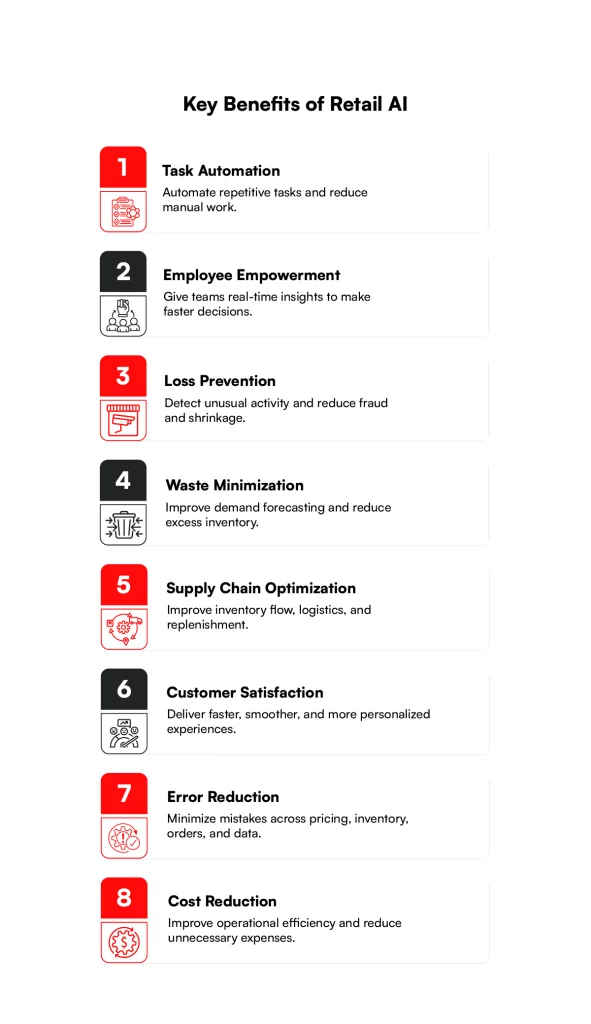
You’ll typically see eight benefits once a retail AI implementation is built right, meaning the retail AI integration underneath it actually works as intended, not just running on a static export somewhere.
1. Task automation
Reordering routine stock, tagging new products against your catalog structure, answering the fiftieth “where’s my order” message this week. None of it needs a human, and getting that time back matters more than most teams give it credit for.
2. Employee empowerment
Give your store associates the ability to pull up a customer’s order history and check stock at the next branch in a few seconds, instead of switching between three legacy screens, and they close more sales while feeling more capable doing it.
3. Loss prevention
Shrink rarely shows up as one dramatic event. It leaks slowly through refunds, voids, and stock discrepancies that a monthly report catches too late to act on.
Pattern-detection models built to watch transactions as they happen can flag unusual refund activity or void patterns within days instead of at quarter’s end.
4. Waste minimization
Overordering perishables, marking items down a week too late, shipping the wrong sizes to the wrong region. Better forecasting quietly fixes most of this, and less product ends up written off.
5. Supply chain optimization
Stockouts rarely come from one big failure. They come from small delays piling on top of each other, a late shipment here, a demand spike there, until something finally breaks.
Continuous visibility into supplier lead times and shipping data catches that pileup while there’s still time to act, though a lot depends on how quickly your carriers actually report shipment status back to you.
6. Customer satisfaction
Your shoppers won’t thank you for great inventory forecasting. They’ll just notice the item was in stock and the checkout didn’t drag. In retail, satisfaction usually looks like the absence of friction rather than any single delightful moment.
7. Error reduction
People mistype prices. Software has its own failure modes too, but automated checks built into the system catch a lot of the small, expensive mistakes before they reach a customer or your P&L.
8. Cost reduction
Fewer write-offs, leaner inventory, less manual reconciliation work. Each trims a line item on its own, and together they’re worth putting in front of finance, as long as you track them individually instead of folding everything into a vague “AI saved us money” number nobody can actually defend later.
That’s a solid case on paper. Now let’s look at where retailers are actually applying this in 2026.
Use Cases of Retail AI Software Integration and Implementation
Sixteen use cases, and nobody’s running all of them at once. Most retailers doing a real retail AI implementation pick two or three tied to their sharpest existing pain point and expand from there.
1. Inventory Management
AI tracking sell-through, returns, and lead times across your locations can recommend transfers and reorders before a shelf actually goes empty.
This depends heavily on solid retail ERP integration, since the model needs live stock numbers, not a snapshot from last night’s batch job.
2. Demand Forecasting
A lot of retailers have moved toward more flexible forecasting models that can factor in promotions, seasonality, and local events, rather than relying purely on simple trend extrapolation from last year’s numbers.
It’ll still miss sometimes. Nothing predicts a product going viral overnight. But the misses tend to get smaller and less frequent.
3. Assortment Planning
Your downtown store and your suburban location don’t serve the same shopper. AI comparing local buying patterns against shelf space and margin targets can draft a tailored product range for each one. Your planners still make the call. They’re just starting from a far better draft than a generic template.
4. Supply Chain and Logistics Optimization
Some retailers are now pairing route-planning software with smarter, adaptive rerouting that reacts to live carrier and shipment data rather than a fixed plan set the week before. The common failure point is timing: if that shipment data arrives late, the system is optimizing against information that’s already out of date.
5. Price Optimization
Worth flagging on its own, since it’s easy to get wrong. AI can test how demand responds to price changes and factor in competitor moves and current stock. Without a firm floor built in, a model chasing a competitor’s price will happily erode your margin without blinking.
6. Merchandising
Where a product sits, on a shelf or in a digital storefront, changes whether it sells. AI can analyze what customers actually buy together and suggest layouts or bundles based on that, giving your store teams clearer planograms and your ecommerce team product grids that respond to real behavior instead of a hunch from last spring.
7. Shopping and Checkout
Self-checkout, scan-and-go, and cashierless formats depend on computer vision accurately tracking what’s in a basket, and that depends on retail POS integration actually working. Your AI, the payment terminal, the loyalty account, and the stock count all need to agree on what just happened, or someone ends up stuck at the exit gate arguing with a gate.
8. Chatbots and Conversational AI
Retail assistants are increasingly built on large language models that can pull live answers from your order system and product catalog, rather than working off a fixed script. The integration work is building a secure, scoped connection that lets the assistant check order status without exposing your entire customer database to a third-party provider.
9. Visual Search and Curation
A shopper photographs something they liked, and AI-powered visual search uses computer vision to find close matches in your catalog. The same underlying approach can assemble outfits or room looks from current inventory far faster than a merchandiser working through thousands of products by hand.
10. Guided Discovery and Product Recommendations
Not every shopper arrives knowing exactly what they want. Guided discovery asks a few narrowing questions, kind of like a good salesperson would. Recommendations only work if they respect context, though. Someone who bought a tent yesterday doesn’t need another tent suggested today.
11. Personalization and Dynamic Outreach
This goes beyond sticking a first name in a subject line. It means adjusting what a customer sees and when a message reaches them, based on how they actually shop. Done well, it feels helpful. Overdone, it feels like being tailed around a store by someone with a clipboard.
12. Customer Insights and Engagement
Every purchase, return, and browsing session tells you something. AI groups shoppers by behavior, flags who’s drifting toward churn, and surfaces what keeps repeat buyers coming back, giving your marketing team something closer to evidence than a persona deck built on guesswork.
13. Emotional Response and Sentiment Analysis
Reviews, support tickets, and social mentions hold a lot of signal nobody has time to read manually. AI can score sentiment at scale, sometimes breaking it down by product attribute (the fit was great, the fabric wasn’t. It misses sarcasm here and there, so treat the output as a strong signal, not a verdict.
14. Marketing Optimization
AI can test creative variations and shift ad spend toward what’s actually converting, handling the constant small adjustments that would otherwise eat your marketing team’s week without adding much strategic value. Your team still shapes the message and the overall strategy.
15. Operational Efficiency
Predicting foot traffic helps you schedule the right headcount for a Saturday rush. Predictive maintenance on refrigeration or HVAC, fed by sensor data, can flag a failing unit before a chiller full of stock spoils.
16. Enhance Loss Prevention Efforts
Beyond flagging odd refunds, AI can catch unusual self-checkout behavior and connect suspicious patterns across multiple stores. The goal is fewer false alarms, not more.
An oversensitive system that stops honest shoppers burns trust fast, with customers and with the staff stuck handling the complaints.
That’s the landscape you’re working with. Every one of these depends on retail AI integration holding up end to end, and that’s exactly where things tend to go sideways.
Integrate AI Into Retail Workflows
Move beyond isolated AI tools by connecting intelligent solutions with your POS, ERP, ecommerce, inventory, and customer platforms.
Contact usAI Integration Issues in the Retail Sector and Solutions
Retail AI integration efforts tend to stall right here, at the technology and data layer, and none of these five problems are really about the model itself.
1. Technology Integration
Older ERPs and legacy connection methods don’t play well with the modern APIs most AI tools expect. Retail ERP integration routinely hits schema mismatches. Your ERP calls something a “vendor code,” your pipeline expects a “supplier ID,” and nobody documented the mapping.
Retail POS integration has its own version of this problem, since store hardware often runs software versions years behind, with modern connectivity added on rather than built in from the start.
Fix it architecturally. Build an integration layer that owns translation between legacy formats and a common data structure every system maps into, rather than point-to-point connections that multiply your maintenance burden. Treat retail software integration as ongoing, monitored infrastructure, not a one-time project.
2. Lack of Technical Knowledge
Most retail IT teams are strong on systems administration and weren’t hired to evaluate whether a vendor’s accuracy claims actually hold up under scrutiny.
Bring in someone data-literate, even part-time, specifically to review integration architecture and vendor claims before a contract gets signed.
Your team doesn’t need to build models from scratch. It needs enough literacy to ask how recent the training data is and what happens when the system isn’t confident in its own answer.
3. Data Quality and Integration
Duplicate SKUs, inconsistent product names across systems, prices that disagree between the ERP and the POS- all of it silently corrupts model output.
A forecast trained on mismatched data between systems produces confident, wrong numbers, and confident wrong numbers cause more damage than obviously broken ones.
Invest in cleaning and standardizing your core data before scaling any use case. Automated checks that catch bad records early save far more time than fixing things six months into a live rollout.
4. Privacy Concerns
GDPR, CCPA, and a growing patchwork of state laws mean consent and deletion capability need to be built into the data pipeline from day one, not bolted on after a regulator asks an uncomfortable question.
Collect only what you genuinely need, be upfront about what’s used and why, and check carefully how any vendor stores and protects customer data before signing a contract.
This also intersects with payment card compliance, since data flowing anywhere near an AI pipeline needs careful scoping.
5. High Integration Cost
Licensing gets budgeted for. Data cleanup, custom connectors for legacy systems, and the ongoing hours spent chasing mismatches usually don’t.
Scope a pilot narrowly, one use case, one or two integration points, and track the real cost including staff time, not just the software line item. Use that number, not the vendor’s optimistic quote, to build the case for the next phase.
Knowing where these break is half the job. Sequencing the rollout is the other half.
Retail AI Implementation Best Practices
These four steps are really about sequencing retail AI integration work so it doesn’t stall halfway through.
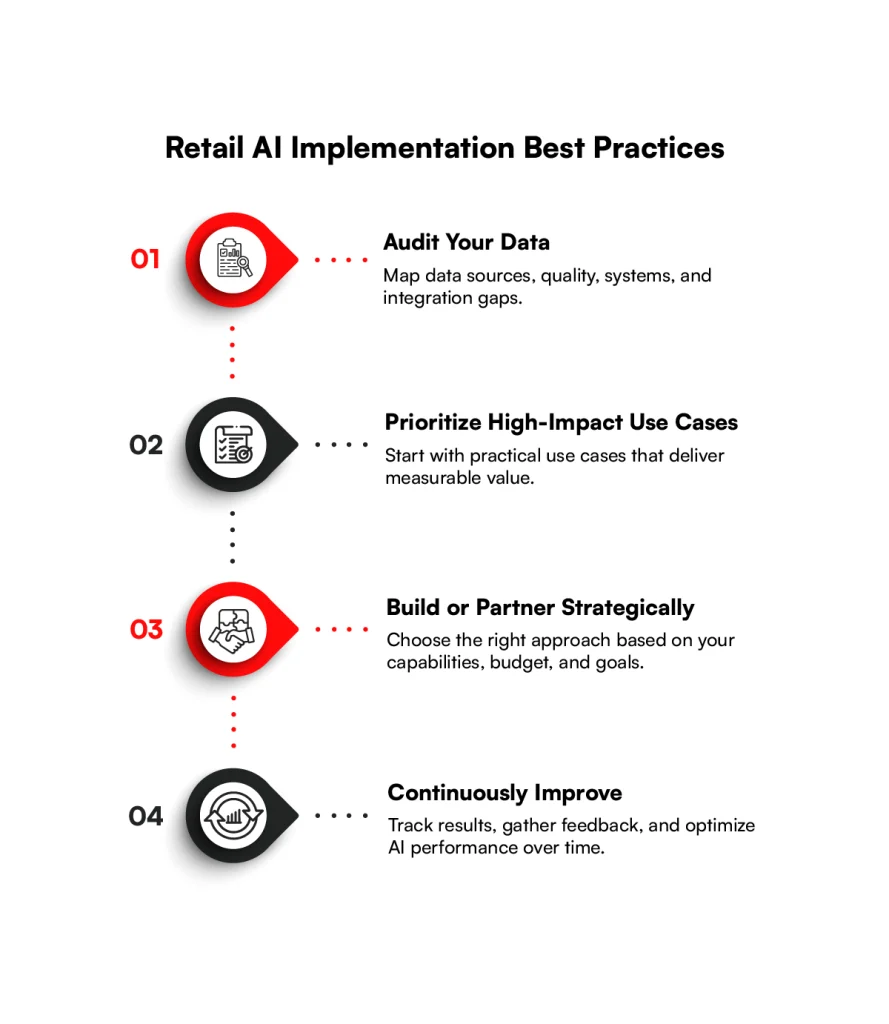
Step 1: Audit data infrastructure
Map every system touching product, customer, or transaction data, ERP, POS, warehouse system, CDP, ecommerce platform, and the spreadsheet workaround nobody mentions in the all-hands.
Document how each one connects and how current that data actually is by the time it reaches anything downstream. Retail ERP integration is usually the biggest lift here, so scope it first.
Step 2: Prioritize high-impact, low-friction use cases
Score candidates on expected value against how hard they’d be to roll out given your current systems. A demand forecast on your best-selling category, fed by one reasonably clean data source, scores well.
A fully cashierless store touching several vendor systems at once doesn’t, at least not first. Build the easy wins to fund the harder ones.
Step 3: Evaluate build versus buy technology partners
Building gives full control but demands technical talent most retail teams don’t have sitting idle. Buying moves faster but means adapting somewhat to a vendor’s constraints.
Either way, ask specifically how well the option handles retail software integration with what you’re already running, and ask for a reference customer in a genuinely similar setup, not just a polished case study.
Step 4: Establish continuous feedback loops
Set clear metrics before going live: forecast accuracy, shrink rate, conversion, whatever matches your goals, and review them on a real schedule.
Watch for the model’s accuracy drifting over time, since shopper behavior shifts constantly and a model left untouched for a year quietly falls behind.
Feedback from store staff, who often spot problems before a dashboard does, should actually reach whoever maintains the system.
Follow that sequence and your budget goes toward the problems that matter instead of firefighting integration issues after launch. We help retailers integrate AI with existing systems and build scalable, production-ready solutions.
From AI strategy and software integration to implementation and optimization, RBMSoft supports the journey end to end. This enables retailers to adopt AI faster while keeping their technology ecosystem connected and scalable.
Scale Retail AI With Confidence
We help retailers build a practical roadmap and connect the technology needed to move AI from pilot to production.
Plan My AI ImplementationConclusion
Retail AI integration is mostly a systems problem with a layer of AI on top, and none of it works without a disciplined retail AI implementation process behind it.
The retailers seeing real returns in 2026 aren’t necessarily running the most advanced models. They’re the ones whose ERP, POS, and customer data actually talk to each other, cleanly and close to real time.
Start with the audit. Find the system with the worst connectivity, the messiest data, or the most manual workarounds, and begin there. That’s usually where the biggest wins are hiding, and it beats trying to launch personalization on top of infrastructure that can’t support it yet.
RBMSoft helps retailers build the integration and technology foundation needed to connect legacy systems, unify retail data, and bring AI-powered solutions into real-world operations.
If your team’s weighing a few vendor pitches with no clear starting point, that’s worth a conversation before anything gets signed.
FAQ’s
1. How do businesses integrate AI checkout into retail platforms?
Businesses connect AI-powered checkout systems with their POS, payment, inventory, and loyalty systems. This allows the platform to recognize products, process payments, update stock, and link purchases to customer accounts in real time.
2. How do retailers integrate AI product recommendations with search experiences?
Retailers connect AI recommendation engines with their product catalog, search, inventory, and customer behavior data. AI can then understand what shoppers are searching for and recommend relevant products based on their preferences, browsing behavior, and real-time availability.
3. How does AI in retail work?
AI analyzes data such as sales history, inventory levels, customer behavior, returns, promotions, and other business information. It identifies patterns and provides recommendations or automates tasks such as forecasting demand, managing inventory, personalizing experiences, and detecting unusual activity.
4. How is generative AI being used by retail businesses?
Generative AI can support customer service, product discovery, content creation, personalized messaging, and conversational shopping experiences. It can also help teams generate product descriptions, answer customer questions, and create marketing content faster.
5. How much does retail AI software integration cost?
The cost varies depending on the systems involved, data cleanup, custom connectors, software licenses, testing, training, and ongoing maintenance. A focused pilot can help retailers understand the investment and potential return before expanding the implementation.
6. How long does it take to implement retail AI solutions?
Implementation time depends on the complexity of the existing technology stack, data quality, integrations, and selected use case. A focused use case can generally be implemented faster than a business-wide transformation involving ERP, POS, ecommerce, inventory, and customer systems.
7. How does a retail ERP and POS integrate?
A retail ERP and POS can be connected through APIs or a middleware layer. The POS sends information such as sales and inventory changes to the ERP, while the ERP can provide information such as product, pricing, and inventory data back to the POS.
8. How to integrate AI in retail?
Start by auditing your existing data infrastructure and identifying where your ERP, POS, ecommerce, inventory, and customer systems store data. Then select a high-impact use case, connect the required data through APIs or middleware, test the solution, and continuously monitor its performance. Successful retail ai integration depends heavily on clean, connected, and reliable data.
9. What are the main benefits of AI integration in retail?
The main benefits include task automation, better employee decision-making, loss prevention, waste reduction, supply chain optimization, improved customer experiences, fewer errors, and lower operating costs. Effective ai integration in retail helps these capabilities work within existing retail workflows rather than operating as isolated tools.