




Table of Contents
Key Takeaways:
- Enterprise search architecture connects information across multiple business systems, making it easier for employees to find relevant data from a single interface.
- Architecture patterns matter: Centralized, federated, hybrid, and agentic search offer different approaches to data access, retrieval, and scalability.
- Core components work together: Connectors, ingestion pipelines, indexes, ranking engines, and security controls determine search quality and reliability.
- Keyword and vector search serve different needs: Combining both helps deliver accurate results for exact queries and relevant matches based on meaning.
- AI enhances enterprise search: RAG generates contextual answers from company data, while AI agents can handle complex, multi-step information retrieval tasks.
- Build a strong foundation first: Prioritize data integration, access permissions, performance, and governance before expanding AI capabilities or investing in enterprise search solutions development.
Ever typed a question into your company’s search bar and gotten back a pile of junk? Or nothing at all? It happens to everyone.
Somewhere in the system, the answer is sitting in a shared drive, or buried in a Slack thread from March, or attached to a CRM record that nobody opens anymore. You just can’t get to it.
Closing that gap is what enterprise search architecture is for. The search box gets the credit, but it’s the thin top layer. Most of the work happens behind it, in the tools that pull data out of dozens of systems, organize it, and check who’s allowed to see what.
Not long ago, all of that amounted to matching the words you typed against the words in a file. Type “vacation policy” when the document says “PTO,” and you got nothing.
Plenty of systems can now work out what you meant, pull a short answer together from several documents, and even file a ticket for you.
Five pieces make that possible: connectors, indexes, vector search, RAG, and AI agents. None of them does the same job as another. This article walks through them in simple terms, with most of the attention on how they connect.
What is Enterprise Search Architecture?
Enterprise search architecture is the technical design that lets an organization search its internal information from a single point. It settles four things:
- How data is collected from source systems
- How it’s processed and indexed
- How queries are interpreted and ranked
- How each person’s access permissions follow every result
The architecture should be distinguished from the search product itself. A product like Elasticsearch or Coveo is one piece of the design, not the design itself.
The architecture is everything around it: the connectors that feed it, the way content gets indexed, the ranking logic, the security rules inherited from the source apps.
Two companies can install the same product and end up with very different search, simply because of how they put those parts together.
Take a retailer. Product details sit in a catalog database, supplier contracts live as PDFs on a shared drive, and customer complaints pile up in a ticketing tool. One is structured data and two are unstructured, and none of them were built to talk to each other.
The architecture handles that. Connectors collect the content, a processing layer extracts text and adds metadata like date and supplier, and an index makes it all searchable.
So one question, say “which suppliers have late deliveries on this item?”, can reach all three sources and come back as a single answer.
This differs from public web search, which indexes openly available pages. Company data is private, messy, and spread across dozens of systems, and each file has its own access rules. That’s why enterprise search needs its own design rather than a borrowed one.
The quality of the design determines whether search is fast and dependable or slow and inconsistent. There’s more than one way to structure all of this. Some companies copy everything into a central index. Others leave the data where it is and query each system as the question comes in.
Plenty do a bit of both, and a newer group lets an AI agent plan the search steps itself. Which route they pick changes how data is stored, how fast results come back, and how permissions get enforced.
Struggling with scattered data and disconnected systems?
RBMSoft helps you design enterprise search solutions that connect information and deliver relevant results faster.
Build My Search Solution
Patterns for Enterprise Search Architecture
Which pattern fits depends on where the data sits, how often it changes, and how people need to get at it. Most real setups end up as one of four: centralized, federated, hybrid, or agentic. Each one of them gives something up to get something else.
| Pattern | Where the data lives | Where it works best | Where it struggles |
| Centralized | Copied into one index | Fast, consistent results across all content | Copies go stale if sync lags, and storage is doubled |
| Federated | Stays in each source system | Data that can’t leave home for legal or regional reasons | Slowest source sets the pace, and ranking differs per source |
| Hybrid | Popular content copied, sensitive or rarely used content left in place | Mixed data that doesn’t fit one model | Two approaches to run and keep consistent |
| Agentic | Whatever the layer underneath holds | Questions that span several systems and need several steps | Still needs an index or federated layer, and its access has to stay narrow |
1. Centralized search: It pulls everything into a single index and sends every query there. Because the engine only ever consults its own copy, answers arrive quickly and ranking stays predictable.
The trouble is keeping that copy current. If syncing lags, people see old versions, and you’re paying to store the same content twice. Wikipedia’s search runs on Elasticsearch, a fair picture of this model working at scale.
2. Federated Search: Nothing gets copied. The tool sends your query to each system live, then stitches the answers together. That helps when data can’t leave its home, say for legal or regional reasons.
A hospital group keeping patient records in separate systems might go this way. The downside? It’s slower, and every source ranks results in its own style.
3. Hybrid Search: This one mixes both. High-value content goes into a central index. Sensitive or rarely used content stays put and gets queried live. Plenty of large firms use this.
4. Agentic search: It is the newest of the four. Rather than running one query and handing back one list, an AI agent plans the job. Say someone asks which customers had delayed shipments this week and what they were promised.
The agent can look in the order system, pull the related support tickets, then write the two together into a short summary. Along the way, it checks its own findings, and now and then it takes an action, like flagging an account.
It doesn’t replace the other three, though. It sits on top of them. An agent still needs an index or a federated layer to search, because it has nothing to look through otherwise.
Which is why the next question is what sits underneath all four patterns: how data gets connected, processed, indexed, and secured.
Those parts decide how good the results are, whatever pattern you pick. Let’s look at the key components that make these search systems work.
Key Components of Enterprise Search Architecture
Regardless of which architecture a company chooses, several components work together to make search useful.
They handle everything from collecting information across different systems to finding relevant results and ensuring users only see what they’re allowed to access. Here are the eight components involved and what each one does.
| Component | What it does | What goes wrong without it |
| Data sources | Hold the company’s knowledge: CRM, ERP, SharePoint, shared drives, wikis, ticketing tools | Nobody knows what exists, so nothing gets searched |
| Data connectors | Pull content and its access rules out of one specific system | Search can’t see inside that tool |
| Ingestion and processing | Extracts text (OCR for scans), cleans it, chunks it, adds labels like author and date | Raw files can’t be searched, and the index falls behind |
| Search index and storage | Keeps a keyword index, a vector index, and metadata | No fast way to find anything |
| Query processing | Fixes typos, widens synonyms, works out intent | “PTO rules” and “vacation policy” land in different places |
| Search and ranking engine | Finds matches and orders them by fit, freshness, clicks, and sometimes who’s asking | Results arrive as an unsorted pile |
| Security and access control | Applies the original permissions at query time using the searcher’s identity | HR-only files show up for everyone |
| Search interface and APIs | Puts search in the intranet, the CRM, or a chat window | People have to leave their tools to search |
1. Data Sources:
This is wherever your company’s knowledge happens to live: the CRM, the ERP, SharePoint, shared drives, a wiki somebody set up years ago, the ticketing tool. Some of it is tidy, like rows in a database. A lot of it isn’t.
Think PDFs, email threads, slide decks. Big companies often have dozens of these places, and nobody has the full list.
2. Data Connectors:
A connector is a small piece of software built for one particular system. Its job is to reach in, pull the content out, and bring along the access rules attached to each file.
You can’t reuse a Salesforce connector on SharePoint, since each system works differently. And if no connector exists for a tool, search simply can’t see what’s inside it. Older in-house apps usually mean writing one from scratch.
3. Data Ingestion and Processing:
Raw files can’t be searched as they come. First, the text has to be pulled out, and for scanned documents that means OCR, which reads text from images.
Then it gets cleaned and cut into smaller chunks, and each chunk gets labels like author, date, and department. This stage also has to keep running, because files change every day and the index has to keep up.
4. Search Index and Storage:
The index is the organized catalog. A keyword index maps each word to the documents that contain it, like the back of a textbook. A vector index stores meaning in numeric form. Metadata lives here too.
5. Query processing:
Before searching, the system tidies up what the person typed. It fixes typos, widens synonyms, and works out intent. “PTO rules” and “vacation policy” should land in the same place.
6. Search and Ranking Engine:
This finds matching items and puts them in order. Ranking weighs how well the text fits, how fresh it is, how often others click it, and sometimes who is asking.
7. Security and Access Control:
Search has to honor the permissions of the original system. If a salary sheet is HR-only, nobody else should see it, not even its title. Most setups filter results at query time using the searcher’s identity.
8. Search Interface and APIs:
Employees still need a way to reach all of this. For some companies that’s a plain search bar on the intranet. For others it’s a panel inside the CRM, or a chat window where people type a question the way they’d ask a coworker.
Behind any of them sits an API, and that’s what lets other applications call search directly, so nobody has to leave the tool they’re already in. A support agent working a ticket shouldn’t have to open a second tab to find the refund policy.
These eight components explain what an enterprise search system is made of. To see how they work together, let’s follow a real search query from the moment an employee enters it to the moment the results appear.
How Enterprise Search Architecture Works
The easiest way to see it is to follow one search from start to finish. Say a support agent types: “refund policy for damaged items, EU customers.” Six stages sit behind that one line.
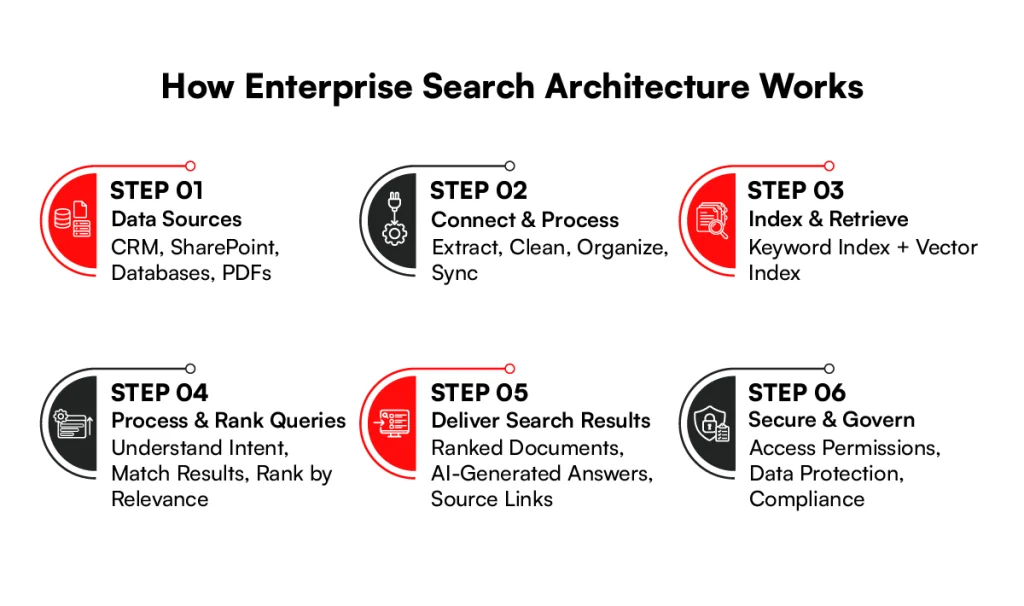
Step 1: Enterprise data sources
Everything starts with where the knowledge lives. For our support agent, that’s the CRM with customer records, the SharePoint site holding policy documents, a ticketing database, and a pile of PDFs.
None of these were built to work together. That’s the problem the next stages solve.
Step 2: Connectors and Data Ingestion
Connectors reach into each of those systems and pull the content out. Then the ingestion layer gets to work. It extracts the text, evens out the formats so a PDF and a database row look alike, and adds labels such as region, date, and document type.
It also keeps syncing, so a policy edited this morning doesn’t show up as last month’s version. All of this happens before anyone types a word.
Step 3: Search Index and Retrieval layer
Next, the content gets filed. A keyword index records which words appear where, a vector index records what each passage is about, and metadata sits alongside both. Think of it as two catalogs for the same library, one sorted by exact words and one sorted by meaning.
Step 4: Query Processing and Ranking
Now her question arrives. The system picks out “refund” and “damaged” as the key ideas and treats “EU” as a region filter.
The keyword index finds exact matches, and the vector index finds passages that say the same thing in different words, like “reimbursement for broken goods.” Ranking then merges both lists. The newer policy outranks the old one, and EU documents move up.
Step 5: The Enterprise Search Experience
The result lands where she already works. That might be a ranked list in the employee portal, a panel inside the CRM, or a short written answer from an AI assistant with links back to the source files. She doesn’t see any of the steps above. She just sees the answer.
Step 6: Security, Permissions, and Governance
This one isn’t really a final step. It runs through everything. Access rules get collected during ingestion, checked again at retrieval, and applied one more time before results are delivered.
If she isn’t cleared to see a document, it never reaches her screen. A gap at any stage would undo the rest, which is why it’s built in everywhere.
Find Answers Faster Across Systems
Tired of employees wasting time searching across disconnected tools? We help build enterprise search solutions that bring relevant information together.
Let’s Get StartedHow to Optimize Latency Through Enterprise Search Architecture
Slow search rarely comes down to weak servers. More often, the design is the culprit, and that’s good news, because design can be changed. A few places are worth checking first.
1. Reduce cross-system dependencies:
Whenever a search has to reach out to another system in real time, you inherit that system’s speed. If the HR tool takes four seconds to respond, your whole answer takes four seconds too, no matter how quick everything else is.
Federated setups run into this the most. A common fix is to copy the content people ask for all the time into a central index, and keep live calls for the rarely used leftovers.
2. Choose the right retrieval strategy:
Plenty of queries don’t need AI at all. Someone typing an exact product code wants a straight keyword lookup, and it comes back almost instantly.
A vague, question-style search like “what happens if a shipment arrives damaged” is where vector search earns its cost. Hybrid setups handle this by routing each query to whichever method fits.
3. Optimize index design:
Index only the fields people actually search. Split data into shards sensibly. Too few limit parallel work, and too many add overhead. Clear out stale content as well.
4. Improve vector search performance:
Vector search gets costly at scale. Approximate methods such as HNSW give up a little accuracy for a big jump in speed. Smaller embeddings also trim memory and time.
5. Use caching strategically:
Popular questions repeat. “Holiday calendar” gets searched constantly. Cache those results briefly. Just make sure caches expire when content or permissions change.
6. Parallelize retrieval:
Query the keyword index, the vector index, and any federated sources at the same time. Total wait then depends on the slowest source, not the sum of all of them.
7. Optimize RAG pipelines:
Fetch fewer, better chunks. Rerank only the top few. Stream the answer so words appear right away.
8. Measure performance at each layer:
Time query processing, retrieval, ranking, and answer generation separately. Watch the slowest five percent of searches, not only the average. Otherwise, you’re guessing. Speed gets people in the door. Good habits keep the system healthy once they’re inside.
Optimizing search speed is only one part of building a reliable system. To keep performance consistent as data grows and business needs change. Teams also need the right design principles and implementation practices. Here are the best practices to follow.
Implementing Enterprise Search Architecture: Best Practices
Implementing these best practices helps build an enterprise search system that is secure, scalable, and easy to maintain.
However, putting these principles into practice also depends on choosing the right technology for your organization’s data, infrastructure, and search requirements.
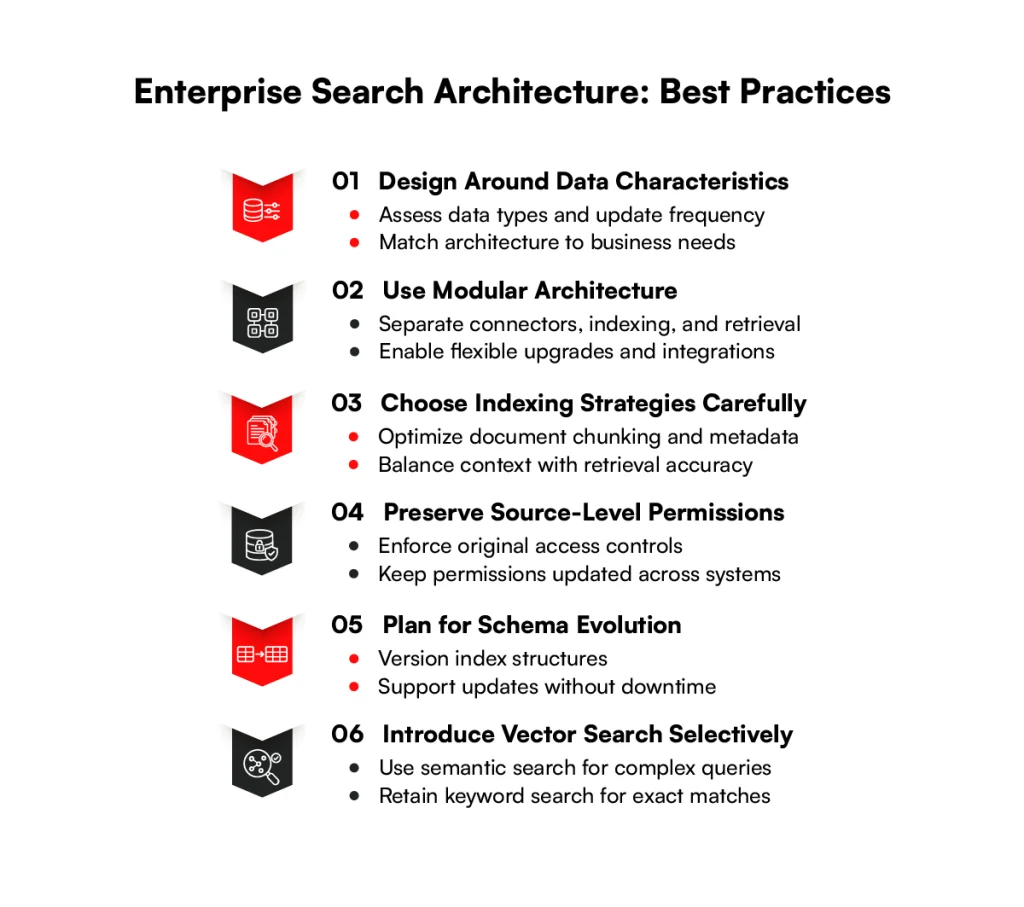
1. Design around data characteristics: Look at your data before picking tools. Mostly tables? Mostly long documents? Updated hourly or once a year? A legal archive that rarely changes suits a central index. A busy ticket system may need near-real-time syncing.
2. Use modular architecture: Keep connectors, indexing, retrieval, and generation as separate pieces. Then you can swap an embedding model or add a new source without rebuilding everything. Models improve fast, and yours will look dated within a year.
3. Choose indexing strategies carefully: Decide how to chunk documents. Chunks that are too big make answers vague. Chunks that are too small lose context. Keep metadata tidy too. A file named “Final_v3_FINAL” helps no one.
4. Preserve source-level permissions: Copy the access rules along with the content, and refresh them often. If someone leaves a project on Monday, search should know by Tuesday. This one is non-negotiable.
5. Plan for schema evolution: Fields change. New sources bring new attributes. Version your index structure so you can reindex gradually without downtime.
6. Introduce vector search selectively: It’s tempting to vectorize everything. Don’t. Start where wording varies a lot, like support articles and policies. Keep keyword search for precise lookups.
Habits are one thing. Several enterprise search solutions offer different capabilities to support these needs.
Examples of Enterprise Search Architecture Solutions
Choosing an enterprise search solution depends on more than its search capabilities. Factors such as integration options, scalability, deployment flexibility, customization, and search platform cost all influence which platform fits an organization’s needs.
Some solutions offer the flexibility to build a custom search system, while others provide ready-made connectors and AI-powered relevance features. Here are four popular enterprise search solutions and what makes each one different.
1. Elasticsearch:
An open-source engine built on Lucene. It’s flexible, strong on keyword and vector search, and a popular base for custom builds. Elastic lists DocuSign among its customers running search at high volume.
2. OpenSearch:
This one began as AWS’s fork of Elasticsearch and has since moved to community governance. Day to day, it behaves a lot like Elasticsearch, so teams that already run most of their stack on AWS tend to find it the easy pick.
3. Coveo:
Coveo is a paid, cloud-hosted product, and it’s best known for tuning relevance with AI and for the prebuilt connectors that save a lot of integration work.
You’ll run into it most in customer service portals and online stores, where results need to feel personal.
4. Lucidworks:
Its Fusion platform sits on top of Apache Solr. Lucidworks pushes hardest in commerce and workplace search, and it gives search teams plenty of dials for tuning how results get ranked.
No single one wins across the board. Your choice usually comes down to who on your team can actually run it, where your data is allowed to sit, how much you want to spend, and how far you need to bend the product.
Plenty of companies buy a platform and still build their own connectors around it. Whichever you pick, the real work starts after that, and it goes better with a plan.
How to Build Enterprise Search Architecture: Step-by-Step Process
Choosing a platform is the easy part. Most of the effort goes into everything around it: finding out what people actually search for, connecting the systems that hold the answers, and getting the first version in front of real users.
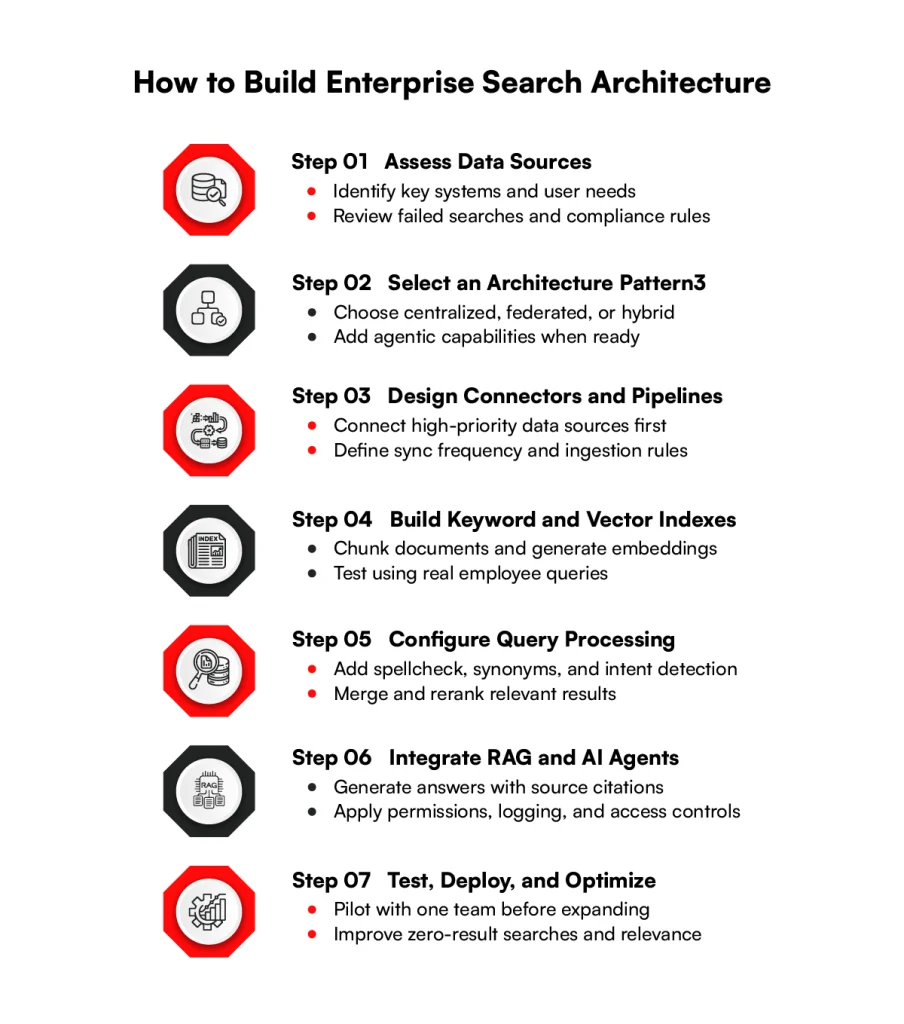
Step 1: Assess data sources and search requirements
Before touching any tool, make a list of every system that holds useful content and who relies on it. Then go and talk to those people. Ask what they search for and what they’ve given up trying to find.
Failed searches are gold here, so collect a handful. Compliance rules belong on the list too, because they’ll shape later decisions.
Step 2: Select the right architecture pattern
What you learned in step one usually points the way. If most data can be copied safely, centralized is simplest. If some of it has to stay where it is, you’re looking at federated or hybrid. Agentic can wait until the basics hold up.
Step 3: Design connectors and ingestion pipelines
Don’t try to connect everything on day one. Pick the two or three systems your people lean on most and start there.
For each, decide how often it should sync, since a pricing sheet that changes hourly needs different care than an archive that changes yearly. Where no ready-made connector exists, expect to build one.
Step 4: Build keyword and vector indexes
Break the content into chunks, turn each chunk into an embedding, and store both the keyword and vector versions. Then test it. Use real questions from actual employees, because made-up test queries tend to be too polite and too easy.
Step 5: Configure query processing and retrieval
This is where search starts to feel smart. Add spellcheck, a synonym list, and some intent detection so “PTO” and “vacation” meet in the middle.
Then decide how the keyword and vector results get merged into one list, and add a reranking pass that reorders the top hits.
Step 6: Integrate RAG and AI agents
Begin with answer generation, and make sure every answer shows its sources. Agents come after that. Start them on read-only jobs like finding and summarizing, and keep their access narrow.
An agent should never see more than the person asking is allowed to see. Log what it does, so you can check it later.
Step 7: Test, deploy, and optimize
Run a pilot with one team before going wide. Watch the searches that return nothing and the results nobody clicks, and fix those first. Then roll out in phases.
Simplify Your Enterprise Search Implementation
Struggling with disconnected data sources, complex integrations, or inconsistent search results? Get expert support to streamline your enterprise search implementation.
Contact USHow RBMSoft Helps Design and Implement Enterprises Search Architecture
RBMSoft builds search for organizations that need more than a plug-in. The team works through six phases: discovery and business alignment, data assessment and integration, model strategy and development, system integration and deployment, real-time monitoring and feedback, and governance.
On the technology side, the team works with Elasticsearch, OpenSearch, Coveo, Lucidworks, and Algolia. It builds custom connectors, API-based ingestion pipelines, and federated, semantic, personalized, and conversational search.
The work spans ecommerce, banking and insurance, healthcare, enterprise software, education, and travel. The approach is simple. Start with an MVP. Prove it with real users. Expand in phases. You can read more on the RBMSoft enterprise search page.
Conclusion
Good search isn’t magic. It’s a chain. Connectors bring data in. Indexes organize it. Vector search adds meaning. RAG turns passages into answers. Agents handle the multi-step work. Security and speed hold it all together.
If you remember one thing, make it this: build the base before the shine. Get your sources connected, your permissions right, and your keyword search solid. Then add AI where it earns its place.
Done well, enterprise search stops being a box people dread and becomes the quickest route to what they need. With the right approach to enterprise search solutions development, RBMSoft can help you build a search system that connects your data, improves information discovery, and supports your evolving business needs.
If you’re planning that journey, a short conversation with RBMSoft can help you map the first step.
FAQ’s
1. What are the key components of an enterprise search architecture?
The key components include data sources, connectors, data ingestion and processing, search indexes, query processing, ranking engines, security controls, and search interfaces or APIs.
Together, they form the architectural framework of enterprise search, allowing organizations to collect, organize, retrieve, and secure information across multiple systems.
2. How does RAG fit into enterprise search architecture?
Retrieval-Augmented Generation (RAG) connects search capabilities with large language models (LLMs). It retrieves relevant information from company data and uses it to generate answers grounded in those sources.
In an enterprise search solution architecture, RAG typically works with keyword indexes, vector search, and reranking to provide relevant answers with source references rather than relying solely on a model’s training data.
3. What security and compliance considerations should be included in enterprise search architecture?
Enterprise search architecture should enforce role-based access controls, preserve source-level permissions, encrypt sensitive data, and maintain audit logs.
It should also support data retention policies, regulatory requirements, and appropriate data residency controls. These safeguards are essential to the architectural framework of enterprise search because users must only access information they are authorized to view, including through AI-generated answers.
4. How much does an enterprise search architecture solution cost?
The cost depends on the volume of data, number of users, integration complexity, hosting requirements, security needs, and AI capabilities. Open-source technologies may reduce licensing costs but still require infrastructure, development, and maintenance.
Commercial platforms typically involve subscription or usage fees. A vector search enterprise architecture may also add costs for embedding generation, vector storage, and model inference. Organizations should evaluate the total cost of ownership rather than licensing alone.
5. How long does enterprise search implementation take?
Implementation can take a few weeks for a limited proof of concept or several months for a large enterprise deployment. The timeline depends on the number of data sources, connector availability, data quality, security requirements, and testing needs.
A well-planned enterprise search solution architecture usually starts with a small pilot, validates search relevance and permissions, and expands gradually across departments.
6. How do you design an enterprise search architecture for large organizations?
Start by mapping data sources, user needs, access permissions, and compliance requirements. Choose between centralized, federated, or hybrid search based on how data must be stored and accessed.
Then build reliable ingestion pipelines, configure keyword and semantic indexes, and test retrieval quality and performance.
A scalable enterprise document search architecture should also support modular integrations, regular index updates, monitoring, and future growth without requiring a complete redesign.
7. How does AI improve enterprise search?
AI improves enterprise search by understanding user intent, recognizing related concepts, interpreting natural-language questions, and generating contextual answers.
Vector search enterprise architecture helps retrieve relevant information based on meaning rather than exact keyword matches.
When combined with RAG, AI can summarize information across documents and provide source references. AI agents can extend these capabilities by coordinating multi-step searches and, where authorized, performing tasks.
8. What is the difference between keyword search, semantic search, and AI-powered enterprise search?
Keyword search finds documents containing specific words or phrases. Semantic search identifies content with similar meanings, even when the wording differs, often using embeddings and vector indexes.
AI-powered enterprise search can combine both methods with RAG, natural-language understanding, and AI agents to answer questions and support multi-step workflows.
A vector search enterprise architecture is particularly useful when employees search using varied terminology. Meanwhile, enterprise document search architecture combines retrieval methods, metadata, ranking, and permissions to make information across organizational documents easier to find and use.