





Quick Summary:
- Secure enterprise search keeps existing access rules intact when company information becomes searchable across connected systems.
- SSO, MFA, RBAC, document permissions, encryption, and permission synchronization help prevent unauthorized access. Pasted markdown
- Sensitive information should be classified, masked, or excluded before it reaches the search index. Pasted markdown
- APIs, connectors, network access, search logs, and incident controls need protection alongside the search platform itself. Pasted markdown
- Enterprise AI search security requires permission checks before restricted content reaches RAG models or appears in generated answers. Pasted markdown
- Security reviews should follow permission, integration, data, and AI changes instead of relying only on fixed review dates. Pasted markdown
Employees rarely search for company information in just one system. A customer record may sit in the CRM, while related contracts are stored elsewhere and other documents live in shared drives.
Enterprise search puts those sources within reach from one search experience. The security question is what happens to the original access rules when that information becomes searchable.
Those rules can get out of step. Someone may lose access to a file in the source application, yet still find it because the search index has not caught up with the change.
AI search raises a similar concern in a different way. Restricted information may appear in a generated response even when the underlying document is never opened.
This is what secure enterprise search needs to account for. Information should remain within the same access boundaries as it moves from its original system into search.
For companies working on enterprise search and information security, that means looking closely at how permissions carry across connected systems and where sensitive information could become visible along the way.
What Is Enterprise Search Security?
Enterprise search pulls information from places employees already use, including shared drives, CRM records, internal documents, databases, and business applications.
Enterprise search security is about keeping the access rules attached to that information when it becomes searchable from one place.
Think about an employee searching for a customer. They might have permission to see account details but not contracts or financial records connected to that customer.
Search needs to keep that boundary intact. Trouble starts when the source system says one thing about access while the search index still carries an older or incorrect permission.
This is where enterprise search and information security become closely connected. Who is searching matters, but so does what appears in the results.
Sensitive fields may also sit inside documents a person is otherwise allowed to find. Authentication, permissions, masking, encryption, and search records each deal with a different part of that exposure.
How Enterprise Search Systems Access Business Data
Before a document appears in search, it usually passes through a few stages. Connectors pull information from systems such as CRM platforms, databases, shared drives, and cloud applications.
The content is then organized in an index so the search platform can find relevant records without checking every source from scratch for each query.
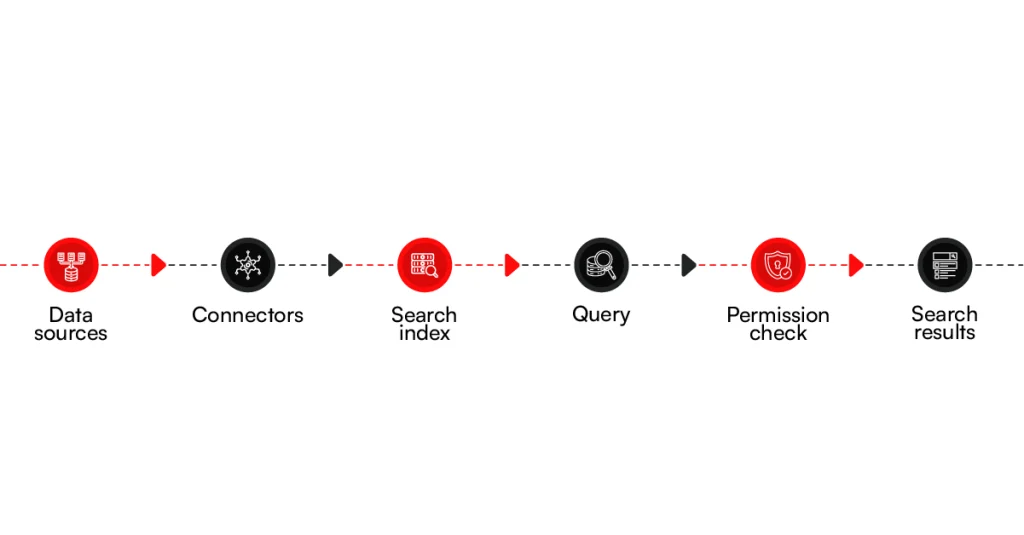
When someone searches, the platform identifies matching information and checks what that person is allowed to access. A secure enterprise search setup should return the permitted records while keeping restricted material out of that user’s results.
Why Search Creates a Different Security Problem
A file sitting inside one business application is governed by that application’s access rules. Search changes the situation because information from several applications can now be discovered through the same interface. The permissions attached to those files have to make that move as well.
This is where mistakes can become difficult to spot. A contract may still be properly restricted in its original application, yet appear in search because its permission details were missed, mapped incorrectly, or did not update when access changed.
Microsoft Azure AI Search, for example, supports document-level access control so results can be filtered according to a user’s permissions.
Once information from several systems becomes searchable in one place, there are more points where access can go wrong. The next step is to look at where those enterprise search security risks actually come from.
Related read: Enterprise Search: Top 13 Use Cases & Real-World Examples
Where Enterprise Search Security Risks Come From
As more business systems connect to search, more security risks can appear. Below are the main risks that can affect enterprise search and information security.
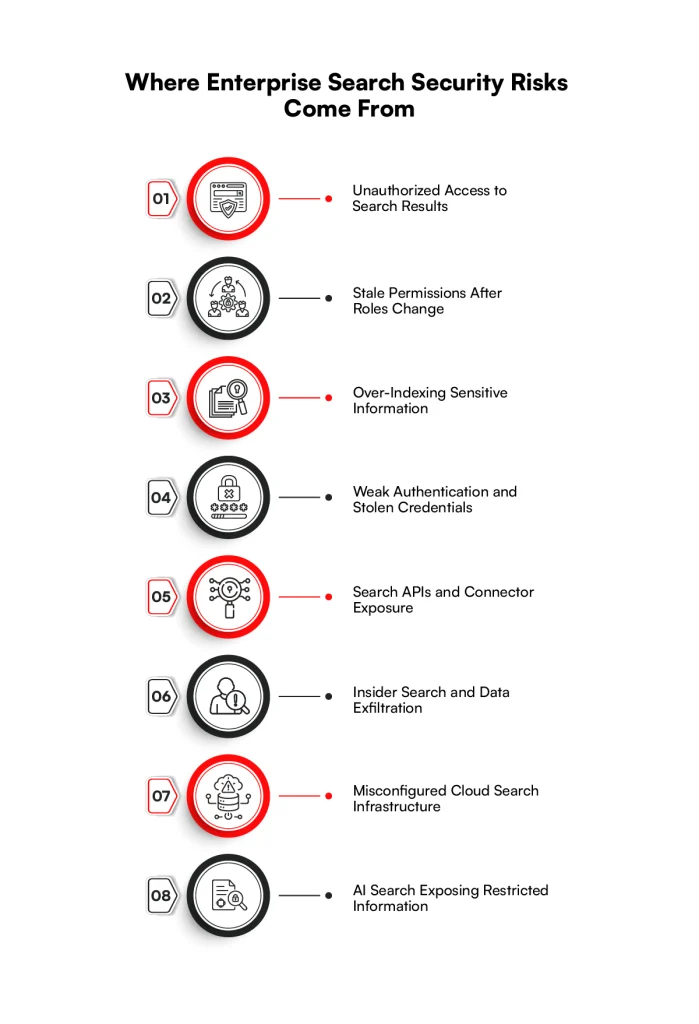
1. Unauthorized Access to Search Results
Someone searching for a customer, project, or department could come across a file they were never given permission to open.
The concern grows when one search covers contracts, HR documents, customer records, and financial information. Secure enterprise search depends on keeping restricted information out of results shown to the wrong person.
2. Stale Permissions After Roles Change
Employee access changes over time. Someone may move to another department, leave a project, or leave the company altogether.
The original application may reflect that change immediately, while the search index still carries the person’s previous access. Until those records catch up, information that should be restricted may remain searchable.
3. Over-Indexing Sensitive Information
An index may contain far more than employees need for everyday searches. Customer details, financial records, confidential files, credentials, or regulated information can end up there along with ordinary business content.
Once sensitive information enters the index, a search error or incorrect permission can expose more than expected.
4. Weak Authentication and Stolen Credentials
A compromised account becomes more serious when the search reaches across several company systems. Instead of trying each application separately, an attacker may use the search function to look for internal documents, customer information, financial records, or other valuable data from one place.
5. Search APIs and Connector Exposure
Search platforms rely on APIs and connectors to pull information from other business applications. Those connections may involve access tokens, service accounts, API credentials, and third-party components.
A compromised connection can expose information moving between systems or provide another route into the search environment.
6. Insider Search and Data Exfiltration
Sometimes the person searching already has legitimate access. An employee with broad permissions could use search to find large sets of customer records, confidential documents, or business information unrelated to their job. Because search makes scattered information easier to find, it can also make inappropriate collection easier.
7. Misconfigured Cloud Search Infrastructure
A cloud search environment can expose indexed information through incorrect network settings, public endpoints, excessive service permissions, or weak tenant boundaries.
The impact may extend beyond one file because the same environment can contain searchable information collected from several parts of the business.
8. AI Search Exposing Restricted Information
Enterprise AI search security brings another concern: users may receive information without opening the original document. A generated response or summary could draw details from restricted material retrieved in the background.
RAG applications and search agents can also pull from several connected sources before returning an answer, making permission mistakes harder for the user to notice.
These risks do not all originate in the same place. Some begin with user access, others with indexing, integrations, infrastructure, or AI-generated responses.
Looking at each point separately makes it easier to see what needs protection as information moves through enterprise search.
Not sure where your search security gaps are?
Review your search environment with RBMSoft.
Assess Your Search Security
8 Security Controls That Protect Enterprise Search
Securing search gets more complicated once information starts coming from several business systems. A permission set in one application may behave differently from one in another, while connectors and indexes add their own security considerations.
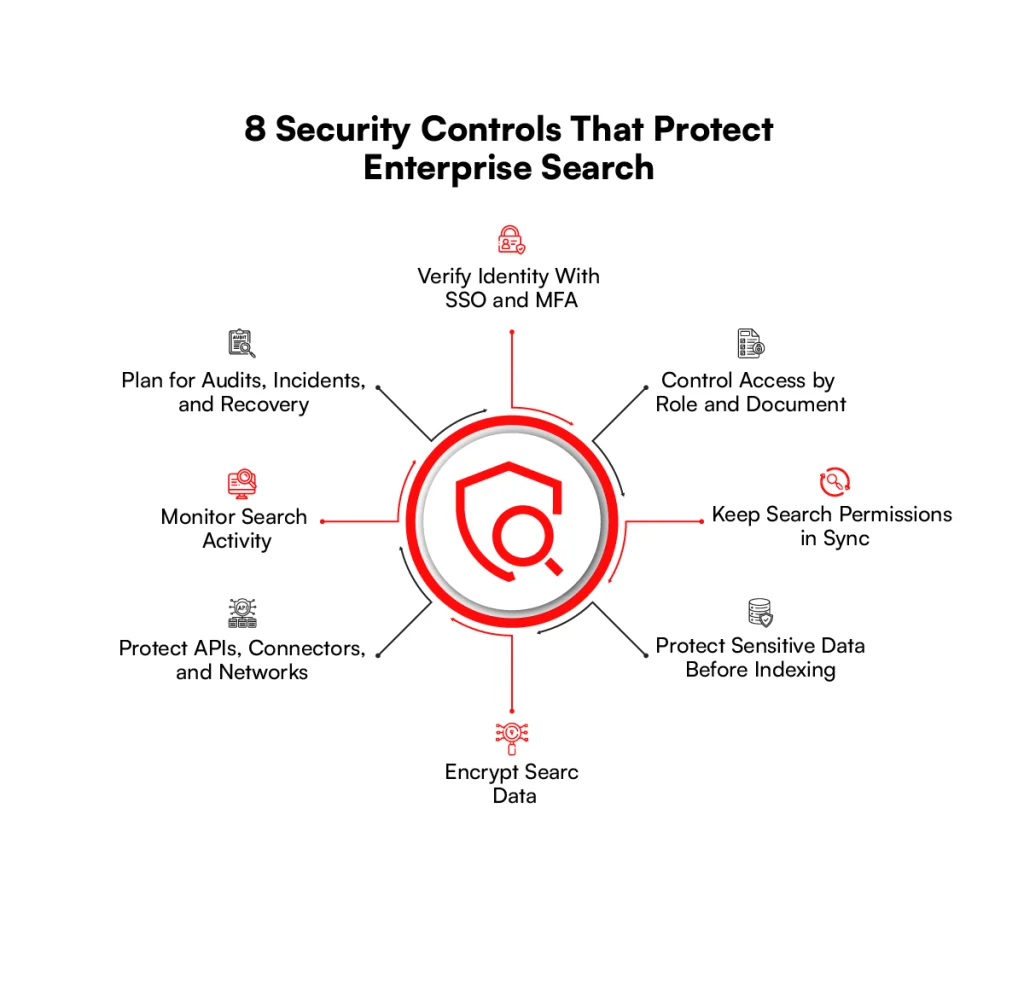
A secure enterprise search setup needs protection at each point where information is accessed, stored, or returned to a user.
1. Verify Identity With SSO and MFA
Before the search platform decides what someone can see, it needs to know who that person is. Single sign-on (SSO) lets employees use an existing company identity rather than creating another set of credentials. Multi-factor authentication (MFA) adds another check when someone signs in.
For applications and services, OAuth 2.0 and OpenID Connect (OIDC) are commonly used to handle identity and authorization without passing passwords between systems. Service identities also need to be treated separately from employee accounts. Shared credentials make activity harder to trace and can leave access open when people change roles or leave the company.
Once identity is established, the search platform still has to decide what that identity is allowed to retrieve.
2. Control Access by Role and Document
Giving someone access to enterprise search should not automatically give them access to everything inside the index. A salesperson, for example, may need customer records while payroll documents remain restricted to HR.
Role-based access control (RBAC) can tie access to a person’s job or group. Attribute-based access control (ABAC) can go further when decisions depend on details such as department, location, or another user attribute. Existing access control lists (ACLs) can also carry document permissions from source systems into search.
Document-level security matters when an index contains material with different access requirements. Microsoft Azure AI Search, for example, supports query-time controls that compare user identity, group membership, roles, attributes, or permission metadata with indexed documents before returning results.
This is often called security trimming: results the person cannot access are left out rather than displayed and blocked afterward.
3. Keep Search Permissions in Sync
Permissions rarely stay fixed. Someone may join a project on Monday and leave it a few months later. A team may be reorganized, a contractor’s access may expire, or a confidential folder may be opened to a different group.
Those changes need to reach the search index too. If the source application removes access but its permission metadata in search remains unchanged, the person could continue finding information they should no longer receive.
The timing matters here. Scheduled permission updates leave a gap between a change in the source and the same change reaching the search.
Where access changes frequently or the information is sensitive, that delay deserves particular attention. Keeping source ACLs and user or group information current reduces the chance of old permissions continuing to affect search results.
4. Protect Sensitive Data Before Indexing
There is another question to ask before information reaches the index: does all of it need to be searchable?
A customer record might contain a name and account number that employees need, along with personal or financial fields they do not. Indexing every field creates unnecessary exposure. Data classification can separate ordinary business information from PII, financial data, credentials, and other restricted material before it becomes searchable.
Masking can hide part or all of a sensitive field. Redaction removes selected information from view, while tokenization can replace a sensitive value with a substitute. In some cases, the better choice is to leave the field out of the search index altogether.
Access control and masking have different jobs. Access rules decide who can retrieve a record. Masking limits which sensitive details remain visible within information that person is otherwise allowed to access.
5. Encrypt Search Data
Search information spends time both moving between systems and sitting inside indexes or related storage. Encryption needs to account for both situations.
Traffic between applications, connectors, APIs, and the search service can be encrypted with TLS. Stored indexes, configuration data, backups, and other search information require encryption at rest. Encryption keys then need their own controls around storage, access, and rotation.
Azure AI Search provides a useful example. Microsoft currently states that connections use TLS 1.2 or 1.3 and customer data at rest is encrypted with 256-bit AES. Organizations that require greater control over encryption keys can configure customer-managed keys and define their own rotation schedule.
6. Protect APIs, Connectors, and Networks
A search platform rarely works alone. Connectors pull information from business applications, while APIs allow other applications to submit queries or work with indexed data. Those connections become part of the enterprise search and information security boundary.
An API should know which application or identity is calling it and what that caller is permitted to do. Service accounts need similarly narrow permissions. Long-lived secrets or credentials stored in application code can become a problem if they are copied, exposed, or forgotten.
Network access matters as well. Private endpoints, firewall rules, and restrictions on inbound and outbound traffic can limit where connections originate and where search data can travel. Tenant isolation also deserves attention when search infrastructure is shared across customers or business units.
These points are especially relevant when considering enterprise search integrations and third-party components, since a connection outside the core search platform can still become a route to indexed information.
7. Monitor Search Activity
Normal search activity leaves useful clues when something starts to look wrong. A user suddenly running far more queries than usual, repeated failed sign-ins, unexpected indexing changes, or administrative changes outside normal work can all warrant investigation.
Search logs can record query and service activity, while identity and infrastructure logs provide other parts of the picture. Bringing relevant events into a SIEM gives security teams a place to compare search behavior with activity elsewhere in the company.
Logs also matter after an incident. They can help establish what changed, when it happened, and which systems were involved. What a particular platform records varies, however.
Azure AI Search resource logs, for instance, do not record individual user identities or detailed document contents by default, so logging requirements need to be checked against the platform being used.
8. Plan for Audits, Incidents, and Recovery
Search security needs attention after the initial configuration is finished. New data sources get connected, permissions change, APIs are updated, and search features are added. A setup that was appropriate at launch may no longer match the environment a year later.
Security audits can check those changes against the organization’s requirements. Vulnerability assessments and penetration tests look at the environment from a different angle, including weaknesses in search services, APIs, authentication, and connected infrastructure.
There also needs to be a plan for what happens when something goes wrong. Incident procedures should establish how search access can be investigated or restricted, while tested backups and recovery procedures help restore data and services after an outage or security event.
Configuration reviews then provide a way to catch settings that have drifted from the company’s approved baseline.
These enterprise search security best practices cover different parts of the same search environment. Putting them into practice starts with understanding what data is searchable, where it comes from, and which permissions need to follow it.
How to Secure Enterprise Search Step by Step
A secure enterprise search setup starts with knowing what is already connected and who can access it. Here’s how to secure enterprise search across your data, permissions, and connected systems.
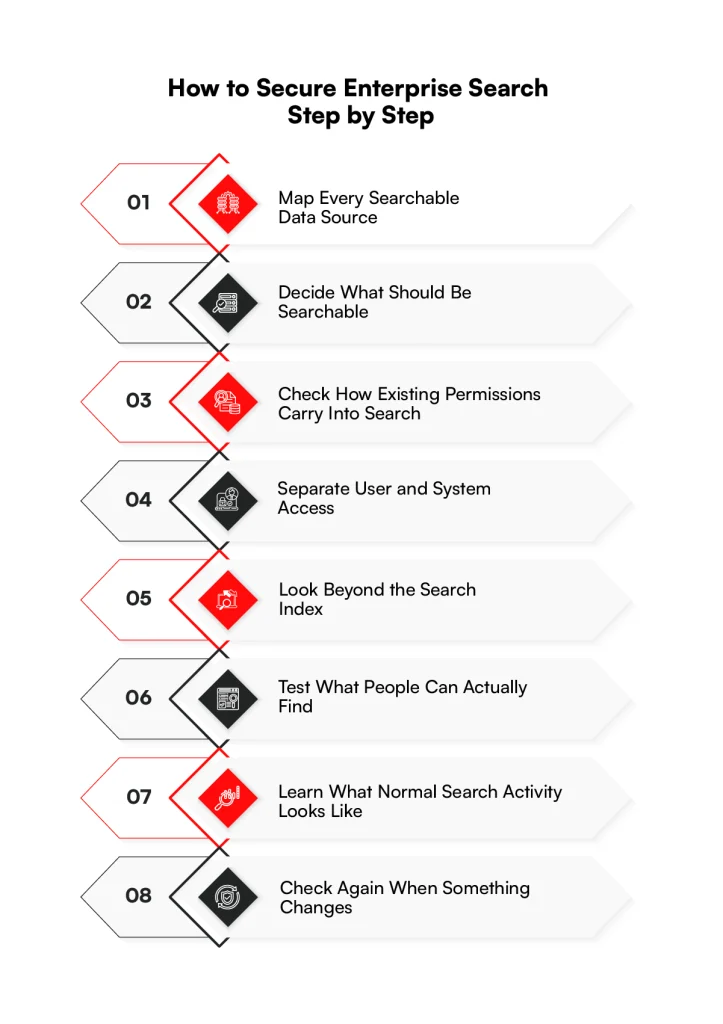
Step 1: Map Every Searchable Data Source
First, trace where search gets its information. This could be a CRM, shared drive, database, cloud application, knowledge base, or another internal system.
Do not stop at making a list of applications. Follow the path the data takes through connectors, APIs, and indexes, and note which applications use those search results. This often reveals connections that are easy to miss when looking at the search platform alone.
Step 2: Decide What Should Be Searchable
Finding a data source does not mean everything inside it belongs in the index. Some information is meant for general internal use. Other records may contain PII, financial details, confidential business data, or information covered by regulatory requirements.
Review that distinction before indexing. If employees have no business reason to search for a particular field or record, there is little value in making it searchable in the first place.
Step 3: Check How Existing Permissions Carry Into Search
Now look at the access rules already attached to the information. A file restricted to a particular group in its original application should remain restricted after it reaches the search index.
Pay attention to ACLs, roles, groups, and user attributes. Then try a change. Remove a test user from a group and see what happens in search. If the person can still find the restricted material, there is a gap between the source permissions and the index.
Step 4: Separate User and System Access
People are only part of the access picture. Administrators, applications, connectors, and background services may all have their own accounts.
Their permissions should reflect the work they actually perform. A connector that only reads documents, for instance, should not receive administrative access simply because it makes setup easier. The same thinking applies to employee accounts, particularly when SSO and MFA are already part of the company’s sign-in process.
Step 5: Look Beyond the Search Index
Information travels before it reaches an index and again when someone searches for it. APIs, connectors, network connections, credentials, and secrets are part of that route.
Check who can call the search APIs and where those requests can come from. Review how connector credentials are stored and how sensitive information is protected while moving between systems. Third-party connections deserve the same review, since they may have direct access to company information.
Step 6: Test What People Can Actually Find
Configuration screens only tell part of the story. Run real searches using accounts from different departments and access levels.
Try to find material each account should be able to see. Then deliberately search for something it should not see. Repeat the test after changing a permission in the source application. What appears on the results page is the clearest way to find out whether the access rules are working as expected.
Step 7: Learn What Normal Search Activity Looks Like
After launch, search activity starts to show its usual pattern. That makes unusual behavior easier to notice.
A large increase in queries from one account, repeated access failures, or unexpected changes to an index may deserve attention. Logs can provide the history behind those events and help show what happened before and after them.
Step 8: Check Again When Something Changes
A search environment will change. New repositories get connected. Teams reorganize. Connectors are replaced. AI search may be added to an index that was originally built for standard document retrieval.
Treat those changes as a reason to check access again. A permission model that worked for the original environment may behave differently once another source or search experience is added.
That is the practical answer to how to secure enterprise search and information over time: keep checking the relationship between the source, the index, and what users can actually retrieve.
Need help putting these search security controls in place?
Build them around your existing systems and permissions.
Talk to Our TeamAI-Powered Enterprise Search Introduces New Security Requirements
As AI becomes part of enterprise search, security needs to cover the information used to create each response. Below are the main enterprise AI search security areas that need attention.
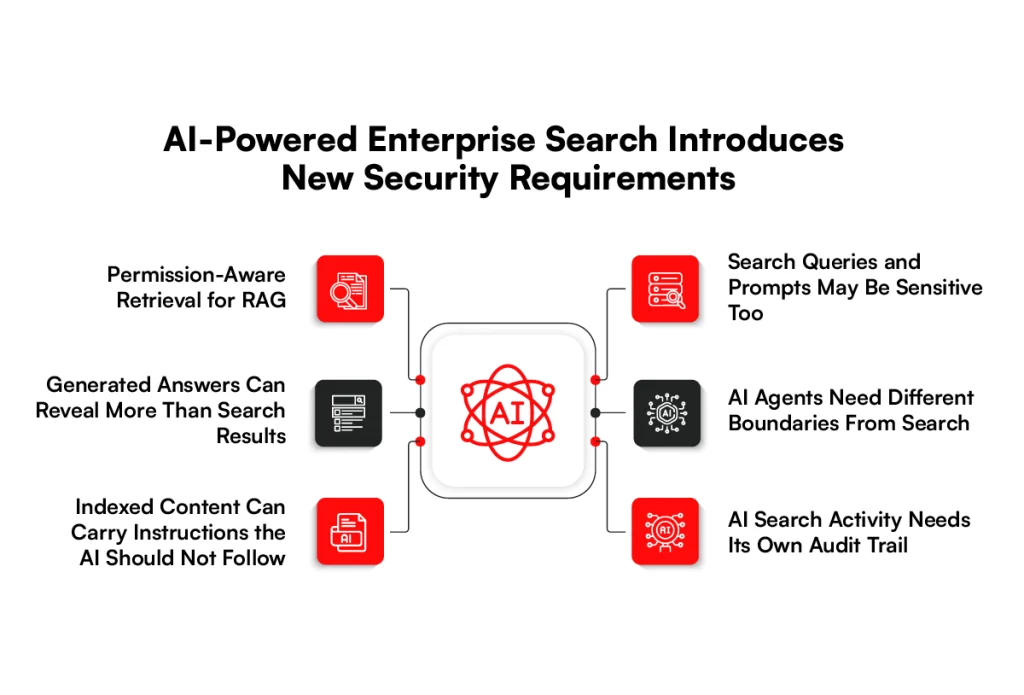
1. Permission-Aware Retrieval for RAG
Consider an employee asking an AI search tool to summarize everything the company knows about a customer. The answer might require information from several documents rather than one search result.
This retrieval process is part of how RAG-powered enterprise search connects an LLM with company knowledge before producing an answer.
The permission check needs to happen before those documents become context for the model. If a user cannot access a contract in the source system, RAG should not retrieve that contract simply because it could help answer the question.
This is an important part of enterprise AI search security. The model should work with information the person is allowed to access, rather than retrieving broadly and trying to remove restricted details afterward.
2. Generated Answers Can Reveal More Than Search Results
Keeping a restricted document out of the results page does not cover every case. AI search can combine pieces of retrieved information and present them as a new answer.
That matters because the user may never see which documents were read in the background. A short summary could contain a customer detail, internal figure, or confidential statement taken from material the person should not have received.
A secure AI enterprise search system therefore has to consider the generated response as well as the documents used to create it. Microsoft, for example, states that supported Copilot experiences use existing permissions so tenant data is not returned to a user or used by the model when that user does not have access to it.
3. Indexed Content Can Carry Instructions the AI Should Not Follow
Connected repositories contain information written by employees, customers, partners, and outside sources. An AI search system may treat some of that material as context when answering a question.
That creates a problem if a document contains hidden or misleading instructions intended to influence the model. The content may look like an ordinary document to the employee while attempting to change what the AI does when the file is retrieved.
This type of prompt injection deserves attention because the harmful instruction can come from retrieved content, not just from the person typing into the search box. Microsoft audit records can even indicate when cross-prompt injection is detected in a resource accessed during supported Copilot interactions.
4. Search Queries and Prompts May Be Sensitive Too
The documents behind enterprise search are not the only information that needs attention. What employees type into the search box can reveal quite a lot on its own.
Someone might enter a customer name, an unreleased product, details about an acquisition, or information from an internal investigation while asking the AI for help. In those cases, the prompt itself becomes company information that may require controls around storage, access, retention, and review.
The same applies to longer conversations. A user may add details over several prompts that would never have appeared together in a single company document.
5. AI Agents Need Different Boundaries From Search
There is a meaningful difference between an AI system finding information and an agent being allowed to do something with it.
An ordinary search might retrieve an order record. An agent connected to business applications could potentially use that information while calling another system or carrying out an approved task. This difference becomes more important in agentic AI architecture, where agents may interact with several enterprise systems.
The agent’s identity, available tools, and permissions need to match what it is actually expected to do. Google, for example, describes Gemini Enterprise as supporting both enterprise search and agents across connected company data, which shows why these two capabilities should not be treated as the same security case.
6. AI Search Activity Needs Its Own Audit Trail
When an AI-generated answer causes concern, knowing that a user signed in is not enough. Security teams may need to understand what was asked, which resources were referenced, what the AI returned, and what happened afterward.
The amount of detail available depends on the platform. Microsoft Purview currently records supported Copilot and AI interactions in its audit system.
Its documentation says records can identify the user and interaction and include references to files or other resources accessed while producing a response. Prompt and response information is also supported in its AI auditing capabilities.
That record becomes more useful as AI search moves beyond finding documents and starts producing answers or working through agents. It gives security teams something concrete to examine when they need to understand how company information was used.
Compliance Requirements for Enterprise Search
Compliance does not come with the search software. Once company data is copied into an index or made available through search, the rules attached to that data still apply. What those rules look like depends on the information involved and where the business operates.
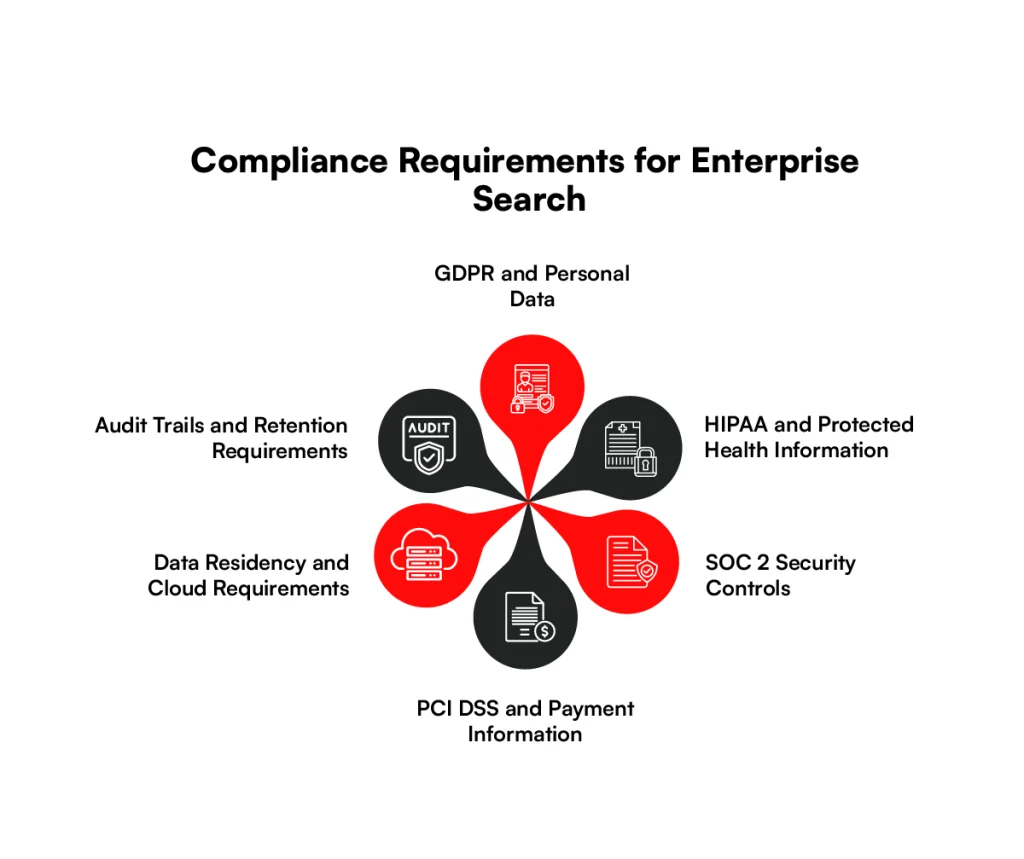
1. GDPR and Personal Data
Personal data does not stop being personal data when it enters a search index. Names, contact information, customer records, and similar details may still fall under GDPR.
One area to watch is old data. A record may change or disappear in the source system while an indexed version remains searchable.
2. HIPAA and Protected Health Information
For healthcare organizations, the concern is straightforward: search should not become another route to protected health information.
If someone cannot access a patient record at its source, finding the same information through search creates an access problem.
3. SOC2 Security Controls
SOC 2 is different from a privacy law such as GDPR. Depending on the scope of the organization’s examination, enterprise search may sit within existing controls for access, monitoring, system changes, and incident handling. The search environment then needs to fit those established processes.
4. PCI DSS and Payment Information
Payment information deserves a different question: does it need to be searchable at all? In plenty of cases, the answer may be no. When cardholder data does pass through or remain within search systems, the relevant PCI DSS requirements do not disappear because the information has moved away from the payment application.
5. Data Residency and Cloud Requirements
The location of the original file does not necessarily tell you where its searchable copy lives. An index may sit in another cloud region, and backups or connected services can introduce other locations. That matters for businesses with rules governing where certain information can be stored or processed.
6. Audit Trails and Retention Requirements
There is no useful reason to keep every search record forever. Some records may need to remain available for an investigation, audit, or regulatory requirement. Others may have a shorter useful life. Retention should follow the requirements attached to the data and the company’s own policies.
For enterprise search security, the practical point is simple: check the actual flow of company information instead of relying on the compliance claims of the search platform.
How Often Should Enterprise Search Security Controls Be Reviewed?
A permission change should not have to wait for the next security review. The same goes for a new connector, data source, or AI search feature.
Each change can affect what people are able to find, so enterprise search security should be checked when the search environment changes. Some areas, such as search activity and permission updates, also need to be watched as they happen.
| Security control | What to check | When to review |
| Access permissions | Roles, groups, and ACLs | After role or organizational changes |
| Permission synchronization | Access in the source compared with the search index | Monitor continuously |
| Sensitive data | PII and restricted fields in the index | When sources or schemas change |
| API security | Keys, tokens, and permissions | After integration changes |
| Encryption | Keys and certificates | According to the rotation schedule |
| Search activity | Unusual queries or access patterns | Monitor continuously |
| Vulnerabilities | Search infrastructure and APIs | During planned security testing |
| AI search | Retrieval and response permissions | Before and after AI feature changes |
The timing should follow what is happening in the search environment. If a new connector starts pulling customer data, for example, its permissions deserve attention then, not three months later because that is when the next review happens.
Scheduled audits still have a place, but change-based checks can catch problems much closer to when they are introduced.
What Enterprise Search Security Costs
The cost of enterprise search security depends on the systems, data, and access controls involved. Below are the main factors that affect the implementation cost.
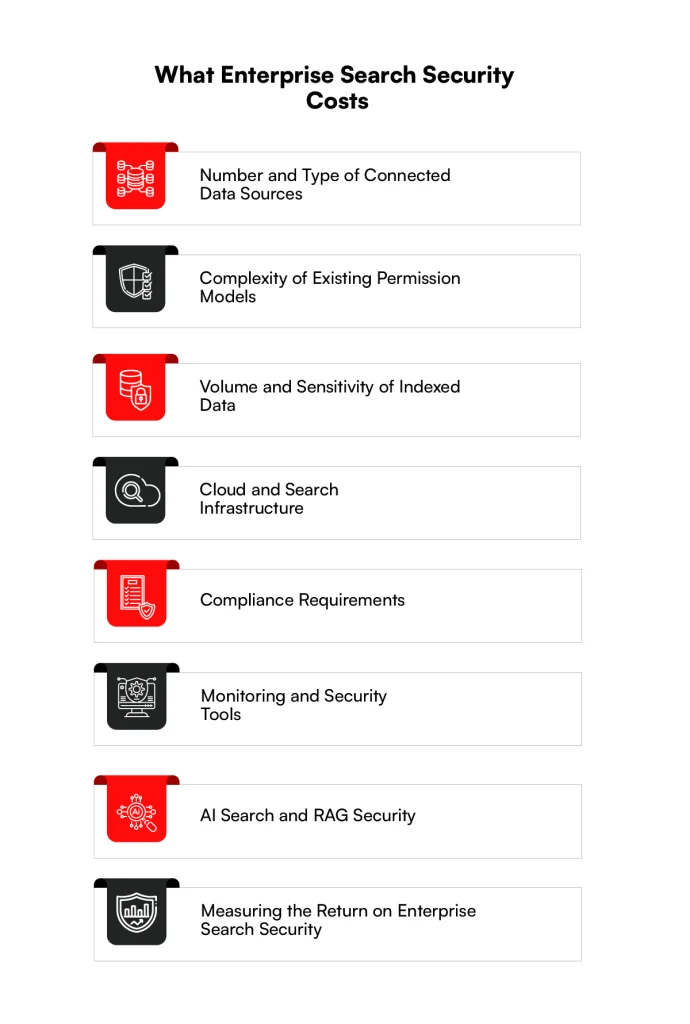
1. Number and Type of Connected Data Sources
Each source brings its own way of storing data and handling access. Adding another shared drive may be fairly straightforward.
Connecting an ERP, CRM, document repository, and several custom applications can involve considerably more work, especially when each one handles permissions differently.
2. Complexity of Existing Permission Models
Existing access rules can have a large effect on the project. Some companies rely mainly on roles and groups. Others have years of document-level permissions, exceptions, inherited access, and custom rules that need to carry into search. The second environment takes more work to map and test.
3. Volume and Sensitivity of Indexed Data
A large index does not automatically mean a large security bill. What is inside it matters too. Customer PII, financial records, health information, or other restricted data may require additional handling that ordinary internal documents do not.
4. Cloud and Search Infrastructure
Search infrastructure brings its own expenses. Compute, storage, network traffic, private connectivity, backups, encryption keys, and separate environments can all affect the final enterprise search development cost.
The search technology matters too, particularly when teams are comparing OpenSearch and Elasticsearch for their search environment.
5. Compliance Requirements
Regulated information usually means more work around access, records, retention, and evidence for audits. The requirements depend on the data involved, so a company handling payment or health information may face different work from a business searching general internal documents.
6. Monitoring and Security Tools
Some organizations already have logging, SIEM, identity, and security tools that can include enterprise search. Others need new integrations or additional tooling.
Cost here often depends on how much of the existing security setup can be reused.
7. AI Search and RAG Security
Adding RAG or AI-generated answers changes the scope again. Teams need to account for the information retrieved for each user and what can appear in a generated response.
Agents that can connect to other applications or take actions bring further permission and audit requirements.
8. Measuring the Return on Enterprise Search Security
ROI is easier to judge against work the business can actually measure. Look at time spent fixing permission issues, preparing evidence for audits, investigating search-related incidents, and manually managing access.
Security incidents and compliance remediation can also carry costs, although avoided losses should be treated as risk reduction rather than guaranteed savings.
The useful comparison is the cost of maintaining secure enterprise search against the security and administrative work the organization would otherwise continue to carry.
Enterprise Search Security Architecture Example
A secure enterprise search setup can be easier to understand by following the data. Information starts in the systems the business already uses and passes through several checks before it reaches the person searching.
The access rules attached to that information need to stay with it throughout that path.
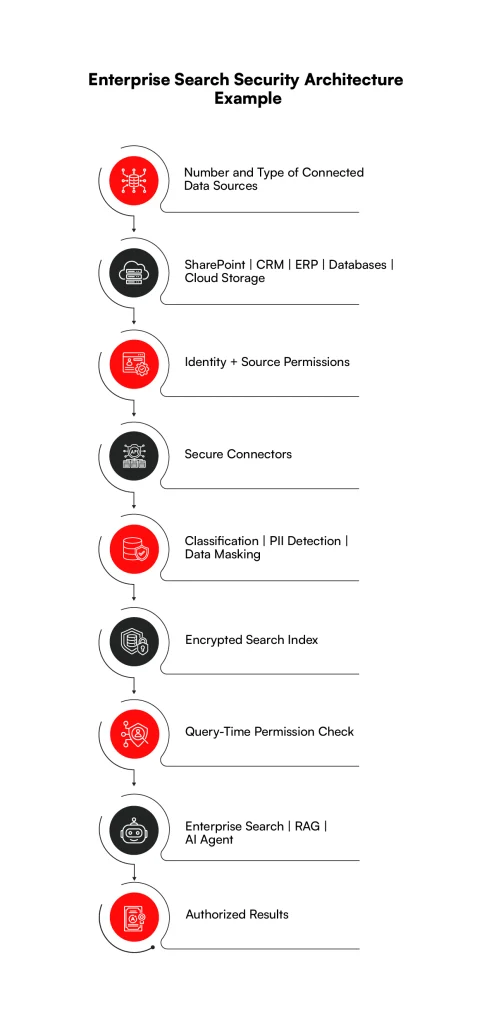
The flow starts with the source systems rather than the search box. A document may already have an owner, user group, or access list before search ever touches it. Those details need to come across with the content when a connector sends it for indexing.
Before information reaches the index, sensitive fields can be identified and handled according to company rules.
The index then holds the searchable content, while permission checks decide what can be returned for a particular user. The same principle applies when RAG or an AI agent retrieves from that index.
There is another flow happening in the background:
Audit Logs → SIEM → Alerts → Incident Response
Search activity and security events can feed into the systems a company already uses for monitoring and investigation. This keeps enterprise security for search connected with the wider security operation instead of treating search as a separate environment.
For retail catalog use cases, the serving architecture does not always need to depend on a traditional search index.
Arvyn uses change data capture and a near-real-time read layer to serve catalog browse, facets, and preview without rebuilding an index after each catalog change.
Planning a secure enterprise search setup?
Talk to RBMSoft about your data, integrations, and access requirements.
Discuss Your RequirementsHow RBMSoft Approaches Secure Enterprise Search
RBMSoft starts with the systems already holding company information. That includes the permissions attached to the data, the connectors moving it, and the search index where it becomes available.
The aim is to keep those existing access rules intact instead of creating a separate set of rules only for search.
1. Search Architecture and Security Assessment
The first questions are practical. Where is the information coming from? How does it reach search? Which users and applications can retrieve it?
Following that route can uncover gaps around connectors, indexed fields, permissions, or sensitive records before they become harder to fix.
2. Identity and Permission Integration
A person who cannot open a document in its original system should not suddenly find it through search. RBMSoft supports existing permission models and role-based access control so access can follow the user into the search experience.
This can involve existing roles, groups, and document permissions rather than maintaining a second permission structure for search.
3. Secure Search Index and API Implementation
Connectors and APIs sit between business systems and the search index, so they are part of the security design too. RBMSoft builds custom connectors and API-based ingestion for enterprise search environments.
The implementation can account for encrypted data movement, index access, service accounts, and the permissions given to connected applications. These controls help extend enterprise security for search across the systems connected to the index.
4. AI Search and RAG Security
RAG introduces another place where permissions have to hold. A restricted document should be filtered before its content reaches the model, rather than relying on the generated answer to hide information afterward.
RBMSoft’s work with semantic and conversational enterprise search provides a base for applying those access rules to AI-powered retrieval.
5. Monitoring, Auditing, and Compliance Support
Permissions and connected systems change after search goes live. Audit records help teams see what was searched, investigate access issues, and trace changes when something looks wrong.
RBMSoft’s enterprise search offering includes auditing and security controls associated with GDPR and HIPAA requirements. Monitoring can then be tied back to the same search environment instead of being handled as a separate process.
For organizations assessing how RBMSoft can help to secure enterprise search and information, the focus is on the points where access can change: source permissions, connectors, indexing, retrieval, and AI-generated responses.
Conclusion
Enterprise search is useful because it brings information from different business systems into one place. That same convenience creates a security responsibility. A document, record, or field should not become easier to access simply because it has moved into a search index.
A secure enterprise search setup keeps the original access rules connected to the information as it moves through connectors, indexes, APIs, and AI-powered search.
As systems and permissions change, those controls need to change with them rather than relying on what was configured when search first went live.
For businesses working on enterprise search and information security, the best place to start is the data itself. Know what is being indexed, who should be able to find it, and where access could change between the source and the final search result. That gives security teams a clearer basis for deciding what needs attention next.
Is your enterprise search exposing more information than it should? Talk to RBMSoft about building secure enterprise search around your existing data, systems, and access controls.
FAQs
1. What is secure enterprise search?
Secure enterprise search gives employees one place to search company information without giving them access to material they could not normally open.
If a finance file is restricted to the finance team in its original system, it should remain restricted when it appears in search. Permissions, encryption, masking, and audit records help maintain those boundaries.
2. How do you secure enterprise search results?
The permissions already set in company systems are a good place to begin. When information is indexed, those access rules need to follow it.
If someone’s role or group changes, search should reflect that change as well. MFA, RBAC, document-level permissions, and encryption can then protect other parts of enterprise search security.
3. What are the best practices for securing enterprise search integrations and third-party components?
Connectors often need access to company systems so they can collect information for search, but they should not receive more access than the job requires. API keys and tokens also need protection, along with the connections carrying the data.
When an integration changes or a new third-party service is connected, check what information it can reach and whether those permissions still make sense.
4. How does enterprise search differ from traditional document management systems?
A document management system usually controls information stored within that system. Enterprise search connects multiple sources, such as CRM, ERP, databases, cloud storage, and document repositories. Enterprise search and information security must therefore account for permissions and sensitive data coming from different systems.
5. What should organizations consider before implementing enterprise search?
Check what information will be indexed, where it comes from, who can access it, and how source permissions will reach the search platform.
Enterprise search and information security should also cover sensitive data, APIs, encryption, monitoring, compliance requirements, and third-party connectors.
6. What are the best practices for securing enterprise search integrations and third-party components?
Give connectors and service accounts only the access they need. Protect API credentials and tokens, encrypt connections, restrict network access, and review what data each integration can retrieve. Changes to third-party connections should also trigger another security check.
7. How do audit logs improve enterprise search security and compliance?
Audit logs provide a record of search activity and system events. Security teams can use them to investigate unusual queries, failed access attempts, permission changes, or administrative activity.
Those records may also provide evidence needed during internal or compliance audits.
8. How can AI improve insider threat detection in enterprise search systems?
Search activity can be analyzed for behavior that differs from established usage patterns, such as unusual query volumes or repeated attempts to reach restricted information.
Any automated detection still needs appropriate rules, review, and context before activity is treated as a security incident.
9. How should organizations secure AI-generated summaries in enterprise search?
Permission checks should happen before documents are supplied to the model. Enterprise AI search security also needs to account for the generated response, prompt and query records, sensitive retrieved content, and any tools an AI agent is permitted to use.
10. Which compliance frameworks and standards apply to enterprise search security?
The answer depends on the information being searched and the organization involved. Enterprise search and information security may need to account for GDPR, HIPAA, PCI DSS, and applicable SOC 2 controls based on the data and systems involved.
11. What are the leading vector search options for enterprise security?
There is no single vector search option that fits every enterprise environment. Teams should compare permission filtering, encryption, identity integration, private networking, audit capabilities, deployment requirements, and how each option works with the company’s existing search and AI architecture.
12. How much does it cost to implement enterprise search security?
The cost to implement enterprise search security depends on the number of connected systems, existing permission models, data sensitivity, infrastructure, compliance needs, monitoring requirements, and AI or RAG features. A security and architecture assessment is usually needed before estimating project cost.