





Table of Contents
Key Takeaways:
- Enterprise search centralizes content through indexing, giving organizations greater control over search speed, relevance, ranking, and personalization.
- Federated search queries multiple systems directly, allowing businesses to search distributed data without moving all underlying information into a central repository.
- Neither approach is universally better. The right choice depends on data freshness, security, system architecture, scalability, and how employees use enterprise information.
- AI can make enterprise and federated search more intelligent by understanding intent, context, natural-language queries, semantic relationships, and relevant information across structured and unstructured data.
- Hybrid architectures can combine both approaches, using centralized indexing for content that benefits from it and federated retrieval for data that needs to remain in its source systems.
Think about how many systems your company runs. Salesforce for customers. Confluence for technical docs. An HR platform for employee records, ServiceNow for tickets, an ERP for the money side.
Then the shared drives, the cloud storage, a database or two, and those older systems nobody opens unless they have no choice.
Most days that’s fine. People know which tool to open. Trouble starts when one question needs several of them. A support agent gets a customer on the line and needs account details from Salesforce, a complaint from months back in ServiceNow, and a product doc from SharePoint.
Or someone’s hunting for a company policy, with part of it in the HR system and the rest in a knowledge base article. The information exists. You just have to track it down, tab after tab.
That’s why enterprise search and federated search keep coming up. Both try to give people one search experience, but they get there differently.
Enterprise search generally pulls content into a central search index. Federated search sends your query to multiple systems and collects whatever they send back.
Which one is better? It depends. Where does your data live? How often does it change? How strict are your access requirements? How much control do you want over relevance and ranking? Settle those first.
Then look at what each architecture does behind the search box. Start with enterprise search.
What is Enterprise Search?
Enterprise search is a search layer built to help employees find information spread across an organization’s internal systems.
The important part is that users do not necessarily have to know where the information is stored. Instead of opening SharePoint for one document, Salesforce for customer information, and a knowledge base for another answer, they can search through one interface.
Consider a support team handling hundreds of customer requests every day. An agent receives a question about a product feature. The answer could be sitting in a product manual, a previous support ticket, an internal FAQ, or a troubleshooting document.
An enterprise search system can connect those sources to a central search index. The system crawls or ingests content, processes it, applies metadata and permissions, and creates a searchable representation of the information.
When the agent searches for the answer, the search engine works against that index rather than asking every source system to perform the search at that moment. That distinction has a practical benefit: the search engine has much more control over how results are retrieved and ranked.
With AI-powered enterprise search, this process can go further by understanding user intent and context, helping surface more relevant information instead of relying only on exact keyword matches.
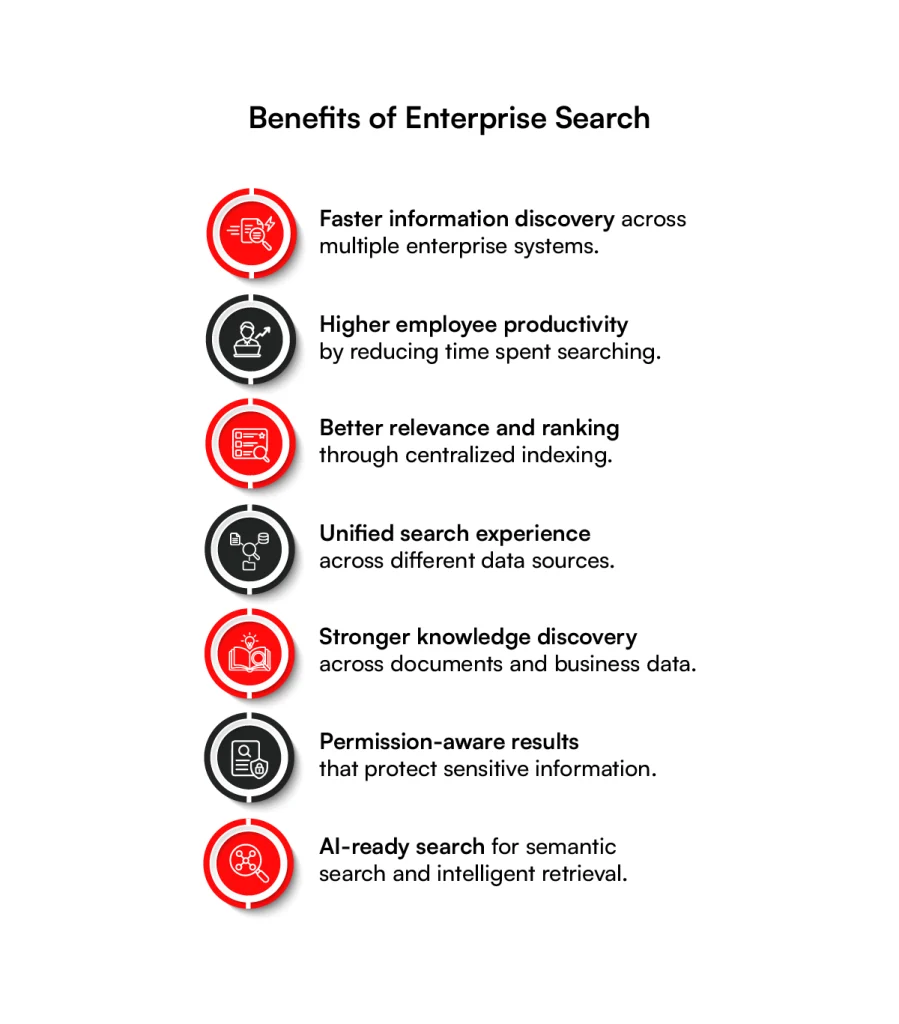
The main components behind enterprise search:
An enterprise search setup usually involves several moving parts:
- Connectors and data ingestion: These connect the search platform with systems such as SharePoint, CRM platforms, databases, document repositories, knowledge bases, and business applications.
- Indexing: Content is processed and stored in a search index so it can be retrieved quickly when someone enters a query.
- Permissions: The search system needs to understand who can access what. A document should not appear in someone’s results simply because it exists in the index.
- Ranking and relevance: The platform determines which results should appear first using factors such as keywords, metadata, user intent, content quality, freshness, and, increasingly, semantic understanding.
- Search experience: This is the part employees actually see. It can include filters, facets, suggestions, natural-language queries, personalized results, and other features.
For example, an employee searching for “parental leave policy” should ideally see the current HR policy before an outdated document from three years ago, even if both contain the words “parental leave.”
That ability to control how information is interpreted and ranked becomes particularly important as search moves beyond simple keyword matching.
What is Federated Search?
Federated search takes a different route. Instead of bringing all the underlying content into one central index, the search system sends the user’s query to multiple source systems.
Those systems perform their own searches, return results, and the federated layer combines them into a single experience.
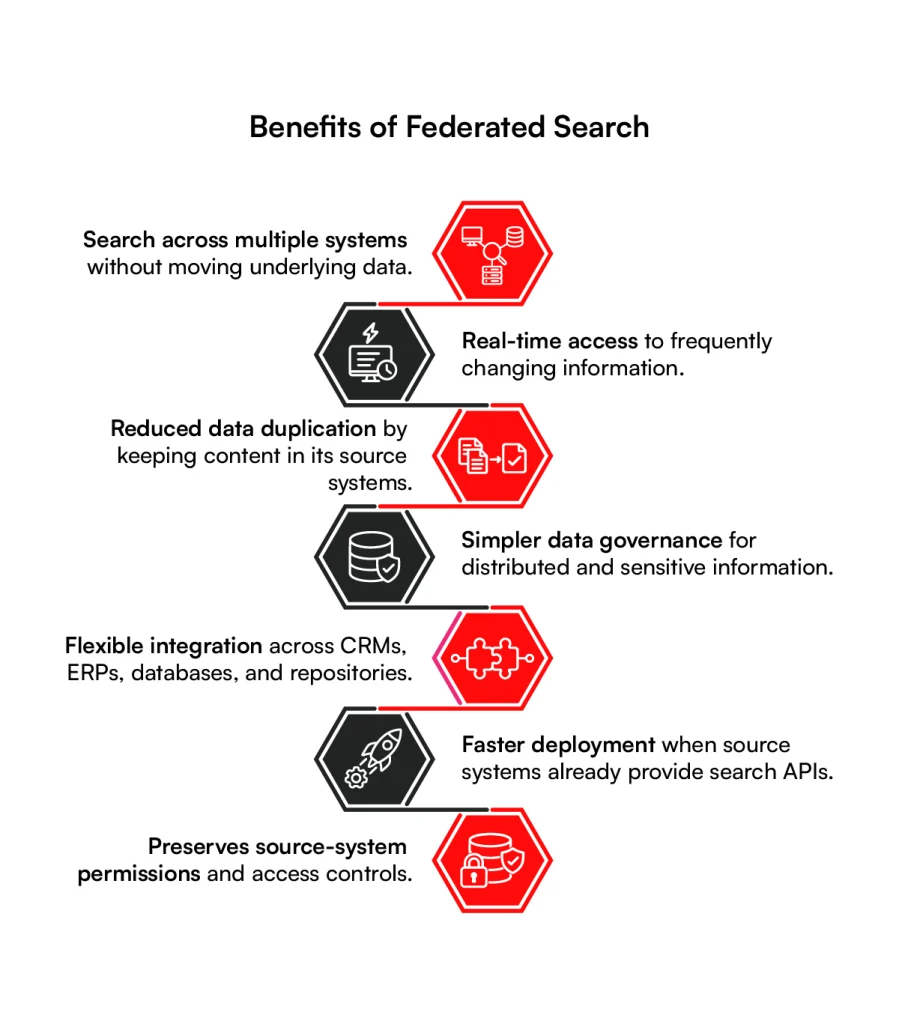
Imagine an employee searches for: “company’s account renewal issues”.
The information could be spread across Salesforce, ServiceNow, an internal document repository, and an ERP. A federated search system can send the query to each relevant system.
Salesforce may return account records, ServiceNow may return support tickets, the document repository may return account-related documents, and the ERP may return transaction information.
The federated layer then brings those responses together, removes obvious duplicates, normalizes the results, and presents them to the user. The data itself can remain in the original systems. That is one of the biggest reasons organizations consider federated search.
If a company has ten systems containing sensitive or frequently changing information, copying everything into another centralized repository may not be desirable.
Federated search allows the organization to search across those systems while keeping the underlying data where it already lives. But there is a trade-off.
The search layer has less control over how each source ranks its own results, because several systems are responding to the same query. And that difference starts to matter when you compare the two architectures side by side.
Find the Right Search Approach
Not sure whether enterprise or federated search fits your environment? Get expert guidance based on your data, systems, and business needs.
Help Me Choose
Difference between Federated Search vs. Enterprise Search
At a high level, enterprise search is built around centralized indexing, while federated search is built around distributed retrieval.
That single architectural difference affects speed, freshness, relevance, cost, security, and scalability.
| Factor | Enterprise Search | Federated Search |
| Data access | Content is crawled, ingested, and made searchable through a central index | Query is sent to multiple source systems, and results are returned from those systems |
| Search speed | Usually faster because queries run against a prepared index | Can be slower because multiple systems must respond before results are assembled |
| Data freshness | Depends on how frequently the index is updated | Can provide highly current results because searches happen against source systems |
| Relevance and ranking | Greater control over ranking, relevance models, personalization, and semantic search | Ranking often depends partly on how individual source systems return results |
| Deployment complexity | Higher initial effort because connectors, indexing, synchronization, and governance must be established | Often quicker to introduce because data does not need to be fully centralized |
| Infrastructure cost | Can require more infrastructure for indexing and maintaining search data | Lower initial storage requirements, although API and source-system costs can add up |
| Security and access control | Permissions can be synchronized into the central index | Source systems remain responsible for their own access controls, with the federated layer enforcing or respecting those permissions |
| Scalability | Scales well once the indexing architecture is mature, but adding sources requires integration work | New sources can often be added through additional connectors or APIs, depending on their search capabilities |
| Best suited for | Large volumes of internal content where speed, relevance, and a unified search experience matter | Distributed, frequently changing, regulated, or externally hosted data where keeping information at the source is important |
The table makes the trade-off look straightforward, but real enterprise environments are rarely that clean. A business may have product documentation that changes once a week, customer records that change every few seconds, compliance documents that need strict access controls, and third-party data that the organization cannot or does not want to copy.
That is why the better question is not simply “Which one is better?” It is: “Which architecture makes sense for the way your information actually behaves?”
Enterprise Search Examples and When to Use for Businesses?
Enterprise search becomes particularly attractive when employees repeatedly search across large volumes of internal information.
Take an organization with thousands of technical documents, support tickets, policies, product specifications, and knowledge articles. If employees search this information all day, every day, response time matters.
A central index means the search engine has already processed much of the content before the user submits a query. It does not need to wait for five different systems to interpret and answer the same request.
There is another advantage that is easy to overlook: consistency. When all searchable content is handled through the same search layer, the organization has more control over ranking.
It can decide that newer policies should outrank older ones, that certain document types should receive more weight, or that results should change depending on a user’s role. That becomes even more useful when the organization introduces semantic search or AI-powered retrieval.
A user does not always search using the exact words used in a document. Someone may type “how do I get money back for a cancelled order” even though the company’s documentation uses the phrase “refund process for order cancellation.”
A search engine with semantic and contextual capabilities can understand that those requests are related instead of relying only on exact keyword matches.
The downside is that this control requires work. Building connectors, maintaining indexes, synchronizing permissions, handling updates, and tuning relevance all take time and resources. So enterprise search tends to make more sense when search quality and performance justify that investment.
Federated Search Examples and When to Use by Businesses?
Now consider a very different environment. Suppose a company has several systems that are independently managed, contain constantly changing information, or cannot easily be copied into a central repository.
The organization may want users to search across them without creating another large data store.
Federated search can be a practical answer. One example is a business that needs to search internal information alongside third-party sources. A legal team might need internal case documents together with external legal databases.
A travel company might need to combine information from multiple supplier systems. An ecommerce platform may need to query product information across different catalogs or services.
In these situations, keeping information at the source can simplify governance. There is also a data residency angle. Some organizations operate under policies or regulations that restrict where certain information can be stored or replicated.
Creating a central copy of everything may introduce unnecessary risk or compliance work. Federated search avoids that particular problem by retrieving information from the source instead of requiring all content to be moved into one index.
It can also be faster to get started when the underlying systems already provide usable search APIs.
But there is a catch. If one source returns excellent results while another returns poorly ranked or poorly structured results, the federated layer has to work harder to make the final experience feel consistent.
Network delays can also affect response time. In other words, federated search can reduce the need to centralize data, but it does not remove the complexity of connecting different systems.
Search Smarter Across Your Business
Connect multiple data sources while maintaining the relevance, security, and access controls your organization requires.
Explore My Search OptionsHow to Choose between Federated Search vs. Enterprise Search and which is better?
Start with the data, not the search product. A surprisingly common mistake is to choose a search platform first and then try to make the organization’s information fit it.
The better approach is to understand the information landscape before deciding how retrieval should work.
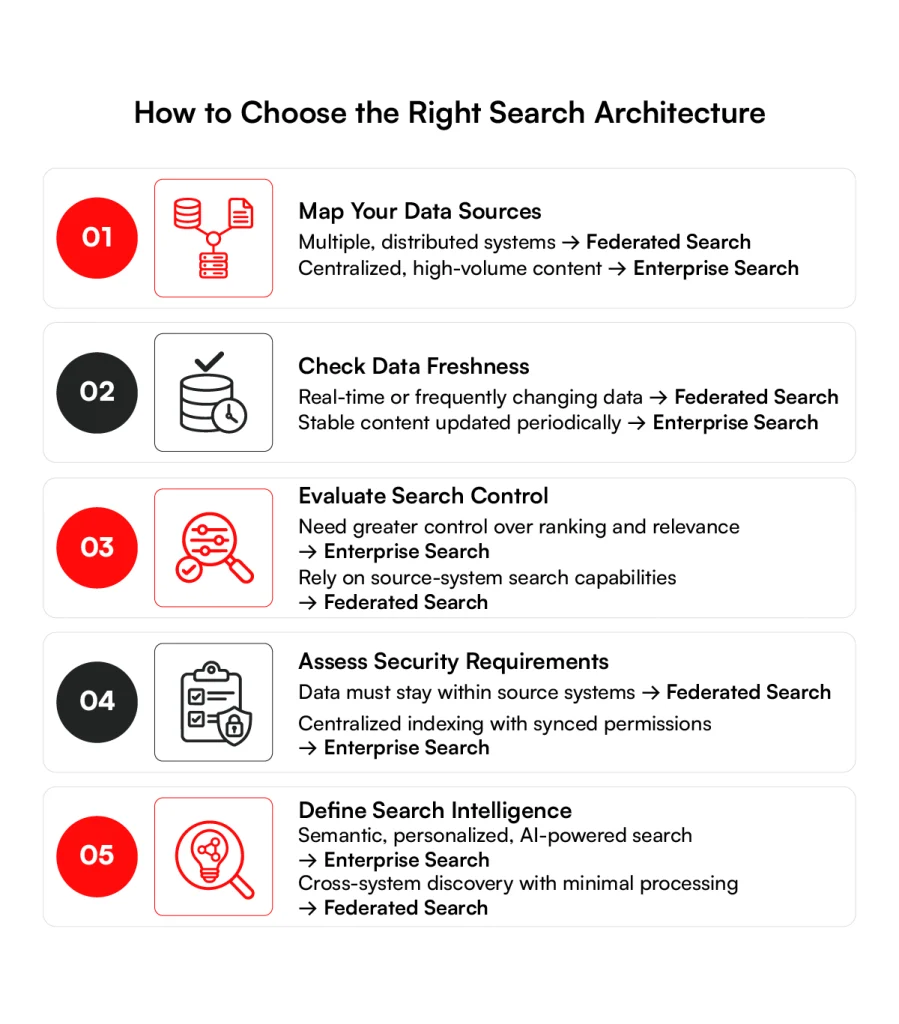
1. Map where information actually lives
Make a list of the systems employees use when they are trying to answer real questions.
Do not stop at the official data architecture diagram. Talk to the people doing the work.
A sales representative may rely on Salesforce and an internal pricing portal. A support agent may use ServiceNow, SharePoint, and a product database. Finance may depend on an ERP, spreadsheets, and a document management system.
The unofficial sources matter because those are often where search problems become visible.
Once you know where the information lives, the next question is whether that information needs to be copied, indexed, or retrieved directly.
2. Separate stable content from live information
Not every data source needs the same search architecture. A product manual that changes once a month can comfortably be indexed and refreshed on a schedule.
A stock availability record that changes every few seconds is a different story. For the first type, centralized indexing may provide an excellent experience. For the second, direct retrieval may be more appropriate.
Many enterprise environments will therefore end up with a mixture rather than one architecture applied everywhere.
3. Look closely at permissions
Search is only useful when users can trust what it shows them. Imagine an employee searches for a customer name and suddenly sees a confidential contract simply because that document exists in an indexed repository. The search engine may have found the information correctly, but the system has failed at access control.
Enterprise search and federated search handle this challenge differently, but neither gets a free pass. An enterprise search platform needs reliable permission synchronization so the index reflects who can access what.
Federated search can rely more heavily on source-system permissions, but the orchestration layer still needs to make sure restricted results do not leak through the unified interface. This is one of the areas that deserves attention before implementation, not after launch.
4. Decide what “good search” means for your users
Fast search is not automatically good search. If an employee searches for “customer onboarding issue” and receives 500 technically related documents, the system has not really solved the problem. You need to define what relevance means in your environment.
Should recent documents rank higher? Should content from the employee’s department receive more weight? Should product names, customer names, or case numbers receive special treatment? Should the system understand synonyms and natural-language questions?
These decisions become increasingly important when search is being used as a foundation for AI assistants and retrieval-augmented applications.
5. Consider how much intelligence you actually need
A basic enterprise search implementation may focus on keyword matching, filters, metadata, and permissions. A more advanced environment may require semantic search, intent detection, personalization, entity recognition, natural-language queries, or conversational search.
That distinction matters because you are no longer designing only a document retrieval system. You are designing a way for employees to interact with organizational knowledge. Once those requirements are clear, the architecture becomes much easier to evaluate.
How RBMSoft can help an Organization in Implementing Enterprise Search
This is where the technology partner matters because enterprise search rarely involves a clean set of modern systems. RBMSoft approaches enterprise search as an integration and discovery problem rather than simply adding a search box to an application.
Its capabilities span federated, cognitive, semantic, personalized, voice, and conversational search, along with integration frameworks for connecting enterprise content sources.
Our federated search capabilities can connect multiple enterprise systems while supporting cross-platform content aggregation, normalization, access permissions, and scalable connectivity.
Its semantic and cognitive search capabilities can help organizations move beyond exact keyword matching by understanding user intent and context, making it easier to surface relevant information from different enterprise sources.
We also provide AI integration services to embed AI-powered search into the applications, portals, and business systems teams already use.
Organizations can introduce intelligent search capabilities without requiring employees to change the tools or processes they already rely on, By connecting search with existing data sources and workflows,
The technology stack can be tailored to the organization’s existing environment, with experience across platforms such as Coveo, Lucidworks, Algolia, OpenSearch, and Elasticsearch, as well as AWS, Microsoft Azure, and Google Cloud.
Whether a business needs centralized indexing, federated retrieval, semantic search, or permission-aware AI-powered discovery, RBMSoft can help build an architecture around its data, systems, and search requirements.
Ready to Modernize Enterprise Search?
From federated and semantic search to AI-powered retrieval, build a search experience that works across your enterprise ecosystem.
Get StartedConclusion
At first glance, enterprise search and federated search can look like competing solutions. Look underneath the interface, however, and the difference becomes clearer.
If your information is distributed across systems that need to remain independent, change frequently, or come with data residency constraints, federated search may be the more practical choice.
And if your environment contains both types of information, a hybrid architecture can bring the two approaches together.
The most useful search architecture is ultimately the one that matches how your business information is stored, governed, updated, and used.
Because employees do not really care whether the answer came from an index, an API, a federated query, or a hybrid retrieval layer. They care about one thing: finding the right information when they need it.
FAQs About Federated Search vs Enterprise Search
1. What is the difference between federated search and enterprise search, and which approach is right for my business?
The key difference: Federated Search vs. Enterprise Search is where and when information is retrieved. Enterprise search typically indexes content into a central search platform, while federated search queries multiple source systems directly.
Enterprise search is often better for large volumes of internal content where speed and relevance are priorities. Federated search can be more suitable when data needs to remain in its original systems.
2. What is the ROI of implementing federated search or enterprise search across multiple data sources?
ROI can come from reducing the time employees spend looking for information, improving productivity, reducing duplicated work, and helping users resolve customer or operational issues faster.
The actual return depends on search volume, the number of systems involved, implementation costs, and how much time employees currently lose navigating disconnected data sources.
3. How does federated search help enterprises search across multiple systems without moving the underlying data?
Federated search sends a user’s query to connected systems such as CRMs, ERPs, databases, knowledge bases, and document repositories.
Each system returns relevant results, which the federated layer combines into a unified search experience. The underlying information remains within its original system rather than being copied into a central index.
4. How do I choose the right enterprise search or federated search platform for a large organization?
Start by evaluating your data sources, search volume, security requirements, data freshness, integration needs, scalability, and relevance requirements.
Also consider whether the platform supports semantic search, AI-powered retrieval, personalization, analytics, and existing enterprise technologies. For Federated Search vs. Enterprise Search, the architecture should ultimately match how your organization’s data is stored and accessed.
5. What enterprise systems and data sources can federated search integrate with?
Federated search can integrate with systems such as Salesforce, ServiceNow, SharePoint, enterprise resource planning platforms, databases, knowledge bases, document repositories, cloud storage, and third-party data sources.
The exact integrations depend on the platform’s available connectors, APIs, and the search capabilities exposed by each source system.
6. How does federated search handle security, permissions, and compliance across different data sources?
Federated search can respect permissions maintained by individual source systems, so users only receive information they are authorized to access.
However, the federated layer must also correctly manage authentication, authorization, encryption, audit requirements, and result filtering. Security should therefore be designed into the architecture rather than added after implementation.
7. How can AI help enhance federated search and enterprise search?
AI can improve search by understanding user intent, recognizing entities and relationships, interpreting natural-language questions, and retrieving contextually relevant information.
Semantic search, machine learning-based ranking, and generative AI can also help users move from simply finding documents to receiving more useful answers from enterprise knowledge.
8. What are the hidden costs and technical challenges of implementing enterprise or federated search?
Costs can extend beyond the search platform itself. Organizations may need to account for connector development, data preparation, indexing infrastructure, API usage, security integration, permission synchronization, monitoring, relevance tuning, maintenance, and ongoing optimization.
Federated search can also face challenges such as inconsistent source-system APIs, response latency, and differences in how individual systems rank results.
9. Can AI-powered enterprise search provide accurate answers across structured and unstructured enterprise data?
Yes, when the underlying search architecture, data quality, permissions, retrieval mechanisms, and AI models are properly designed.
AI-powered search can combine structured information from databases and business systems with unstructured content such as documents, knowledge articles, and support tickets. Retrieval quality and source governance remain critical to producing accurate answers.
10. What does a modern federated search and enterprise search architecture look like?
A modern architecture typically includes data connectors, APIs, indexing or retrieval layers, access-control mechanisms, relevance and ranking capabilities, analytics, and a unified search interface.
AI capabilities such as semantic retrieval, vector search, natural-language processing, and retrieval-augmented generation can be added depending on the organization’s requirements. Hybrid architectures can combine centralized indexing with federated retrieval where appropriate.
11. How long does it typically take to implement federated or enterprise search across an organization?
Implementation time varies significantly based on the number of data sources, integration complexity, security requirements, data volume, customization, and AI capabilities required.
A focused implementation involving a few well-supported systems may take weeks, while an organization-wide deployment involving many legacy systems, complex permissions, and extensive relevance tuning can take several months.