



Quick Summary:
- Ecommerce architecture is a five-layer system: presentation, business logic, data, integration, and infrastructure. Every performance and scaling decision traces back to how these layers are built.
- Monolithic setups fit stores under $1M. Headless commerce suits $5M to $20M brands. Composable stacks are built for enterprise scale.
- Implementation costs run $15,000 to $50,000 for small stores and $500,000 or more for enterprise builds. Always budget for training, API tooling, and load testing on top.
- Over 80% of data migration projects exceed time or budget constraints. Plan the rollback before you plan the deployment.
- Headless commerce without server-side rendering kills SEO. One documented case saw a 30% organic traffic drop within two weeks of launching on client-side rendering alone.
- 80% of retail businesses have adopted or are actively planning composable commerce, but only 2% describe themselves as fully composable. Most stores are still in mid-transition.
- Retailers with AI-capable architecture saw 14.2% sales growth between 2023 and 2024, compared to 6.9% for those without. AI is now an architecture decision, not just a marketing tool.
- Load test at 10x peak traffic before every major release. Blue-green deployment and a tested rollback plan are non-negotiable at any store size.
Your ecommerce store is not just a website. It’s a system. Every page load, checkout process, and Black Friday traffic spike runs on a technical foundation you either designed intentionally or inherited by default.
That foundation is your ecommerce architecture, and it determines how fast your store loads, how much traffic it handles, how quickly your team ships updates, and how much a bad deployment costs you at the worst possible moment.
Despite having good products and strong marketing, many businesses hit a wall because the architecture underneath can’t support the business on top of it. Plugins conflict. Databases lock under load.
A headless migration tanks organic traffic because nobody configured server-side rendering. A composable build blows the budget because APIs got scoped after the build started.
This guide covers every major ecommerce architecture type, the five layers every serious store runs on, verified costs by revenue size, a 13-step implementation checklist, the failure patterns that kill projects, and what top-performing stores are building in 2026. Every stat is sourced. Every recommendation ties to real order volumes and real budgets.
What is Ecommerce Architecture?
Ecommerce architecture is the technical blueprint that connects your storefront to everything running behind it. It defines how your product pages, checkout flow, inventory data, payment systems, and customer information all talk to each other.
Think of it like the floor plan of a store. If the layout is smart, customers find what they need fast and check out without friction. If it’s a mess, they leave. Research shows that 76% of users abandon sites with slow load times or unclear navigation.
A solid ecommerce architecture framework organizes your system into distinct layers, each handling a specific job. The most common layers are:
- Presentation — what shoppers see (product pages, cart, checkout UI)
- Business logic — what happens behind the scenes (pricing, inventory checks, authentication)
- Data storage — where product info, orders, and customer profiles live
- Search — how shoppers find products through filters, autocomplete, and recommendations
- Integrations — the connections to payment gateways, ERPs, and shipping tools
This layered approach is the foundation of every modern ecommerce platform architecture, from small online stores to enterprise retailers handling millions of transactions.
Ready to modernize your store’s foundation?
RBMSoft’s team builds scalable, future-ready ecommerce architecture for businesses at every stage.
Talk to Our Experts
Core Purpose: What Does Ecommerce Architecture Do?
Your ecommerce architecture does a lot of heavy lifting in real time. The moment a shopper clicks a product, your system has to check inventory, pull pricing rules, validate their session, and be ready to process payment all at once.
Unlike a simple website, an online store has to handle traffic spikes, like flash sales or Black Friday surges, without going down. That’s why e-commerce system architecture is designed with resilience in mind, not just speed.
When each layer handles its own job independently, you can scale just the parts that need it.
- Need more search capacity during a sale? Scale that layer.
- Payment processing slowing down? Fix it without touching the rest of the system.
This is how modern web based ecommerce architecture keeps costs in check while staying fast.
According to Baymard Institute, the average cart abandonment rate sits at around 70%, meaning most shoppers don’t complete their purchase. A well-built architectural framework of ecommerce reduces friction at checkout, which directly helps bring that number down.
Ecommerce Architecture Components
Research shows that 43% of website visitors go straight to the search bar when they land on a site, which makes your search layer one of the most business-critical parts of your entire system design.
Here’s a quick breakdown of the five core components in a modern ecommerce architecture framework:
| Component | What It Does | Common Tech |
| Presentation Layer | Product pages, cart UI, checkout experience | React, PWAs, responsive design |
| Business Logic | Pricing, inventory validation, authentication | Node.js, microservices |
| Data Storage | Product catalogs, order history, customer profiles | PostgreSQL, Redis |
| Search Engine | Filters, autocomplete, product recommendations | Elasticsearch |
| Integration APIs | Payment gateways, ERP, shipping systems | REST, GraphQL |
One of the biggest advantages of the above 5-layer modular approach: you can upgrade one layer without rebuilding everything else. That’s a major edge over older, all-in-one setups where changing one thing breaks another.
How Ecommerce Architecture Evolved: 2-Tier to Modern Frameworks
Ecommerce architecture didn’t start out this way. It evolved through three key phases:
2-Tier (Legacy): The browser talked directly to the database. Simple to build, but it falls apart fast under real traffic. A spike of even a few thousand simultaneous users could crash the whole system.
3-Tier Standard: This added a middle layer — separating the presentation, business logic, and data. It’s still the baseline for many mid-sized stores today and handles steady order volumes well.
Modern Multi-Layer Architecture: Today’s leading architectural framework of ecommerce goes further. They add dedicated layers for commerce modules like pricing engines and product catalogs, plus separate integration layers for third-party tools.
This makes it possible to build your front end using modular, composable components while keeping your backend stable and independent, which is the foundation of headless and composable commerce.
How a Layered Ecommerce Architecture Framework Works
Think of your ecommerce architecture like floors in a building. Each floor handles one job. And because each floor is separate, you can renovate one without the whole building going dark.
That’s the core promise of a layered ecommerce architecture framework: scale exactly what you need, exactly when you need it. During a flash sale, you might only need to beef up your checkout layer. Your product pages can keep humming along untouched.
Modern ecommerce platform architecture typically runs on five layers. Here’s what each one does and why it matters.
The 5 Layers of Modern Ecommerce Architecture
Layer 1: Presentation
This is everything your shoppers actually see. Product photos, descriptions, the cart, the checkout screen. If this layer is slow or confusing, people leave.
The presentation layer drives mobile traffic outcomes. Mobile devices now account for 62.3% of all ecommerce site traffic globally, so this layer has to work flawlessly on small screens.
Layer 2: Business Logic
This layer is your store’s brain. It calculates taxes, validates coupons, runs fraud checks, and confirms inventory before any order goes through. It’s invisible to shoppers, but it’s doing a lot of work behind the scenes.
This layer is what stops you from overselling during high-traffic moments, like a product drop or a holiday sale.
Layer 3: Commerce Modules
This is where your architectural framework of ecommerce gets smart. Instead of one giant system handling everything, you break it into focused modules. One handles pricing. Another watches inventory. Another manages promotions.
The real win here: if your pricing engine has a bug, you fix just that module. You don’t take down the whole store.
Layer 4: Infrastructure
Search, caching, backups, and performance monitoring all live here. This layer is what keeps your site fast when hundreds of shoppers are browsing at the same time.
During Black Friday 2024, Shopify merchants peaked at $4.6 million processed per minute. Infrastructure that can’t handle that kind of volume will fail at the worst possible moment.
Layer 5: Integrations
This layer connects your store to the outside world. Payment gateways, shipping carriers, ERP systems, accounting tools. It’s the bridge between your online store and your actual business operations.
A strong integration layer is what makes true omnichannel possible. Your in-store inventory and online inventory stay in sync. Orders flow to fulfillment automatically. Returns get logged in your accounting system without anyone touching a spreadsheet.
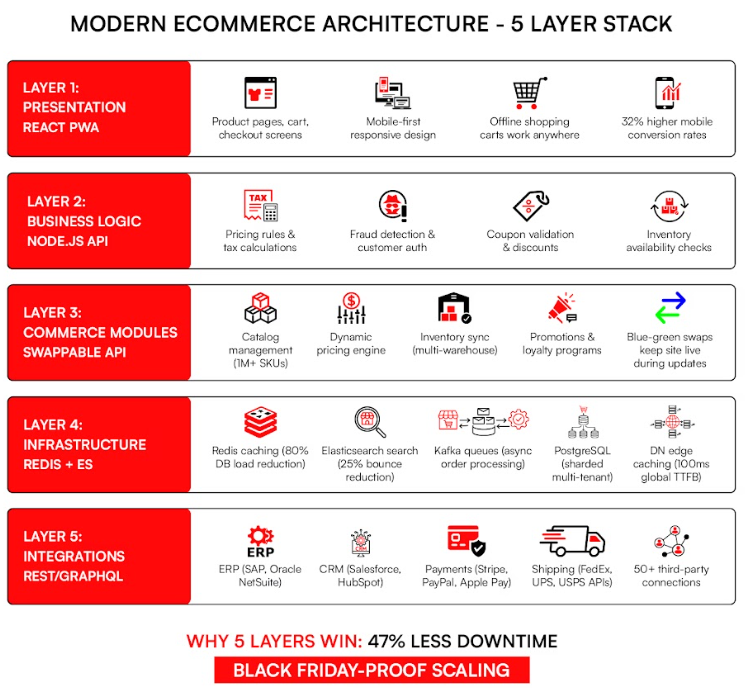
Every layer depends on the one beneath it. Get the foundation wrong and everything above it suffers. Building it right from the start is what ecommerce solutions development is fundamentally about.
The Big Advantage: Independent Scaling
Here’s what makes this ecommerce architecture framework so powerful for growing stores.
Each layer scales on its own. Got a Black Friday sale coming up? Scale your infrastructure and business logic layers ahead of time. Your presentation layer doesn’t need to change at all.
Compare that to a monolithic system, where everything is connected. Scale one part, and you’re scaling all of it, whether it needs it or not. That gets expensive fast, and it creates risk.
With a layered web-based commerce architecture, you fix bugs in one layer without touching others. You test new features in isolation. You bring in a better payment tool without rebuilding your checkout flow.
This is the foundation of a scalable ecommerce architecture framework, and it explains why composable and headless commerce are preferred choices for growing stores.
When business requirements go beyond what these approaches can support, companies often look at custom software development as a more flexible option. Knowing when to take that step, along with the time and cost involved, is important before finalizing your architecture strategy.
At millions of SKUs, a stale catalog is lost revenue at scale. Arvyn keeps your catalog data live and unified, from source system to storefront.
Get Free DemoTypes of Architectural Approaches in Ecommerce Solutions
Not every store needs the same setup. The right ecommerce architecture depends on your order volume, your team size, and how fast you plan to grow. Pick the wrong type and your site slows down under pressure. Pick the right one and scaling feels effortless.
There are three main ways to categorize ecommerce architecture types: by structure, by how the frontend and backend relate to each other, and by where everything is hosted. Let’s break each one down.
1. Architecture by Structure: Monolithic vs. Microservices
Monolithic architecture packages everything into one application. Your product pages, checkout logic, pricing rules, and database all live together and run as a single unit. It’s fast to build and easy to manage when you’re starting out.
The downside shows up when you grow. Change one part of the system and you risk breaking something else. Scaling means scaling everything at once, even the parts that don’t need it. That drives up costs and slows down your team.
Microservices architecture takes the opposite approach. Each function runs as its own independent service. Pricing is one service. Inventory is another. Search is another. They all talk to each other through APIs. Fix a bug in one service and the rest keep running.
The State of Headless 2024 confirms that nearly three-quarters of all businesses have now adopted a headless or API-first web based ecommerce architecture, representing a 14% increase from 2021. That shift reflects exactly why microservices and composable approaches have become the default for growing stores.
Which structure fits your store?
| Factor | Monolithic | Microservices |
| Daily order volume | Under 10,000 | 100,000+ |
| Dev team size | 1 to 3 people | 10+ people |
| Deploy speed | Slow (full redeploy required) | Fast (one service at a time) |
| Best for | New stores, MVP builds | Scaling retailers, enterprise |
2. Architecture by Frontend-Backend Relationship: Coupled vs. Headless Commerce
Coupled architecture keeps the frontend and backend tightly connected. The server generates full web pages and sends them to the browser. It works reliably, SEO comes built in, and a small team can manage it. But it struggles on mobile and makes it hard to build apps or expand to new channels.
Headless commerce separates the two. The backend handles data, logic, and transactions. The frontend is built independently and pulls data through APIs. One backend can power your website, your mobile app, and any other channel all at the same time.
Businesses that have implemented headless commerce report an average 20% decrease in website load times, and research confirms that every one-second improvement in page load time delivers a 2% increase in conversions.
It’s worth being clear about one thing: headless commerce does require more upfront work. Your team needs both frontend and backend skills, and SEO needs more intentional setup since dynamically loaded pages require careful configuration to be crawled properly.
But for stores that are growing fast or selling across multiple channels, the performance and flexibility payoff is significant.
| Need | Coupled | Headless Commerce |
| Mobile app support | Difficult | Built for it |
| Page speed | Standard | Faster with proper setup |
| Team skills needed | Backend-focused | Frontend + backend |
| Multi-channel selling | Limited | Strong |
3. Architecture by Deployment: SaaS, PaaS, On-Premise, and Cloud-Native
Where your ecommerce platform architecture lives matters as much as how it’s structured.
SaaS (Software as a Service) runs entirely on the vendor’s infrastructure. You pay a monthly subscription and get a fully managed platform. Think Shopify or BigCommerce. It’s the fastest way to launch and requires no server management. The tradeoff is that you’re working within the platform’s rules.
By 2025, 85% of all ecommerce application architecture is expected to be SaaS-based, and companies migrating to cloud platforms can reduce their total cost of ownership by up to 40%.
PaaS (Platform as a Service) gives you a middle ground. The vendor runs the backend infrastructure, but you build and control the frontend. More flexibility than pure SaaS, less overhead than running your own servers.
On-premise means your infrastructure runs on your own servers. You control everything. This is the right choice for businesses in heavily regulated industries — finance, healthcare, defense — where data cannot live on third-party servers. It’s the most expensive option to maintain.
Cloud-native architecture is built from the ground up to run on cloud infrastructure. It auto-scales based on real-time traffic, which makes it ideal for stores with major seasonal spikes. You’re not paying for capacity you don’t need most of the year.
| Business Type | SaaS | PaaS | On-Premise | Cloud-Native |
| Early-stage startup | Best fit | Good | Not ideal | Worth exploring |
| $10M+ revenue store | Works | Best fit | Maybe | Best fit |
| Regulated industry (Finance/Healthcare) | Not recommended | Limited | Best fit | Good |
Benefits of Ecommerce Architecture Models
Each model solves a different problem depending on where your store is right now.
- Monolithic architecture gives small teams a fast path to launch. One codebase, one deployment, low overhead. The tradeoff is a ceiling you’ll eventually hit.
- Headless commerce gives growing stores frontend flexibility without touching the backend. You move faster on design and mobile experience. The tradeoff is added engineering complexity and SEO risk if server-side rendering isn’t configured correctly.
- Composable architecture gives enterprise operations the ability to swap, scale, or replace any single component independently. The tradeoff is cost and the team size required to maintain it.
Which Type Should You Choose?
The right ecommerce architecture comes down to three things: your current order volume, your team’s technical capacity, and where you’re headed in the next two to three years.
Monolithic and SaaS work well when you’re moving fast and keeping the team lean. Microservices, headless commerce, and cloud-native are built for stores that need to scale hard, sell across channels, and move without waiting on full system deploys.
If you’re unsure where you fall, it usually makes sense to talk through your architecture with a team that builds these systems every day.
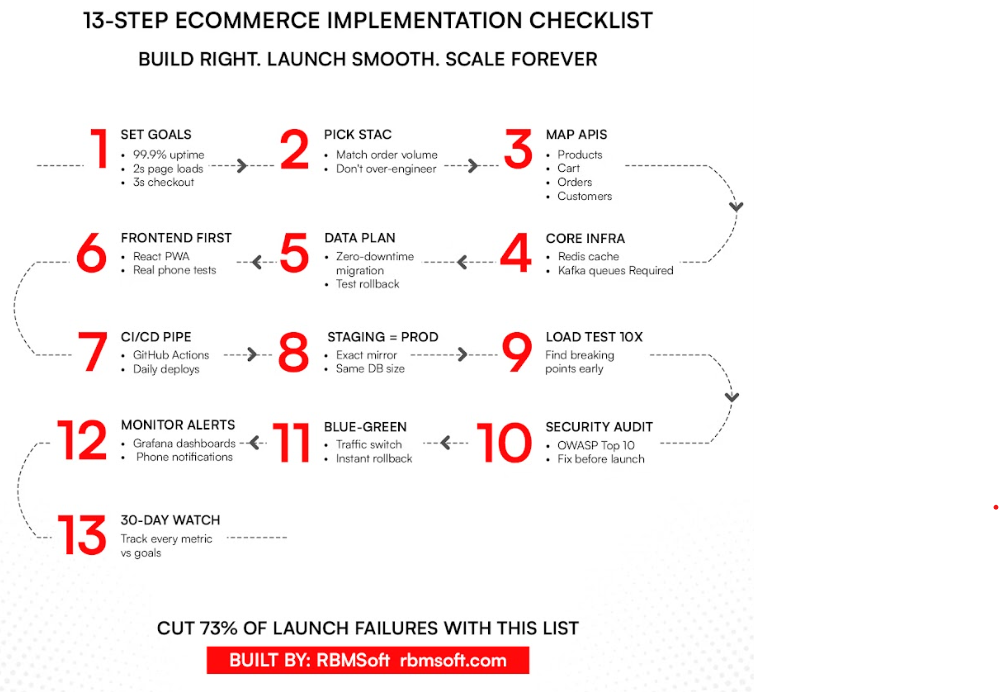
Ecommerce Architecture Implementation Checklist
You’ve chosen your ecommerce architecture framework. Now you need to build it correctly. This checklist walks you through every major step, from initial planning to post-launch monitoring.
Skipping steps here is where most projects go wrong. Research from the Bloor Group shows that over 80% of data migration projects exceed their time or budget constraints. The teams that stay on track plan the details before a single line of code gets written.
Pre-Implementation Assessment
Before you pick tools or write requirements, answer these questions honestly.
- What does your order volume actually look like?
Know your daily average and your peak. A store doing 1,000 orders on a normal day might hit 15,000 on Black Friday. Your architecture needs to handle the peak, not the average.
- Where does your current store break down?
Slow search? Broken mobile checkout? Plugin conflicts? List every known problem. These become your first priorities.
- What systems have to connect?
Shipping carriers, accounting software, your ERP, loyalty programs. Map every integration before you start building, not after.
- What’s your team size?
A team of three developers needs a different architecture than a team of thirty. Be realistic. Once you’ve answered those questions, do three things before moving forward.
- First, map every connection in your current system. Slow database queries, plugin conflicts, third-party scripts that bog down page speed. Document all of it.
- Second, set a realistic budget. Industry benchmarks in 2025 put ecommerce replatforming costs at $15,000 to $50,000 for small businesses, $50,000 to $150,000 for mid-sized retailers, and $150,000 to $500,000 or more for large enterprises.
- Third, get executive buy-in before you start. Show leadership what a site outage costs in lost revenue per hour. Approval gets a lot easier when the business case is concrete.
Phased Rollout Timeline
| Phase | Weeks | What Gets Done | Success Criteria |
| Foundation | 1 to 2 | Goals documented, API map complete, team aligned | All stakeholders sign off |
| Core Build | 3 to 6 | Cart and checkout live in staging | Loads under 3 seconds in load test |
| Full Stack | 7 to 10 | All layers running, integrations connected | Handles 10,000 simulated orders without errors |
| Go-Live | 11 | 100% traffic switched to new system | Zero crashes in first week |
Go-Live Checklist
Print this. Check every box before you flip the switch.
- DNS configured with low TTL
- CDN warmed with your top 20 pages cached
- Payments tested end to end including refunds
- Inventory sync verified across all channels
- Mobile tested on both iPhone and Android hardware
- Search indexes rebuilt and verified
- Backup tested with a full restore drill
- Rollback procedure documented and ready
Cutover approach: Switch 10% of traffic to the new system first. Monitor for 30 minutes. If everything is stable, move to 100%.
The stores that launch smoothly aren’t the ones that avoided problems. They’re the ones that planned for them. That’s exactly what IT services for ecommerce are designed to support.
Common Roadblocks and How to Fix Them
| Problem | Why It Hurts | Fix |
| Plugin conflicts | Blocks upgrades, creates unpredictable bugs | Replace plugins with direct API integrations |
| Team resistance | Slows adoption, creates workarounds | Weekly demos, small wins shared publicly |
| Stale prices | Destroys customer trust immediately | Switch to event-driven cache invalidation |
| DB bottlenecks | Checkout slows under load | Add Redis caching plus read replicas |
| No rollback plan | Panic at launch, extended downtime | Blue-green deployment, always |
Ready to build your ecommerce architecture the right way?
RBMSoft’s development team handles everything from system design to go-live, with a proven implementation process built for scale.
Get Service AssistanceEcommerce System Design Best Practices
Good system design is what separates a store that survives Black Friday from one that crashes under it. When traffic spikes, every layer of your ecommerce website architecture gets tested at once. The stores that stay up aren’t lucky — they’re engineered.
Here’s what that engineering looks like in practice.
1. Core Components Every Store Needs
Before you think about scaling, make sure these four components are solid and connected properly.
- Product Catalog shows shoppers what you’re selling. It needs fast search, filtering by size, category, or price, and clean product data across every page.
- Shopping Cart holds items in real time. It has to update totals instantly and keep data intact even if a shopper closes the tab and comes back.
- Payments handle the most sensitive moment in the entire transaction. You need multiple payment options including cards, digital wallets, and Buy Now Pay Later. Every step must meet PCI compliance standards.
- Inventory tracks stock levels in real time across every warehouse and channel. When an item hits zero, it stops showing as available. Overselling is not just an operational headache. It damages customer trust.
The key to making all four work together without slowdowns: connect them through APIs. When each component communicates through clean interfaces, a slowdown in one doesn’t drag the others down.
2. Scaling Patterns That Handle Traffic Spikes
These are the technical patterns that let your ecommerce architecture framework absorb sudden surges without breaking.
- Caching with Redis: Instead of querying your database every time someone views a product page, Redis stores your most-accessed data directly in memory. The result is dramatically faster response times. A well-implemented caching layer means your database might only need to handle 10% of read requests, while the cache serves the remaining 90%. That kind of load reduction is what keeps product pages fast when thousands of shoppers browse at the same time.
- Message Queues with Kafka: Not every task needs to happen instantly. Sending confirmation emails, updating inventory records, and syncing data to your ERP can all happen in the background. Kafka lines these jobs up in a queue so your checkout flow doesn’t have to wait for them. Your cart stays fast even when the backend is doing heavy lifting.
- Load Balancers with Nginx: A load balancer like Nginx distributes incoming traffic across multiple servers. No single server takes the full hit. If one goes down, traffic automatically routes to the others. This is one of the simplest and most effective ways to prevent a single point of failure during traffic spikes.
- Database Sharding: As your order volume grows, a single database becomes a bottleneck. Sharding splits your data across multiple databases, often by region or customer segment. Each shard handles a smaller slice of total traffic, keeping queries fast at scale.
- CDN for Global Delivery: A content delivery network like AWS CloudFront caches your images, scripts, and static assets on servers around the world. A shopper in Los Angeles and a shopper in New York both get content served from the nearest edge location, not from a central server. Google and Deloitte found that a 0.1-second improvement in load time produces an 8.4% increase in conversions for ecommerce stores.
3. Security and Performance Rules
These aren’t optional. They protect your customers and your store.
- OAuth for authentication: Session tokens expire automatically. Shoppers stay logged in securely, and stolen session data can’t be reused by attackers.
- PCI compliance for payments: Tokenize card numbers. Never store raw card details on your servers. Every payment flow must meet PCI DSS standards.
- Rate limiting: Cap how many requests a single user or IP can make per second. This blocks bot traffic and protects your checkout during flash sales when traffic patterns get abnormal.
- Active monitoring: Tools like Grafana track response times across every layer. You want to know when something is slowing down before your customers do.
- Performance targets to aim for: Google’s Core Web Vitals guidelines define a good page load (Largest Contentful Paint) as under 2.5 seconds, with Interaction to Next Paint under 200 milliseconds. Google For ecommerce specifically, most performance engineers target full page load under 2 seconds and checkout completion under 3 seconds.
4. High-Traffic Event Load Test Checklist
You don’t want to discover a scaling problem when real shoppers are on your site. Test before they arrive.
- Simulate real traffic volume: Use a tool like JMeter to run at 10x your average daily traffic. If you normally get 5,000 visitors a day, test at 50,000.
- Stress test checkout end to end target: 95% of users complete checkout in under 3 seconds under full load.
- Flush your caches and test again: Cold-start performance matters. Make sure stale prices or outdated inventory don’t appear when caches reset.
- Run failure testing: Shut down individual servers randomly during your load test. Your site should keep running. This is called chaos engineering, and it’s how the most reliable stores validate their redundancy setup.
- Review every error from the test: Log all failures. Fix them before go-live. A load test you don’t act on is just a warning you ignored.
The goal isn’t a perfect test. The goal is to find the breaking point before your customers do.
The Best Tech Stack for Ecommerce Architecture
Your ecommerce architecture is only as strong as the tools running each layer. The right stack depends on your order volume, team size, and growth stage. Here’s what high-performing stores are running in 2026, backed by current data.
Layer-by-Layer Stack
1. Presentation
React and Next.js dominate frontend development. In the Stack Overflow Developer Survey 2025, React ranked as the most-used frontend framework at 44.7% of developers.
According to the State of Frontend 2024 report, Next.js is the most popular rendering framework at 52.9% usage and positive sentiment among developers. Next.js handles server-side rendering out of the box, which solves the headless SEO problem before it starts.
Related Read – React vs Vue vs Angular breaks down exactly how each framework performs in headless commerce.
2. Business Logic
Node.js is the most-used backend runtime in the JavaScript ecosystem. According to the Stack Overflow Developer Survey 2024, Node.js was the most commonly used web technology, cited by 40.8% of respondents.
Its non-blocking, event-driven architecture makes it well suited for handling concurrent checkout requests under load. Node.js reduces loading times by 50% to 60% and is widely used in ecommerce, payment processing, and IoT applications.
3. Data
PostgreSQL is the standard for transactional data. In Stack Overflow’s 2024 Developer Survey, PostgreSQL was used by 49% of developers, making it the most popular database for the second year in a row. Redis sits in front of your database and handles the bulk of read traffic from cache.
Applications of ecommerce architecture use Redis to store product catalog data, pricing information, inventory status, and shopping cart contents, helping stores handle major sales and seasonal traffic spikes without database failure.
4. Infrastructure
AWS leads cloud infrastructure by a significant margin. According to Synergy Research Group, AWS held 30% of the worldwide cloud infrastructure market in Q2 2025, ahead of Microsoft Azure at 20% and Google Cloud at 13%. Docker is near-universal in professional teams. In the 2024 Stack Overflow Developer Survey, Docker was used by 59% of professional developers.
5. Integrations
REST APIs remain the baseline for third-party connections. GraphQL is gaining ground for internal service communication, reducing over-fetching on mobile matters.
Stack by Store Size
The best tech stack for ecommerce looks different at every revenue stage. Here’s how it breaks down.
| Store Size | Frontend | Backend | Database | Infra |
| Under $1M | React or Vue.js | Node.js monolith | PostgreSQL | Managed SaaS |
| $1M to $10M | Next.js | Node.js microservices | PostgreSQL + Redis | AWS or GCP, Docker |
| $10M to $100M | Next.js + PWA | Node.js + Python | PostgreSQL + Redis + Elasticsearch | AWS or GKE, Kubernetes |
| $100M+ | Custom headless frontend | Microservices + GraphQL | Sharded DB + Redis cluster | Multi-region, Cloudflare |
Note – Three Tech Stack Rules to Follow
- Don’t stack tools your team can’t maintain.
- Don’t lock yourself to one vendor’s ecosystem.
- Don’t add a service without setting up an alert for it first.
Challenges of Implementing Cloud Ecommerce Architecture Models
The technical plan matters. The tool choices matter. But most ecommerce architecture optimization projects fail before the code even becomes the problem.
About 70% of all digital transformation projects, including ecommerce builds, fail to meet their stated objectives. The causes are rarely mysterious. The same patterns show up again and again: teams overbuild for their stage, skip testing, or underestimate what it takes to keep people aligned through a multi-month build.
This section names the specific failure modes, explains why they happen, and tells you how to prevent each one.
The 8 Most Common Implementation Failures
1. Overbuilding for your current stage
This is the most expensive mistake small stores make. A team doing 500 orders a day doesn’t need a 5-layer enterprise ecommerce architecture framework. They need a simple, fast, reliable setup they can actually maintain.
A $400,000 enterprise build that serves 5,000 monthly orders is money that could have gone into marketing, inventory, and customer experience. Match your architecture to your current order volume and team size, not to where you hope to be in five years.
2. Outgrowing a SaaS platform without a migration plan
SaaS platforms are the right choice to start. The fees are low and the setup is fast. The problem comes when order volume climbs and the platform’s transaction limits, API rate limits, or plugin ecosystem start creating friction.
Migration to a more flexible ecommerce platform architecture mid-growth is expensive and disruptive. Plan the exit criteria before you sign the first contract.
3. Building a distributed monolith instead of real microservices
This failure mode is more common than most teams admit. A team splits their app into separate services, but those services are still tightly coupled and call each other synchronously. The result is a distributed monolith: all the operational complexity of microservices with none of the independence.
Poorly implemented microservices can show 2 to 3 times higher response times compared to monolithic architectures, due to network overhead and serialization costs between services. If your services can’t be deployed and scaled independently, you haven’t actually built microservices.
4. Shipping headless commerce without server-side rendering.
Headless commerce is a powerful architecture. But if your frontend team builds the storefront as a client-side React application without server-side rendering, Google can’t reliably index your pages. The result is an SEO problem, not a commerce problem.
One documented case saw a 30% drop in organic traffic within two weeks of migrating to a headless setup, after an audit found client-side rendering without an SSR fallback and missing meta descriptions on 80% of pages.
The fix was straightforward: implement SSR, automate meta tag generation, and add a sitemap. Organic traffic recovered within 30 days. Don’t let the architecture decision create an invisible SEO liability.
5. Plugin sprawl that breaks on every upgrade
Stores that accumulate plugins over years eventually hit a wall. What started as a quick solution for reviews, shipping rates, and loyalty programs becomes a minefield when the underlying platform releases a major update. Plugins that worked independently start conflicting.
The fix is API-based integrations, not plugins. If a vendor offers an API, use it. Plugins are technical debt with a timer.
6. Skipping load testing before peak season
This one is purely preventable. If your staging environment doesn’t mirror production, and if you’ve never simulated 10x your peak traffic, you have no idea where your system breaks. You’ll find out on Black Friday.
Run load tests against staging before every major traffic event. Find the breaking point in testing, not in production.
7. Weak API contract management
APIs between your commerce platform, ERP, warehouse management system, and shipping carrier are the connective tissue of your operation. When you update one API without versioning, something downstream breaks. Orders go out with wrong inventory counts. Fulfillment delays hit customers.
The fix is semantic versioning and a clear deprecation policy for every internal and external API. This is especially important for ecommerce system design at scale.
8. Testing only on desktop
In Q4 2024, smartphones made up over 75% of retail site visits and drove about 67% of online orders. A checkout flow that works perfectly on a MacBook and breaks on a Samsung Galaxy is a conversion problem.
Every test run, every sprint review, and every pre-launch checklist needs real device testing on both iOS and Android.
Technical Debt Traps
These problems don’t cause an immediate crash. They compound slowly until something breaks at the worst moment.
- Cache serving stale prices
When a price change or promotional discount doesn’t propagate to cached pages, customers see incorrect prices at checkout. This is a trust problem, not just a technical one.
The fix is event-driven cache invalidation: when a price changes in the backend, an event fires that clears the relevant cached pages immediately. Don’t rely on time-based cache expiration for pricing data.
- API versioning gaps
A v1-to-v2 API update that isn’t properly versioned can silently break a shipping carrier integration or a third-party tax service. The first sign is usually an order that completes on the frontend but fails to fulfill.
Run contract tests against every external API dependency before any platform update.
- Database lock contention at scale
Shared database schemas that serve multiple tenants or multiple services start showing performance degradation as load grows. One large catalog query can lock rows and slow down concurrent checkout operations.
Read replicas, query caching, and clear separation of write-heavy and read-heavy workloads are the standard solutions. This is one of the core system design decisions to get right early.
- No rollback path
Teams that deploy directly to production without a tested rollback procedure are one bad deployment away from extended downtime.
Blue-green deployment, covered in the implementation checklist, solves this. If you can’t flip back to the previous version in under 10 minutes, you don’t have a rollback plan.
Human and Process Failures
| Problem | Real Cost | Why It Happens |
| Dev team resists new tools | Months of delay | Fear of new systems, no training plan |
| Scope creep | Budget overruns | “Just one more feature” without formal change control |
| No clear project owner | Project stalls or dies | Everyone assumes someone else is deciding |
| Insufficient QA | Live crashes | “It works on my machine” culture |
| No post-launch training | Team can’t operate the system | Training treated as optional, not part of the build |
The pattern across all five rows is the same: process problems that were visible before the build started but weren’t addressed. A weekly demo to keep stakeholders aligned, a formal change control process, and a named project owner with decision-making authority prevent most of these.
Failure Prevention Checklist
Do these before spending a dollar on development:
- Match your architecture to your current order volume. Under 5,000 orders a day, keep it simple.
- Test every integration end to end before launch, not just the happy path.
- Build a staging environment that mirrors production exactly, including data volume.
- Start training the team two weeks before go-live, not the day after.
- Write and test your rollback plan before you write the deployment plan.
- Load test at 10x expected peak traffic. Find the breaking point in staging.
- Set up real-time alerts for 5xx error rates before launch day, not after.
- Maintain a live commerce innovation platform roadmap with a minimum six-month horizon so the team knows where the architecture is heading.
Ecommerce Architecture Trends in 2026
Ecommerce architecture is changing faster than at any point in the past decade. The stores gaining ground right now are making smarter structural choices. Three shifts define the landscape: composable commerce becoming the standard, edge computing resetting speed expectations, and AI embedding itself into the architecture layer itself.
Composable Commerce: From Early Adopter to Default
Composable commerce means building your store from interchangeable, best-of-breed components connected through APIs. One service handles search. Another handles checkout. Each one swaps out independently when a better option appears.
This approach is now mainstream. 80% of retail businesses have already adopted a composable commerce system for retail or are actively planning to, with 21% intending to do so within the next year. By 2027, over 60% of mid-sized and large retailers are projected to rely on composable architectures as their primary ecommerce infrastructure.
The appeal is practical. A retailer using a composable ecommerce architecture framework can connect Algolia for search, Stripe for payments, and a specialist returns platform through a clean API layer. When a new channel like TikTok Shop emerges, they add an integration instead of waiting for a platform vendor.
Only 2% of retailers describe themselves as fully composable today. Most are mid-transition. The stores that finish first will have the most flexibility when the next major channel shift arrives.
Edge Computing and Serverless: Speed as Infrastructure
Edge computing moves processing closer to the end user instead of routing every request to a central origin server. Edge computing typically saves 150 to 750 milliseconds per page load by executing HTML rendering and API calls at the CDN location rather than a central data center.
That latency reduction connects directly to revenue. As covered in the system design section, each 1-second improvement drives a 2% conversion increase. Cutting 500 milliseconds off every product page load across millions of sessions adds up fast.
Serverless architecture complements edge deployments. Checkout and cart functions run as event-triggered functions that scale automatically under peak load and cost nothing when idle. For system design at the ecommerce layer, this means Black Friday spikes no longer require weeks of pre-provisioning. The infrastructure scales to the traffic and scales back down.
AI-Driven Architecture Evolution
AI in 2026 is not just a feature layer. It’s becoming an architectural component embedded in how stores process requests, serve content, and manage inventory.
The clearest example is agentic commerce. AI agentic platforms are projected to account for 1.5% of US retail ecommerce sales in 2026, representing approximately $20.9 billion, nearly quadruple the 2025 figure. This is the category where a shopper tells an AI assistant what they want and the agent completes the purchase. The architecture supporting this is API-first by necessity.
The revenue evidence on AI personalization is solid. Retailers with AI capabilities saw 14.2% sales growth between 2023 and 2024, compared to 6.9% for retailers without AI. Stores embedding AI into recommendations, dynamic pricing, and predictive caching are compounding that advantage every quarter.
At the architecture level, AI modules are appearing in the business logic layer of commerce innovation platforms as first-class components. Predictive caching, pricing engines, and search ranking models are services in the stack, not bolt-on plugins.
2026 Architecture Maturity Overview
| Architecture | Trajectory | Typical Adopter | Key 2026 Trend |
| Monolithic | Declining | New stores, startups, <$1M GMV | Legacy “all-in-one” apps are being replaced by entry-level SaaS. |
| Headless Commerce | Established | $5M to $50M revenue brands | 92% of top US brands now use headless to power mobile-first journeys. |
| Composable / PaaS | Fastest Growing | High-growth enterprise, $50M+ | “Agentic Commerce”—autonomous AI agents managing modular stacks. |
The direction is consistent: stores are migrating up this curve. The constraint is execution capacity, not desire.
Emerging Patterns Worth Watching
1. GraphQL over REST: Clients request exactly the data they need in a single query. It reduces payload size and round trips, and it’s now the preferred API pattern for composable ecommerce platform builds.
2. Event sourcing with Kafka: The system records every event — price change, inventory update, order placed — and derives current state from the log. This is the right system design for high-volume operations where data consistency across services matters.
3. Zero-trust security: Every service call is authenticated regardless of network origin. This is now the standard security model for web based ecommerce architecture at enterprise scale, especially as composable stacks involve more third-party integrations.
4. Multi-region databases: Data replicated across US East, US West, and European nodes reduces latency for international customers. Essential for any ecommerce solution serving customers across geographies.
AI as a Layer 3 module: Leading teams are designing the business logic layer to include AI inference endpoints as native components of the commerce innovation platform, not as third-party plugins added after launch.
Ecommerce Architecture Cost vs. ROI
Building ecommerce website architecture costs real money upfront. But the right investment pays back through faster pages, fewer outages, and more completed checkouts. This section gives you honest numbers by architecture type so you can match your budget to your actual growth stage.
Implementation Cost Breakdown by Architecture
Not every store needs the same setup. Here’s what each architecture tier realistically costs.
Monolithic is the lowest-cost starting point. A small team builds the entire store in one codebase. Budget between $15,000 and $50,000 for a small business build, or up to $120,000 for a mid-sized store. The timeline runs 3 to 6 months. It’s the right fit for stores doing under $1 million in annual revenue that need to move fast.
Headless commerce costs more because you’re paying for two separate systems. A dedicated frontend layer talks to the backend through APIs.
Expect $150,000 to $300,000 and a 6 to 9-month build. Stores in the $5 million to $20 million range use this to get faster load times, native mobile apps, and the flexibility to push updates without touching the backend.
Full 5-layer enterprise architecture is the most complex and the most expensive. Every layer gets custom engineering: presentation, business logic, data, integration, and infrastructure.
Budget $220,000 to $800,000 with a 9 to 12-month timeline. Large retail chains, marketplaces, and high-volume B2B operations use this to build a scalable ecommerce architecture framework that handles unlimited growth.
Businesses planning multi-vendor ecosystems should also evaluate the long-term marketplace app development cost alongside their architecture investment, since vendor workflows, payment systems, and scalability requirements directly affect infrastructure complexity.
Hidden costs that teams consistently underestimate:
- Staff training on new tools: $8,000 to $15,000
- API management and monitoring tools: $10,000 to $20,000 per year
- Load testing and QA tooling: $15,000 to $25,000
Build these into your budget from day one, not as a line item you discover mid-project.
ROI Metrics and Payback Periods
The return on architecture of ecommerce investment shows up in a few specific places: conversion rate, page speed, and the ability to scale without crashing.
Businesses that implement headless commerce report an average 42% increase in conversion rates after migration. That’s a significant revenue lift when you’re running millions in annual sales.
Nine out of ten organizations report that composable commerce meets or exceeds their ROI expectations. And headless platforms report an average 24% increase in sales in the first year, alongside a 50% reduction in SaaS operational costs.
These numbers don’t apply equally to every store. A 20% conversion lift on $500,000 in revenue is meaningful, but it may not cover a $200,000 headless build within a year. At $10 million in revenue, the same lift pays back the investment in months.
Here’s a realistic view of payback by architecture and store size:
| Store Revenue | Architecture | What Drives ROI | Realistic Payback |
| Under $1M | Monolithic | Faster load time, stable checkout | 12 to 18 months |
| $5M to $20M | Headless commerce | Conversion lift, mobile performance | 9 to 15 months |
| $100M+ | 5-Layer enterprise | Scale, Black Friday resilience | 18 to 24 months |
The payback period is shorter for mid-market stores moving to headless because the conversion gains are immediate and the revenue base is large enough to absorb them quickly.
Enterprise builds take longer to pay back because the cost is higher, but the ceiling for revenue growth is also much higher. That payback accelerates when the engineering is done right from the start. Tailored software engineering for ecommerce is what separates stores that hit their ROI targets from those that don’t.
Total Cost of Ownership (TCO) Analysis
The upfront build cost is only part of the story. Look at what the architecture of ecommerce actually costs over three years.
| Architecture | Upfront Build | Avg. Annual Maintenance | 3-Year TCO | Best Fit |
| Monolithic | $45K to $120K | $15K to $25K | $90K to $195K | Small stores, simple catalogs |
| Headless commerce | $150K to $300K | $30K to $50K | $240K to $450K | Growing brands, omnichannel |
| 5-Layer enterprise | $220K to $800K | $60K to $100K | $400K to $1.1M | Enterprise platform, high volume |
The monolithic path looks cheapest over three years, and it is. The problem is the ceiling. Once your catalog or order volume outgrows the architecture, migration costs often exceed what you would have spent building it right the first time.
Cloud-native and PaaS deployments change the maintenance cost profile. Migrating to the public cloud can reduce total cost of ownership by as much as 40%.
Auto-scaling means you stop paying for idle servers during off-peak hours, and you stop scrambling to provision capacity before major sales events. The infrastructure scales to meet the traffic, then scales back down.
When Costs Outweigh Benefits
Complexity is not a virtue. Bigger architecture is not always better architecture. Here’s when you should stay simple:
| Your Situation | Skip This | Do This Instead | Why |
| Under 5,000 orders per month | 5-Layer enterprise ($400K+) | Monolithic or SaaS ($15K to $80K) | You will never use the extra capacity |
| No in-house dev team | Headless commerce ($150K+) | Managed SaaS platform | Headless requires ongoing technical ownership |
| Stable catalog < 2,000 products | Microservices architecture | Simple 3-layer or SaaS | Microservices add complexity for no gain |
| Pre-launch or MVP stage | Any custom build | SaaS with low monthly cost | Validate the model before investing in architecture |
The rule is simple. Match your architecture cost to your order volume and your team’s real ability to maintain it. Stores under $1 million in annual revenue should keep the ecommerce system design simple and invest the savings in marketing and inventory.
Stores crossing $5 million are where a headless or modular investment starts making financial sense.
Overspending on architecture is one of the clearest patterns in failed ecommerce projects. The commerce innovation platform you build should fit the business you have today, with room to grow, not the business you hope to have in five years.
Get the exact cost of your ecommerce architecture – scoped to your revenue level, tech stack, and growth stage.
Book Your Custom QuoteHow RBMSoft Can Help You Set Up E-commerce Architecture
We at RBMSoft build ecommerce architecture from the ground up through our bespoke IT services for ecommerce. We match your stack to your order volume and budget, not the other way around.
Our commerce innovation platform approach connects best-of-breed tools through APIs. Algolia for search. Stripe for payments. Each one swappable without rebuilding the stack.
We deploy on edge infrastructure for faster load times globally, and build AI-ready modules for dynamic pricing and smart recommendations into the ecommerce platform from day one.
Our 5-Layer Architectures
Our team builds ecommerce architecture frameworks using React PWAs at the presentation layer, Node.js microservices for business logic, and separated pricing and inventory modules. Small stores get a clean, simple stack. Growing brands get a full 5-layer system design built for Black Friday peaks.
We Fix the Common Pain Points
- Plugin conflicts: We replace them with clean API integrations. No more upgrade nightmares.
- Cache showing wrong prices: We implement event-driven invalidation so prices update in real time.
- Headless commerce hurting SEO: We add server-side rendering so Google crawls every page cleanly.
Why Retailers Choose RBMSoft
No vendor lock-in. Our APIs connect your ERP, CRM, and shipping systems cleanly. We’ve solved slow checkout, plugin conflicts, and peak-traffic crashes for retailers at every scale.
- Enterprise ecommerce experience, not theory. We’ve worked with Big Lots, DSW, PetMeds, Fleet Farm, and Beachbody — retailers with real complexity, real catalog scale, and real traffic pressure.
- Search and discovery built in. Our enterprise search practice covers Elasticsearch, Algolia, Coveo, and Lucidworks. We don’t bolt search on at the end. We architect it from the start.
- Composable commerce across every major platform. Shopify, Salesforce Commerce Cloud, Adobe Commerce, ATG — our team has hands-on delivery experience across all of them, not just one.
Most architecture problems don’t show up at launch. They show up later, when order volume grows and the system wasn’t built for it. Getting the foundation right from the start is what separates stores that scale from stores that scramble.
At RBMSoft, we don’t just build ecommerce platforms. We engineer the architecture underneath them. The layers, integrations, and infrastructure that keep everything running when it matters most. Partner with us to build a scalable ecommerce architecture designed for the business you’re growing into, not just the one you have today.
FAQs
1. What is MACH Architecture and why enterprises must use it?
MACH stands for Microservices, API-first, Cloud-native, and Headless. It’s the underlying design philosophy behind modern ecommerce architecture, where every component is independent, connected through APIs, and deployable without touching the rest of the stack.
Enterprises use it because it eliminates the “all or nothing” problem of monolithic platforms. You can upgrade your search, checkout, or pricing engine without a full replatform.
2. What is ecommerce enterprise architecture?
Ecommerce enterprise architecture is the full-stack technical blueprint for a high-volume online operation. It covers all five layers: presentation, business logic, data, integration, and infrastructure.
At enterprise scale, it also includes multi-region deployments, ERP and CRM integrations, and a commerce innovation platform layer that connects every third-party service through a unified API layer.
3. How do you develop a scalable ecommerce architecture?
Start by matching your architecture to your current order volume, not your five-year ambitions. Build your data layer with read replicas and caching from day one.
Use event-driven design so services communicate without tight coupling. Load test at 10x peak traffic before every major release. Scalable ecommerce architecture grows incrementally. It doesn’t require a full rebuild every time your order volume doubles.
4. How do you choose and implement the best ecommerce architecture framework and models?
Following ecommerce architecture best practices means matching your framework to three things: your order volume, your team’s technical capacity, and your integration requirements. Stores under $1M revenue do well on a clean monolithic or managed SaaS setup.
Stores crossing $5M benefit from a headless or modular approach. Enterprises need a full composable web-based commerce architecture with independent services for each core function.
Implementation follows the 13-step checklist covered earlier in this guide: goals first, staging environment second, load testing third, blue-green deployment at launch.
5. How long does it take to develop ecommerce architecture?
It depends on the complexity of the ecommerce system architecture and your team size. A clean monolithic build runs 3 to 6 months. A full headless commerce implementation takes 6 to 9 months.
A 5-layer enterprise build with custom integrations runs 9 to 12 months. These timelines assume a staged rollout: foundation, core build, full stack, and go-live, as outlined in the implementation section of this guide.
6. How do you develop a scalable ecommerce architecture?
Start by matching your architecture to your current order volume, not your five-year ambitions. Build your data layer with read replicas and caching from day one. Use event-driven design so services communicate without tight coupling. Load test at 10x peak traffic before every major release.
Scalable ecommerce architecture grows incrementally. It doesn’t require a full rebuild every time your order volume doubles.
7. How do you choose and implement the best ecommerce architecture framework and models?
Following ecommerce architecture best practices means matching your framework to three things: your order volume, your team’s technical capacity, and your integration requirements.
Stores under $1M revenue do well on a clean monolithic or managed SaaS setup. Stores crossing $5M benefit from a headless or modular approach. Enterprises need a full composable web-based commerce architecture with independent services for each core function.
Implementation follows the 13-step checklist covered earlier in this guide: goals first, staging environment second, load testing third, blue-green deployment at launch.