- Retail AI
- Services
Looking for a more specific outcome? We’ll build a solution to get you there.
- Industries
Looking for a more specific outcome? We’ll build a solution to get you there.
- About
- Case Studies
- Resources
- Arvyn

The most consistent complaint was speed. Pages took too long to load. Updates didn’t reflect immediately. Navigating between sections of a project felt sluggish. Speed matters a lot in a live consultation but even the simplest actions such as price updates took several seconds to complete. The stop-and-wait experience poorly affected the revenue figures as well as the brand perception. SPEED · LATENCY · RENDER TIME

Associates were navigating through more steps than necessary to complete routine tasks. Adding a product, updating a configuration, moving an item between spaces. These actions happened dozens of times in a single client session. The cumulative friction was significant, and because it happened in front of clients, it couldn’t be hidden or worked around. UX · WORKFLOW · TASK FRICTION

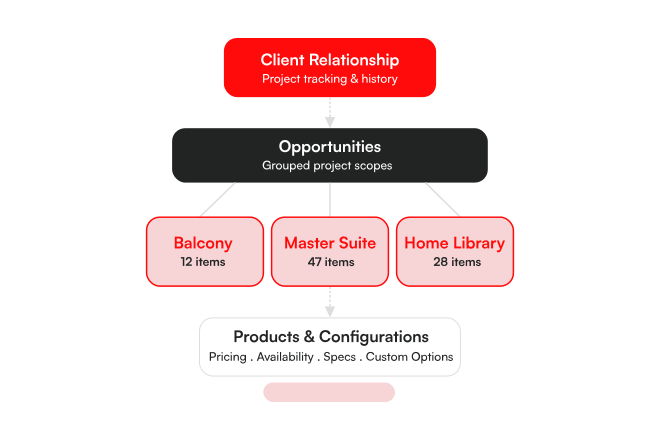
High-value clients typically have large, complex projects. Multiple spaces. Hundreds of items. The application would load all of them at once, which consumed browser resources aggressively. Associates working across multiple tabs reported frequent browser crashes and slow recovery. The bigger the project, the more fragile the experience became. MEMORY · STABILITY · CRASHES

Perhaps the most damaging problem was stale data. Updates made during a session weren’t always reflected immediately. Pricing would show an old figure. A product the associate had just added might not appear. For associates quoting prices and configuring products in front of clients, showing incorrect data was a credibility problem. DATA INTEGRITY · SYNC · TRUST

Built the Foundation

Made it Fast

One of the more significant performance bottlenecks was the GraphQL processing layer. For high-volume responses involving large product lists, the GraphQL server was adding substantial processing time on top of the API response time, and the browser was then adding its own overhead on top of that. The cumulative latency meant associates were waiting far longer than the underlying API actually required. We moved high-volume endpoints from GraphQL to REST. By removing the GraphQL compression and transformation step for these calls, we cut response-to-render time by around 50% on the most data-heavy operations in the application.

Pricing in the Concierge cascades through multiple levels: an update at the item level affects space totals, opportunity totals, and project totals. The previous flow made an update call, waited for it to resolve, then made a GET call to fetch the refreshed project data before updating the UI. The sequential nature of this meant every pricing change had a visible delay. We introduced Optimistic UI for pricing updates. Instead of waiting for the server round-trip, the response from the update mutation is used immediately to calculate and reflect pricing changes across the project. The UI updates in real time. If the server response differs (which is rare), it reconciles. This reduced wait time on pricing interactions by approximately 40%.

Associates frequently move items between spaces during client sessions. The existing drag-and-drop implementation was custom-built and suffered from increasing performance degradation as project size grew. Dragging items in large projects became noticeably laggy. We replaced it with the native HTML5 drag-and-drop API. The native implementation uses a lightweight ghost element instead of rendering the actual item during the drag operation, which is dramatically less expensive for the browser.

The application was loading all items in a project on initial render, regardless of how many were visible on screen. For large projects this meant the browser was maintaining full DOM nodes for hundreds of items simultaneously, consuming memory aggressively and causing crashes when the application was open across multiple tabs. We implemented windowing, a technique that renders only the items currently visible in the viewport and adds or removes items as the user scrolls. Since the browser is now only maintaining a small number of active DOM nodes at any time, memory utilization dropped significantly and browser crash issues were resolved.

The application had been using React’s Context API for global state management. The problem with Context at this scale is that any mutation anywhere in the tree triggers a re-render of all components consuming that context, even those unaffected by the change. In an application with complex, nested project data, this was generating substantial unnecessary rendering work. We replaced the relevant state with Jotai, a reactive state management library that only re-renders components that actually consume the changed data. The result was a significant reduction in unnecessary renders and a noticeably more responsive UI, particularly during pricing updates and configuration changes.

The stale data problem associates had flagged came down to a specific architectural issue: data update calls were routing through three hops before resolving. The UI called the BFF layer, the BFF called a Heroku service that maintained its own copy of the data, and the Heroku service called Salesforce. This chain created redundant data copies and caching inconsistencies that caused associates to see outdated information during active sessions. We removed the Heroku layer and established a direct connection between the BFF and Salesforce.

End-to-end interaction time reduced by up to 50%, eliminating multi-second delays and enabling fluid, uninterrupted client consultations.

Wait time on pricing interactions dropped ~40%. One of the most frequent actions in a client session now feels immediate, with cascading updates across spaces.

With windowing and optimized rendering, the platform now handles large, multi-space projects with zero browser crashes — even with hundreds of items loaded across multiple tabs.

Frontend optimizations — lazy loading, lighter rendering, reduced bundle size — significantly lowered memory consumption, ensuring consistent performance across all session lengths.