






Table of Contents
Quick Summary:
- Most search tools match words. Intelligent search understands what shoppers actually mean, and returns results that convert.
- Stores using intelligent search see 35% higher conversions and double the order values.
- It connects all your data sources, indexes everything in one place, and ranks results with full source citations.
- Key features include AI agents, conversational search, personalization, vector search, and revenue analytics.
- Use cases span product discovery, customer support automation, and enterprise knowledge retrieval.
- By 2027, agentic AI and multimodal search will be standard.
Your customers are telling you exactly what they want to buy. They type it right into your search bar. But if your site responds by showing them a wall of unfiltered results that has nothing to do with the query, they will bounce away.
Most stores are bleeding sales this way every single day. A shopper types “lightweight jacket for travel” and gets back every jacket in the catalog sorted by newest arrival.
Intelligent search use cases prove this doesn’t have to be your story. Stores that implement intelligent search systems are seeing 35% higher conversions and double the average order values.
This article breaks down exactly how it works, the real-life examples of Gen AI intelligent search driving results for enterprises, and how you can implement it.
What is Intelligent Search?
Intelligent search is a search system that understands the intent behind a query, not just the words in it. It uses AI to read context, interpret meaning, and return results that match what a shopper actually wants.
A shopper searching for “office chairs for back pain” expects ergonomic options with lumbar support. A basic search bar returns anything tagged “office chair.” Intelligent search reads the full context and narrows results to what actually fits the need.
Traditional Search vs Intelligent Search
Traditional search operates on exact keyword matching. It scans product tags and titles for the words a shopper typed and returns matching terms. If the search term does not align precisely with how products are catalogued, the result is either irrelevant or empty.
Intelligent search works from context rather than syntax. It recognises synonyms, interprets qualifiers like price ranges or fit preferences, and factors in browsing behaviour to rank results by relevance rather than keyword frequency.
The gap between the two shows up directly in conversion rates, average order value, and the number of shoppers who leave without buying.
| Traditional Search | Intelligent Search |
| Exact keywords only | Understands meaning and synonyms |
| No user context | Knows your role and past searches |
| Simple word lists | Natural conversation style |
| One data source | Pulls data from everywhere |
| Just links | Answers with sources |
Types of Intelligent Search Systems
Before mapping use cases to your business, it helps to understand the types of intelligent search systems in use today. Broadly, they fall into three categories.
1. Semantic search systems interpret the meaning behind a query rather than matching exact words. They use natural language processing and vector embeddings to understand synonyms, intent, and context.
2. Conversational search systems maintain context across a session. A follow-up query like “show me those in blue” is understood in relation to the previous query without the shopper needing to repeat themselves.
3. Agentic search systems go beyond retrieval. They execute multi-step tasks, comparing options, checking availability, and completing transactions, triggered by a single query. This is where Gen AI use cases of intelligent search are expanding fastest in 2026.
Most enterprise deployments combine all three depending on the use case.
How Intelligent Search Works
Intelligent search processes a query through several layers before returning a result. Each layer adds context that a keyword-based system cannot provide.

Data ingestion and indexing
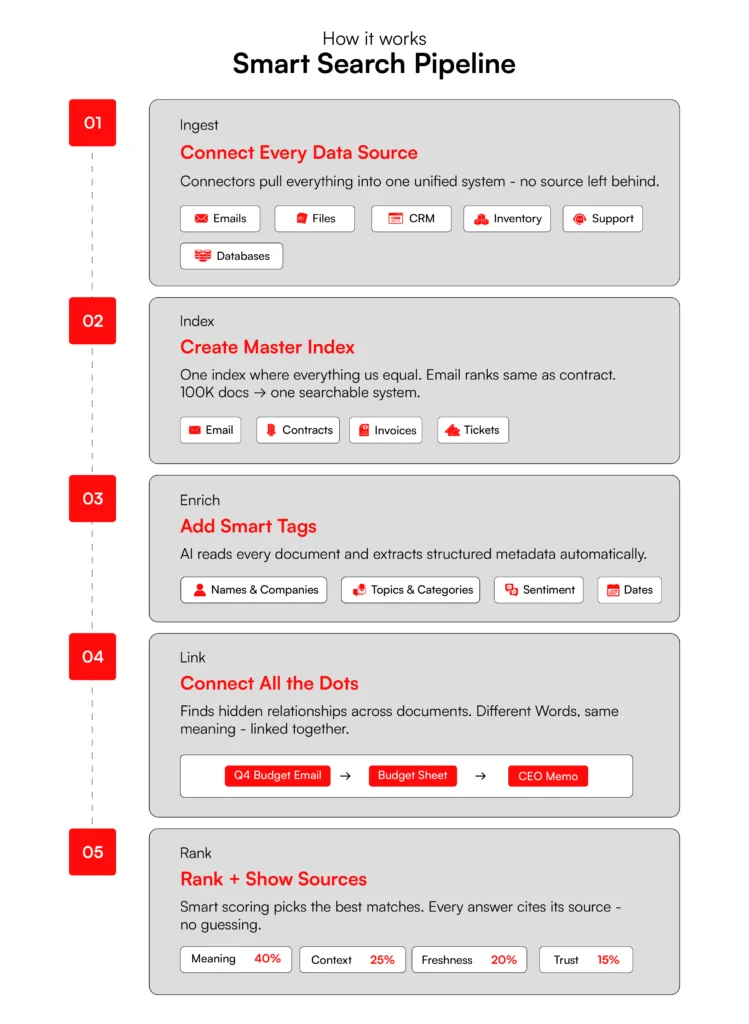
Intelligent search pulls from every connected data source simultaneously, whether that is a product catalogue, a CRM, a document library, or a website. Everything is indexed in a single unified layer, so no source is treated as secondary.
Semantic understanding
When a query comes in, the system does not scan for matching words. It interprets meaning. Natural language processing identifies the intent behind the query, recognises synonyms, and factors in qualifiers like price, size, or sentiment to understand what the shopper actually wants.
Entity recognition and relationship mapping
The system identifies named entities within content, people, products, categories, attributes, and maps the relationships between them. This allows it to connect a query to relevant results even when no shared keyword exists between the two.
Relevance scoring and ranking
Results are ranked by contextual relevance rather than keyword frequency. Behavioural signals such as click patterns and purchase history feed into the ranking model, so results improve over time without manual intervention.
Source attribution
When an AI gives you an answer, source attribution shows exactly where that answer came from, such as a specific dataset, report, or signal. This lets you verify the output rather than blindly trusting it. It turns AI from a black box into an auditable system where every recommendation has evidence behind it.
Let’s now look into the core features that actually enable intelligent search for enterprises.
Core Features of Intelligent Search
A mature intelligent search platform does more than return results. It connects systems, personalises responses, and gives merchandising teams the data to act on what shoppers actually want.

Here’s everything that happens under the hood.
1. AI Agents for Automated Actions
When a shopper searches for running shoes for flat feet, an AI agent returns matched options, compares prices, applies applicable loyalty discounts, and moves the transaction toward checkout without the customer needing to navigate away.
These agents handle multi-step actions at the search layer, reducing the dependency on manual support and shortening the path to purchase.
2. Unified Search Across Systems
Product catalogues, inventory data, customer service tickets, email campaigns, and vendor pricing typically live in separate systems. Intelligent search queries all of them simultaneously. A search for “red dresses size 8 under £75 in stock nearby” returns accurate, available results in seconds rather than sending the shopper down a dead end.
3. Natural Language Query Handling
Shoppers do not search the way product teams tag. Intelligent search handles conversational queries, recognises multi-intent inputs covering product type, budget, and delivery preference, and maintains context across follow-up queries within the same session. The result is a search experience that keeps pace with how people actually think when they shop.
4. Personalization Based on User Context
The same search query returns different results depending on who is asking. New visitors see top-rated products. Returning customers see their purchase history alongside relevant accessories. Wholesale accounts see bulk pricing. This segmentation happens at the search layer without any changes to the underlying product catalogue.
5. Vector Search for Semantic Matching
Vector search retrieves results based on meaning rather than exact keyword matches. A query like “customer complained about late delivery” surfaces relevant emails, reviews, and support tickets regardless of how they are phrased.
Combined with retrieval-augmented generation, every result is tied to a source document, so the system returns verifiable information rather than an approximation.
6. Search Analytics and Insights
The analytics layer surfaces the gap between what customers search for and what the catalogue actually contains. If a significant number of shoppers searched for a product last month and the store returned zero results, that is quantifiable missed revenue.
Merchandising teams get a direct view into unmet demand through zero-result queries, abandoned searches, and product gaps.
7. Role-Based Access Control
Different user roles see different data. Finance teams access payment and PII data. Marketing teams see campaign assets. Permissions are enforced at the search layer, so every query respects access rules without requiring manual oversight.
8. Compliance Coverage
Enterprise deployments support PCI-DSS for payment data, GDPR for customer records, and SOC 2 for vendor contracts. Compliance is enforced within the search architecture from the beginning.
See what intelligent search could do for your store.
Talk to us
Top 12 Use Cases of Intelligent Search
These top intelligent search use cases span retail, enterprise, and customer support, covering the full spectrum of Gen AI use cases of intelligent search running in production environments today.
1. Personalized Recommendations
When a shopper searches for “running shoes,” two different shoppers should not see the same results. Intelligent search builds a ranked result set from a combination of past purchase history, session behaviour, browsing patterns, and real-time interactions.
Embedding-based similarity maps the query to product vectors. Collaborative filtering identifies what shoppers with similar profiles bought next. Behavioural scoring adjusts rankings in real time based on what the current session is signalling.
According to McKinsey, Amazon attributes 35% of its total revenue to this model. A search for “gaming laptops” routes to high-GPU configurations rather than office devices. This happens because over time the system has learned what that query means in the context of who is asking it.
2. Visual and Image-Based Search
A shopper who photographs a friend’s jacket and wants to find something similar cannot easily describe what they are looking for in words. Image-based search solves this by converting the uploaded image into a vector representation using computer vision models.
The system extracts attributes including texture, colour distribution, shape, and pattern, then matches those vectors against the product index using similarity search.
For categories like fashion, home furnishings, and beauty where visual match drives purchase intent, this removes one of the most persistent gaps between what a shopper is looking for and what a keyword search can surface.
3. Dynamic Merchandising and Pricing
Search becomes a merchandising control layer when ranking is influenced by business signals alongside relevance. Inventory levels, margin targets, demand velocity, and customer segment all feed into a weighted ranking model that runs continuously.
Bookshop.org applied this across more than six million titles. Their previous search engine matched queries by keyword, so relevance depended entirely on how closely a shopper’s phrasing matched catalogue metadata. After applying intelligent search, the team built ranking rules weighted by recency of sale, publication date, and reader behaviour signals.
Non-engineers could adjust these rules directly without rebuilding the index. Search-to-purchase rate moved from 14% to 20%, a 43% increase in conversion, with one in five searches resulting in a completed purchase.
4. Cart Abandonment Recovery
Abandonment is a pattern of signals: hesitation at the price, repeated filtering without clicking, time spent on the returns policy page, a pause at checkout. Intelligent search models read these signals at session level and run real-time inference to assess abandonment likelihood before the shopper leaves.
When the system anticipates cart abandonment, it triggers an intervention calibrated to what the session data suggests.
A price-sensitive session sees a relevant alternative at a lower price point. A shopper who filtered repeatedly sees a bundle that simplifies the decision. One who stalled at checkout sees an incentive drawn from their purchase history.
5. Multilingual Search Experiences
Multilingual search is harder than translation. A shopper searching in Portuguese may use colloquial category terms that do not map directly to the English product tags in the catalogue. A brand name spelled differently across markets can produce zero results even when the product is in stock.
Effective multilingual intelligent search addresses this by training language models on domain text across multiple languages rather than running queries through a translation layer first.
Cross-lingual embedding models place queries from different languages into a shared semantic space. A search in French and its equivalent in English resolve to the same ranked result set because the system is matching meaning.
6. Trend Prediction
Search query data is one of the earliest signals of shifting demand. The trends start weeks before the movement shows up in sales figures. Intelligent systems analyse query frequency, co-occurrence patterns, and temporal spikes using time-series analysis and anomaly detection. When a category or term begins accelerating, the system surfaces it before it peaks.
Spotify’s Discover Weekly applies this logic at scale. The recommendation engine analyses listening patterns and collaborative filtering signals across millions of users to detect emerging genre clusters, then builds personalised playlists that surface those trends to relevant listeners before they reach mainstream visibility.
A retailer applying the same model to search query data can identify a rising category, cross-reference current stock levels, and trigger a reorder or promotional push while the demand curve is still climbing.
7. Unified Knowledge Access
Enterprise teams lose significant time navigating between systems that do not communicate. A query that requires pulling from a CRM, a document library, and a project management tool typically means opening three separate applications and assembling the answer manually.
Intelligent search solves this by running a single query across all connected sources simultaneously through indexing pipelines that normalise formats, extract metadata, and generate embeddings. Retrieval uses hybrid search combining keyword and vector approaches, followed by re-ranking.
Morgan Stanley built this at scale using an AI assistant built with OpenAI that searches across more than 100,000 proprietary documents covering investment strategies, market analysis, and sector research.
Every response gets backed by a specific source document through retrieval-augmented generation, so advisors receive a cited answer traceable to the original research. Document retrieval efficiency improved from 20% to 80%, and over 98% of advisor teams actively use the tool daily.
8. Executive Research and Insights
Compiling a regional performance report typically means pulling data from multiple systems, normalising formats, and assembling a view that is already partially out of date by the time it lands. Intelligent search addresses this by layering analytical capability directly onto retrieval.
Queries are parsed for intent, entities, and required aggregations. The system retrieves the relevant datasets, applies the necessary transformations, and returns a structured output with source attribution.
A query like “Q4 pipeline versus forecast by region” returns a breakdown drawn from live connected data rather than a static export. The output is auditable, the sources are visible, and the answer reflects the current state of the data rather than whenever someone last ran the report.
9. Employee Onboarding and Policies
New employees generate a predictable pattern of questions: leave policies, expense procedures, system access, compliance requirements. Without intelligent search, those questions route to HR or a manager, creating a support load that scales with headcount.
With semantic indexing across policy documents, guides, and FAQs, the same questions resolve at the point of asking.
Retrieval is combined with answer extraction so the system surfaces the specific paragraph that answers the question rather than returning the full document. A new employee asks in plain language and receives a direct answer with a source reference rather than being directed to a folder and left to search through it manually.
10. Compliance and Legal Document Search
Legal search requires precision that keyword search cannot reliably deliver. A query for indemnification clauses across a contract portfolio needs to find every relevant clause regardless of how it is worded across different documents and drafting styles. Intelligent systems handle this through clause-level indexing, entity recognition, and version tracking.
Queries can combine conditions such as clause type, jurisdiction, and amendment history. Every result carries a source reference showing the specific clause, document version, and origin.
11. Self-Service Query Resolution
Most support queries are not unique. The same questions about delivery windows, return eligibility, and product compatibility arrive repeatedly across different channels and phrasings.
Intelligent search maps incoming queries to known resolutions through intent classification and similarity matching, then ranks responses by historical resolution success rate rather than recency or keyword overlap.
The ranking improves continuously as resolution data accumulates. The answers that have reliably solved the problem before surface first. Customers find accurate answers without waiting for an agent, and ticket volume falls as a direct consequence.
12. Agent Productivity Boost
A support agent handling a live interaction should not need to pause and search across five systems to find relevant information. Intelligent search processes the conversation context in real time and surfaces ranked resolutions from past tickets, product documentation, and the knowledge base simultaneously.
Rankings reflect what has actually resolved similar issues before, not what matches the surface-level keywords of the current query.
It helps reduce handling time and the quality of the response improves because the agent is working with ranked, relevant information.
| Top Use Case | Problem It Solves |
| Personalized Recommendations | Shoppers get irrelevant results that don’t match their style, size, or budget |
| Visual and Image-Based Search | Customers can’t find products they’ve seen but can’t describe in words |
| Dynamic Merchandising and Pricing | Homepages show the same products to every visitor regardless of intent |
| Cart Abandonment Recovery | Checkout drop-offs go unaddressed until the customer is already gone |
| Multilingual Search | International shoppers hit language barriers and leave without buying |
| Trend Prediction | Businesses restock too late after trends have already peaked |
| Unified Knowledge Access | Data lives in 6 or 7 different tools with no single place to search |
| Executive Research and Insights | Leadership spends 2 days pulling data that should take minutes |
| Employee Onboarding and Policies | New hires can’t find answers and flood HR with repeat questions |
| Compliance and Legal Document Search | Audit prep requires weeks of manual document hunting |
| Self-Service Query Resolution | Simple support questions eat up agent time that should go elsewhere |
| Agent Productivity Boost | Reps waste live chat time searching for answers across multiple tabs |
Need enterprise deployment?
Explore Enterprise Search Solutions
Future Trends in Intelligent Search
The businesses that adapt to these shifts early will hold a structural advantage that late movers will find difficult to close.
Agentic AI Takes Over
Search is moving from retrieval to execution. Rather than returning results for a user to act on, agentic AI completes the task.
A query like “book a client dinner near the airport tomorrow” resolves through a sequence of actions: locating options, checking availability, completing the reservation, and updating the calendar. The user defines the outcome. The agent handles the steps.
In retail, this changes the nature of the purchase journey. An agent can compare pricing across multiple sources, identify the best available option against a defined set of criteria, and complete the transaction without the shopper navigating between tabs or re-entering information.
Search stops being a tool the shopper uses and becomes a process that runs on their behalf.We’ve covered exactly how this shift is playing out in retail in our deep look at agentic commerce in retail.
Multimodal Search Goes Mainstream
Text is one input among several. A shopper who photographs a broken appliance part can receive matched replacement options across vendors, complete with pricing and availability, without knowing the part number or being able to describe it precisely.
The same logic applies to fashion, home furnishings, and any category where visual match is a stronger signal than language.
Google Lens processes 12 billion visual searches every month, and Circle to Search has tripled usage year over year. Shoppers can circle multiple objects within a single image and receive individual results for each one.
Visual discovery is accelerating because it removes the gap between what a shopper can see and what they can articulate.
Smarter Retrieval-Augmented Generation
The current generation of RAG systems retrieves documents and surfaces relevant passages. What is developing now is meaningfully different.
RAG systems are beginning to combine knowledge graphs with multi-step reasoning, so rather than pulling a document, the system verifies sources, cross-checks facts across them, and constructs a response that shows its working.
Agentic RAG takes this further by planning and executing multi-stage research without being prompted at each step.
A query like “what caused our Q4 budget overrun” would trigger retrieval across finance reports, vendor contracts, and transaction records, with the system identifying anomalies and surfacing a reasoned explanation rather than a list of documents to read. For enterprise teams, this shifts intelligent search from a tool that finds information to one that analyses it.
How RBMSoft Can Help You Integrate Intelligent Search
RBMSoft builds and deploys intelligent search systems for retail and enterprise teams. Our intelligent search implementation services are structured, transparent, and focused on measurable outcomes from the first week.
How we work
We begin with a data discovery and audit across your existing systems, mapping product catalogues, support histories, inventory data, and internal documentation into a unified index.
Enterprise catalogs are large, fast-moving, and full of complexity. Most platforms weren’t built for this. Arvyn is a real-time catalog intelligence layer built specifically for that scale.
Get Free Demo
From there we build the semantic search layer, configure personalisation based on your customer segments, and instrument the analytics needed to track impact from day one.
Every engagement is scoped to your data, your systems, and your commercial priorities. We build around how your business actually operates.
What we measure
Success is tracked against the metrics that matter to your operation: search-to-purchase conversion, zero-result query rate, abandoned cart recovery, and support ticket deflection. You see the numbers from the first week of go-live.
What you get
A search system built on your own data, with no black-box outputs and no dependency on a SaaS platform that does not fit your business model. The architecture is yours. The results are traceable. And the system improves continuously as it learns from your shoppers.
FAQs
1. How to build an intelligent search system for your business?
To build an intelligent search system, you need four components in place: a unified data pipeline that connects every source you have, a semantic indexing layer that generates embeddings across all connected data, a retrieval engine combining keyword and vector search with re-ranking, and an analytics layer tracking zero-result queries and conversion impact from day one.
The architecture of intelligent search development you choose at this stage determines how well the system scales. Start with a data audit before touching any technology — the intelligent search use cases you are trying to solve should drive every build decision, not the other way around.
2. How do you implement an intelligent search system?
To implement an intelligent search system, begin by mapping every data silo in your organisation, connect those sources through a semantic indexing engine, layer in natural language understanding, and configure role-based access so different users see data relevant to their function.
The benefits of intelligent search only materialise if the implementation is scoped correctly from the start — skipping the audit phase is the most common reason enterprise projects stall.
RBMSoft’s intelligent search implementation services cover discovery, build, and go-live tracking in a structured engagement so you are measuring real impact from week one.
3. How do intelligent search use cases work?
Intelligent search use cases follow a five-step process. First, the system connects every data source, CRM, product catalog, support tickets, cloud storage. Then it builds a single searchable index from all of it. AI reads every document and tags what matters: topics, sentiment, named entities.
Then it finds hidden connections between documents even when they use completely different words. Finally, it ranks results by relevance and cites every source so you know exactly where the answer came from.
The most common intelligent search use cases in retail and enterprise both rely on this same foundation to deliver accurate, cited results at scale.
4. What are the key features of an intelligent search platform?
The non-negotiables are natural language understanding, vector search, and RAG for cited, accurate answers. Beyond that, look for multi-source connectivity, role-based access controls, real-time personalisation, conversational follow-up capability, and an analytics dashboard that shows you what people are searching for versus what you actually have.
The features you prioritise should map directly to the intelligent search use cases most critical to your business, whether that is product discovery, compliance search, or enterprise knowledge retrieval. If a platform cannot tell you your top 20 zero-result queries, it is not doing its job.
5. How much does it cost to build the intelligent search?
It depends on three things: the number of data sources you are connecting, the complexity of your personalisation layer, and whether you are building custom AI pipelines or working with pre-built infrastructure. A basic implementation for a mid-size retailer typically starts around $30,000 to $50,000.
Enterprise deployments with custom pipelines, multi-tenant architecture, and deep integrations run higher. The better question is what it costs you not to have it. If 1,247 monthly searches are returning zero results, that is a revenue number you can calculate today.
The scope of your intelligent search use cases directly determines where your investment should be concentrated.
6. How long does it take to implement an intelligent search system?
A well-scoped deployment takes 9 weeks from data audit to live ROI measurement. Weeks 1 and 2 cover discovery and mapping. Weeks 3 through 5 handle the unified index build. Weeks 6 through 8 layer in AI personalisation.
Week 9 goes live with full tracking in place. The projects that drag on for 18 months are usually the ones that skipped proper scoping upfront or tried to move too fast on day one.


