




Table of Contents
Quick Summary:
- Enterprises waste time and productivity when critical information sits across emails, drives, chats, and personal folders. A KMS centralizes knowledge for instant access.
- Organizing content with categories, tags, and hierarchies ensures faster access to accurate information for smarter choices.
- Connecting KMS with CRM, project management, and collaboration tools allows employees to access knowledge within their daily work platforms.
- Encouraging participation, recognizing contributions, and leadership involvement strengthens a knowledge-sharing culture across the organization.
- AI-driven search, recommendations, and document summarization help employees quickly locate relevant insights and retain critical knowledge.
- Regular content updates, version control, and role-based access keep knowledge accurate, secure, and trustworthy for long-term use.
Every organization runs on knowledge. Your teams rely on processes, documentation, insights, and experience to make decisions and keep operations moving.
Yet in many enterprises, this knowledge sits scattered across emails, shared drives, chat platforms, and personal folders. When employees cannot quickly find the information they need, productivity slows down.
Teams waste time searching for answers, repeat work that already exists, and struggle to collaborate effectively. Most organizations already generate enormous amounts of knowledge every day.
The real challenge is organising that knowledge so employees can easily access and use it. Without a structured system, valuable expertise often stays trapped within departments or with individual employees.
Building a knowledge management system helps you solve this problem. It gives your organization a reliable way to capture knowledge, organize it properly, and make it available to the people who need it.
When information flows freely across teams, employees collaborate better, make faster decisions, and work with greater confidence.
Knowledge Management System Development Market Forecast
The global knowledge management software market was valued at USD 20.15 billion in 2024 and is expected to reach USD 62.15 billion by 2033, growing at a CAGR of 13.6% between 2025 and 2033.
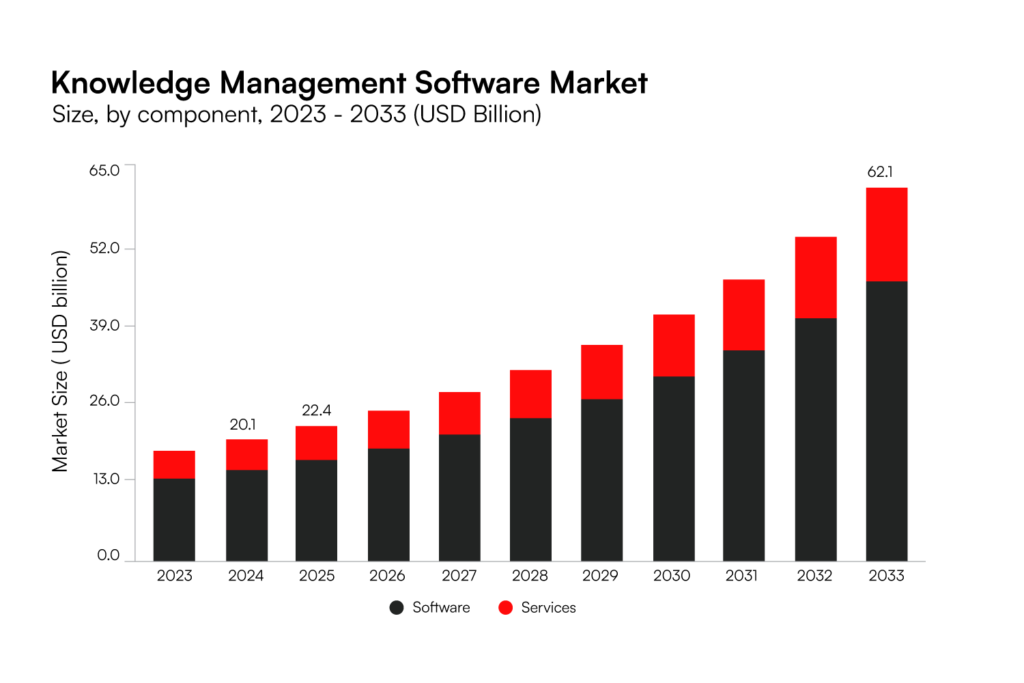
Source: Grand View Research
This growth reflects the increasing demand for agile, cloud-based platforms that help enterprises quickly discover information, collaborate efficiently, and make smarter decisions across complex digital ecosystems.
Don’t let your teams waste another day searching for scattered knowledge.
Implement a centralized KMS now and get instant access to all critical information.
Talk to Our Experts
Types of Knowledge Management Systems
Once you understand the value of a knowledge management system development, the next question is simple: What kind of system do you actually need?
Knowledge does not reside in a single format or department. It spreads across documents, conversations, training materials, customer interactions, and internal processes.
That’s why different types of knowledge management systems software serve different purposes. Let’s look at the major ones.
Enterprise Knowledge Bases
An Enterprise Knowledge Base functions as your organization’s central intelligence layer. It brings together structured, searchable content, such as policies, operating procedures, technical documentation, and compliance guidelines, into a unified system.
Instead of storing information across shared drives, emails, personal folders, or disconnected tools, you organize it in a controlled and indexed environment. Employees can search by keyword, filter by department or function, and access only the most recent, approved version of any document.
This approach reduces confusion and eliminates dependency on informal or tribal knowledge. Teams no longer rely on “who knows what.” They rely on a validated system. For enterprises operating across multiple geographies, departments, or business units, this becomes even more important.
A centralized knowledge base ensures process standardization, consistent policy enforcement, and aligned decision-making. It also strengthens governance by maintaining version control, access permissions, and audit trails.
Document Management Systems (DMS)
It helps you store, organize, track, and control access to important files. This includes contracts, compliance documents, SOPs, reports, design files, and regulatory records.
With a DMS, your teams always work on the latest version of a document. The system manages version control, sets clear access permissions, and keeps audit trails so you can track who made changes and when. This becomes critical in regulated industries where accuracy, traceability, and compliance are non-negotiable.
Poor document management slows teams down. Employees waste time searching for files, recreating missing documents, or correcting errors caused by outdated versions. A structured DMS reduces that waste. It prevents duplication, lowers compliance risk, and ensures your organization retains critical knowledge in a secure and accessible way.
Collaboration and Social Tools
A large share of organizational knowledge develops through daily interactions. Teams exchange ideas in chats, meetings, project threads, and discussion boards. If you capture those interactions properly, they become valuable knowledge assets rather than disappearing into message history.
Collaboration platforms help you record shared ideas, decisions, project updates, and peer insights in real time. When you integrate these tools into your broader knowledge management strategy, you turn daily communication into searchable, reusable knowledge.
Research from McKinsey shows that effective collaboration can improve productivity by 20%-25% in knowledge-based organizations. When teams share insights openly and document decisions clearly, information flows faster, and silos begin to break down.
Integration makes the real difference. If your collaboration tools operate separately from your central knowledge system, critical insights get buried. A mature enterprise KMS connects conversations with structured repositories, ensuring valuable knowledge remains accessible and usable across the organization.
Learning Management Systems (LMS)
A Learning Management System focuses on structured learning and capability development. You use an custom LMS development to manage onboarding programs, compliance training, certifications, skill development modules, and internal academies.
While a knowledge base provides reference information, an LMS delivers guided learning experiences. Organizations with strong learning cultures consistently outperform peers.
LinkedIn’s Workplace Learning Report has shown that companies that prioritize learning see higher retention and engagement rates. In enterprise KM architecture, LMS platforms like Apta LMS play a critical role in transforming stored knowledge into structured capability-building.
Content Management Systems (CMS)
A CMS manages how content gets created, updated, and published across digital channels. This includes websites, intranets, portals, and internal communication platforms. From a knowledge perspective, a CMS ensures that the right content reaches the right audience in the right format.
It controls workflows, approvals, and publishing standards. In large enterprises, unmanaged content quickly becomes outdated or inconsistent. A CMS ensures governance and accuracy, which directly impacts brand credibility and operational clarity.
Customer Support Knowledge Bases
Customer-facing knowledge bases help support teams and end users access product documentation, troubleshooting guides, and FAQs. When customers can solve issues themselves, support costs decrease.
Gartner has reported that well-designed self-service portals can significantly reduce call center volume while improving customer satisfaction. Internally, support agents also rely on these systems to resolve queries quickly and consistently. This directly improves first-contact resolution rates and customer experience metrics.
Types of Knowledge Captured
All of these systems store different kinds of knowledge. Understanding the types helps you design a system that captures value. To build an effective enterprise-wide KMS, you must understand what kind of knowledge you are capturing.
Explicit Knowledge
Explicit knowledge is structured, documented, and easy to store. This includes manuals, policies, reports, SOPs, databases, and product documentation. You can codify this knowledge and upload it directly into systems.
Most traditional document management and knowledge base platforms focus heavily on explicit knowledge. It is the easiest type to manage, but not the most valuable on its own.
Implicit Knowledge
Implicit knowledge is applied knowledge. Employees may not formally document it, but they use it regularly in their work. For example, a project manager may know how to navigate internal approvals efficiently.
That process may not be written anywhere, yet it drives results. When you encourage documentation and collaboration, you convert implicit knowledge into explicit assets that benefit the entire organization.
Tacit Knowledge
Tacit knowledge is the most valuable and the hardest to capture. It lives in people’s experiences, judgments, intuitions, and problem-solving abilities. Think about your senior engineer who knows exactly where a system may fail or your sales leader who senses when a deal is about to collapse.
That expertise rarely exists in documents. If those individuals leave, that knowledge often leaves with them.
An enterprise-wide knowledge strategy must intentionally capture tacit knowledge through interviews, mentoring programs, recorded sessions, collaborative documentation, and structured debriefs. Organizations that fail to capture tacit knowledge face significant intellectual capital loss during employee turnover.
Benefits of Knowledge Management System Development
Developing knowledge management system software transforms how your organizations capture, shares, and applies knowledge. Rather than letting critical insights live in individual heads or scattered folders, a well-built system makes knowledge findable, reusable, and actionable. Here’s how that delivers real value.
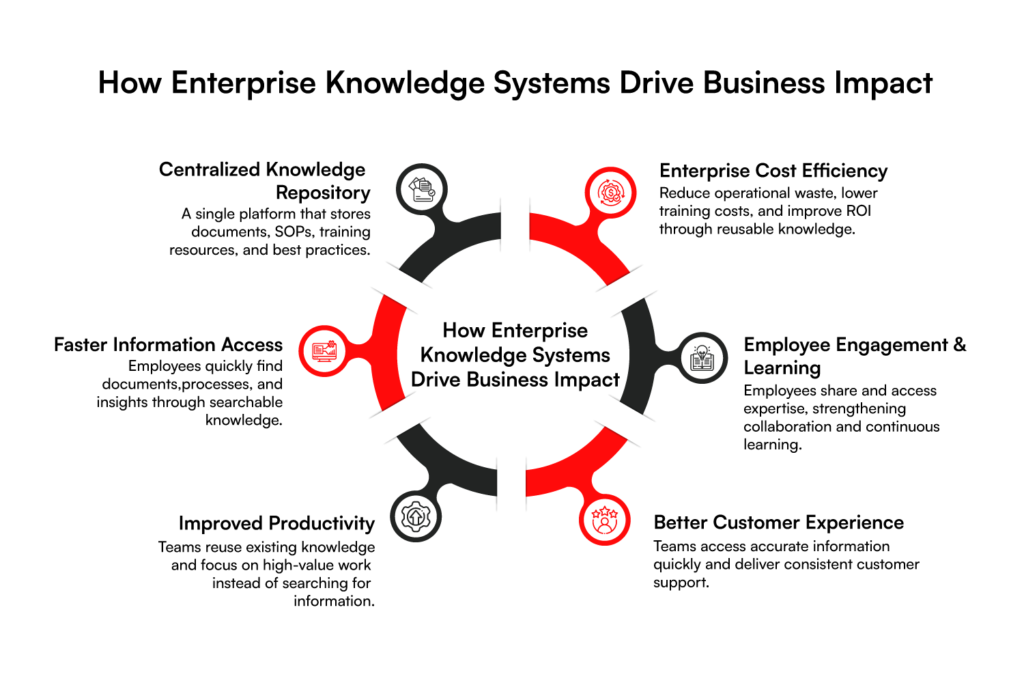
Faster Access to Knowledge and Information
Right now, your employees probably spend more time searching for information than they should. They switch between emails, chat threads, shared drives, and internal portals. They message colleagues and wait for responses. Every small query turns into a time-consuming search.
According to McKinsey, employees spend nearly 20% of their workweek just looking for internal information. That equals almost one full working day every week spent just trying to find answers instead of doing meaningful work.
Now, what happens when you centralize that knowledge? You make it searchable, organized, and easy to navigate. Instead of digging through scattered systems, your team finds reliable answers in seconds. When people access accurate knowledge instantly, they make faster decisions.
They reduce unnecessary back and forth. They keep projects moving without delays. Work becomes smoother as information flows. And when information flows smoothly, performance improves naturally.
Improved Efficiency and Productivity
Without a proper system, teams often reinvent the wheel. Someone builds a document that already exists. Another team solves a problem that engineering solved last quarter. Knowledge stays trapped in silos.
A strong KMS eliminates that waste. When your teams can reuse documented processes, templates, lessons learned, and best practices, productivity improves naturally. Studies suggest that effective knowledge sharing can increase productivity by 15–30% in knowledge-intensive roles.
Instead of repeating work, your employees focus on higher-value tasks like innovation, strategy, and execution. That’s how you scale intelligently.
Enhanced Customer Service
Your customer experience reflects how quickly and accurately your teams respond. When support agents struggle to locate updated policies, product specifications, or troubleshooting guides, response times increase. Customers notice delays immediately, and even small inconsistencies can reduce their confidence in your brand.
A centralized knowledge management system software eliminates that friction. It gives your teams instant access to real-time, validated, and standardized information. Instead of searching across multiple systems or asking colleagues for clarification, agents find the right answer in seconds.
This reduces unnecessary escalations since teams rely on accurate, approved knowledge. It also ensures every customer receives consistent information, regardless of which agent handles the case. When your employees speak with clarity and confidence, conversations become smoother and more productive.
Customers feel understood and supported. Over time, that consistency strengthens trust and improves satisfaction scores. It turns service interactions into opportunities to build relationships.
Cost Savings
At an enterprise level, short-term losses turn into big money losses. When employees spend hours every week searching for files or redoing work that already exists, you are paying for that inefficiency.
Now, if each employee saves just 3 to 4 hours per week because they can quickly find accurate information, the impact adds up fast. In a company with hundreds or thousands of employees, the saved hours add up to millions in recovered productivity over a year.
A strong knowledge management system helps you cut hidden costs. When all knowledge lives in one trusted place, you don’t need multiple overlapping tools. You don’t repeat the same training sessions again and again because employees can access clear documentation anytime.
You avoid rework caused by outdated files. You reduce mistakes that happen when teams rely on inconsistent information. Instead of losing money to confusion and duplication, you create clarity and control. Developing a knowledge management system helps you operate smarter, reduce waste, and protect your margins.
Increased Employee Engagement
When people struggle to find the information, frustration builds quickly. Over time, that frustration turns into disengagement. If knowledge stays locked inside departments or with a few key individuals, employees feel dependent instead of empowered. That slows collaboration and weakens morale.
Knowledge management system development changes that dynamic. It gives your teams clarity about processes, priorities, and expectations. It also makes expertise visible across the organization, so people know who knows what and where to go for reliable insights.
When employees trust the information in front of them, their confidence grows. They stop wasting energy searching for answers and start focusing on meaningful, high-impact work. Engagement also increases when employees contribute their own knowledge.
When they document insights, share lessons learned, and see others benefit from their contributions, they feel recognized and valued. That sense of ownership strengthens commitment and improves retention.
Simplified Employee Training
Onboarding should never depend on who is free to train a new hire. When knowledge lives in a structured system, you give every employee immediate access to what they need to succeed.
A well-designed KMS creates a self-service learning environment. New team members can explore role-based guides, operating procedures, recorded training sessions, and proven best practices in one place. They do not have to wait for meetings or chase colleagues for answers.
As a result, they understand processes faster and start contributing sooner. Organizations that formalize knowledge access reduce onboarding time and speed up time to competency. More importantly, when experienced employees move on, their expertise stays documented and accessible.
You preserve institutional knowledge, protect business continuity, and strengthen your enterprise’s long-term capabilities.
How to Build a Knowledge Management System?
Developing a knowledge management system requires a clear strategy, the right structure, and consistent participation across the organization. The following steps can help you design and implement a system that works at an enterprise level.

Step 1: Define Your Knowledge Management Goals
Start with a clear purpose. Ask yourself what you want the knowledge management solution to achieve. Some organizations focus on improving internal collaboration. Others want to reduce support costs, speed up onboarding, or preserve institutional knowledge.
Clear goals help you define the scope of your system. They also guide decisions about technology, structure, and governance. Without well-defined objectives, the system can quickly become a document repository rather than a strategic knowledge platform.
When you align the system with business outcomes, every knowledge asset contributes to operational efficiency and decision-making.
Step 2: Identify Key Knowledge Sources
Next, identify where your organization’s knowledge currently exists. Valuable insights rarely reside in a single place. They live across documents, databases, emails, collaboration platforms, internal reports, and employees’ experiences.
Map these knowledge sources carefully. Product documentation, customer support records, training materials, project reports, and internal communication threads often contain critical information.
You should also consider tacit knowledge. Senior employees and subject matter experts hold insights that are not always documented.
Capturing their expertise through interviews, documentation sessions, or recorded discussions can significantly strengthen your knowledge base.
Step 3: Choose the Right Knowledge Management Tools
Technology plays an important role in supporting knowledge management. The tools you select should match your organizational needs and integrate with existing systems.
For example, you may need a combination of knowledge bases, document management platforms, collaboration tools, and learning management systems. Each tool supports a different aspect of knowledge capture and distribution. Ease of use should remain a priority.
If employees find the platform difficult to navigate, adoption will remain low regardless of its capabilities. Choose tools that provide strong search functionality, integration capabilities, and flexible content management.
Step 4: Establish a Clear Knowledge Structure
A knowledge system works only when information is well organized. Without structure, content becomes difficult to navigate, and employees struggle to locate the information they need.
Start by defining clear categories, tags, and content hierarchies. Group knowledge based on departments, functions, processes, or topics. Use consistent naming conventions and metadata to make information searchable.
A structured knowledge architecture allows employees to locate relevant content quickly. It also helps maintain consistency as new knowledge gets added to the system.
Step 5: Develop a Content Creation and Maintenance Process
Knowledge must stay accurate and up to date. That requires a clear process for creating, reviewing, and updating content. Assign ownership for each knowledge asset.
Define who creates documentation, who reviews it, and how often it should be updated. Establish content templates to maintain consistency across articles and guides.
Regular review cycles prevent outdated information from accumulating. When employees trust that the knowledge base contains reliable information, they are more likely to use it as their primary source of guidance.
Step 6: Implement Access Controls and Permissions
Not every piece of information should be accessible to everyone. Sensitive documents, financial records, and strategic plans require controlled access.
Role-based permissions help manage this challenge. You can grant employees access based on their responsibilities, departments, or project roles.
This approach protects confidential data while ensuring employees still have access to the information they need to perform their jobs. It also supports compliance requirements and strengthens information governance.
Step 7: Encourage Employee Participation
A knowledge management solution thrives on participation. If employees only consume information but never contribute, the system quickly becomes outdated.
Encourage teams to document insights, share lessons learned, and contribute to internal knowledge resources. Recognize employees who actively share knowledge and help others learn. Training sessions and awareness programs can also increase participation.
When employees understand the value of knowledge sharing, they become active contributors rather than passive users.
Step 8: Integrate Your KMS with Other Business Tools
Knowledge rarely exists in isolation. Employees interact with many systems throughout their daily work. These include project management tools, CRM platforms, communication systems, and analytics dashboards. Integrating the KMS with these platforms improves accessibility.
Employees can access knowledge directly within the tools they already use. This reduces friction and encourages consistent use of knowledge. It also ensures insights from multiple systems feed into a single knowledge ecosystem.
Step 9: Continuously Optimize and Improve the System
Knowledge management is not a one-time project. It is an ongoing process that evolves with the organization. Track usage metrics to understand how employees interact with the system. Monitor search patterns, content engagement, and user feedback.
These insights reveal where improvements are needed. Regular optimization keeps the system relevant. It also ensures that your knowledge platform continues to support new business goals, processes, and technologies as the organization grows.
When you treat knowledge management as a continuous initiative, the system becomes a long-term asset rather than a static repository.
Every day without a structured KMS, your enterprise loses hours to information silos.
Build your custom Knowledge Management System to lock in your growth.
Get Service AssistanceKey Features of Knowledge Management System
A strong Knowledge Management System software creates an environment where knowledge flows easily across teams and continues to evolve with the organization. To achieve that, certain capabilities need to be built into the system from the start.
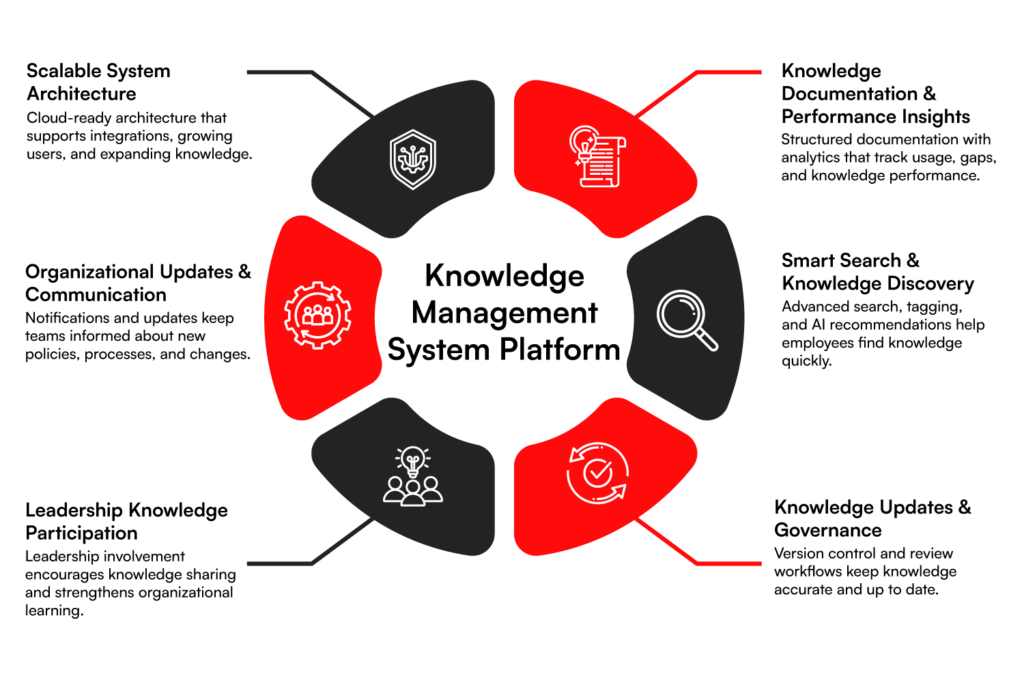
Flexible and Scalable Architecture
Think about how quickly organizations grow today. New teams form, new tools get added, and the volume of internal knowledge increases constantly. If the architecture behind your knowledge system cannot scale, it will eventually slow people down rather than help them. The best approach is to design the system with flexibility in mind.
Many organizations build their KMS on cloud-based, modular architectures that allow easy integrations with existing platforms such as ERP systems, CRM tools, and collaboration platforms. APIs play a key role here because they allow knowledge to flow between systems rather than remain isolated.
Why does this matter? Because knowledge rarely stays confined to one department. Sales insights, product documentation, support guides, and operational knowledge often require interaction with multiple platforms. A flexible architecture allows the system to grow with your business rather than forcing costly rebuilds later.
When done right, your knowledge platform remains stable even as content, users, and integrations expand. Teams can continue adding new knowledge without worrying about system limitations.
Documentation and KPI Tracking
A knowledge system becomes valuable only when people actively use it. That is why documentation practices and performance tracking must go hand in hand. Start by setting clear documentation standards.
Teams should know how to write knowledge articles, who owns each document, and when it needs to be updated. Structured templates help maintain consistency, while assigned ownership ensures accountability.
Once knowledge starts flowing into the system, tracking its impact becomes equally important. Analytics dashboards can show how often articles are viewed, which searches fail to return results, and which content employees rely on most. These insights reveal whether the knowledge base truly supports business operations.
If employees repeatedly search for the same topic without finding answers, you immediately know where documentation gaps exist. The biggest benefit is visibility. You move from guessing what knowledge people need to understanding it through measurable data.
Intelligent Navigation and Content Discovery
Even the most detailed knowledge repository becomes useless if people cannot find what they are looking for. Search experience plays a major role in whether employees trust and adopt a KMS. Instead of relying on simple keyword search, modern systems organize knowledge using metadata, tagging structures, and contextual search capabilities.
AI-powered discovery tools can recommend related articles, suggest relevant documentation, and guide users toward the most accurate content.
For example, when an employee searches for a troubleshooting issue, the system can surface related technical guides, previous solutions, and internal discussion threads. This approach dramatically reduces the time employees spend searching for answers.
Studies from McKinsey show that knowledge workers spend nearly 20% of their time searching for internal information, underscoring the critical importance of effective discovery tools. When navigation works well, employees naturally turn to the knowledge platform first. That habit significantly improves productivity across the organization.
Integrated Change Management Framework
Knowledge does not stay static. Processes change, policies evolve, and products improve over time. Without a structured process for updating knowledge, information quickly becomes outdated and unreliable.
A change management framework ensures that knowledge evolves alongside the organization. Contributors should be able to submit updates easily, while reviewers verify accuracy before publishing changes. Version control also becomes essential because it allows teams to track how information has evolved.
Some organizations go a step further and introduce automated reminders that prompt content owners to review documents periodically. This prevents important documentation from becoming obsolete. This feature is important because Outdated knowledge can cause more harm than missing knowledge.
When employees rely on incorrect procedures or policies, operational mistakes become inevitable. A well-managed update process protects the credibility of your knowledge system and ensures employees always work with accurate information.
Leadership Engagement and Visibility Modules
Knowledge sharing rarely succeeds as a purely technical initiative. People take cues from leadership when deciding whether a system truly matters.
When leaders actively participate in knowledge platforms, they send a powerful message about the importance of transparency and shared learning. This participation may include publishing insights, sharing project lessons, documenting strategic decisions, or highlighting team achievements.
Technology can support this behavior through leadership dashboards, expert spotlight sections, and visible knowledge contributions from senior teams. Once employees see leaders engaging with the platform, participation tends to increase across the organization.
Knowledge sharing becomes part of everyday work rather than an optional activity. The result is a stronger knowledge culture where expertise flows more freely between teams.
Change Awareness and Communication Tools
Every organization experiences constant change. New policies roll out, workflows shift, and systems evolve. If employees do not clearly understand these changes, confusion spreads quickly. A knowledge management system can act as a central communication channel for these updates.
Notifications, announcement feeds, and role-based updates ensure that employees receive relevant information without needing to search for it.
For instance, when a new compliance policy is introduced, the system can automatically notify affected departments and link them directly to updated documentation. This type of structured communication reduces misunderstandings and helps teams adapt faster.
Instead of relying on scattered emails or meetings, employees receive clear guidance within the same platform they already use to access knowledge. Over time, the system becomes not just a repository but a trusted hub for organizational communication.
Knowledge Management System Examples
Global companies such as Amazon, Canva, and Google demonstrate different ways knowledge management supports business operations. Each organization uniquely uses knowledge systems. Some focus on internal documentation to capture processes and insights.
Others build customer support knowledge bases to help users solve problems quickly. Together, these systems improve efficiency, support innovation, and enhance user experience at scale.
Knowledge Management at Amazon
Amazon demonstrates how large enterprises use knowledge management to support innovation, operational efficiency, and customer experience. The company captures knowledge from multiple sources, including employee insights, operational data, and customer interactions. It then integrates this knowledge into systems that teams across the organization can easily access and use.
A key part of Amazon’s approach is structured documentation and knowledge sharing. Teams document processes, technical learnings, and project insights so knowledge does not remain isolated within individuals or departments.
Amazon also encourages written communication through internal documents and reports. This practice helps teams clearly explain ideas, record decisions, and preserve knowledge for future use.
Amazon’s knowledge management strategy also relies heavily on data. The company continuously collects and analyzes information from customer behavior, product reviews, and transaction data.
Teams use these insights to improve services, optimize operations, and develop new features. For example, customer data helps Amazon refine product recommendations and personalize the shopping experience.
This approach shows why knowledge management matters at an enterprise level. Amazon systematically captures operational knowledge, employee expertise, and customer insights. It then turns that information into actionable intelligence that supports faster decisions, continuous improvement, and long-term innovation.
Knowledge Management at Canva
Canva provides a strong example of how knowledge management can improve both customer support and product adoption. The company focuses heavily on making knowledge easy to access, understand, and use. Its help center acts as a centralized knowledge base where users can quickly find answers, learn features, and resolve issues without needing direct support.
A key part of Canva’s approach is simplicity and user-focused design. The help center organizes information through clear categories, structured navigation, and a detailed sidebar.
This structure allows users to browse topics easily and locate relevant guidance within seconds. A prominent search bar also helps users quickly find answers to specific questions.
Canva also uses customer interactions as a source of knowledge. Feedback, support queries, and common user challenges help the company continuously update its knowledge base. This allows Canva to refine documentation, improve product guidance, and address frequently asked questions more effectively.
This strategy supports Canva’s massive global user base. The platform serves around 30 million monthly users, who create designs for presentations, marketing materials, videos, and social media content.
By enabling self-service knowledge access, Canva reduces reliance on support while helping users learn the platform faster and work more efficiently.
Knowledge Management at Google
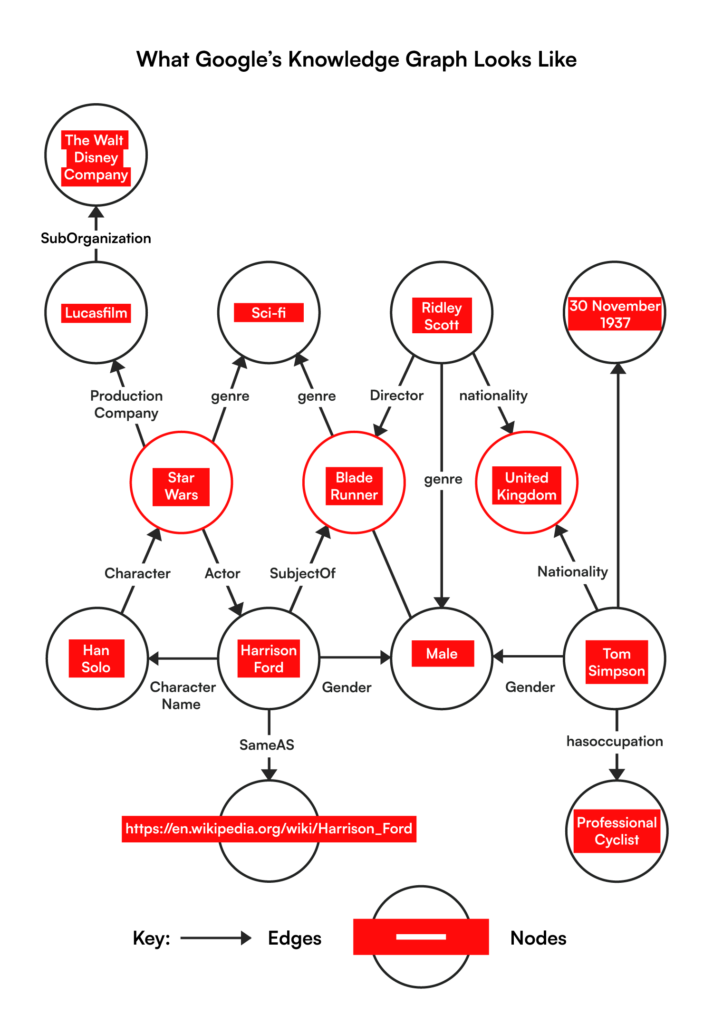
Google represents one of the most advanced examples of knowledge management at a global scale. The company uses artificial intelligence and machine learning to collect, organize, and deliver information from billions of sources. Its systems transform vast amounts of raw data into structured knowledge that users can quickly access and understand.
Two key technologies support this approach: Google Search and the Knowledge Graph. These systems analyze relationships between people, places, concepts, and events. They connect information across multiple sources and present it in a structured format. As a result, users receive accurate answers instead of just lists of links.
This ability to understand context is what makes Google’s knowledge management powerful. The platform does not simply retrieve information. It interprets user intent and connects related knowledge across different domains. This allows users to solve problems faster and access reliable information instantly.
Google processes billions of searches every day, which demonstrates the scale of its knowledge ecosystem. By combining AI, structured data, and intelligent search capabilities, Google has created one of the most efficient knowledge discovery systems in the world.
It shows how advanced technology can turn massive information networks into actionable knowledge for both users and organizations.
Knowledge Management at Airbnb
Airbnb uses an internal knowledge management platform, Airbnb Knowledge, to centralize information for hosts and internal teams. The system serves as a shared repository for hosting guidelines, operational policies, and best practices, which are documented and regularly updated.
This allows hosts to quickly access reliable information that helps them manage listings, improve guest experiences, and maintain service standards.
The platform also supports collaboration and continuous learning within the company. Airbnb’s engineering and data teams contribute detailed analyses, experiment results, tutorials, and technical documentation. These resources help employees and analysts understand new tools, data methods, and operational insights.
This approach ensures that important knowledge does not remain confined to individual teams. Instead, Airbnb captures insights from experiments, data analysis, and operational experience and makes them available across the organization.
By creating a centralized and evolving knowledge base, Airbnb enables faster learning, better decision-making, and consistent service quality for both hosts and customers.
Challenges in the Implementation of Knowledge Management Systems for Enterprises
Many enterprises face challenges in organizing knowledge, encouraging adoption, and maintaining the system over time. Understanding these challenges early helps you plan better and avoid common mistakes.
1. Lack of a Clear Knowledge Strategy
Many organizations start building a knowledge management system without defining clear goals. Teams begin uploading documents and resources, but no one clearly defines what the system should achieve. Over time, the platform becomes a simple document repository rather than a true knowledge management solution.
You can avoid this by defining your knowledge management goals early. Identify the business problems you want to solve. This could include reducing support tickets, improving employee onboarding, or making internal information easier to access. Clear goals help you design a system that actually supports your operations.
2. Poor Knowledge Organization
Another common challenge is poor content structure. When teams upload information without a clear structure, the knowledge base becomes cluttered. Employees struggle to find the information they need, and the system’s usefulness slowly declines.
To prevent this, build a strong knowledge architecture from the start. Organize content into categories, departments, and topics. Use tags and metadata to improve searchability. A well-structured system allows employees to locate information quickly and confidently.
3. Low Employee Participation
A knowledge management system only works when employees actively contribute and use it. In many organizations, employees continue storing information in emails, personal notes, or private folders. This behavior limits the value of the centralized system.
Encourage teams to share knowledge regularly. Make documentation and knowledge sharing part of daily workflows. You can also assign knowledge owners for each department who are responsible for adding and maintaining content.
4. Difficulty Integrating with Existing Tools
Most enterprises already use several digital tools every day. These may include CRM systems, project management platforms, communication tools, and helpdesk software. If your knowledge management system does not connect with these platforms, employees must constantly switch between tools.
Choose a KMS that integrates with the tools your teams already use. When knowledge is available inside existing workflows, employees can access information faster, and adoption becomes much easier.
5. Keeping Knowledge Up to Date
Information changes quickly in most organizations. Processes evolve, products improve, and policies get updated. If the knowledge base contains outdated information, employees will eventually stop trusting it.
You can solve this by creating a clear content governance process. Assign ownership for different sections of the knowledge base. Schedule regular reviews to update important documents. This keeps your knowledge base accurate and reliable.
6. Managing Security and Access Control
Enterprise knowledge often contains sensitive information. This may include internal processes, confidential documents, or customer data.
Without proper access control, organizations risk exposing important information. Implement role-based permissions within the system. This allows employees to access only the information relevant to their responsibilities. At the same time, it protects sensitive content from unauthorized access.
7. Measuring the Impact of the System
Many companies implement a knowledge management solution but struggle to measure its success. Without clear metrics, it becomes difficult to understand whether the system actually improves productivity.
Track key indicators such as search success rates, system usage, reduced support queries, and faster employee onboarding. These insights help you evaluate the system’s performance and identify areas for improvement.
Cost to Build the Knowledge Management System
Knowledge Management System development cost depends on the type of system you choose, the level of customization, and the number of users.
Enterprise organizations usually invest in scalable platforms that support multiple teams, integrations, and long-term knowledge management processes. Costs are heavily influenced by the chosen approach:
| Solution Type | Typical Cost Range | What’s Usually Included |
| Small / Mid-sized Agencies | $12,000 – $25,000 | CMS-based knowledge platforms with standard features, basic integrations, and initial setup. |
| Enterprise Solutions | $50,000+ | Fully custom knowledge management systems, advanced integrations, AI-powered search, analytics, and enterprise-level scalability. |
| Maintenance & Implementation | Ongoing costs | Licensing, system updates, performance monitoring, training, and continuous platform support. |
Factors Affecting the Cost of Building the Knowledge Management System
| Factor | Impact on Pricing |
| System Complexity | More features, such as AI search, analytics, and automation, increase development cost. |
| Type of System | SaaS tools are usually cheaper. Custom enterprise platforms require higher investment. |
| Organization Size | Large organizations with global teams need more infrastructure and user management capabilities. |
| Integrations | Connecting the KMS with CRM, ERP, helpdesk, and collaboration tools adds development effort. |
| Area | Business Benefit |
| Operational Efficiency | Employees find information faster and reduce repetitive work. |
| Customer Support | Teams resolve issues quickly with centralized documentation. |
| Employee Training | New employees learn processes faster through structured knowledge bases. |
| ROI Timeline | Many organizations recover their investment within six months or less due to productivity gains. |
20% of your workweek vanishes hunting for information that should take seconds to find.
Book your quote to know the exact cost of developing a custom KMS.
Book Your Custom QuoteThe Future of Knowledge Management Systems
Organizations no longer treat KMS platforms as simple knowledge repositories. Instead, they are becoming intelligent systems that support collaboration, learning, and decision-making across the enterprise. Several trends are shaping the future of knowledge management system development.
Higher Adoption of Generative AI
Generative AI is a major driver of modern knowledge management systems. Many organizations now use AI tools to search knowledge bases, summarize documents, and generate answers from internal knowledge repositories.
This shift is already visible in industry research. According to research, incorporating AI and other smart technologies has become a top priority for knowledge management teams.
Instead of manually searching through large document libraries, employees can ask questions and receive contextual answers generated from the company’s internal knowledge. AI can also help teams automatically organize documents, tag content, and identify outdated information.
In the future, many enterprises will build AI-powered knowledge systems that act more like intelligent assistants. These systems will help employees access information faster and reduce the time spent searching for knowledge.
Deeper Integration with Enterprise Collaboration Tools
Another important trend is the growing integration between knowledge management systems and workplace collaboration tools. Employees today work across many platforms such as project management software, communication tools, and CRM systems.
If knowledge exists only inside a standalone system, employees often struggle to access it during their daily work. This creates knowledge silos where valuable information stays trapped within specific teams or departments. Modern KMS platforms are solving this problem by integrating directly with collaboration tools.
Employees can access knowledge while working inside the tools they already use. For example, support teams can retrieve documentation directly inside helpdesk platforms, while product teams can reference internal documentation inside project management tools.
This type of integration helps organizations break down knowledge silos and encourages smoother information sharing across teams.
Improved Training and Knowledge Retention
Knowledge loss remains a major challenge for many organizations. When experienced employees leave a company, they take years of expertise with them. Replacing that knowledge takes time, effort, and additional training costs.
Building a knowledge management system helps organizations capture and retain this valuable expertise. Companies can document best practices, processes, troubleshooting guides, and internal insights inside a centralized knowledge base.
These knowledge repositories also play a key role in employee training. New employees can learn faster by accessing structured documentation, training materials, and step-by-step guides. This reduces onboarding time and helps employees become productive more quickly.
Research highlights that transferring expert knowledge and preserving institutional knowledge remain major priorities for knowledge management teams. As organizations face workforce transitions and remote work environments, knowledge retention will become even more important.
Future knowledge management systems will focus on capturing expert knowledge and making it accessible to the entire organization.
Conclusion
Knowledge is one of the most valuable assets in any enterprise. But it only delivers real value when your teams can find, share, and use it easily.
When information stays scattered across systems and departments, productivity slows, and important expertise gets lost. A well-designed knowledge management system organizes this information and makes it instantly accessible across the organization.
As businesses grow, quickly locating the right information becomes critical. This is where our enterprise search implementation services help employees discover relevant knowledge across large systems and repositories without delays.
- Centralized Knowledge Architecture: We structure enterprise knowledge so teams can capture, organize, and access critical information from a single system.
- Intelligent Knowledge Discovery: We implement powerful search and navigation capabilities that help employees find the right insights quickly.
- Scalable Knowledge Platforms: Our solutions integrate with existing enterprise tools and scale as your organization grows.
At RBMSoft, we specialize in knowledge management system development that turns scattered information into a reliable, searchable knowledge ecosystem. Through our software development services, we design and implement systems tailored to your workflows, integrations, and long-term knowledge strategy.
FAQ’s
1. What is a knowledge management system?
A Knowledge Management System is a digital platform that helps organizations capture, organize, store, and share knowledge across teams. It centralizes documents, processes, training resources, and internal expertise so employees can quickly access reliable information.
Instead of knowledge being scattered across tools or individuals, a KMS creates a structured environment where information becomes searchable and reusable across the enterprise.
2. What is the purpose of a knowledge management system?
The main purpose of a knowledge management system is to make organizational knowledge easy to find, share, and use. It helps employees access information faster, reduces duplicate work, and improves decision-making.
A KMS also protects institutional knowledge by documenting processes and expertise so it remains available even when employees leave the organization.
3. How does a knowledge management system work?
A knowledge management system works by collecting information from different sources, such as documents, training materials, internal guides, and support resources. It organizes this content into structured categories and searchable repositories.
Employees can then access knowledge through search functions, navigation menus, or integrated business tools, making it easier to locate accurate information when they need it.
4. How to implement a knowledge management system?
Implementing a knowledge management system starts with defining clear goals and identifying key knowledge sources across the organization.
Next, choose the right platform, create a structured knowledge architecture, and establish processes for content creation and updates. Integrating the system with existing business tools and encouraging employee participation ensures the knowledge base remains active, accurate, and valuable.
5. How can a knowledge management system improve workplace performance?
A knowledge management system improves workplace performance by reducing the time employees spend searching for information. Teams can quickly access processes, best practices, and training resources.
This speeds up decision-making, improves collaboration, and reduces repeated mistakes. As a result, employees become more productive and organizations can operate more efficiently across departments.
6. Why is a knowledge management system important for a business?
A knowledge management system helps businesses retain critical knowledge, improve operational efficiency, and support employee learning. It ensures that important processes, expertise, and insights remain accessible across teams.
This improves collaboration, strengthens customer service, and reduces dependency on individual employees who may hold important knowledge.
7. How to set up a knowledge management system?
To set up a knowledge management system, start by identifying the knowledge your organization needs to capture. Create a clear content structure with categories, tags, and search functionality. Upload key documentation such as SOPs, guides, and training materials.
Assign content owners, establish update processes, and integrate the system with existing business tools to ensure consistent use.
8. What are the key components of a knowledge management system?
Key components of a knowledge management system include a centralized knowledge repository, search and navigation features, document management capabilities, collaboration tools, and access control mechanisms.
Many modern systems also include analytics, integration capabilities, and AI-powered search features that help employees discover relevant knowledge quickly and efficiently.
9. How long does it take to develop and implement a knowledge management system?
The development and implementation timeline depends on the system’s complexity and enterprise requirements. Basic implementations may take a few weeks using SaaS platforms, while custom enterprise knowledge management systems can take several months.
The timeline usually includes planning, system design, content migration, integrations, testing, and employee training.
10. How can AI help in the development, implementation, and effectiveness of a knowledge management system for enterprises?
AI can significantly improve knowledge management systems by automating content organization, tagging, and search. AI-powered tools can summarize documents, recommend relevant knowledge, and generate answers from internal repositories.
This helps employees find information faster and reduces manual knowledge management tasks, making the system more efficient and easier to maintain at an enterprise scale.